Flow#
A macOS dictation app inspired by Wispr Flow. Press a key, speak, and Flow transcribes your speech, cleans it up, and types it at your cursor. It uses Apple’s on-device models by default. Cloud models are optional and use your own API keys.
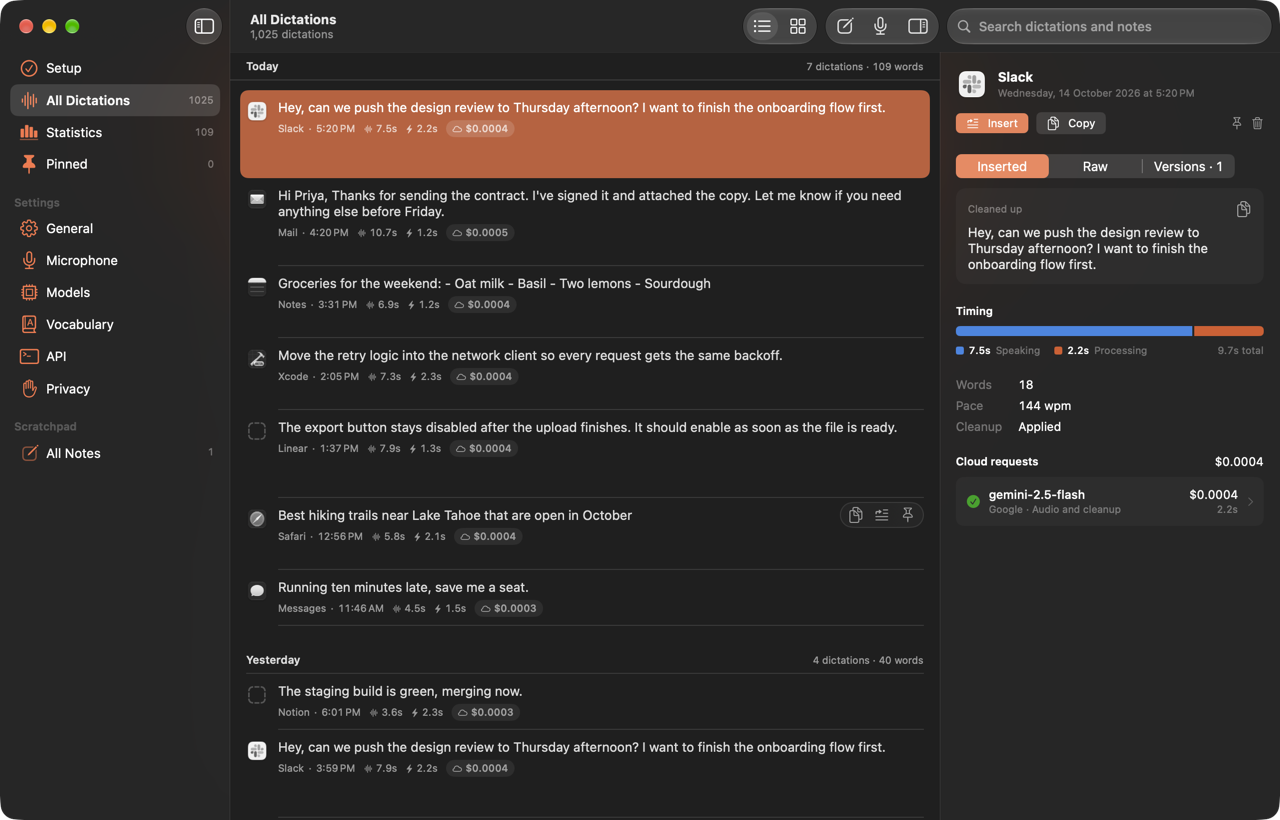
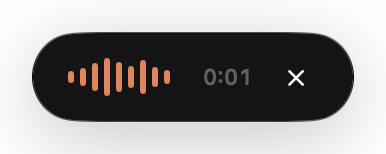
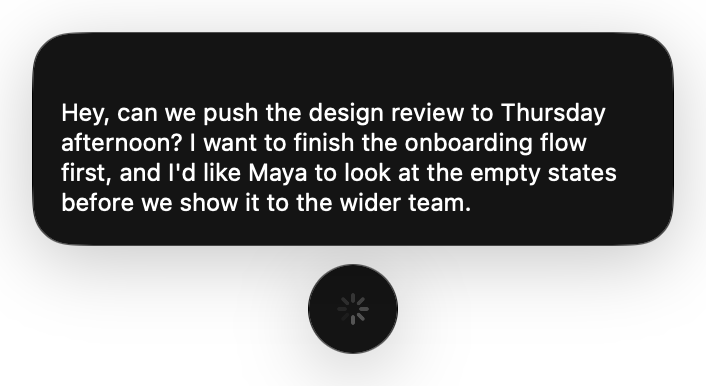

The pill while you speak, while a model writes the answer, and once the text is in.
All screenshots use made-up data. scripts/screenshots.sh regenerates them.
Install#
Flow needs macOS 26 or newer and a Swift 6 toolchain.
bash <(curl -fsSL https://raw.githubusercontent.com/tashifkhan/flow-dictate/main/scripts/bootstrap.sh)
This downloads scripts/bootstrap.sh from main, clones the repository, builds the app, installs it in /Applications, and opens it. Read the script first if you would rather not run remote code.
From a checkout:
scripts/make-cert.sh   # once per Mac
scripts/install.sh     # again after every pull
make-cert.sh creates the local signing certificate that keeps permission grants working across rebuilds (see Permissions). install.sh builds a release app, replaces /Applications/Flow.app, checks its signature, and opens it.
Using Flow#
- Press the dictation shortcut anywhere, speak, and release (or press again in Start and stop mode). The default is
fn. Change it in Settings › General. It can be a modifier on its own, such as right ⌥, or a key with at least one modifier, such as ⌃⌥Space. Flow refuses a bare letter, because a global shortcut would fire while you type. - ⌘Enter while recording stops and inserts. Flow consumes the shortcut so the app underneath does not also send the message.
- Escape while recording cancels.
- ⇧⌘V inserts the selected history entry at the cursor.
- ⇧⌘N makes a new note and ⇧⌘D starts a dictation, both inside Flow.
- Spoken commands work during dictation: “scratch that”, “replace X with Y”, “new paragraph”.
Flow lives in the menu bar. It shows in the Dock and Command-Tab while one of its windows is open, and Settings › General can keep the Dock icon all the time. Until both permissions are granted, Flow opens a Setup screen at launch that shows what is missing. Later, open the window from the menu bar icon › Flow Window.
The flowclone:// URL scheme works from Raycast or Shortcuts: toggle, history, note, models, and vocabulary.
Permissions#
| Permission | Used for | Where |
|---|---|---|
| Accessibility | Watching the dictation shortcut and typing at your cursor | System Settings › Privacy & Security › Accessibility |
| Microphone | Recording while you dictate | Prompted on first dictation |
macOS has no way to grant Accessibility from a script, so Flow opens the prompt and reminds you in the menu bar until you grant it. Quit and reopen Flow after granting it, because Flow installs its keyboard event tap at launch.
When a permission will not stick#
If Flow still says it lacks Accessibility after you turn it on, the build is probably signed ad hoc. An ad-hoc signature’s designated requirement is a hash of the binary, so every rebuild looks like a different app to macOS, and the old grant no longer applies even though the switch looks on.
scripts/make-cert.sh creates a self-signed identity in its own keychain, so no login-keychain password is needed. The requirement becomes identifier "sh.taf.flow" and certificate leaf = H"…", which survives rebuilds. After switching, clear the stale grants once and grant them again:
tccutil reset Accessibility sh.taf.flow
tccutil reset Microphone sh.taf.flow
Cleanup#
Flow cleans the whole thought after you stop speaking. It removes filler, false starts, stutters, and repeats, applies your corrections (“Thursday, sorry, Friday” becomes “Friday”), and turns spoken structure into paragraphs and lists. It keeps every fact, name, number, and constraint instead of summarizing. Finished text never contains an em dash, even when a model ignores the instruction.
Cleanup adapts to where the text goes. Chat apps keep a casual tone, email gets complete sentences, and developer tools get technical vocabulary. This also works for known sites in a browser, such as Gmail, Slack, WhatsApp, GitHub, GitLab, Google Docs, and Notion. Flow classifies the site on your Mac, then discards the page title and URL. Neither goes to history or to a model.
Settings › General › Language has a Hinglish mode. It uses the Hindi speech model, accepts Hindi mixed with English, and writes Hindi in Roman script. English product names and technical terms stay in English. Without Apple Intelligence, a local transliteration still keeps the result in Latin characters.
Streaming#
With a cloud model that streams, text appears in the focused field as the model writes it.
- Native Mac fields are edited through Accessibility. Browser and Electron fields get a real paste per chunk, so the editor’s own input handling runs. Flow puts your clipboard back after each paste.
- Before each update, Flow checks that the same field still has focus and holds the draft it wrote. If you click away or edit the draft, Flow stops writing to the field and shows the rest in the pill.
- The pill shows live text only when there is no editable field or the field refused an edit. Once shown, it stays up for at least 0.9 seconds.
- Escape restores your original text while the draft is unchanged and still focused.
- The final result replaces the draft once cleanup, replacements, and list numbering are applied.
When streaming finishes, the circle draws a tick. If the text went to the clipboard, the tick turns into a button that copies it again.
Some editors report their contents in ways Flow has to account for:
- Firefox reports an empty composer’s placeholder, such as Gemini’s “Ask Gemini”, as its text. When the first paste leaves only the draft, Flow treats the earlier text as a placeholder and takes over the editor.
- Rich editors with existing paragraphs can leave line breaks out of their cursor offsets. Flow finds the draft in the field’s text instead.
- Composers that parse pasted Markdown, such as T3 Code’s, rewrite blank lines and "- " lines. Flow accepts the rewrite when the words match the draft and the text around it is untouched.
Each time Flow stops writing to a field, it logs why under sh.taf.flow category stream, with lengths and offsets but never the text.
Insertion without streaming#
Flow presses the app’s own Edit › Paste when it has exactly one plain ⌘V item, and sends a ⌘V keystroke otherwise. It waits for the shortcut’s modifier keys to come up first. The temporary clipboard item is marked transient and local to this Mac, and Flow restores your previous clipboard 600 ms later unless you copied something in between. Fields marked as protected content are treated like password fields.
If no editable field has focus, Flow leaves the text on the clipboard and says so. Two exceptions:
- Zed draws its editor on the GPU and exposes only its window to Accessibility, so Flow treats a focused Zed window as the editor and pastes there.
- Electron apps such as T3 Code, Slack, and VS Code expose no focused field until an assistive app asks, so Flow sets
AXManualAccessibilityon each one as it comes to the front.
Only one Flow process can own the shortcut. If the installed app is running and a second copy starts from a build folder, the second copy quits before it records anything.
Vocabulary#
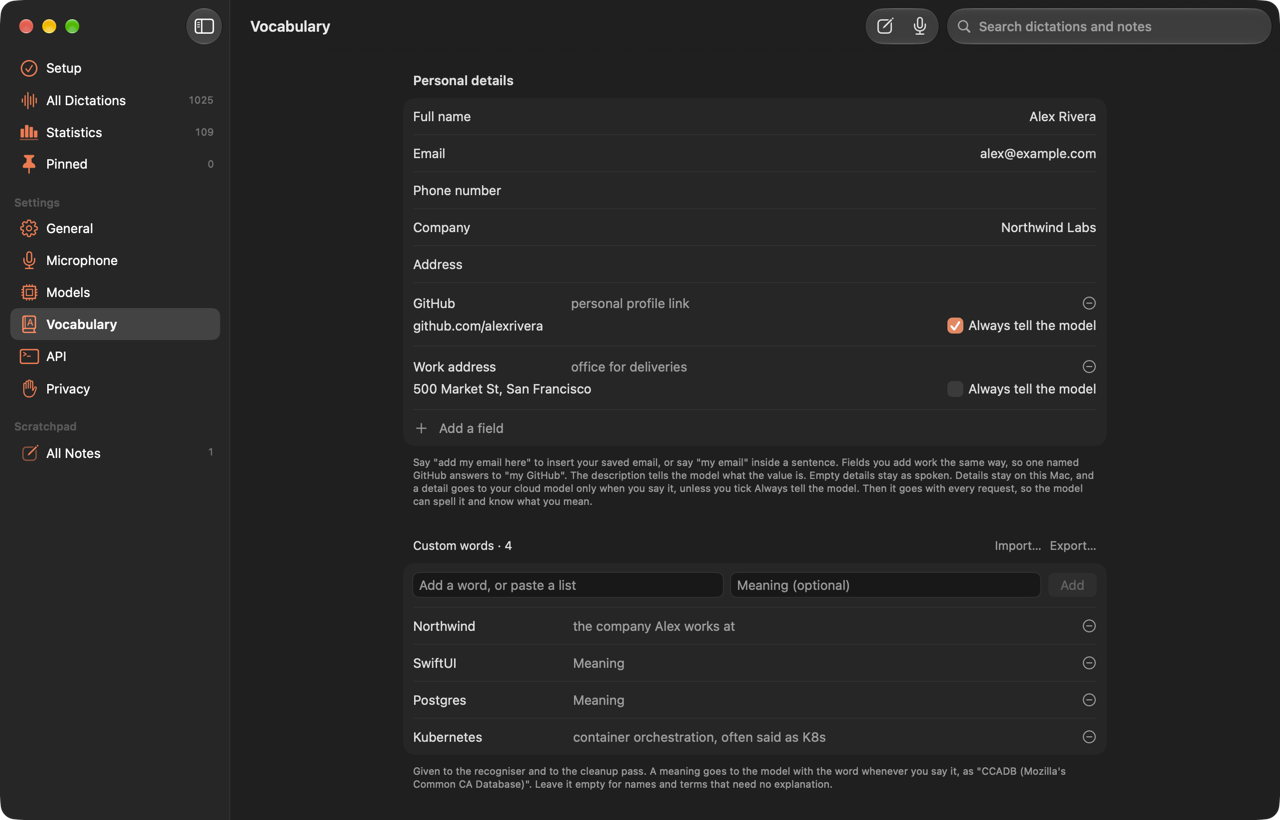
Settings › Vocabulary holds what Flow should know about you and your words.
- Personal details. Name, email, phone, company, and address, plus fields you add with a name, a description, and a value. Say “add my email here” to insert the saved value without a model call, or say “my email” inside a sentence. A field named GitHub answers to “my GitHub”. A detail reaches a model only when you say it, unless you tick Always tell the model. Then every cleanup request includes it, as “GitHub, personal profile link: you”, with an instruction never to add it unprompted.
- Custom words. Names and terms the recognizer gets wrong. Each word can have a meaning, which reaches the prompt as “CCADB (Mozilla’s Common CA Database)” when you say the word. A single-word entry also fixes an unambiguous recognition error within one letter.
- Replacements. “Heard as” and “Write instead” pairs. They run locally, including when cleanup is off, and a replacement never triggers another one.
- Custom speech model. An opt-in model trained on your words and past corrections. It only attaches to
DictationTranscriber, so turning it on trades the betterSpeechTranscriberfor the fallback. Try the word list first.
Details stay on this Mac. A detail you say inside a sentence becomes part of what the cloud model receives.
Cloud models#
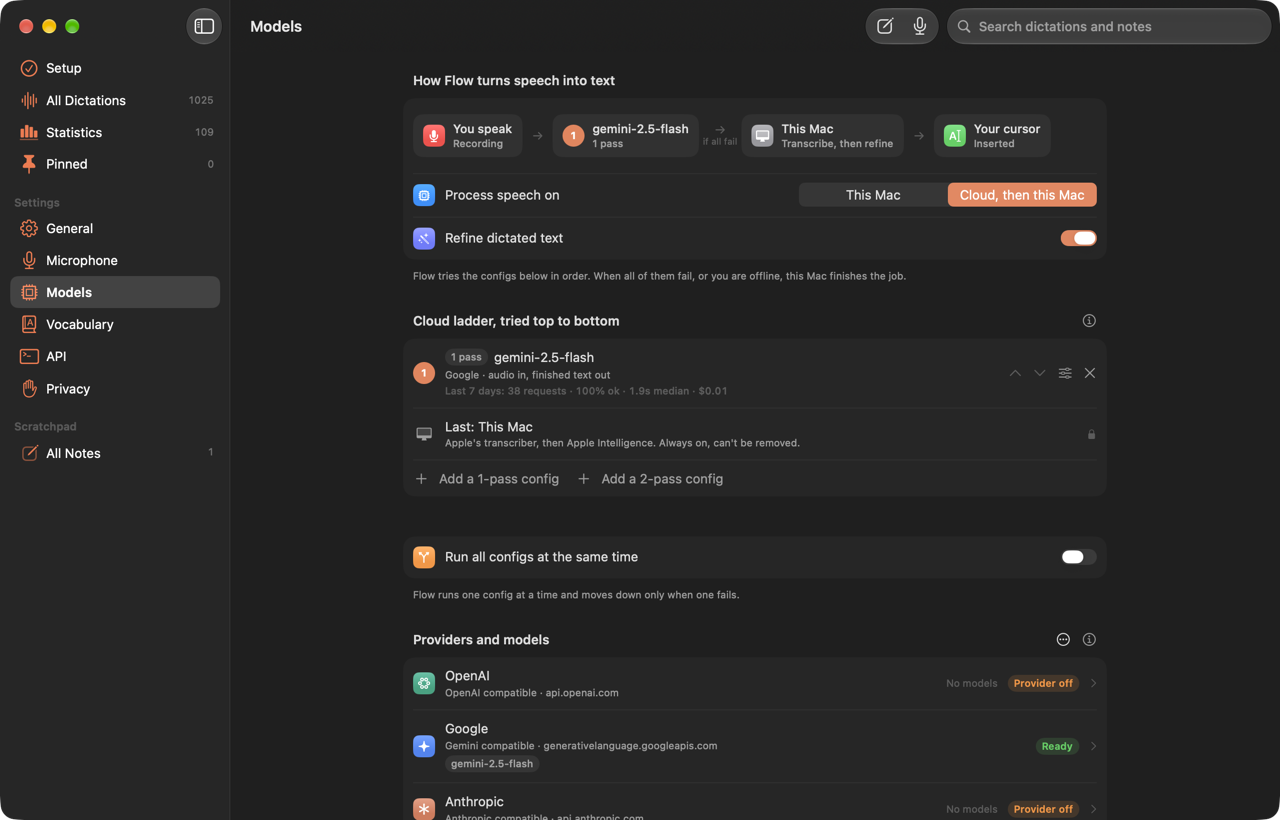
Settings › Models starts with editable OpenAI, Google, and Anthropic providers. You can add more, each with its own name, API format, base URL, and key. Keys are stored in the macOS Keychain. You type every model ID yourself. Anthropic’s Messages API takes no audio, so Anthropic-format providers can only refine text.
Models are arranged as an ordered list of configs, and Flow tries the next one when a config fails.
- A one-pass config sends the recording and gets finished text back.
- A two-pass config transcribes first and refines second. Either step can run on this Mac.
- With parallel results on, every config runs at once and the highest-ranked success wins.
Apple Intelligence cleanup runs alongside and stays available as an alternative version. OpenAI-compatible transcription models can use either the audio transcription API or the multimodal chat API. For background on one-pass cleanup, see the Rambler research notes.
Streaming is automatic for each provider, endpoint, and model. If a server rejects streaming or answers with plain JSON, Flow remembers that for the session. Each provider has a Streaming setting to turn it off, and Recheck streaming support forgets what Flow learned.
If macOS needs your approval to read a saved key, dictation on this Mac keeps working and Models shows the pending state. Approve Flow in the dialog, or use Reload saved keys from Keychain after a denial.
History and costs#
Each history row shows the text, its app, speaking time, processing time, and cloud cost. The details panel has Inserted, Raw, and Versions tabs. Raw is Apple’s untouched transcription. Versions holds the local and cloud results, and late results attach to the dictation that started them.
The panel also lists every cloud request, including failures and retries, with provider-reported tokens, request time, time to the first streamed text, and words per minute over the whole request. Flow never estimates usage from word counts. Cost estimates use exact prices from models.dev/api.json, cached daily and saved with each request. Google transcription models missing from that catalog use official rates checked on October 1, 2026, on Google’s own host only. A compatible proxy can name its models.dev provider in the provider editor. Unknown prices stay unknown and are counted apart from known spend.
Request records keep an output word count but no transcript, audio, request or response body, or API key, so cost totals survive deleting transcripts.
Prompts#
Every prompt Flow sends is a Markdown file in Prompts/, one per job, such as cloud-cleanup.md and apple-intelligence-cleanup.md. {placeholder} slots are filled at run time, like a Python format string. Edit a file and rebuild to change what the models see. Flow --print-prompts prints the rendered prompts for a sample dictation, and the self-check fails if a prompt is missing, unused, or has a slot the code does not fill.
Statistics#
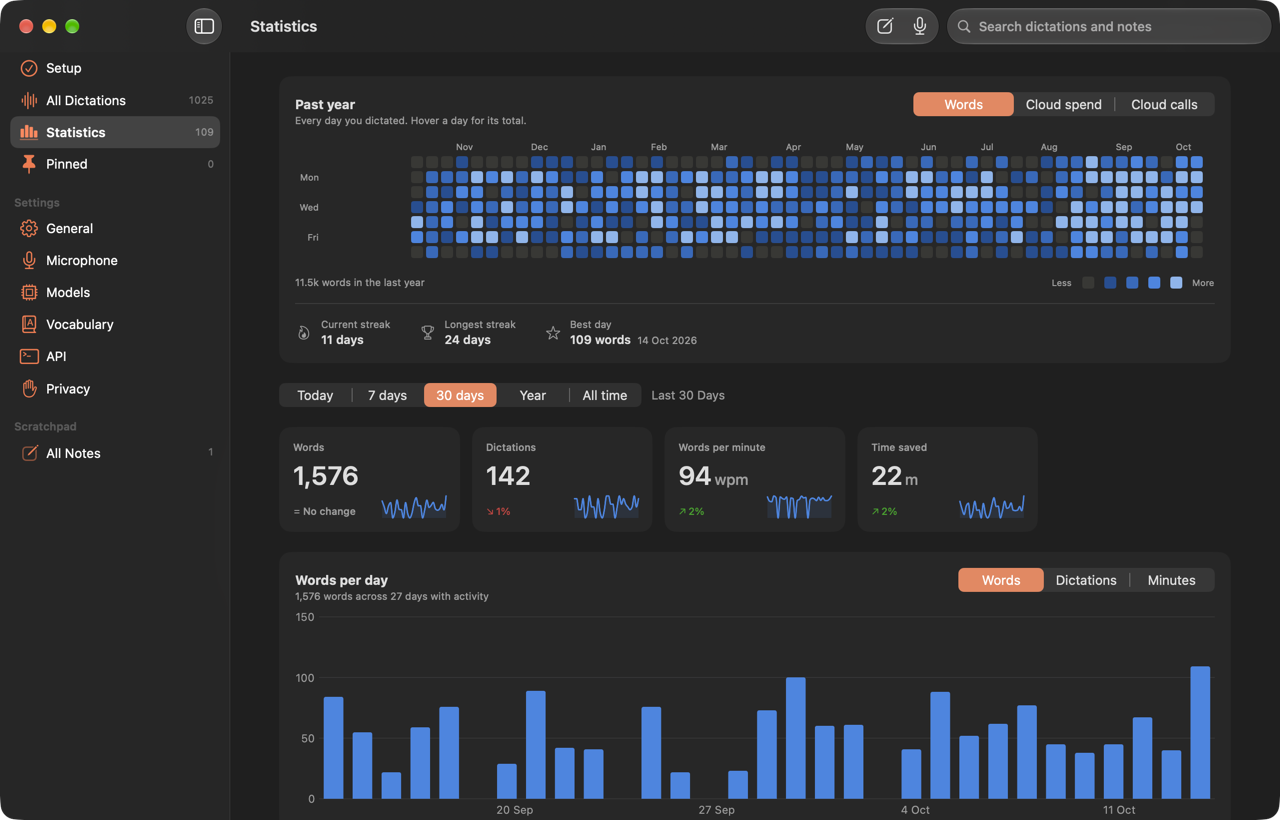
Sidebar › Statistics shows a contribution graph of the past year, with streaks and your best day. A range picker (Today, 7 days, 30 days, Year, All time) scopes the rest:
- Words, dictations, words per minute, and time saved, each compared with the previous period.
- A chart of words, dictations, or minutes by hour, day, week, or month.
- Words by hour of day and by app.
- Cloud spend, requests, success rate, and latency, with per-model and per-request tables.
Totals come from a separate daily_stat table that holds only dates and counts, so a year of activity survives a 30-day retention setting. Hourly and per-app numbers come from saved transcripts, so retention limits them, and the page says so.
Words per minute divides inserted words by the time from the start of recording to final text, so processing counts. Totals divide summed words by summed time. Records from before processing time was saved count toward words and dictations but not speed. Time saved compares that time with typing at 40 words per minute, and the page labels it an estimate.
Local API#
Off by default. Turn it on in Settings › API. It listens only on 127.0.0.1, and every endpoint except /v1/health needs the bearer token shown there.
curl -H "Authorization: Bearer $TOKEN" http://127.0.0.1:8787/v1/stats
| Method | Endpoint | Does |
|---|---|---|
| GET | /v1/health |
Version and setup state. No token. |
| GET | /v1/stats?range= |
today, week, month, year, allTime |
| GET | /v1/activity |
Words per day |
| GET | /v1/history?q=&limit= |
Dictations, raw and cleaned |
| GET | /v1/notes |
Scratchpad notes |
| POST | /v1/notes |
{"text":"…"} adds a note |
| POST | /v1/dictate |
{"action":"start|stop|toggle|cancel"} |
| POST | /v1/insert |
{"text":"…"} types at the cursor |
Development#
SwiftPM builds the executable, and scripts/build.sh assembles and signs the app bundle with the Flow Dev identity from make-cert.sh. Without that identity it signs ad hoc and warns.
scripts/run.sh               # debug build and launch
scripts/run.sh release       # release build and launch
scripts/build.sh debug       # build without launching
Checks#
scripts/check.sh             # build without warnings, then the self-check and streaming suites
scripts/check-cloud.sh       # provider protocols against a localhost fixture
FLOW_ELECTRON_PATH=/path/to/Electron scripts/check-electron.sh
FLOW_FIREFOX_APP="/Applications/Firefox Nightly.app" scripts/check-firefox.sh
scripts/screenshots.sh       # README screenshots, from a demo copy of the app
The Electron and Firefox checks bring a test window to the front and stream into it, so leave the Mac alone while they run. screenshots.sh runs a copy of the app renamed to sh.taf.flow.demo, so it has its own settings, keeps its made-up history in memory, and never reads your dictations or Keychain keys. The Firefox check uses a throwaway profile and refuses to run while that browser is open.
Layout#
Sources/Flow/
  App/            scenes, app delegate, commands
  Diagnostics/    self-checks and desktop checks
  Dictation/      capture, speech, cleanup, prompts, lexicon, controller
  Insertion/      Accessibility and paste insertion, streaming, focus detection
  Hotkey/         dictation shortcut event tap
  Panel/          floating panel, waveform, levels
  Store/          records, SQLite store, statistics
  Window/         main window, settings, note editor, menu bar
  Support/        settings, login item, environment, local API
Prompts/          every prompt Flow sends
AppBundle/        Info.plist and entitlements
scripts/          build, install, checks, certificate, packaging
Design notes#
The first version was built with only the Command Line Tools, which lack Xcode’s macro plugins and test runtimes. That shaped a few choices:
- Persistence uses SQLite behind a
HistoryStoreprotocol instead of SwiftData, whose@Modelmacro needs Xcode. - Cleanup builds its schema with
DynamicGenerationSchemainstead of@Generable, with the same constrained decoding. - Audio capture is a hand-written
AVAudioEnginetap that converts to the analyzer’s format and also measures levels for the waveform, so there is one microphone session. - The transcriber uses the
.progressiveTranscriptionpreset, which emits the live partial results. - The shortcut is a
CGEventtap, because push-to-talk needs both the key-down and key-up. - Tests run inside the app behind
--self-check, andscripts/check.shruns them.
SpeechTranscriber.results never finishes if the analyzer received no audio, and it ignores cancellation. Flow therefore never awaits it after finalizing. finish() cancels the results task and yields once so queued results land.
Shipping#
scripts/package.sh                                          # ad-hoc DMG, not notarized
DEVELOPER_ID="Developer ID Application: You (TEAM)" scripts/package.sh
DEVELOPER_ID=... NOTARY_PROFILE=flow scripts/package.sh     # sign, notarize, staple
Store the notary profile once:
xcrun notarytool store-credentials flow --apple-id [email protected] \
      --team-id TEAMID --password APP-SPECIFIC-PASSWORD
Without DEVELOPER_ID, the DMG keeps an ad-hoc signature and Gatekeeper warns on other Macs. The notarized path has not been run yet.
Known limitations#
- Without a cloud model, cleanup needs Apple Intelligence. If it is off or not ready, Flow inserts the raw transcript.
- Anything you copy during the 600 ms after a paste is replaced when Flow restores your clipboard.
- Streaming into browser and Electron editors depends on how each one reports its text. When Flow cannot follow an editor, it falls back to the pill and pastes the final text once.