Configuration and Environment Variables
Overview
This document explains the configuration system for the Agentic Browser, including environment variable management via .env files, API key setup for LLM providers and external services, and logging configuration. The system uses python-dotenv for environment variable loading and a centralized configuration module for application settings.
For information about running the application and selecting server modes, see page 2.3 (Running the Application).
Configuration Loading System
The application loads configuration from environment variables using the python-dotenv library. Configuration is centralized in the core/config.py module.
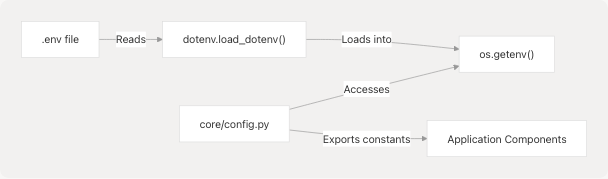
The configuration loading sequence in core/config.py:
dotenv.load_dotenv()reads.envfile from project root core/config.py6- Configuration variables are read via
os.getenv()with defaults core/config.py8-14 - Module exports typed constants for application use core/__init__.py3-7
Sources: core/config.py1-26 core/__init__.py1-15 main.py5-8 pyproject.toml16
Core Configuration Variables
Application Settings
| Variable Name | Type | Purpose | Default Value | Source |
|---|---|---|---|---|
ENV |
string | Environment mode | "development" |
core/config.py8 |
DEBUG |
boolean | Debug mode flag | True (dev), False (prod) |
core/config.py9 |
BACKEND_HOST |
string | API server host | "0.0.0.0" |
core/config.py10 |
BACKEND_PORT |
integer | API server port | 5454 |
core/config.py11 |
These variables are exported from core/__init__.py and used by the FastAPI application for server binding.
Sources: core/config.py8-11 core/__init__.py3-7
Logging Configuration
The logging system is configured based on the DEBUG setting:
# From core/config.py
logging_level = logging.DEBUG if DEBUG else logging.INFO
logging.basicConfig(level=logging_level)
The get_logger(name: str) factory function core/config.py22-25 creates configured logger instances:
def get_logger(name: str) -> logging.Logger:
    l = logging.getLogger(name)
    l.setLevel(logging_level)
    return l
Usage pattern throughout the codebase:
from core.config import get_logger
logger = get_logger(__name__)
Sources: core/config.py16-25 tools/google_search/seach_agent.py6-8 routers/browser_use.py3-9
LLM Provider Configuration
The system supports multiple LLM providers through a unified configuration approach in the LargeLanguageModel class. Each provider requires specific environment variables.
Required Environment Variables by Provider
| Provider | API Key Variable | Base URL Variable | Notes |
|---|---|---|---|
google |
GOOGLE_API_KEY |
- | Google Gemini models |
openai |
OPENAI_API_KEY |
- | OpenAI GPT models |
anthropic |
ANTHROPIC_API_KEY |
- | Anthropic Claude models |
ollama |
- | OLLAMA_BASE_URL |
Local Ollama server (no API key required) |
deepseek |
DEEPSEEK_API_KEY |
- | Uses fixed base URL: https://api.deepseek.com/v1 |
openrouter |
OPENROUTER_API_KEY |
- | Uses fixed base URL: https://openrouter.ai/api/v1 |
At least one provider's credentials must be configured for the application to function.
Sources: core/llm.py21-75
Provider Configuration Dictionary
The PROVIDER_CONFIGS dictionary core/llm.py21-75 defines each provider's configuration schema:
PROVIDER_CONFIGS = {
    "google": {
        "class": ChatGoogleGenerativeAI,
        "api_key_env": "GOOGLE_API_KEY",
        "default_model": "gemini-2.5-flash",
        "param_map": {"api_key": "google_api_key"},
    },
    "openai": {
        "class": ChatOpenAI,
        "api_key_env": "OPENAI_API_KEY",
        "default_model": "gpt-5-mini",
        "param_map": {"api_key": "openai_api_key", "base_url": "base_url"},
    },
    # ... additional providers
}
Each provider configuration includes:
class: LangChain adapter class (e.g.,ChatGoogleGenerativeAI,ChatOpenAI)api_key_env: Environment variable name for the API keydefault_model: Default model identifier if none specifiedparam_map: Mapping from generic parameter names to provider-specific parameter namesbase_url_env(optional): Environment variable for custom base URL (Ollama)base_url_override(optional): Fixed base URL (DeepSeek, OpenRouter)
Sources: core/llm.py21-75
LLM Initialization Flow
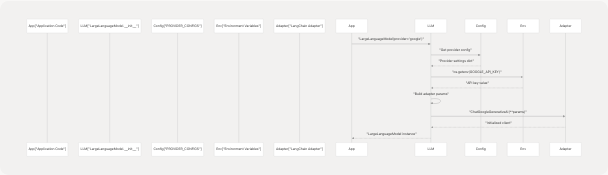
The initialization process in LargeLanguageModel.__init__ core/llm.py79-169:
- Provider Validation: Checks if provider exists in
PROVIDER_CONFIGScore/llm.py101-105 - API Key Resolution: Retrieves API key from parameter or environment variable core/llm.py121-129
- Base URL Handling: Resolves base URL from parameter, override, or environment core/llm.py136-155
- Parameter Mapping: Constructs provider-specific parameters using
param_mapcore/llm.py128-129 - Adapter Instantiation: Creates LangChain adapter with constructed parameters core/llm.py160
Sources: core/llm.py78-169
Default LLM Instance
The module initializes a default LLM instance at import time:
# From core/llm.py:197-205
try:
    _model = LargeLanguageModel()
    llm = _model.client
except Exception as e:
    print(f"Failed to initialize default LLM: {e}")
    raise e
This default instance uses:
- Provider: Google (default)
- Model:
gemini-2.5-flash(fromPROVIDER_CONFIGS["google"]["default_model"]) - API Key:
GOOGLE_API_KEYenvironment variable (viagoogle_api_keyimported fromcore.config)
The default instance is available as llm for import by other modules.
Sources: core/llm.py196-205 core/llm.py2
External Service API Keys
Beyond LLM providers, the application requires API keys for external services.
Tavily Search API
The web search functionality uses TavilySearch for content retrieval:
# From tools/google_search/seach_agent.py
from langchain_tavily import TavilySearch
tavily_tool = TavilySearch(topic="general")
Required Environment Variable: TAVILY_API_KEY
The TavilySearch class from langchain-tavily automatically reads the TAVILY_API_KEY environment variable. This key is required for the web search agent to function.
Sources: tools/google_search/seach_agent.py5-11 pyproject.toml25
Google API Keys (Gmail and Calendar)
Gmail and Calendar integration requires Google OAuth credentials. These are managed through:
- Application Credentials: Google Cloud project OAuth client ID and secret
- User Tokens: Access tokens and refresh tokens obtained through OAuth flow
- API Scopes: Calendar and Gmail permissions
Configuration for Google APIs is handled at runtime through OAuth flows rather than static environment variables. See the Gmail and Calendar Integration documentation (page 3.3.1) for details.
Sources: pyproject.toml23
Configuration File Security
Git Exclusion Patterns
The .gitignore file ensures sensitive configuration files are never committed to version control:
# Environments
.env
.envrc
.venv
env/
venv/
ENV/
env.bak/
venv.bak/
Sources: .gitignore136-144
Environment File Structure
A typical .env file for the Python backend should contain:
# LLM Provider API Keys (choose at least one)
GOOGLE_API_KEY=your_google_api_key_here
OPENAI_API_KEY=your_openai_api_key_here
ANTHROPIC_API_KEY=your_anthropic_api_key_here
DEEPSEEK_API_KEY=your_deepseek_api_key_here
OPENROUTER_API_KEY=your_openrouter_api_key_here

# Ollama Configuration (if using local models)
OLLAMA_BASE_URL=http://localhost:11434

# Backend Configuration (optional)
BACKEND_HOST=localhost
BACKEND_PORT=8000
The system loads environment variables using python-dotenv library, specified in pyproject.toml16
Sources: pyproject.toml16 .gitignore136-144
Security Best Practices
API Key Management
- Never Commit Keys: The
.gitignorefile prevents.envfiles from being committed - Use Environment Variables: API keys should only be provided via
.envfiles or environment variables, never hardcoded - Minimal Permissions: Use the minimum required OAuth scopes for functionality
- Key Rotation: Regularly rotate API keys and regenerate OAuth tokens
- Separate Keys: Use different API keys for development, staging, and production environments
Sources: .gitignore136-144 core/llm.py121-127
Token Storage Security
- Browser Storage Isolation: Browser extension storage is isolated per-extension and not accessible to web pages
- Token Expiration: Access tokens automatically expire (default 3600 seconds/1 hour)
- Automatic Refresh: Token refresh mechanism prevents expired token usage
- Logout Capability: Users can manually clear stored tokens via logout extension/Extension/entrypoints/sidepanel/hooks/useAuth.ts238-242
The useAuth hook provides token age visibility through getTokenAge() and getTokenExpiry() functions extension/Extension/entrypoints/sidepanel/hooks/useAuth.ts244-269
Sources: extension/Extension/entrypoints/sidepanel/hooks/useAuth.ts91-126 extension/Extension/entrypoints/sidepanel/hooks/useAuth.ts238-269
Network Security Considerations
- HTTPS Only: OAuth flows and API requests should use HTTPS in production
- Backend URL Configuration: The hardcoded
BACKEND_URL = "http://localhost:5000"in extension/Extension/entrypoints/sidepanel/hooks/useAuth.ts3 should be configurable for production deployments - CORS Configuration: Backend API should implement proper CORS headers for extension origin
- Base URL Validation: User-provided base URLs should be validated before use
Sources: extension/Extension/entrypoints/sidepanel/hooks/useAuth.ts3 extension/Extension/entrypoints/sidepanel/components/UnifiedSettingsMenu.tsx133-135
Credential Deletion
The extension provides explicit credential deletion functions:
- Google OAuth Logout: extension/Extension/entrypoints/sidepanel/hooks/useAuth.ts238-242 removes
googleUserfrom storage - JIIT Portal Logout: extension/Extension/entrypoints/sidepanel/components/UnifiedSettingsMenu.tsx199-206 clears portal credentials
- General Credentials:
deleteCredentials()function removes saved email/password extension/Extension/entrypoints/sidepanel/components/UnifiedSettingsMenu.tsx270-286
All deletion functions require user confirmation before executing.
Sources: extension/Extension/entrypoints/sidepanel/hooks/useAuth.ts238-242 extension/Extension/entrypoints/sidepanel/components/UnifiedSettingsMenu.tsx199-206 extension/Extension/entrypoints/sidepanel/components/UnifiedSettingsMenu.tsx270-286
Security Architecture Summary
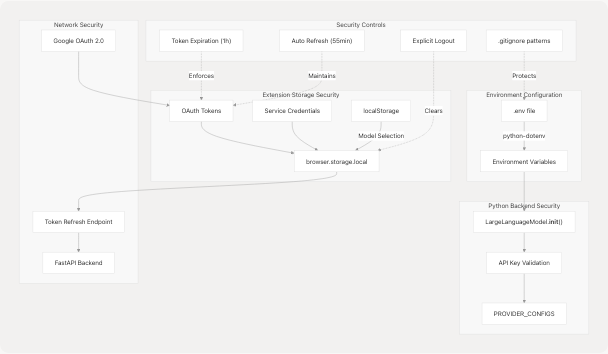
Sources: core/llm.py78-169 extension/Extension/entrypoints/sidepanel/hooks/useAuth.ts17-311 extension/Extension/entrypoints/sidepanel/components/UnifiedSettingsMenu.tsx1-1167 .gitignore136-144
The security architecture implements defense-in-depth with multiple layers:
- Environment isolation via
.envfiles and.gitignorepatterns - Provider-agnostic API key management in
LargeLanguageModelclass - Browser storage isolation for extension credentials
- OAuth 2.0 with automatic token refresh for Google services
- Explicit user controls for credential management and deletion
All sensitive data remains local to the user's environment, supporting the "Bring Your Own Keys" (BYOKeys) architecture described in the project README.