Response Models
Purpose and Scope
This page documents the Pydantic response models used throughout the Agentic Browser backend to serialize and validate data returned from API endpoints. These models define the structure of responses sent from the FastAPI application back to the browser extension and other clients.
The two primary agent response models are:
ReactAgentResponse: Conversational AI results from the React Agent systemGenerateScriptResponse: Browser automation action plans from the Browser Use Agent
For information about incoming request structures, see page 6.1. For details on the FastAPI routers that utilize these models, see page 3.2 and page 3.3.
Sources: models/response/__init__.py1-20 models/response/agent.py1-11
Response Model Architecture
The response models are centrally defined in the models/response/ package and provide type-safe serialization for all API outputs. Each service integration router returns its corresponding response model to ensure consistent data structures across the system.
Response Model Registry
Sources: models/response/__init__.py1-20 models/response/agent.py1-11
Response Model Catalog
The following table summarizes all response models in the models/response package:
| Model Class | Purpose | Primary Router | Key Fields |
|---|---|---|---|
ReactAgentResponse |
React Agent conversation results | POST /api/genai/react |
messages, output |
GenerateScriptResponse |
Browser automation action plan | POST /api/agent |
ok, action_plan, error, problems |
SubtitlesResponse |
YouTube transcript data | POST /api/genai/youtube/subtitles |
Video subtitle content |
AskResponse |
YouTube Q&A answers | POST /api/genai/youtube/ask |
AI-generated answers |
WebsiteResponse |
Processed web content | POST /api/genai/website |
Markdown conversion |
CrawllerResponse |
GitHub repository analysis | POST /api/genai/github |
Code structure data |
HealthResponse |
System health check | GET /api/genai/health |
Service status |
Sources: models/response/__init__.py5-18 models/response/agent.py1-11
ReactAgentResponse
The ReactAgentResponse model returns conversational AI results from the React Agent system via POST /api/genai/react. This model represents the output of LangGraph workflow execution with tool use.
Structure
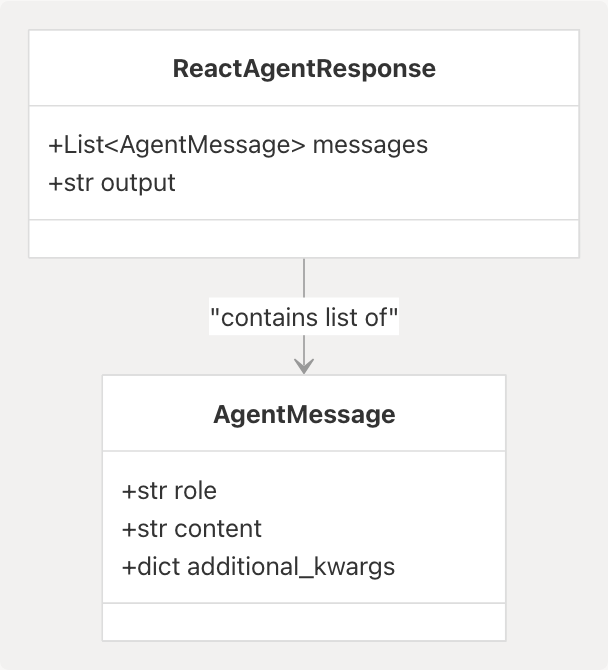
Field Definitions
| Field | Type | Required | Description |
|---|---|---|---|
messages |
List[AgentMessage] |
Yes | Complete conversation history including user messages, agent reasoning, and tool invocations |
output |
str |
Yes | Content of the final assistant message extracted for direct access |
The messages field preserves the full AgentState from LangGraph's StateGraph, enabling stateful multi-turn conversations. The output field provides the agent's final answer without requiring message list parsing.
Implementation
The model is defined at models/response/react_agent.py10-15:
class ReactAgentResponse(BaseModel):
    messages: List[AgentMessage] = Field(
        ..., description="Final conversation state including the agent reply."
    )
    output: str = Field(..., description="Content of the latest assistant message.")
Sources: models/response/react_agent.py1-15 models/requests/__init__.py10
GenerateScriptResponse
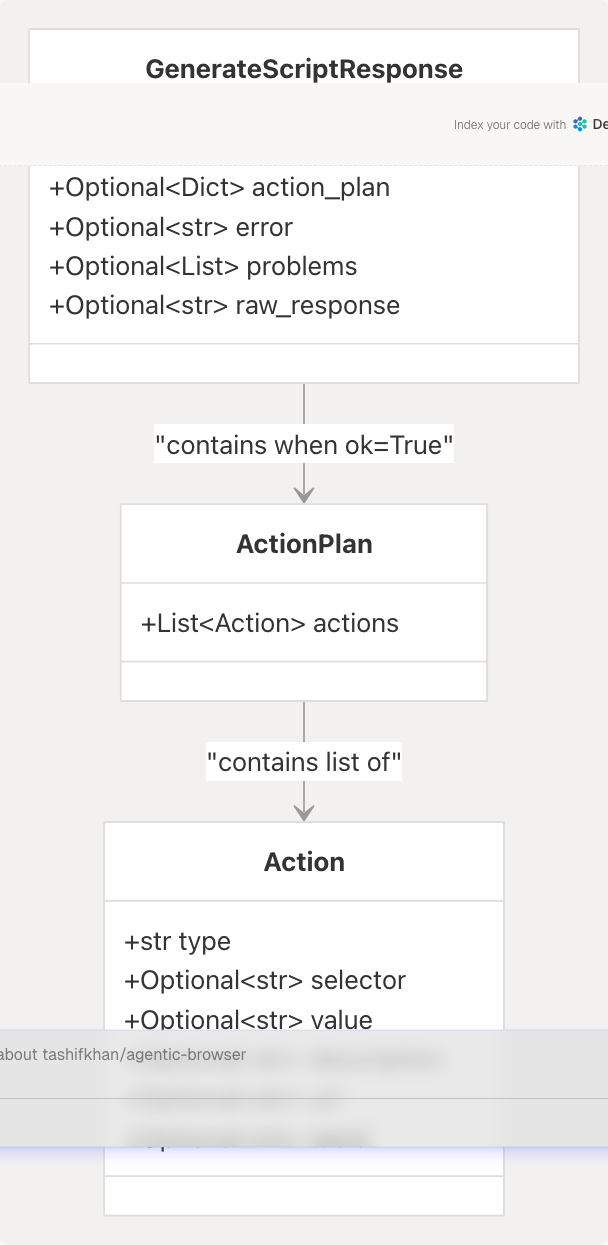
The GenerateScriptResponse model returns browser automation action plans from the Browser Use Agent via POST /api/agent. This model wraps the structured JSON action plan generated by the LLM and validated by sanitize_json_actions().
Structure
Field Definitions
| Field | Type | Required | Description |
|---|---|---|---|
ok |
bool |
Yes | Success indicator: True if action plan generated successfully |
action_plan |
Optional[Dict[str, Any]] |
No | Validated JSON action plan with actions array |
error |
Optional[str] |
No | Error message if generation or validation failed |
problems |
Optional[List[str]] |
No | List of validation problems from sanitize_json_actions() |
raw_response |
Optional[str] |
No | First 1000 characters of LLM response (debugging) |
Response States
The response follows two distinct patterns:
Success Response (ok=True):
{
  "ok": true,
  "action_plan": {
    "actions": [
      {
        "type": "OPEN_TAB",
        "url": "https://www.google.com/search?q=flights",
        "active": true,
        "description": "Open new tab and search for flights"
      }
    ]
  }
}
Failure Response (ok=False):
{
  "ok": false,
  "error": "Action plan failed validation.",
  "problems": [
    "Action 0: missing 'selector' field",
    "Action 1: invalid type 'INVALID_ACTION'"
  ],
  "raw_response": "{\"actions\": <FileRef file-url="https://github.com/tashifkhan/agentic-browser/blob/e94826c4/{\\\"type\\\"#LNaN-LNaN" NaN  file-path="{\\\"type\\\"">Hii</FileRef>:
- **DOM Actions**: `CLICK`, `TYPE`, `SCROLL`, `WAIT`, `SELECT`, `EXECUTE_SCRIPT`
- **Tab Control Actions**: `OPEN_TAB`, `CLOSE_TAB`, `SWITCH_TAB`, `NAVIGATE`, `RELOAD_TAB`, `DUPLICATE_TAB`

### Implementation

The model is defined at <FileRef file-url="https://github.com/tashifkhan/agentic-browser/blob/e94826c4/models/response/agent.py#L5-L11" min=5 max=11 file-path="models/response/agent.py">Hii</FileRef>:

```python
class GenerateScriptResponse(BaseModel):
    ok: bool
    action_plan: Optional[Dict[str, Any]] = None
    error: Optional[str] = None
    problems: Optional[List[str]] = None
    raw_response: Optional[str] = None
Generation and Validation Flow
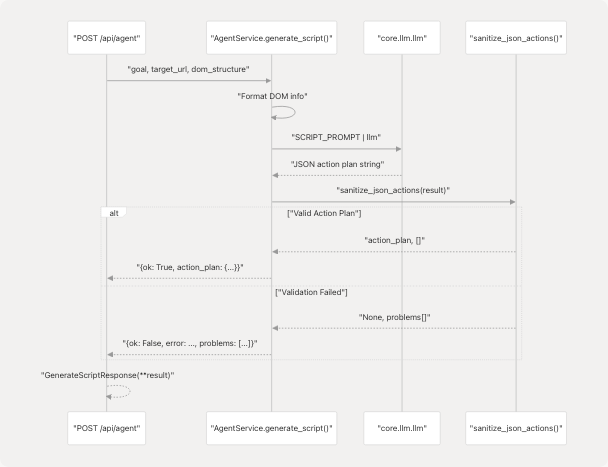
The AgentService.generate_script() method at services/browser_use_service.py12-96 constructs the response by:
- Formatting DOM structure information for the LLM prompt
- Invoking the LLM with
SCRIPT_PROMPTfrom prompts/browser_use.py5-123 - Sanitizing the raw LLM response with
sanitize_json_actions()from utils/agent_sanitizer.py20-96 - Returning a dictionary matching
GenerateScriptResponsestructure
Validation Rules
The sanitize_json_actions() function validates:
- JSON structure has
actionsarray - Each action has valid
typefield - DOM actions (CLICK, TYPE) require
selectorfield - TYPE actions require
valuefield - Tab control actions (OPEN_TAB, NAVIGATE) require
urlfield - EXECUTE_SCRIPT actions checked for dangerous patterns
- SWITCH_TAB actions require
tabIdordirectionfield
Validation problems are returned in the problems field, allowing the client to diagnose LLM output issues.
Sources: models/response/agent.py1-11 services/browser_use_service.py12-96 utils/agent_sanitizer.py20-96
Response Data Flow
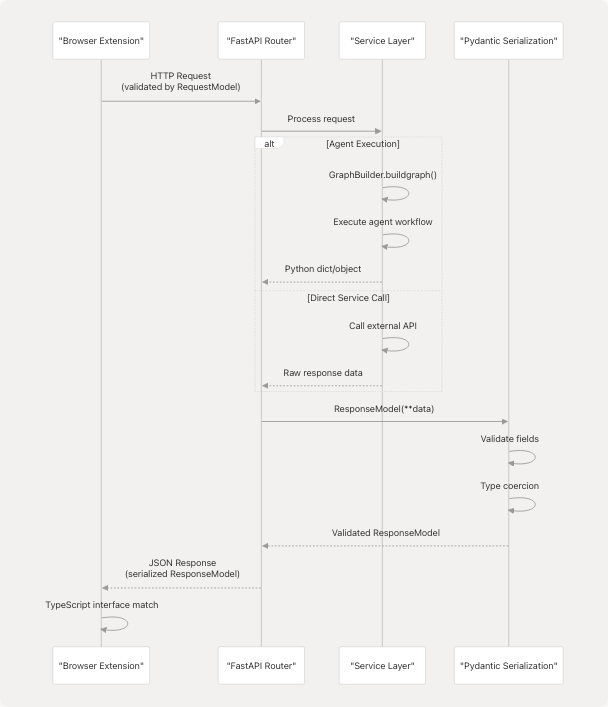
The following diagram illustrates how response models fit into the request-response cycle of the Agentic Browser system:
Sources: models/response/__init__.py1-20 models/response/react_agent.py1-15
Response Model Features
Pydantic Field Validation
All response models inherit from pydantic.BaseModel, providing automatic validation and serialization:
- Type enforcement: Fields are type-checked at runtime
- JSON serialization: Automatic conversion to JSON via FastAPI
- Field descriptions: Using
Field(..., description="...")for API documentation - Default values: Optional fields can specify defaults
- Nested models: Response models can contain other Pydantic models (e.g.,
AgentMessagewithinReactAgentResponse)
FastAPI Integration
FastAPI automatically:
- Serializes response model instances to JSON
- Generates OpenAPI schema documentation from model definitions
- Includes field descriptions in API documentation
- Validates response structure before sending to client
Sources: models/response/react_agent.py5-14
Response Model Organization
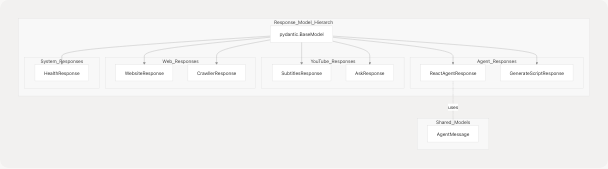
Response models are logically grouped by functionality:
- Agent responses:
ReactAgentResponse(LangGraph workflow),GenerateScriptResponse(browser automation) - YouTube responses: Video transcription and analysis results
- Web responses: HTML-to-markdown conversion and GitHub crawling
- System responses: Health checks and service status
Sources: models/response/__init__.py5-18 models/response/agent.py1-11
Usage Patterns
Router Implementation Patterns
Pattern 1: Direct Model Instantiation
Routers return response model instances directly with response_model parameter:
# ReactAgentResponse example
@router.post("/api/genai/react", response_model=ReactAgentResponse)
async def react_agent(request: ReactAgentRequest):
    result = await service.generate_answer(request)
    return ReactAgentResponse(
        messages=result["messages"],
        output=result["output"]
    )
Pattern 2: Service-Level Dictionary Return
The Browser Use Agent returns a raw dictionary from the service layer, which FastAPI validates against the response model:
# GenerateScriptResponse example at services/browser_use_service.py
async def generate_script(self, goal, target_url, dom_structure, constraints):
    # ... LLM generation and validation ...
    return {
        "ok": True,
        "action_plan": action_plan
    }
    # or
    return {
        "ok": False,
        "error": "Validation failed",
        "problems": problems,
        "raw_response": result[:1000]
    }
FastAPI automatically:
- Validates return values match the
response_modelstructure - Serializes models to JSON
- Includes model schemas in OpenAPI documentation
- Coerces dictionary returns to response model instances
Client-Side Consumption
The browser extension receives strongly-typed JSON responses matching the Pydantic model structure:
// TypeScript interface mirrors ReactAgentResponse
interface ReactAgentResponse {
  messages: AgentMessage[];
  output: string;
}

// Fetch and parse response
const response = await fetch('/api/genai/react', {
  method: 'POST',
  body: JSON.stringify(request)
});
const data: ReactAgentResponse = await response.json();
Sources: models/response/react_agent.py10-15
Model Relationships
Cross-Model Dependencies
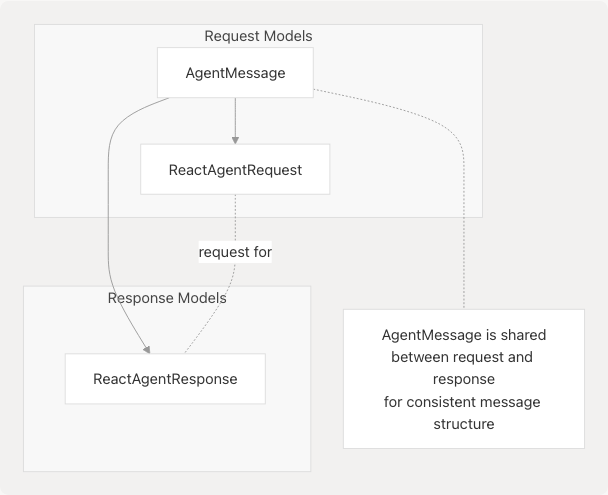
The AgentMessage model is imported from models.requests.react_agent and reused in ReactAgentResponse, ensuring consistency between the conversation history sent in requests and received in responses. This allows the agent system to maintain stateful conversations across multiple API calls.
Sources: models/response/react_agent.py7 models/requests/__init__.py10-19
Summary
Response models in the Agentic Browser system provide:
- Type Safety: Pydantic validation ensures all API responses conform to expected structures
- Consistency: Standardized response formats across all service integrations
- Documentation: Automatic OpenAPI schema generation from model definitions
- Maintainability: Centralized model definitions in
models/response/package - Client Integration: Direct mapping to TypeScript interfaces in the browser extension
The six response models (ReactAgentResponse, SubtitlesResponse, AskResponse, WebsiteResponse, CrawllerResponse, HealthResponse) cover all API endpoints, with ReactAgentResponse serving as the primary interface for agent intelligence interactions.
Sources: models/response/__init__.py1-20 models/response/react_agent.py1-15