YouTube Integration
Purpose and Scope
This document covers the YouTube integration subsystem, which enables video content extraction and Q&A capabilities. The integration provides:
- REST API endpoint for asking questions about YouTube videos
- Video metadata extraction using
yt-dlp - Subtitle/caption retrieval with automatic fallback to audio transcription using
faster-whisper - Multi-stage transcript cleaning and deduplication pipeline
- LLM-powered question answering over video content
For information about the YouTube agent tool used in the React Agent system, see Agent Tool System. For general web search capabilities, see Web Search and Content Processing.
Sources: routers/youtube.py1-59 tools/youtube_utils/get_info.py1-77 tools/youtube_utils/get_subs.py1-178
System Architecture
The YouTube integration follows the standard three-tier router-service-tool pattern:
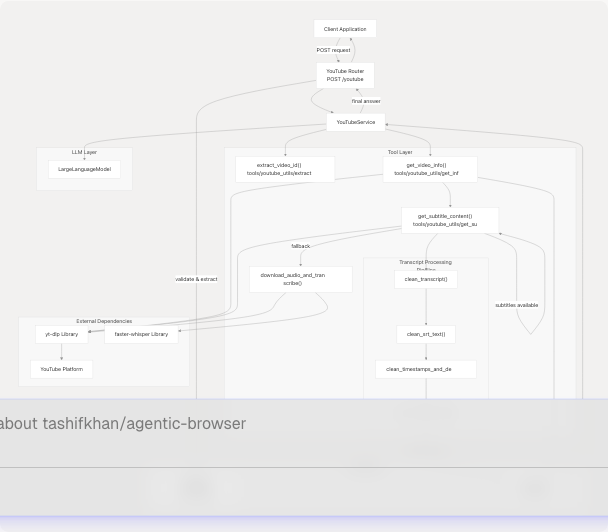
Sources: routers/youtube.py1-59 tools/youtube_utils/__init__.py1-14 tools/youtube_utils/transcript_generator/__init__.py1-22
API Endpoint
POST /youtube
The YouTube router exposes a single endpoint that accepts video URLs and questions.
Request Model:
class AskRequest(BaseModel):
    url: str
    question: str
    chat_history: Optional[List] = []
Response:
{
    "answer": "string"
}
The router performs validation, converts chat history to string format, and delegates to YouTubeService.generate_answer():
| Parameter | Required | Description |
|---|---|---|
url |
Yes | YouTube video URL (youtube.com or youtu.be format) |
question |
Yes | User question about the video content |
chat_history |
No | List of previous conversation messages for context |
Sources: routers/youtube.py14-59 models/requests/ask.py (referenced but not provided)
Video Information Extraction
The get_video_info() function extracts comprehensive metadata from YouTube videos:

Extracted Metadata:
models/yt.py5-17 defines the YTVideoInfo model with fields:
| Field | Type | Description |
|---|---|---|
title |
str | Video title |
description |
str | Video description |
duration |
int | Duration in seconds |
uploader |
str | Channel/uploader name |
upload_date |
str | Upload date |
view_count |
int | Number of views |
like_count |
int | Number of likes |
tags |
List[str] | Video tags |
categories |
List[str] | Video categories |
transcript |
Optional[str] | Cleaned transcript text |
The function uses yt-dlp with options to skip video download and extract only metadata: tools/youtube_utils/get_info.py14-22
Error Handling: The function detects error messages from subtitle extraction and sets transcript to None if known error patterns are found: tools/youtube_utils/get_info.py43-70
Sources: tools/youtube_utils/get_info.py11-76 models/yt.py5-17
Subtitle and Transcript Extraction
The system employs a two-phase approach with automatic fallback:
Phase 1: Subtitle Download
The get_subtitle_content() function attempts to download existing subtitles or captions:
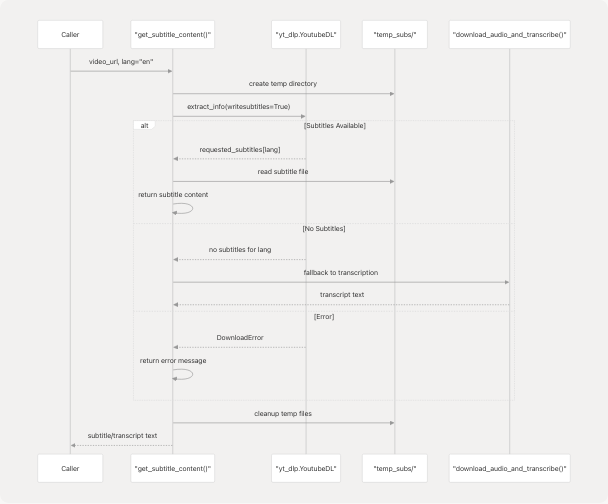
Configuration: tools/youtube_utils/get_subs.py14-25
- Writes both manual and auto-generated subtitles
- Supports subtitle languages via
subtitleslangsparameter - Formats: VTT, SRT, or best available
- Skips video download (
skip_download: True)
Sources: tools/youtube_utils/get_subs.py8-100
Phase 2: Audio Transcription Fallback
If subtitles are unavailable, download_audio_and_transcribe() uses faster-whisper:
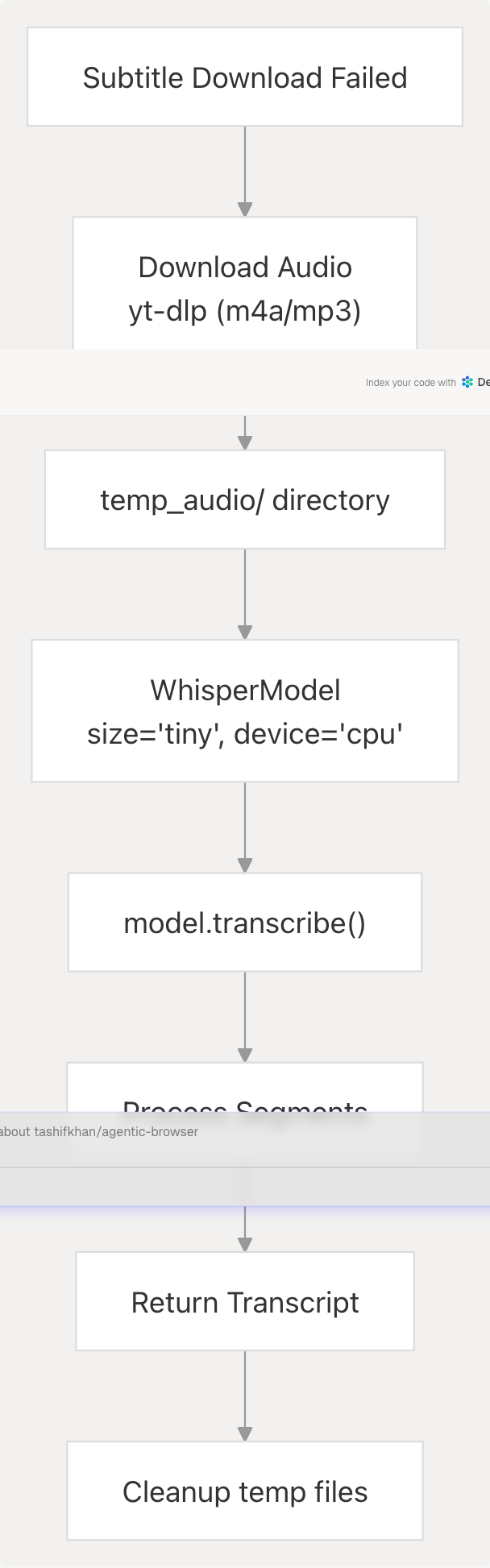
Audio Download Options: tools/youtube_utils/get_subs.py117-132
- Format:
m4a/bestaudio/best - FFmpeg post-processing to MP3 (192 kbps)
- Custom User-Agent header for compatibility
Transcription Configuration: tools/youtube_utils/get_subs.py148-164
- Model:
tiny(lightweight, fast) - Device:
cpu(no GPU required) - Compute type:
int8(quantized for efficiency) - Beam size: 5
The transcription segments are joined into a single text string and returned.
Sources: tools/youtube_utils/get_subs.py102-178
Transcript Processing Pipeline
Raw subtitle/transcript text undergoes four sequential cleaning stages to remove formatting artifacts:

Stage 1: clean_transcript()
tools/youtube_utils/transcript_generator/clean.py22-66
Removes:
- Full timestamp lines matching
HH:MM:SS.mmm --> HH:MM:SS.mmm - VTT headers:
WEBVTT,Kind:,Language: - VTT metadata:
NOTE,STYLE,REGION,::cue - Speaker tags:
<v Speaker Name>content</v> - Inline timestamps:
<HH:MM:SS.mmm> - Cue tags:
<c>,</c>, etc. - VTT alignment directives:
align:start position:0%
Groups consecutive non-empty lines into paragraphs separated by blank lines.
Stage 2: clean_srt_text()
tools/youtube_utils/transcript_generator/srt.py4-29
Removes:
- Full SRT timestamp blocks with trailing
\n\n - Inline time codes
- Alignment directives
- Converts literal
\nsequences to actual newlines
Stage 3: clean_timestamps_and_dedupe()
tools/youtube_utils/transcript_generator/timestamp.py10-31
Removes:
- Timestamp arrow patterns:
HH:MM:SS.mmm --> HH:MM:SS.mmm - Inline cue markers:
<HH:MM:SS.mmm>
Deduplicates lines using a set to track seen content.
Stage 4: remove_sentence_repeats()
tools/youtube_utils/transcript_generator/duplicate.py4-25
Collapses consecutive duplicate sentences. Uses a forward-looking check: if the current line is a prefix of the next line, it's considered a repeat and removed.
Pipeline Orchestration: tools/youtube_utils/transcript_generator/__init__.py11-16
def processed_transcript(text: str) -> str:
    cleaned_text = remove_sentence_repeats(
        clean_timestamps_and_dedupe(
            clean_srt_text(
                clean_transcript(text)
            )
        )
    )
    return cleaned_text
Sources: tools/youtube_utils/transcript_generator/__init__.py11-16 tools/youtube_utils/transcript_generator/clean.py22-66 tools/youtube_utils/transcript_generator/srt.py4-29 tools/youtube_utils/transcript_generator/timestamp.py10-31 tools/youtube_utils/transcript_generator/duplicate.py4-25
Video ID Extraction
The extract_video_id() utility handles multiple YouTube URL formats:
tools/youtube_utils/extract_id.py8-23
| URL Format | Hostname | Extraction Method |
|---|---|---|
https://www.youtube.com/watch?v=VIDEO_ID |
www.youtube.com or youtube.com |
Parse query parameter v |
https://youtu.be/VIDEO_ID |
youtu.be |
Extract from path (skip first /) |
Returns None if extraction fails or URL is invalid.
Sources: tools/youtube_utils/extract_id.py8-23
Integration with Agent System
The YouTube integration is exposed to the React Agent system through the youtube_agent tool, allowing agents to autonomously query video content as part of multi-step reasoning workflows. See Agent Tool System for details on tool registration and usage patterns.
Sources: routers/youtube.py1-59
Error Handling
The system implements comprehensive error handling at multiple levels:
Router Level
- Returns HTTP 400 for missing required parameters
- Returns HTTP 500 for internal errors
- Preserves HTTPException from service layer
Tool Level
Subtitle Extraction: tools/youtube_utils/get_subs.py73-89
- Catches
yt_dlp.utils.DownloadError - Returns specific error messages for known cases:
- "Video unavailable."
- "Subtitles not available for the specified language."
Video Info: tools/youtube_utils/get_info.py54-70
- Detects error messages from subtitle extraction
- Sets
transcriptfield toNoneon errors - Logs warnings for unavailable transcripts
Transcription Fallback: tools/youtube_utils/get_subs.py166-168
- Returns error message string if transcription fails
- Logs detailed error information
Cleanup Guarantees
Both subtitle download and audio transcription use finally blocks to ensure temporary files are removed: tools/youtube_utils/get_subs.py91-99 tools/youtube_utils/get_subs.py170-177
Sources: routers/youtube.py34-58 tools/youtube_utils/get_subs.py73-99 tools/youtube_utils/get_subs.py166-177 tools/youtube_utils/get_info.py54-70
Dependencies
| Library | Purpose | Configuration |
|---|---|---|
yt-dlp |
Video metadata extraction and subtitle download | Configured via ydl_opts dict |
faster-whisper |
Audio transcription when subtitles unavailable | tiny model, CPU/INT8 compute |
BeautifulSoup |
(Indirect) HTML parsing in related tools | N/A |
Sources: tools/youtube_utils/get_subs.py2 tools/youtube_utils/get_subs.py108 tools/youtube_utils/get_info.py5