Extension Architecture Overview
Purpose and Scope
This document provides an architectural overview of the browser extension component of the Agentic Browser system. The extension operates as a standalone subsystem that provides frontend browser automation capabilities through a TypeScript-based browser extension (built with WXT framework) paired with a Python Flask backend service.
The extension enables users to perform AI-assisted browser automation directly from the browser UI, independent of the main API server. For detailed information about specific components:
- Background script message handling: see 5.2
- Browser automation tool implementations: see 5.3
- Flask backend service details: see 5.4
This page focuses on the overall architecture, component relationships, and how the extension integrates with the broader Agentic Browser ecosystem.
High-Level Component Architecture
The browser extension follows a three-tier architecture: a TypeScript frontend running in the browser, a message-passing system for inter-component communication, and a Python Flask backend providing AI and authentication services.
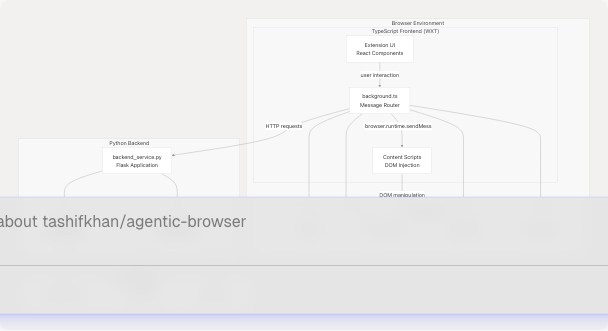
Sources: High-level system diagrams (Diagram 4: Browser Extension System)
Frontend Architecture (TypeScript/WXT)
The extension frontend is built using the WXT framework, which provides a modern development experience for cross-browser extensions. The architecture consists of three primary components:
Background Script
The background script (extension/background.ts) serves as the central message router and orchestrator for the extension. It runs persistently in the browser's background context and handles:
- Message Dispatching: Routes incoming messages from the UI to appropriate handlers
- Browser API Coordination: Manages interactions with
browser.tabs,browser.scripting, andbrowser.storageAPIs - Agent Tool Execution: Dispatches execution requests to specialized tool handlers
- State Management: Maintains extension-wide state using browser storage APIs
The background script processes six primary message types:
EXECUTE_AGENT_TOOL: Execute specific browser automation toolsACTIVATE_AI_FRAME: Enable AI assistant UI overlayGET_ACTIVE_TAB: Retrieve current tab informationEXECUTE_ACTION: Execute DOM manipulation actionsGEMINI_REQUEST: Forward requests to Flask backendRUN_GENERATED_AGENT: Execute generated automation scripts
Content Scripts
Content scripts (extension/content/) are injected into web pages and provide the bridge between the background script and the DOM. They:
- DOM Access: Execute JavaScript in the context of web pages
- Element Manipulation: Perform clicks, form fills, and other DOM operations
- Page Information Extraction: Retrieve page content, URLs, and structural information
- Security Boundary: Operate with restricted permissions for safe execution
Content scripts are injected dynamically using browser.scripting.executeScript to maintain security and avoid persistent injection overhead.
UI Layer
The extension UI (extension/entrypoints/) is built with React and provides:
- User Interface: Extension popup and side panels
- User Input Collection: Forms for goals, constraints, and configuration
- Result Display: Visualization of automation results and agent responses
- Settings Management: Configuration for API keys and preferences
Sources: High-level system diagrams (Diagram 4), extension/.gitignore1-27
Backend Service Architecture (Python/Flask)
The Python Flask backend (extension/backend_service.py) operates independently from the main API server and provides specialized services for the extension:
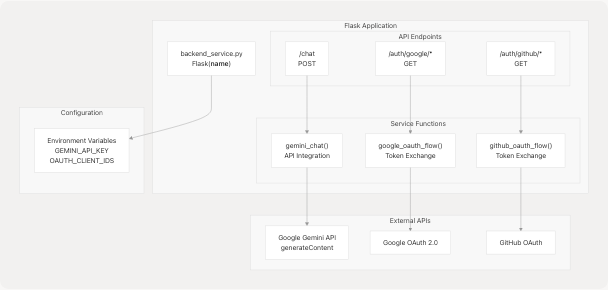
Key Responsibilities
| Component | Purpose | Dependencies |
|---|---|---|
/chat endpoint |
Process natural language queries using Gemini | GEMINI_API_KEY environment variable |
/auth/google/* |
Google OAuth flow for Gmail/Calendar access | Google OAuth 2.0 credentials |
/auth/github/* |
GitHub OAuth flow for repository access | GitHub OAuth credentials |
| API Key Management | Secure storage and validation of API keys | Flask session management |
The backend runs as a separate process from the main API server, typically on a different port (e.g., http://localhost:5000). This separation provides:
- Independent Deployment: Extension backend can run without the main API server
- Simplified Authentication: Direct API key management without complex token systems
- Resource Isolation: Extension operations don't impact main server performance
- Security Boundary: Separate security context for browser-specific operations
Sources: High-level system diagrams (Diagram 4), extension/backend_service.py (inferred)
Message Passing System
The extension uses Chrome's message passing API (browser.runtime.sendMessage) to enable communication between components. The message flow follows a request-response pattern:
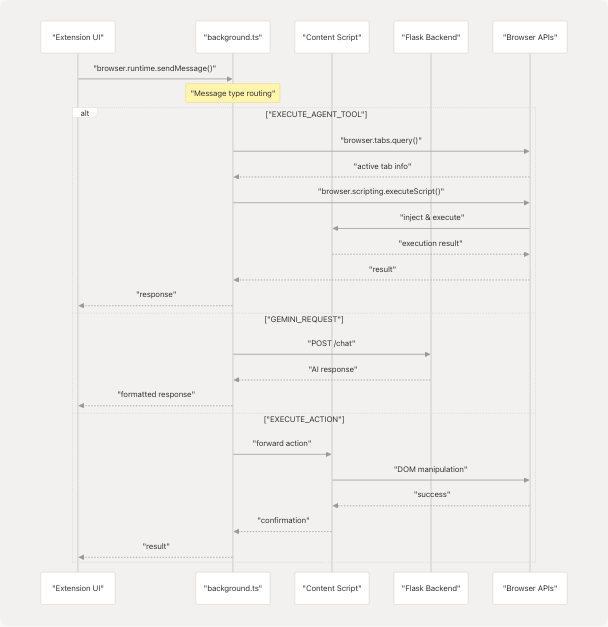
Message Type Taxonomy
| Message Type | Handler Location | Purpose |
|---|---|---|
EXECUTE_AGENT_TOOL |
Background Script | Execute browser automation tools (20+ handlers) |
ACTIVATE_AI_FRAME |
Background Script | Toggle AI assistant overlay |
GET_ACTIVE_TAB |
Background Script | Retrieve current tab metadata |
EXECUTE_ACTION |
Content Script | Perform DOM operations |
GEMINI_REQUEST |
Flask Backend | Process AI queries |
RUN_GENERATED_AGENT |
Background Script | Execute generated automation scripts |
Sources: High-level system diagrams (Diagram 4: Browser Extension System)
Integration with Main System
While the extension operates independently, it shares conceptual alignment with the main Agentic Browser system through the browser_action_agent tool:
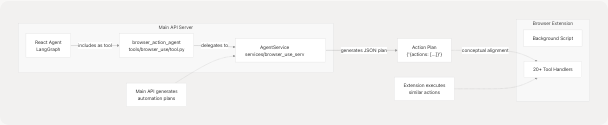
The browser_action_agent tool (tools/browser_use/tool.py43-48) in the main API system generates structured action plans that conceptually align with the tool handlers implemented in the extension:
- Main API: Generates JSON action plans using LLM reasoning
- Extension: Executes actions directly in the browser
- Shared Vocabulary: Both use similar action types (click, type, navigate, fill_form, etc.)
However, these systems operate independently:
- The extension does not consume action plans from the main API
- The extension has its own Flask backend for AI operations
- Tool handlers in the extension are independently implemented
Sources: tools/browser_use/tool.py1-49 tools/browser_use/__init__.py1-4
Technology Stack
Frontend Stack
| Technology | Purpose | Version/Details |
|---|---|---|
| WXT Framework | Browser extension development framework | Modern, TypeScript-first |
| TypeScript | Type-safe JavaScript | Strict mode enabled |
| React | UI component framework | For extension popup/panels |
| Browser APIs | Native browser functionality | WebExtensions API (Chrome/Firefox compatible) |
Backend Stack
| Technology | Purpose | Configuration |
|---|---|---|
| Python | Backend runtime | 3.10+ |
| Flask | Web framework | Lightweight HTTP server |
| Google Generative AI | LLM integration | Gemini API client |
| Requests | HTTP client | For OAuth flows |
Build and Development
The extension uses modern JavaScript tooling:
- Package Manager: npm/pnpm
- Build Output:
.outputdirectory (extension/.gitignore11) - Development Server: WXT dev server with hot reload
- Build Artifacts:
.wxtdirectory (extension/.gitignore14) - Configuration:
web-ext.config.ts(extension/.gitignore15)
Sources: extension/.gitignore1-27
Deployment Model
The extension follows a two-process deployment model:
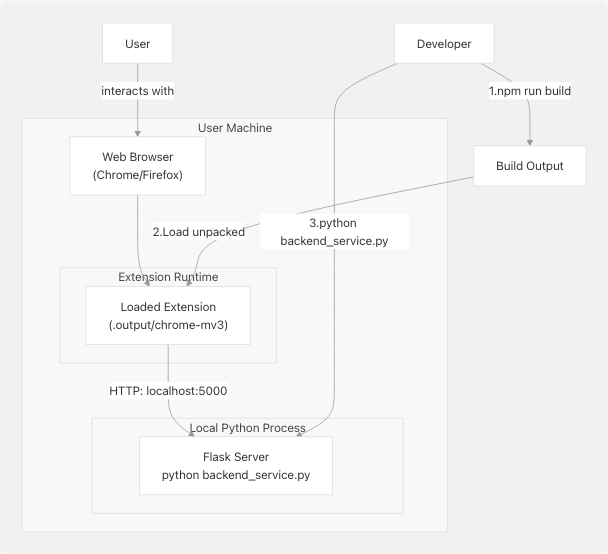
Installation Steps:
- Build Extension: Run
npm run buildto compile TypeScript and bundle extension - Load Extension: Load unpacked extension from
.output/chrome-mv3in browser - Start Backend: Run
python extension/backend_service.pyto start Flask server - Configure: Set API keys in extension settings or environment variables
This deployment model allows:
- Development Mode: Hot reload with
npm run dev - Production Mode: Optimized build with minification
- Cross-Browser Support: Separate builds for Chrome and Firefox
- Backend Flexibility: Flask backend can run on any port/host
Sources: extension/.gitignore11-15
Security Considerations
The extension implements several security boundaries:
| Security Layer | Implementation | Purpose |
|---|---|---|
| Content Security Policy | Manifest restrictions | Limit script execution sources |
| Message Validation | Type checking in background.ts | Prevent malicious message injection |
| API Key Storage | Browser storage API (encrypted) | Secure credential management |
| OAuth Flows | Server-side token exchange | Avoid exposing client secrets |
| Script Injection | browser.scripting.executeScript |
Controlled DOM access |
| CORS Policies | Flask backend configuration | Restrict cross-origin requests |
The separation between frontend (browser context) and backend (local server) provides defense in depth: even if the extension is compromised, API keys in the Flask backend remain protected by operating system security boundaries.
Sources: High-level system diagrams (Diagram 4)