Dynamic Tool Construction and Context Management
Purpose and Scope
This document explains the dynamic tool construction system that enables the React Agent to conditionally expose tools based on user authentication context. When a user provides OAuth tokens or session credentials, the agent automatically gains access to protected tools (Gmail, Calendar, PyJIIT) without requiring the user to manage credentials directly.
For information about the overall React Agent architecture and LangGraph orchestration, see React Agent Architecture. For details about individual tool implementations, see Agent Tool System.
Sources: agents/react_tools.py1-721
Authentication Context Overview
The system supports two primary authentication contexts that unlock protected tools:
| Context Key | Description | Unlocked Tools | Source |
|---|---|---|---|
google_access_token |
OAuth 2.0 token with Gmail and Calendar scopes | gmail_agent, gmail_send_email, gmail_list_unread, gmail_mark_read, calendar_agent, calendar_create_event |
User OAuth flow |
pyjiit_login_response |
Encrypted session payload from JIIT Webportal | pyjiit_agent |
PyJIIT webportal authentication |
These context values are passed from the API request through the service layer to the build_agent_tools function, which constructs the appropriate tool set.
Sources: agents/react_tools.py609-699 routers/react_agent.py30-35
System Architecture: Context Flow
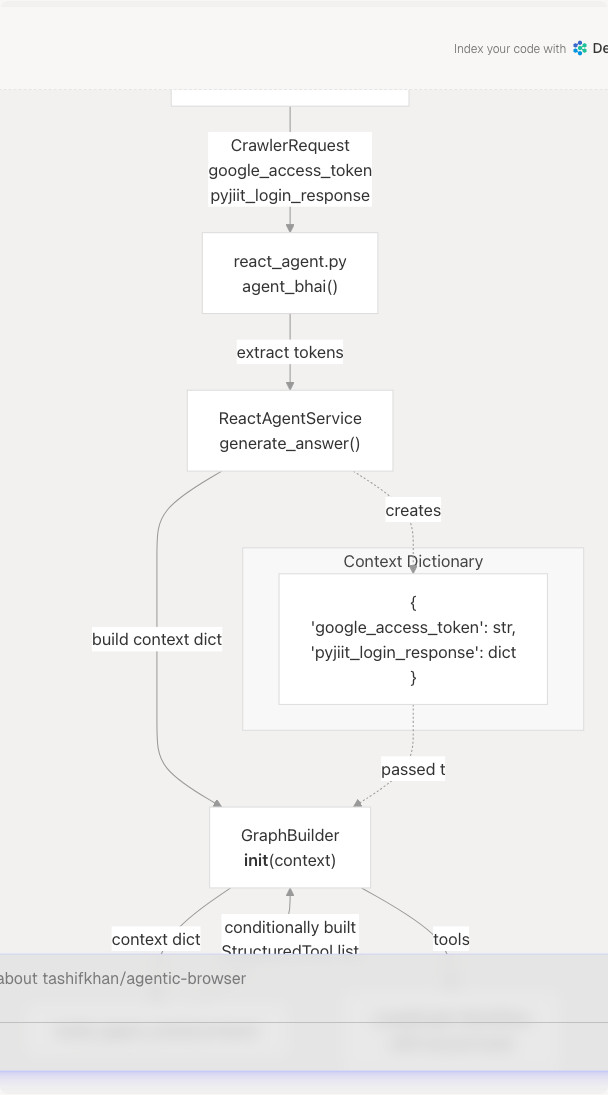
Diagram: Context Propagation from Request to Tool Binding
This diagram shows how authentication credentials flow from the HTTP request through the service layer to dynamically construct the tool set. The build_agent_tools function receives a context dictionary and returns a customized list of tools.
Sources: routers/react_agent.py18-36 agents/react_agent.py138-152 agents/react_tools.py609-699
The build_agent_tools Function
The core of dynamic tool construction is the build_agent_tools function at agents/react_tools.py609-699 This function implements a three-phase process:
Phase 1: Context Extraction and Normalization
def build_agent_tools(context: Optional[Dict[str, Any]] = None) -> list[StructuredTool]:
    ctx: Dict[str, Any] = dict(context or {})
    google_token = ctx.get("google_access_token") or ctx.get("google_acces_token")
    pyjiit_payload = ctx.get("pyjiit_login_response") or ctx.get("pyjiit_login_responce")
The function normalizes common typos in context keys (google_acces_token, pyjiit_login_responce) to ensure robustness. This handles historical API inconsistencies.
Phase 2: Base Tool Set Assembly
    tools: list[StructuredTool] = [
        github_agent,
        websearch_agent,
        website_agent,
        youtube_agent,
        browser_action_agent,
    ]
Five tools are always available regardless of authentication:
github_agent: Repository analysiswebsearch_agent: Web search via Tavilywebsite_agent: HTML to Markdown conversion and analysisyoutube_agent: Video transcript extraction and Q&Abrowser_action_agent: Browser automation commands
These tools do not require user-specific credentials.
Phase 3: Conditional Tool Binding
The function conditionally appends authenticated tools using functools.partial to bind default credentials.
Sources: agents/react_tools.py609-699
Tool Binding with functools.partial
The system uses functools.partial to inject authentication credentials into tool functions without modifying their signatures. This preserves the tool's input schema while providing a default credential source.
Gmail Tool Binding Pattern

Diagram: functools.partial Binding Mechanism
When google_token is present in context, the system creates new StructuredTool instances with partially applied functions:
if google_token:
    tools.append(
        StructuredTool(
            name=gmail_agent.name,
            description=gmail_agent.description,
            coroutine=partial(_gmail_tool, _default_token=google_token),
            args_schema=GmailToolInput,
        )
    )
The partial call binds _default_token=google_token as a keyword argument. Inside _gmail_tool, the implementation uses fallback logic:
async def _gmail_tool(
    access_token: Optional[str] = None,
    max_results: int = 5,
    *,
    _default_token: Optional[str] = None,
) -> str:
    token = access_token or _default_token
    if not token:
        return "Unable to fetch Gmail messages because no Google access token was provided..."
Sources: agents/react_tools.py624-632 agents/react_tools.py279-301
Conditional Tool Availability Matrix
The following table documents which tools are added based on available authentication context:
| Tool Name | Always Available | Requires google_access_token |
Requires pyjiit_login_response |
Implementation |
|---|---|---|---|---|
github_agent |
✓ | agents/react_tools.py217-230 | ||
websearch_agent |
✓ | agents/react_tools.py233-247 | ||
website_agent |
✓ | agents/react_tools.py250-262 | ||
youtube_agent |
✓ | agents/react_tools.py265-276 | ||
browser_action_agent |
✓ | tools/browser_use1-999 | ||
gmail_agent |
✓ | agents/react_tools.py624-632 | ||
gmail_send_email |
✓ | agents/react_tools.py633-643 | ||
gmail_list_unread |
✓ | agents/react_tools.py644-654 | ||
gmail_mark_read |
✓ | agents/react_tools.py655-665 | ||
calendar_agent |
✓ | agents/react_tools.py666-673 | ||
calendar_create_event |
✓ | agents/react_tools.py674-684 | ||
pyjiit_agent |
✓ | agents/react_tools.py686-697 |
Sources: agents/react_tools.py609-699
Google OAuth Tool Binding Details
Six tools depend on Google OAuth tokens with appropriate scopes:
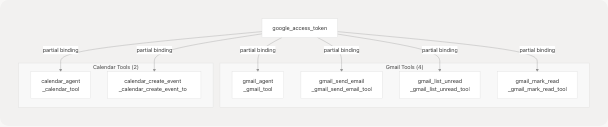
Diagram: Google OAuth Token Distribution
Each tool function signature includes _default_token: Optional[str] = None as a keyword-only parameter. The build_agent_tools function binds this parameter using partial(_tool_function, _default_token=google_token).
The tool implementations all follow this pattern:
- Accept an optional
access_tokenparameter in the input schema - Use fallback logic:
token = access_token or _default_token - Return an error message if both are
None
Sources: agents/react_tools.py279-301 agents/react_tools.py303-331 agents/react_tools.py334-355 agents/react_tools.py358-375 agents/react_tools.py378-399 agents/react_tools.py402-435
PyJIIT Session Tool Binding
The PyJIIT tool requires a more complex session payload containing encrypted authentication data:
if pyjiit_payload:
    tools.append(
        StructuredTool(
            name=pyjiit_agent.name,
            description=pyjiit_agent.description,
            coroutine=partial(
                _pyjiit_attendance_tool,
                _default_payload=pyjiit_payload,
            ),
            args_schema=PyjiitAttendanceInput,
        )
    )
The _pyjiit_attendance_tool function at agents/react_tools.py438-521 implements:
- Payload extraction and normalization (handles nested
session_payloadandraw_responsekeys) WebportalSessionconstruction from the encrypted payload- Hardcoded semester ID mapping (e.g.,
"2025ODDSEM" -> "JIRUM25030000001") - Attendance data fetching and processing
Sources: agents/react_tools.py686-697 agents/react_tools.py438-521
Error Handling for Missing Credentials
When tools are invoked without required credentials, they return user-friendly error messages instead of raising exceptions:
Gmail Tool Error Response
async def _gmail_tool(
    access_token: Optional[str] = None,
    max_results: int = 5,
    *,
    _default_token: Optional[str] = None,
) -> str:
    token = access_token or _default_token
    if not token:
        return (
            "Unable to fetch Gmail messages because no Google access token was provided. "
            "Provide 'google_access_token' or include it in the tool call."
        )
PyJIIT Tool Error Response
async def _pyjiit_attendance_tool(
    registration_code: Optional[str] = None,
    session_payload: Optional[Dict[str, Any]] = None,
    *,
    _default_payload: Optional[Dict[str, Any]] = None,
) -> str:
    payload = session_payload or _default_payload
    if not payload:
        return (
            "Unable to fetch attendance because no PyJIIT login session was provided. "
            "The user must be logged in to access attendance data."
        )
These error messages are returned as tool output, allowing the LLM to:
- Understand that authentication is required
- Inform the user appropriately
- Continue the conversation without crashing
Sources: agents/react_tools.py285-290 agents/react_tools.py444-449
Integration with GraphBuilder
The GraphBuilder class at agents/react_agent.py138-175 uses build_agent_tools to construct the tool set before compiling the LangGraph workflow:
class GraphBuilder:
    def __init__(
        self,
        tools: Sequence[StructuredTool] | None = None,
        context: dict[str, Any] | None = None,
    ) -> None:
        if tools is not None:
            self.tools = list(tools)
        elif context:
            self.tools = build_agent_tools(context)
        else:
            self.tools = list(AGENT_TOOLS)
        self._compiled: Any | None = None
The constructor accepts either:
- An explicit
toolslist (for custom tool sets) - A
contextdictionary (delegates tobuild_agent_tools) - Neither (defaults to
AGENT_TOOLS, which isbuild_agent_tools()with no context)
The compiled graph binds these tools to the LLM using _llm.bind_tools(list(tools)) at agents/react_agent.py126
Sources: agents/react_agent.py138-175
Complete Context Flow Sequence
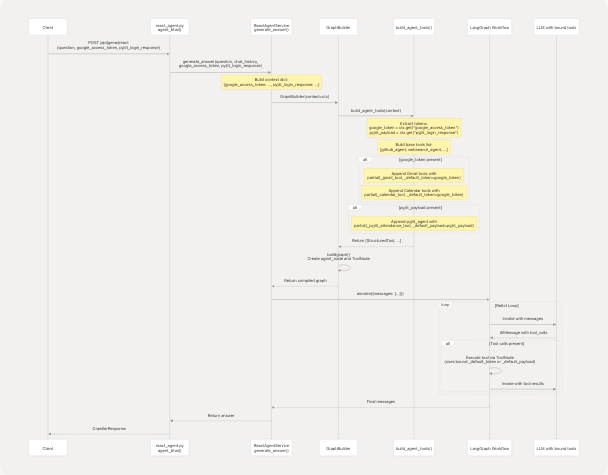
Diagram: Complete Authentication Context Flow Sequence
This sequence demonstrates how authentication credentials flow from the HTTP request through the service layer, enabling dynamic tool construction, and ultimately being available to tool execution during the ReAct loop.
Sources: routers/react_agent.py18-36 agents/react_agent.py138-175 agents/react_tools.py609-699
Key Design Patterns
Pattern 1: Keyword-Only Default Parameters
Tool functions use keyword-only parameters (after *) for default credentials:
async def _gmail_tool(
    access_token: Optional[str] = None,
    max_results: int = 5,
    *,  # Forces keyword-only parameters after this
    _default_token: Optional[str] = None,
) -> str:
This prevents accidental positional argument passing and clearly separates user-provided parameters from injected defaults.
Pattern 2: Fallback Chain
token = access_token or _default_token
if not token:
    return "Error message explaining missing credentials..."
Tools check both the explicit parameter (from tool call arguments) and the injected default, allowing the LLM to optionally override the default token.
Pattern 3: New StructuredTool Instance
Rather than modifying existing tool objects, build_agent_tools creates new StructuredTool instances:
tools.append(
    StructuredTool(
        name=gmail_agent.name,  # Reuse metadata
        description=gmail_agent.description,
        coroutine=partial(_gmail_tool, _default_token=google_token),  # New coroutine
        args_schema=GmailToolInput,  # Same schema
    )
)
This ensures thread-safety and allows multiple concurrent agent instances with different credentials.
Sources: agents/react_tools.py279-301 agents/react_tools.py624-632
Default AGENT_TOOLS Constant
The module exports a default tool list at agents/react_tools.py702:
AGENT_TOOLS = build_agent_tools()
This is called with no context, producing the base five tools (GitHub, web search, website, YouTube, browser). The default system prompt at agents/react_agent.py25-34 instructs the LLM:
"Credentials such as Google access tokens and PyJIIT login sessions are provided automatically; never request them from the user."
This ensures the LLM understands that authenticated tools may become available mid-conversation without explicit credential handling.
Sources: agents/react_tools.py702 agents/react_agent.py25-34