Agent Tool System
Purpose and Scope
This document describes the agent tool system that provides the React Agent with capabilities to interact with external services and data sources. The system is implemented in agents/react_tools.py and includes 11+ specialized tools for web search, GitHub analysis, email management, calendar operations, and browser automation. Each tool is defined as a LangChain StructuredTool with a Pydantic input schema and an async implementation function.
For information about how these tools are integrated into the React Agent workflow, see React Agent Architecture. For details on how tools are dynamically assembled based on authentication context, see Dynamic Tool Construction and Context Management.
Tool Architecture Overview
The agent tool system follows a three-layer pattern: Input Schema → Implementation Function → StructuredTool Registration. Each tool is defined by a Pydantic model that validates inputs, an async function that executes the tool's logic, and a StructuredTool object that binds them together for LangChain integration.
Diagram: Tool Architecture Layers
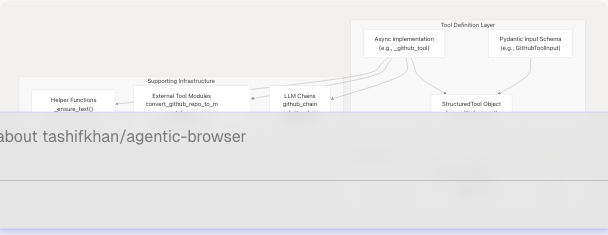
Sources: agents/react_tools.py1-720
Tool Categories and Catalog
The system provides 11+ tools organized into five functional categories:
Diagram: Tool Taxonomy by Function

Sources: agents/react_tools.py524-720
Tool Catalog Table
| Tool Name | Category | Authentication | Primary Function |
|---|---|---|---|
github_agent |
Web Content | None | Answer questions about GitHub repositories |
websearch_agent |
Web Content | None | Search web and summarize top results |
website_agent |
Web Content | None | Fetch webpage, convert to markdown, answer questions |
youtube_agent |
Web Content | None | Answer questions about YouTube videos using transcripts |
gmail_agent |
Gmail | Google OAuth | Fetch recent Gmail messages |
gmail_send_email |
Gmail | Google OAuth | Send plain-text emails |
gmail_list_unread |
Gmail | Google OAuth | List unread messages with metadata |
gmail_mark_read |
Gmail | Google OAuth | Mark message as read by ID |
calendar_agent |
Calendar | Google OAuth | Retrieve upcoming calendar events |
calendar_create_event |
Calendar | Google OAuth | Create new calendar event |
pyjiit_agent |
Educational | PyJIIT Session | Fetch attendance data from JIIT webportal |
browser_action_agent |
Browser | None | Generate JSON action plan for browser automation |
Sources: agents/react_tools.py524-720
Tool Input Schemas
Each tool defines its input parameters using Pydantic BaseModel classes. These schemas provide type validation, default values, and descriptive field metadata that LLMs use to understand tool usage.
Diagram: Input Schema Hierarchy

Sources: agents/react_tools.py61-210 tools/browser_use/tool.py12-25
Key Schema Patterns
- URL Tools (
GitHubToolInput,WebsiteToolInput,YouTubeToolInput): AcceptHttpUrlfor validation,questionstring, and optionalchat_historylist. - Gmail Tools: All include optional
access_tokenfield. If omitted, the tool attempts to use a pre-configured token provided during tool construction viafunctools.partial. - Calendar Tools: Similar to Gmail, include optional
access_tokenand use boundedmax_resultsparameters. - PyJIIT Tool: Accepts optional
registration_code(semester identifier) andsession_payload(encrypted login session). - Browser Tool: Accepts freeform
goalstring, optionaltarget_url, and structureddom_structure/constraintsdictionaries.
Sources: agents/react_tools.py61-210 tools/browser_use/tool.py12-25
Tool Implementation Pattern
All tool implementations follow a consistent async pattern with error handling and context management.
Diagram: Tool Execution Flow
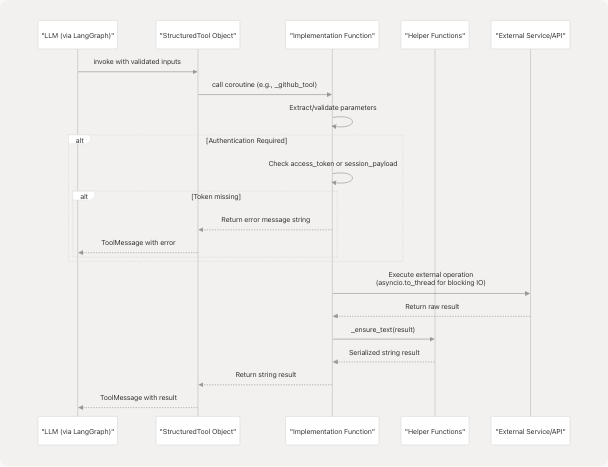
Sources: agents/react_tools.py217-522
Implementation Function Structure
Each implementation function follows this pattern:
async def _<tool_name>_tool(
    # Required parameters
    param1: Type,
    # Optional parameters with defaults
    param2: Type = default,
    # Context parameters (injected via partial)
    *,
    _default_token: Optional[str] = None,
) -> str:
    # 1. Resolve authentication/context
    token = param_token or _default_token
    if not token:
        return "Error: authentication required..."

    # 2. Validate/bound numeric parameters
    bounded = max(min_val, min(max_val, param2))

    # 3. Execute blocking IO in thread pool
    try:
        result = await asyncio.to_thread(external_function, ...)
        return _ensure_text(result)
    except Exception as exc:
        return f"Failed to ...: {exc}"
Key Implementation Details:
- Authentication Resolution agents/react_tools.py285-290: Tools check
access_tokenorsession_payloadparameter first, falling back to_default_tokenor_default_payloadinjected viafunctools.partial. - Error Handling agents/react_tools.py294-300: All exceptions are caught and returned as descriptive error strings rather than raised. This allows the LLM to understand failures and potentially retry or ask for clarification.
- Blocking IO Management agents/react_tools.py229: Blocking operations (LLM chain invocations, API calls) are wrapped in
asyncio.to_thread()to avoid blocking the event loop. - Result Serialization agents/react_tools.py35-44: The
_ensure_text()helper converts any result type (strings, dicts, objects) into JSON or string representation for LLM consumption. - Chat History Formatting agents/react_tools.py47-58: The
_format_chat_history()helper normalizes conversation history from various formats into a consistent string representation.
Sources: agents/react_tools.py35-58 agents/react_tools.py217-522
Tool-Specific Implementation Details
Web Content Tools
GitHub Agent agents/react_tools.py217-230:
- Calls
convert_github_repo_to_markdown()to fetch and process repository - Passes repository content, tree structure, and summary to
github_chainLLM - Formats chat history and invokes chain in thread pool
Web Search Agent agents/react_tools.py233-247:
- Executes
web_search_pipeline()with boundedmax_results(1-10) - Formats results as URL + snippet pairs
- Returns concatenated summaries (max 320 chars per snippet)
Website Agent agents/react_tools.py250-262:
- Fetches webpage via
markdown_fetcher()(HTML to Markdown) - Invokes
website_chainwith question and markdown content - Supports chat history for contextual Q&A
YouTube Agent agents/react_tools.py265-276:
- Delegates to
get_youtube_answer()with URL and question - Uses
youtube_chainto analyze video transcripts - Formats chat history for context
Gmail Tools
Gmail Fetch agents/react_tools.py279-300:
- Retrieves recent emails via
get_latest_emails() - Bounds
max_resultsto 1-25 - Returns JSON structure with message list
Gmail Send agents/react_tools.py303-331:
- Validates recipient email via
EmailStrtype - Calls
gmail_send_email()with token, recipient, subject, body - Returns message ID on success
Gmail List Unread agents/react_tools.py334-355:
- Calls
list_unread()with boundedmax_results(1-50) - Returns empty message if no unread emails found
Gmail Mark Read agents/react_tools.py358-375:
- Takes
message_idparameter - Calls
mark_read()API function - Returns confirmation message
Calendar Tools
Calendar Get Events agents/react_tools.py378-399:
- Fetches upcoming events via
get_calendar_events() - Bounds
max_resultsto 1-25 - Returns JSON structure with event list
Calendar Create Event agents/react_tools.py402-435:
- Validates ISO 8601 datetime strings via Pydantic schema
- Calls
create_calendar_event()with summary, times, description - Returns event
htmlLinkon success
PyJIIT Tool
PyJIIT Attendance agents/react_tools.py438-521:
- Extracts
raw_responsefrom nested session payload structure - Creates
WebportalSessionandWebportalinstances - Uses hardcoded semester mapping dictionary (2026EVESEM → JIRUM25100000001, etc.)
- Defaults to
2025ODDSEMif no registration code specified - Fetches attendance meta, constructs
Semesterobject, retrieves attendance data - Processes
studentattendancelistto extract subject codes and percentages - Strips bracketed codes from subject names using regex
Browser Action Tool
Browser Action Agent tools/browser_use/tool.py27-40:
- Instantiates
AgentServicefromservices.browser_use_service - Calls
generate_script()with goal, URL, DOM structure, constraints - Returns structured JSON action plan for browser automation
- See Browser Use Agent and Script Generation for details
Sources: agents/react_tools.py217-521 tools/browser_use/tool.py1-49
StructuredTool Registration
Each tool is registered as a LangChain StructuredTool object that binds the input schema to the implementation coroutine.
Tool Registration Pattern:
# Example: github_agent registration
github_agent = StructuredTool(
    name="github_agent",
    description="Answer questions about a GitHub repository using repository contents.",
    coroutine=_github_tool,
    args_schema=GitHubToolInput,
)
Diagram: StructuredTool Components
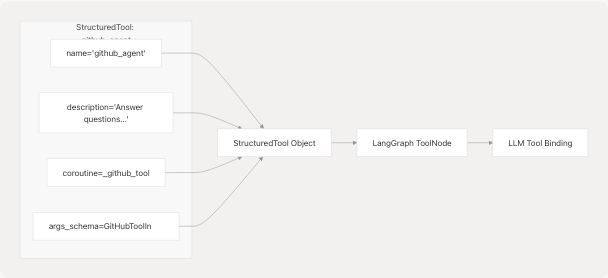
Tool Definitions:
| Variable Name | Name String | Lines |
|---|---|---|
github_agent |
"github_agent" |
agents/react_tools.py524-529 |
websearch_agent |
"websearch_agent" |
agents/react_tools.py531-536 |
website_agent |
"website_agent" |
agents/react_tools.py538-543 |
youtube_agent |
"youtube_agent" |
agents/react_tools.py545-550 |
gmail_agent |
"gmail_agent" |
agents/react_tools.py553-558 |
gmail_send_agent |
"gmail_send_email" |
agents/react_tools.py561-566 |
gmail_list_unread_agent |
"gmail_list_unread" |
agents/react_tools.py569-574 |
gmail_mark_read_agent |
"gmail_mark_read" |
agents/react_tools.py577-582 |
calendar_agent |
"calendar_agent" |
agents/react_tools.py585-590 |
calendar_create_event_agent |
"calendar_create_event" |
agents/react_tools.py593-598 |
pyjiit_agent |
"pyjiit_agent" |
agents/react_tools.py601-606 |
browser_action_agent |
"browser_action_agent" |
tools/browser_use/tool.py43-48 |
Sources: agents/react_tools.py524-606 tools/browser_use/tool.py43-48
Dynamic Tool Assembly with build_agent_tools()
The build_agent_tools() function dynamically constructs the tool list based on available authentication context. Tools requiring credentials are only included when those credentials are provided.
Function Signature:
def build_agent_tools(context: Optional[Dict[str, Any]] = None) -> list[StructuredTool]
Diagram: Dynamic Tool Construction Logic
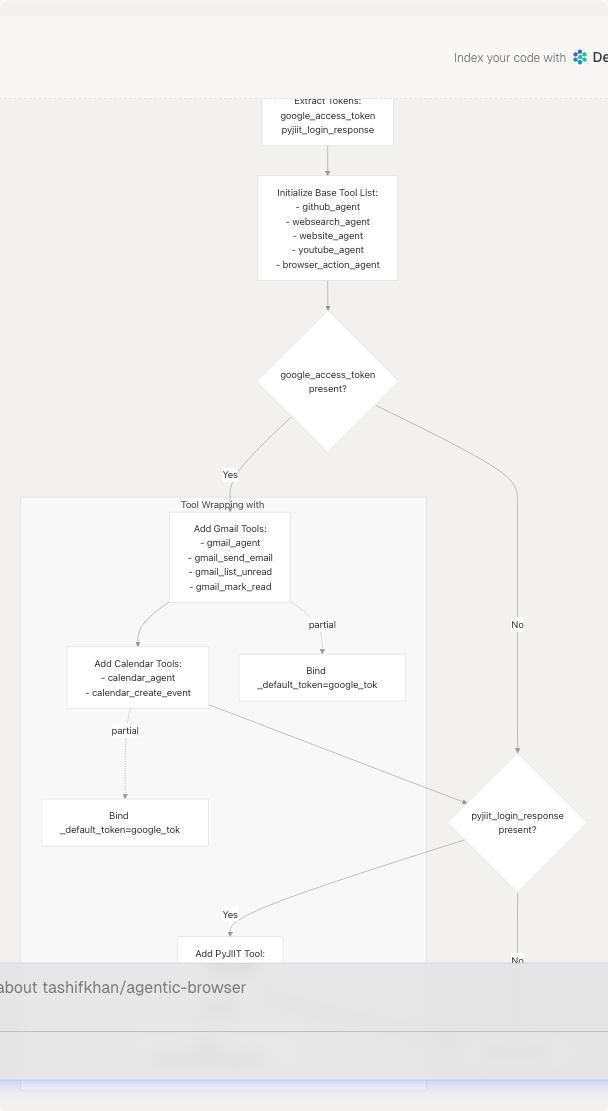
Implementation Details:
-
Context Extraction agents/react_tools.py610-614:
- Extracts
google_access_token(with typo fallbackgoogle_acces_token) - Extracts
pyjiit_login_response(with typo fallbackpyjiit_login_responce)
- Extracts
-
Base Tools agents/react_tools.py616-622:
- Always includes:
github_agent,websearch_agent,website_agent,youtube_agent,browser_action_agent - These tools require no authentication
- Always includes:
-
Conditional Gmail Tools agents/react_tools.py624-665:
- If
google_tokenpresent, creates newStructuredToolinstances wrapping original tools - Uses
functools.partialto inject_default_token=google_tokeninto implementation coroutines - Preserves original name, description, and args_schema
- If
-
Conditional Calendar Tools agents/react_tools.py666-684:
- Same pattern as Gmail tools
- Requires same
google_tokenfor Google Calendar API access
-
Conditional PyJIIT Tool agents/react_tools.py686-697:
- If
pyjiit_payloadpresent, wrapspyjiit_agentwith_default_payload=pyjiit_payload
- If
-
Default Tool List agents/react_tools.py702:
AGENT_TOOLS = build_agent_tools()creates default list with no authentication
Example Usage:
# No authentication - only base tools
tools = build_agent_tools()  # 5 tools

# With Google OAuth token - adds Gmail + Calendar
tools = build_agent_tools({
    "google_access_token": "ya29.a0..."
})  # 11 tools

# With PyJIIT session - adds PyJIIT
tools = build_agent_tools({
    "pyjiit_login_response": {"session_payload": {...}}
})  # 6 tools

# With both - full tool set
tools = build_agent_tools({
    "google_access_token": "ya29.a0...",
    "pyjiit_login_response": {"session_payload": {...}}
})  # 12 tools
Sources: agents/react_tools.py609-699
Module Exports and Integration
The module exports all tools and the builder function via __all__ agents/react_tools.py704-720:
__all__ = [
    "AGENT_TOOLS",           # Default tool list
    "build_agent_tools",     # Dynamic builder function
    "github_agent",          # Individual tool exports...
    "websearch_agent",
    "website_agent",
    "youtube_agent",
    "gmail_agent",
    "gmail_send_agent",
    "gmail_list_unread_agent",
    "gmail_mark_read_agent",
    "calendar_agent",
    "calendar_create_event_agent",
    "pyjiit_agent",
    "browser_action_agent",
]
Integration Points:
-
GraphBuilder agents/react_agent.py138-151:
- Calls
build_agent_tools(context)when context dictionary provided - Falls back to
AGENT_TOOLSconstant if no context - Passes tool list to
_create_agent_node()for LLM binding
- Calls
-
ReactAgentService routers/react_agent.py30-35:
- Constructs context dictionary with
google_access_tokenandpyjiit_login_response - Passes context to
GraphBuilderfor dynamic tool construction - See React Agent Architecture for details
- Constructs context dictionary with
Sources: agents/react_tools.py704-720 agents/react_agent.py138-151 routers/react_agent.py18-36