React Agent Architecture
Purpose and Scope
This document describes the React Agent system, which implements a conversational AI agent using LangGraph orchestration and the ReAct (Reason + Act) pattern. The React Agent can dynamically select and execute from 11+ specialized tools to answer complex, multi-step questions while maintaining conversation context.
For information about the individual tools available to the agent, see Agent Tool System. For the Browser Use Agent that generates automation scripts, see Browser Use Agent and Script Generation. For LLM provider configuration, see LLM Integration Layer.
Sources: agents/react_agent.py1-191 agents/react_tools.py1-721 services/react_agent_service.py1-92
System Architecture Overview
The React Agent system consists of four main layers: the API router, the service layer, the orchestration layer (GraphBuilder + LangGraph), and the tool execution layer.
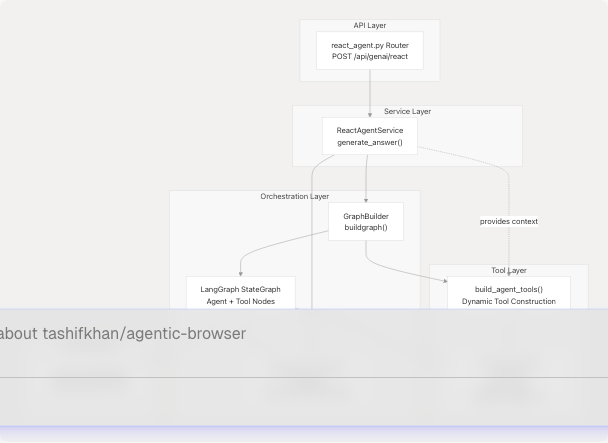
Architecture Layers:
| Layer | Component | Purpose |
|---|---|---|
| API | routers/react_agent.py |
HTTP endpoint accepting CrawlerRequest |
| Service | ReactAgentService |
Context preparation, message conversion, orchestration |
| Orchestration | GraphBuilder + StateGraph |
LangGraph workflow compilation and execution |
| Tool | build_agent_tools() |
Dynamic tool assembly based on authentication context |
| LLM | LargeLanguageModel |
Provider-agnostic AI model interface |
Sources: agents/react_agent.py1-191 agents/react_tools.py609-699 services/react_agent_service.py1-92 routers/react_agent.py1-55
Agent State and Message Model
AgentState TypedDict
The AgentState is the core state container passed through the LangGraph workflow. It uses LangGraph's add_messages reducer to accumulate conversation history.
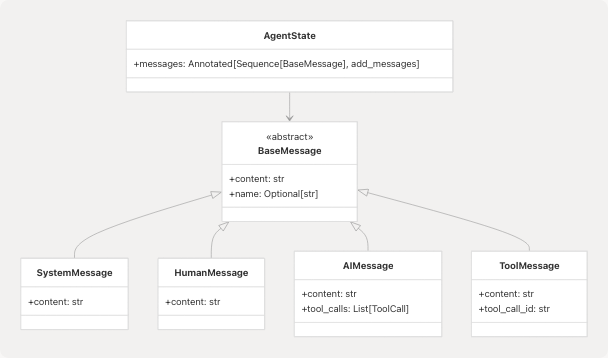
The AgentState is defined at agents/react_agent.py40-41 as:
class AgentState(TypedDict):
    messages: Annotated[Sequence[BaseMessage], add_messages]
The add_messages reducer from LangGraph automatically appends new messages to the existing list, enabling stateful conversation flow.
Sources: agents/react_agent.py40-41
Message Conversion Layer
The agent uses two conversion functions to bridge API format and LangChain format:
| Function | Direction | Purpose |
|---|---|---|
_payload_to_langchain() |
API → LangChain | Converts AgentMessagePayload dict to BaseMessage subclass |
_langchain_to_payload() |
LangChain → API | Converts BaseMessage to serializable dict |
API Message Format (AgentMessagePayload):
class AgentMessagePayload(TypedDict, total=False):
    role: Literal["system", "user", "assistant", "tool"]
    content: str
    name: str
    tool_call_id: str
    tool_calls: list[dict[str, Any]]
The conversion functions handle normalization of content (JSON serialization if needed), extraction of tool calls from AIMessage, and preservation of tool execution metadata from ToolMessage.
Message Type Mapping:
role Value |
LangChain Class | Usage |
|---|---|---|
"system" |
SystemMessage |
System prompt injection |
"user" |
HumanMessage |
User questions |
"assistant" |
AIMessage |
Agent responses and tool calls |
"tool" |
ToolMessage |
Tool execution results |
Sources: agents/react_agent.py44-121
Graph Construction with GraphBuilder
GraphBuilder Class
The GraphBuilder class compiles the LangGraph workflow and manages tool selection based on provided context.
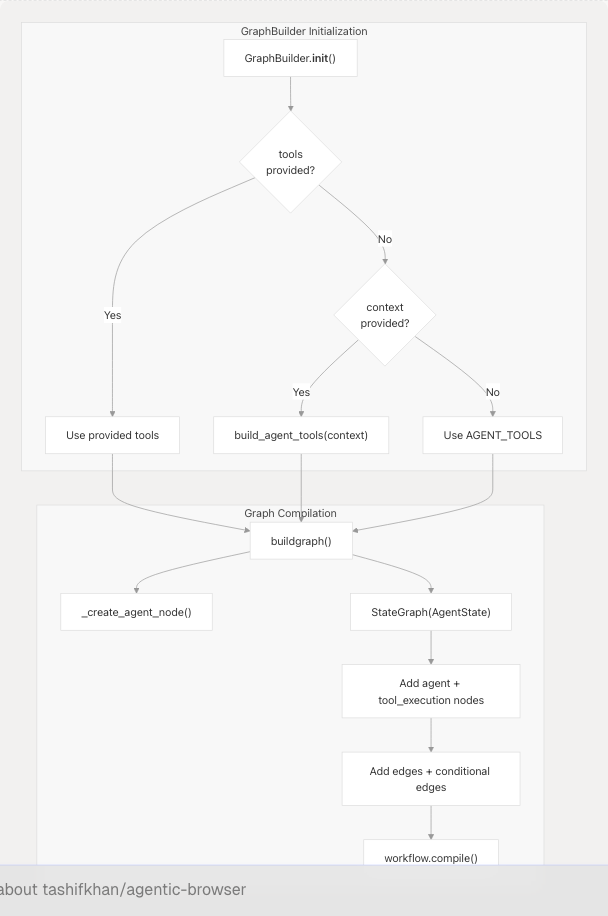
Initialization Logic (agents/react_agent.py138-152):
- If
toolslist provided → use those tools - Else if
contextdict provided → callbuild_agent_tools(context)for dynamic tool selection - Else → use default
AGENT_TOOLS(5 base tools without authentication)
Graph Structure (agents/react_agent.py154-170):
The compiled graph has two nodes:
| Node Name | Type | Function |
|---|---|---|
"agent" |
Custom async function | Invokes LLM with bound tools to get next action |
"tool_execution" |
ToolNode |
Executes tools selected by agent |
Edge Configuration:
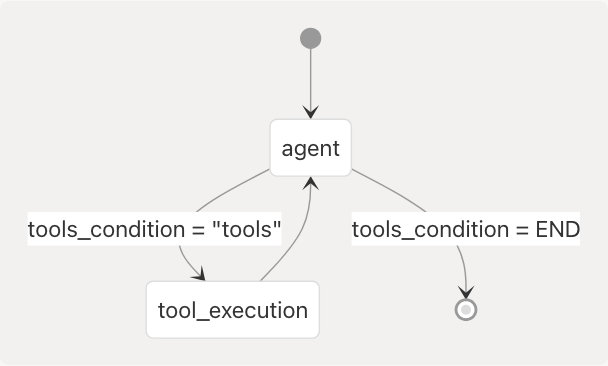
The tools_condition examines the AIMessage returned by the agent. If tool_calls are present, it routes to "tool_execution". Otherwise, it ends the conversation.
Sources: agents/react_agent.py138-176
Agent Node Construction
The _create_agent_node() function creates the agent reasoning node:
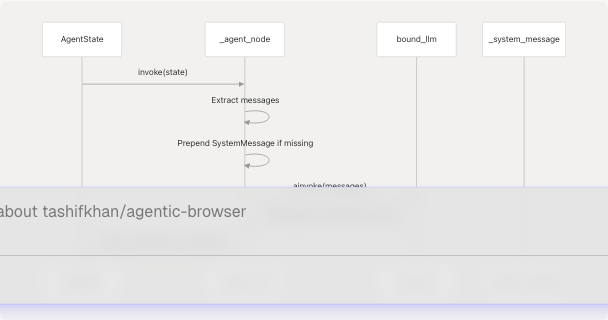
Key behavior at agents/react_agent.py123-135:
- Binds tools to LLM using
_llm.bind_tools(list(tools)) - Ensures
SystemMessageis first message (injects if missing) - Invokes LLM with full message history
- Returns LLM response as state update
The system prompt (agents/react_agent.py25-34) instructs the agent to:
- Maintain conversation context
- Use tools when they improve the answer
- Never request Google or PyJIIT credentials from users (they're provided automatically)
- Report session expiration rather than asking for passwords
Sources: agents/react_agent.py25-135
The ReAct Execution Loop
The React Agent implements the ReAct (Reason + Act) pattern through LangGraph's conditional edges.
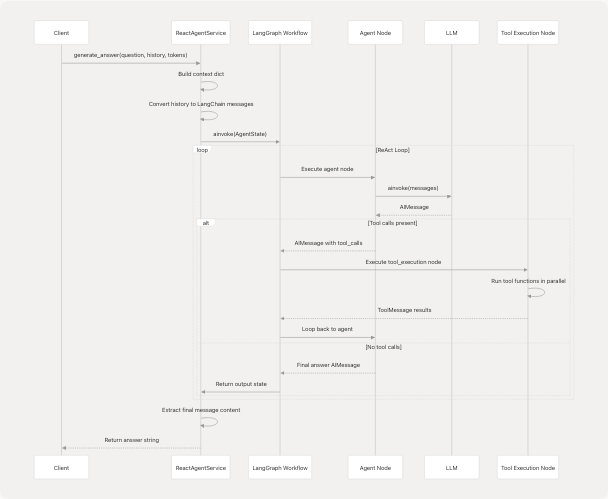
Execution Flow Breakdown:
-
Service Preparation (services/react_agent_service.py22-36):
- Build context dict from
google_access_tokenandpyjiit_login_response - Instantiate
GraphBuilder(context=context) - Convert chat history to
HumanMessage/AIMessageobjects
- Build context dict from
-
Graph Invocation (services/react_agent_service.py58-75):
- Construct
AgentStatewith messages list - Call
graph.ainvoke(state)to start workflow
- Construct
-
Agent Reasoning:
- LLM receives messages with tool descriptions
- Decides to either: (a) call one or more tools, or (b) respond directly
-
Tool Execution (if needed):
ToolNodeexecutes selected tools in parallel- Results appended as
ToolMessageobjects - Flow returns to agent node
-
Loop Continuation:
- Agent re-evaluates with updated context
- May call additional tools or provide final answer
- Loop terminates when agent produces response without tool calls
-
Result Extraction (services/react_agent_service.py77-83):
- Extract last message content from output state
- Return as string to API layer
Sources: services/react_agent_service.py14-92 agents/react_agent.py154-170
Dynamic Tool Construction
Tool Registry
The system defines 11+ base tools in agents/react_tools.py:
| Tool Name | Input Schema | Requires Auth | Description |
|---|---|---|---|
github_agent |
GitHubToolInput |
No | Repository analysis using gitingest |
websearch_agent |
WebSearchToolInput |
No | Web search via TavilySearch |
website_agent |
WebsiteToolInput |
No | Webpage to markdown + Q&A |
youtube_agent |
YouTubeToolInput |
No | Video transcript analysis |
browser_action_agent |
(see 4.3) | No | Browser DOM manipulation |
gmail_agent |
GmailToolInput |
Yes | Fetch recent emails |
gmail_send_email |
GmailSendEmailInput |
Yes | Send email |
gmail_list_unread |
GmailListUnreadInput |
Yes | List unread messages |
gmail_mark_read |
GmailMarkReadInput |
Yes | Mark message as read |
calendar_agent |
CalendarToolInput |
Yes | Fetch calendar events |
calendar_create_event |
CalendarCreateEventInput |
Yes | Create calendar event |
pyjiit_agent |
PyjiitAttendanceInput |
Yes | JIIT attendance data |
Sources: agents/react_tools.py524-607
Context-Based Tool Selection
The build_agent_tools() function at agents/react_tools.py609-699 implements dynamic tool selection:
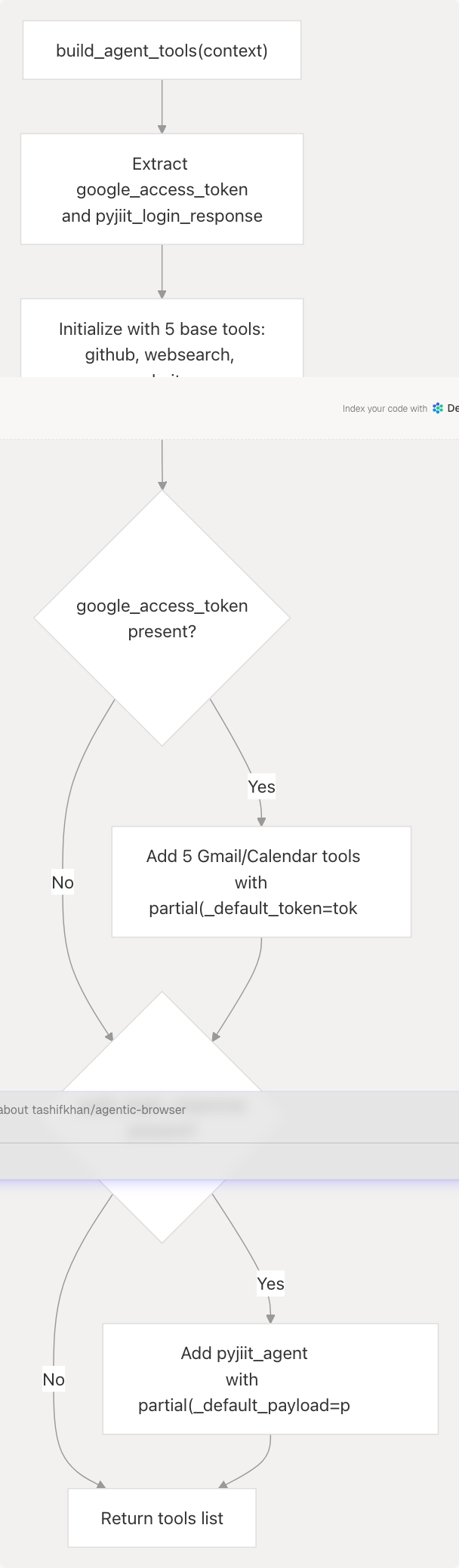
Implementation Pattern (agents/react_tools.py609-699):
- Base Tools: Always included (no authentication required)
- Google Tools: Added if
google_access_tokenin context- Uses
functools.partialto bind_default_tokenparameter - Tools can still accept token in their input schema (overrides default)
- Uses
- PyJIIT Tool: Added if
pyjiit_login_responsein context- Binds
_default_payloadto tool function
- Binds
Partial Application Example:
When google_access_token is provided, the service creates Gmail tools like:
StructuredTool(
    name=gmail_agent.name,
    description=gmail_agent.description,
    coroutine=partial(_gmail_tool, _default_token=google_token),
    args_schema=GmailToolInput,
)
This allows the LLM to call gmail_agent() without specifying the token, but users can still override by passing access_token in the call.
Sources: agents/react_tools.py609-699
Service Layer Integration
ReactAgentService
The ReactAgentService class at services/react_agent_service.py14-92 bridges the API router and the agent system.
Key Responsibilities:
| Method | Parameters | Returns | Purpose |
|---|---|---|---|
generate_answer() |
question, chat_history, google_access_token, pyjiit_login_response |
str |
Orchestrate agent execution and return final answer |
Detailed Flow (services/react_agent_service.py22-91):
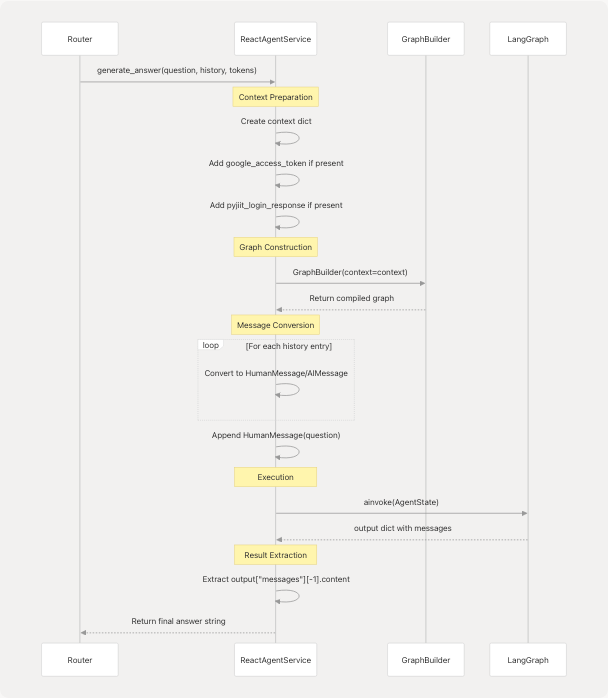
Error Handling:
The service wraps execution in try-except (services/react_agent_service.py85-91):
- Logs exceptions with full context
- Returns user-friendly error message instead of raising
- Prevents sensitive error details from leaking to client
Chat History Conversion (services/react_agent_service.py40-55):
Accepts flexible history format:
- Looks for
"role"key with values:"user","assistant","bot","ai" - Converts to appropriate LangChain message type
- Skips entries that don't match expected format
Sources: services/react_agent_service.py14-92
API Entry Point
Router Endpoint
The FastAPI router at routers/react_agent.py1-55 exposes the agent as HTTP endpoint.
Endpoint Definition:
@router.post("/", response_model=CrawllerResponse)
async def agent_bhai(
    request: CrawlerRequest,
    service: ReactAgentService = Depends(get_react_agent_service),
) -> CrawllerResponse:
Request Model (CrawlerRequest):
| Field | Type | Required | Description |
|---|---|---|---|
question |
str |
Yes | User's question or instruction |
chat_history |
list[dict] |
No | Previous conversation turns |
google_access_token |
str |
No | OAuth token for Gmail/Calendar |
pyjiit_login_response |
PyjiitLoginResponse |
No | JIIT webportal session |
Response Model (CrawllerResponse):
| Field | Type | Description |
|---|---|---|
answer |
str |
Agent's final response |
Validation (routers/react_agent.py27-28):
- Raises
HTTPException(400)ifquestionis empty - Dependency injection provides
ReactAgentServiceinstance - Service errors caught and converted to
HTTPException(500)
Full Request-Response Flow:
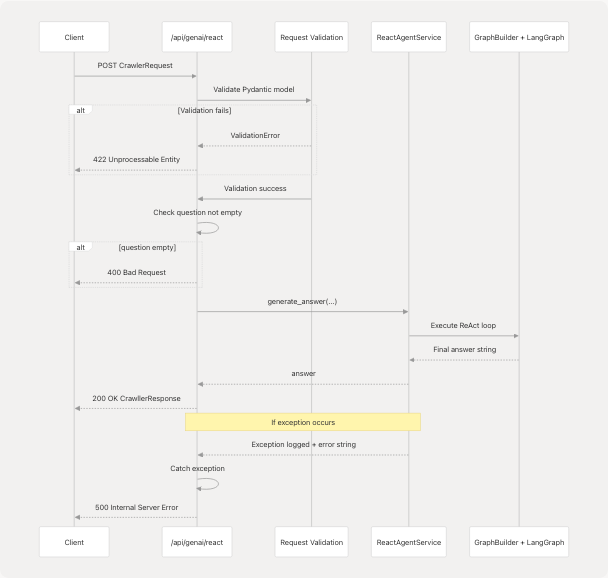
Sources: routers/react_agent.py1-55 models/requests/crawller.py models/response/crawller.py
Configuration and Caching
LLM Singleton
The agent uses a module-level LLM instance (agents/react_agent.py36):
_llm = LargeLanguageModel().client
This ensures all agent executions share the same configured LLM client, avoiding redundant initialization.
System Message
A default system prompt is defined at agents/react_agent.py25-34 and injected as a module-level SystemMessage:
_system_message = SystemMessage(content=DEFAULT_SYSTEM_PROMPT)
The prompt emphasizes:
- Maintaining conversation context
- Using tools when beneficial
- Not requesting credentials from users (they're auto-provided)
- Reporting session expiration without asking for passwords
Graph Caching
A cached graph builder is available via _compiled_graph() at agents/react_agent.py178-180:
@lru_cache(maxsize=1)
def _compiled_graph():
    return GraphBuilder()()
This caches the default (no-context) graph compilation. However, the ReactAgentService typically creates a fresh GraphBuilder with context, so this cache is primarily for the standalone run_react_agent() function.
Sources: agents/react_agent.py25-36 agents/react_agent.py178-180
Summary
The React Agent Architecture implements a sophisticated conversational AI system with:
- Stateful Orchestration: LangGraph manages multi-turn conversations with the
AgentStatecontainer - ReAct Pattern: Agent alternates between reasoning (LLM invocation) and acting (tool execution)
- Dynamic Tool Selection: Tools conditionally included based on authentication context
- Message Abstraction: Clean conversion between API and LangChain message formats
- Layered Design: Router → Service → GraphBuilder → LangGraph provides separation of concerns
The system supports 11+ specialized tools including web search, repository analysis, video processing, Gmail, Calendar, and institutional data access. Tools requiring authentication use functools.partial to bind credentials without exposing them in the LLM's tool schema.
Key Files:
- agents/react_agent.py1-191 - Core orchestration logic
- agents/react_tools.py1-721 - Tool definitions and dynamic construction
- services/react_agent_service.py1-92 - Service layer integration
- routers/react_agent.py1-55 - HTTP API endpoint