Gmail and Calendar Integration
This document describes the Gmail and Calendar integration routers that expose Google Workspace API functionality through the FastAPI backend. These routers provide endpoints for email management (reading, sending, marking as read) and calendar operations (listing events, creating events). Both routers require Google OAuth2 access tokens obtained through the browser extension's authentication flow.
For information about the authentication mechanism that provides these access tokens, see Settings and Authentication. For details on how the agent system dynamically loads these tools based on available credentials, see Tool System.
Architecture Overview
The Gmail and Calendar routers are mounted on the main FastAPI application and provide REST endpoints that wrap Google API calls. These routers accept OAuth2 access tokens in request bodies and forward authenticated requests to Google's Gmail and Calendar APIs.
Sources: api/main.py33-34 routers/gmail.py1-141 routers/calendar.py1-106
Gmail Router
The Gmail router is mounted at /api/gmail and provides four endpoints for email operations. All endpoints accept a TokenRequest or derived model containing the Google OAuth2 access token.
Endpoints and Request Models
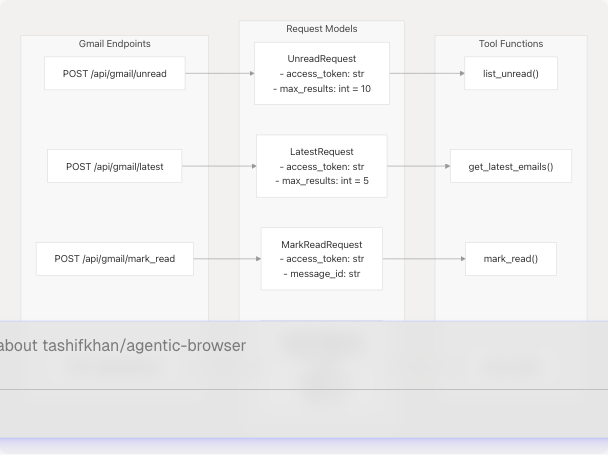
Sources: routers/gmail.py15-35 routers/gmail.py37-141
| Endpoint | Request Model | Tool Function | Description |
|---|---|---|---|
/unread |
UnreadRequest |
list_unread() |
Lists unread emails with configurable max results |
/latest |
LatestRequest |
get_latest_emails() |
Fetches most recent emails regardless of read status |
/mark_read |
MarkReadRequest |
mark_read() |
Marks a specific message as read by message ID |
/send |
SendEmailRequest |
send_email() |
Sends an email to specified recipient |
Sources: routers/gmail.py37-141
Request Model Hierarchy
All Gmail request models inherit from TokenRequest, which provides the base access_token field required for Google API authentication:
Sources: routers/gmail.py15-35
Implementation Details
Each endpoint follows a consistent pattern:
- Validates required fields (raises
HTTPExceptionwith status 400 if missing) - Sets default values for optional parameters
- Calls the corresponding tool function from
tools/gmail/ - Returns formatted response with consistent structure
- Catches exceptions and logs errors before raising
HTTPExceptionwith status 500
List Unread Endpoint:
# routers/gmail.py:37-60
@router.post("/unread", response_model=dict)
async def list_unread_messages(request: UnreadRequest)
The endpoint validates access_token, ensures max_results is positive (defaulting to 10), then calls list_unread(). Response format: {"messages": [...]}
Latest Emails Endpoint:
# routers/gmail.py:63-88
@router.post("/latest", response_model=dict)
async def fetch_latest(request: LatestRequest)
Similar validation pattern with default max_results=5, calls get_latest_emails(). Response format: {"messages": [...]}
Mark Read Endpoint:
# routers/gmail.py:91-113
@router.post("/mark_read", response_model=dict)
async def mark_message_read(request: MarkReadRequest)
Requires both access_token and message_id, calls mark_read(). Response format: {"result": "ok", "details": {...}}
Send Email Endpoint:
# routers/gmail.py:116-140
@router.post("/send", response_model=dict)
async def send_message(request: SendEmailRequest)
Validates access_token, to, and subject fields, calls send_email(). Response format: {"result": "sent", "details": {...}}
Sources: routers/gmail.py1-141
Tool Function Integration
The router imports tool functions that directly interact with Gmail API:
# routers/gmail.py:6-9
from tools.gmail.list_unread_emails import list_unread
from tools.gmail.fetch_latest_mails import get_latest_emails
from tools.gmail.mark_email_read import mark_read
from tools.gmail.send_email import send_email
Each tool function accepts the OAuth access token and makes authenticated HTTPS requests to Gmail API endpoints using the requests library with Authorization: Bearer {access_token} headers.
Sources: routers/gmail.py6-9
Calendar Router
The Calendar router is mounted at /api/calendar and provides two endpoints for calendar operations. Like the Gmail router, it uses Pydantic models that inherit from a base TokenRequest.
Endpoints and Request Models
Sources: routers/calendar.py14-27 routers/calendar.py29-105
| Endpoint | Request Model | Tool Function | Description |
|---|---|---|---|
/events |
EventsRequest |
get_calendar_events() |
Lists upcoming calendar events |
/create |
CreateEventRequest |
create_calendar_event() |
Creates a new calendar event |
Sources: routers/calendar.py29-105
Request Model Structures
Sources: routers/calendar.py14-27
Events List Endpoint
The /events endpoint retrieves upcoming calendar events from the user's primary calendar:
# routers/calendar.py:29-51
@router.post("/events", response_model=dict)
async def list_events(request: EventsRequest)
Validation:
- Checks
access_tokenis provided - Ensures
max_resultsis positive (defaults to 10)
Processing:
- Calls
get_calendar_events(access_token, max_results) - Returns response:
{"events": [...]}
The underlying tool function at tools/calendar/get_calender_events.py6-23 makes a GET request to https://www.googleapis.com/calendar/v3/calendars/primary/events with query parameters:
maxResults: Number of events to returnorderBy: "startTime" for chronological orderingsingleEvents: True to expand recurring eventstimeMin: Current UTC time to only fetch future events
Sources: routers/calendar.py29-51 tools/calendar/get_calender_events.py6-23
Event Creation Endpoint
The /create endpoint creates new calendar events with ISO 8601 formatted timestamps:
# routers/calendar.py:64-105
@router.post("/create", response_model=dict)
async def create_event(request: CreateEventRequest)
Validation:
- Required fields:
access_token,summary,start_time,end_time - ISO 8601 format validation using helper function
_is_isoformat()
The helper validates ISO format:
# routers/calendar.py:54-62
def _is_isoformat(s: str) -> bool:
    try:
        datetime.fromisoformat(s)
        return True
    except Exception:
        return False
Processing:
- Calls
create_calendar_event()with validated parameters - Returns response:
{"result": "created", "event": {...}}
The tool function at tools/calendar/create_calender_events.py6-40 constructs event data with:
summary: Event titledescription: Event descriptionstart: Dictionary withdateTime(ISO format) andtimeZone("UTC")end: Dictionary withdateTime(ISO format) andtimeZone("UTC")
Makes POST request to https://www.googleapis.com/calendar/v3/calendars/primary/events.
Sources: routers/calendar.py54-105 tools/calendar/create_calender_events.py6-40
Authentication Token Flow
Both routers rely on OAuth2 access tokens obtained through the browser extension's authentication system. The tokens are passed in request bodies rather than headers to simplify the API contract.
Sources: routers/gmail.py37-140 routers/calendar.py29-105
Token Handling Pattern
All endpoints follow this token handling pattern:
- Receive token in request body: Token included as part of Pydantic request model
- No token storage: Routers do not cache or store tokens
- Stateless operation: Each request must include a valid token
- Bearer authentication: Tools format token as
Authorization: Bearer {access_token}header - Error propagation: Invalid/expired tokens cause Google API to return 401, which raises exception
Sources: routers/gmail.py1-141 routers/calendar.py1-106
Integration with Agent System
These routers are also exposed as agent tools through the LangChain-based agent system. The agent dynamically loads Gmail and Calendar tools only when google_access_token is present in the execution context.
Dynamic Tool Loading
The agent's tool builder conditionally includes Google tools:
# Referenced from agent system (see section 4.2)
if context.google_access_token:
    tools.extend([
        gmail_agent,
        gmail_send_email,
        gmail_list_unread,
        gmail_mark_read,
        calendar_agent,
        calendar_create_event
    ])
Tool Invocation Pattern
When the agent decides to invoke a Gmail or Calendar tool, it:
- Extracts
google_access_tokenfrom context - Constructs tool-specific parameters (e.g.,
max_results,message_id) - Makes internal API call to the appropriate router endpoint
- Processes response and returns formatted output to LLM
This architecture allows the same Gmail/Calendar functionality to be used both:
- Directly: Via REST API calls from the browser extension
- Indirectly: Through the agent system's tool invocation mechanism
Sources: api/main.py33-34 routers/__init__.py10-12
Error Handling and Logging
Both routers implement consistent error handling:
# Pattern used in all endpoints
try:
    # Validate request
    # Call tool function
    # Return formatted response
except HTTPException:
    raise  # Re-raise validation errors
except Exception as e:
    logger.exception("Error message: %s", e)
    raise HTTPException(status_code=500, detail=str(e))
This pattern:
- Preserves validation errors: 400-level HTTPExceptions pass through unchanged
- Logs unexpected errors: All other exceptions logged with full traceback
- Returns clean errors: Converts exceptions to 500 HTTPException with error message
- Uses structured logging: Logger obtained via
get_logger(__name__)fromcore.config
Sources: routers/gmail.py52-60 routers/calendar.py43-51
Router Registration
Both routers are registered on the main FastAPI application with prefixes:
# api/main.py:33-34
app.include_router(gmail_router, prefix="/api/gmail")
app.include_router(calendar_router, prefix="/api/calendar")
The routers are imported via the routers package:
# api/main.py:22-23
from routers import gmail_router, calendar_router

# routers/__init__.py:10-11
from .gmail import router as gmail_router
from .calendar import router as calendar_router
Sources: api/main.py16-34 routers/__init__.py1-25