Installation and Dependencies
- core/config.py
- pyproject.toml
- tools/google_search/__init__.py
- tools/google_search/seach_agent.py
- uv.lock
Purpose and Scope
This page documents the installation process and dependency requirements for the Agentic Browser project. It covers Python version requirements, the package management approach using uv, and the categorization of dependencies that support the system's multi-mode architecture (API server, MCP server, and browser extension backend).
For information about configuring environment variables and API keys after installation, see Configuration and Environment Variables. For instructions on running the application after installation, see Running the Application.
Prerequisites
Python Version Requirements
The Agentic Browser requires Python 3.12 or higher. This requirement is specified in pyproject.toml6:
requires-python = ">=3.12"
Package Manager: uv
The project uses uv as its package manager and dependency resolver. The uv.lock file pins exact versions of all dependencies and their transitive dependencies, ensuring reproducible builds across environments. The lock file tracks dependencies for Python 3.12 and 3.13 with separate resolution markers uv.lock1-7
Dependency Overview
Core Dependency Categories
The project's dependencies fall into six primary categories:
| Category | Purpose | Key Dependencies |
|---|---|---|
| AI/LLM Integration | Multi-provider LLM support and agent orchestration | langchain, langchain-google-genai, langchain-openai, langchain-anthropic, langchain-ollama, langchain-tavily, langgraph |
| Web Framework | HTTP API server and routing | fastapi, uvicorn |
| Data Validation | Request/response schemas and type safety | pydantic[email] |
| Web Content Processing | HTML parsing, content extraction, web search | bs4, html2text, googlesearch-python |
| Media Processing | YouTube video transcription and subtitle extraction | yt-dlp, faster-whisper |
| Code Repository Analysis | GitHub repository crawling | gitingest |
| Security & Utilities | Environment management, encryption, HTTP requests | python-dotenv, pycryptodome, requests |
| MCP Server | Model Context Protocol server mode | mcp |
Complete Dependency List
The following dependencies are declared in pyproject.toml pyproject.toml7-28:
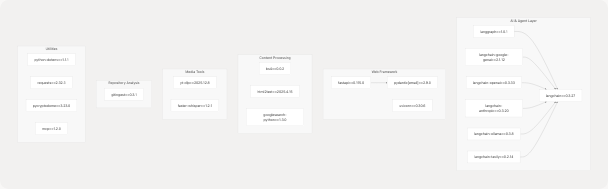
LangChain Ecosystem Dependencies
The project heavily relies on the LangChain ecosystem for AI agent capabilities. The following diagram shows the relationship between LangChain core and provider-specific adapters:
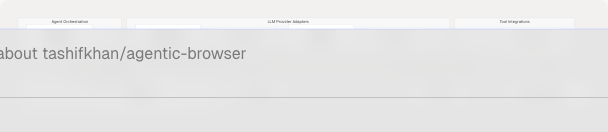
Key LangChain Components:
langchain: Core library providing abstractions for messages, prompts, chains, and toolslanggraph: State machine framework for building complex agent workflows with conditional routing and cycles- Provider adapters: Model-specific implementations conforming to LangChain's
BaseChatModelinterface langchain-tavily: Integration with Tavily web search API for real-time information retrieval
Specialized Tool Dependencies
Web Content Processing Stack
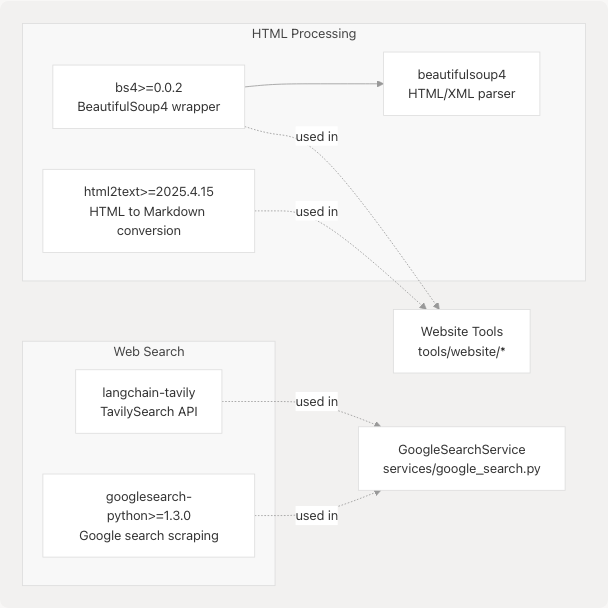
Purpose:
bs4/beautifulsoup4: Parse HTML documents and extract structured content from web pageshtml2text: Convert HTML to clean Markdown format for LLM consumptiongooglesearch-python: Perform Google searches programmatically (fallback/alternative search method)
Media Processing Tools
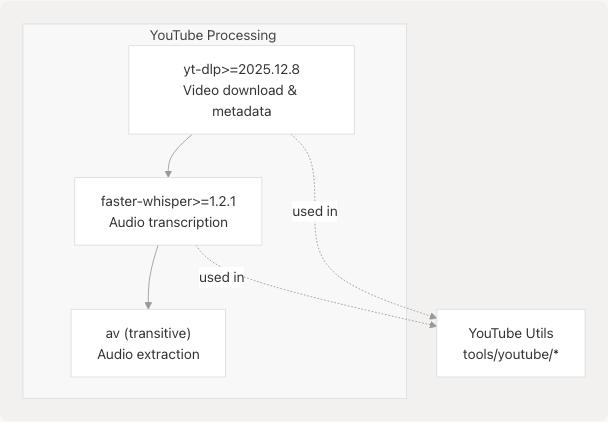
Purpose:
yt-dlp: Download YouTube videos, extract subtitles, and retrieve video metadatafaster-whisper: High-performance OpenAI Whisper implementation for audio transcriptionav(transitive dependency viafaster-whisper): Extract audio streams from video files
These dependencies power the YouTube integration that enables video content Q&A capabilities.
Repository Analysis
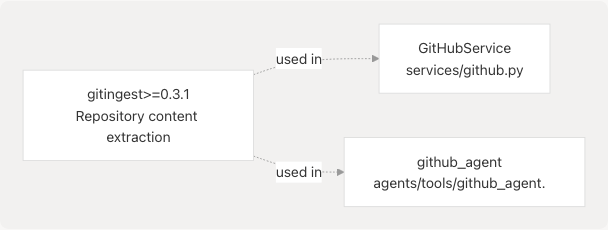
Purpose:
gitingest: Efficiently crawl and extract repository contents for AI analysis, handling directory structures, file filtering, and content aggregation
Security and Utility Dependencies
Core Utilities
| Dependency | Version | Purpose | Usage Example |
|---|---|---|---|
python-dotenv |
>=1.1.1 | Load environment variables from .env files |
core/config.py3-6 |
pycryptodome |
>=3.23.0 | AES encryption for PyJIIT session tokens | PyJIIT authentication |
requests |
>=2.32.3 | HTTP client for external API calls | Various service integrations |
pydantic[email] |
>=2.9.0 | Data validation and serialization with email validation support | All request/response models |
mcp |
>=1.2.0 | Model Context Protocol server implementation | MCP server mode |
Configuration Loading Example:
The python-dotenv dependency is used to load environment variables at application startup core/config.py3-6:
import dotenv
dotenv.load_dotenv()

ENV = os.getenv("ENV", "development")
DEBUG = os.getenv("DEBUG", True if ENV == "development" else False)
Installation Steps
Step 1: Install uv
Install the `uv` package manager if not already installed:

# macOS/Linux
curl -LsSf https://astral.sh/uv/install.sh | sh

# Windows
powershell -c "irm https://astral.sh/uv/install.ps1 | iex"

# Using pip

pip install uv
Step 2: Clone the Repository
git clone https://github.com/tashifkhan/agentic-browser.git
cd agentic-browser
Step 3: Install Dependencies
Using uv, install all dependencies from the lock file:
uv sync
This command:
- Creates a virtual environment (if not exists)
- Installs all dependencies specified in
pyproject.toml - Respects the exact versions pinned in
uv.lockfor reproducibility - Installs the project itself in editable mode
Alternative: Manual Installation with pip
If you prefer using pip:
pip install -e .
This installs dependencies from pyproject.toml but without version locking.
Step 4: Verify Installation
Check that the project scripts are available:
# Check API server entry point
agentic-api-run --help

# Check MCP server entry point
agentic-mcp --help
These commands correspond to the console scripts defined in pyproject.toml30-32:
[project.scripts]
agentic-api-run = "app.run:run"
agentic-mcp = "mcp_server.server:run"
Transitive Dependencies
The lock file uv.lock tracks hundreds of transitive dependencies. Key transitive dependency chains include:
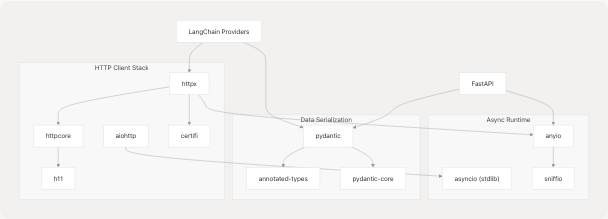
Notable Transitive Dependencies:
httpx: Modern async HTTP client used by LangChain provider librariesaiohttp: Alternative async HTTP client, used by some integrations uv.lock70-152anyio: Async I/O abstraction layer supporting both asyncio and triopydantic-core: Rust-based core for Pydantic's validation performancecertifi: Mozilla's CA bundle for HTTPS certificate verification uv.lock296-302attrs: Class attribute definition library used throughout the ecosystem uv.lock210-216
Development vs. Production Dependencies
The pyproject.toml currently specifies all dependencies as production dependencies. There is no separate [project.optional-dependencies] section for development-only tools.
Implied Development Requirements:
While not explicitly listed, development typically requires:
- Code formatting:
black,ruff, or similar - Type checking:
mypy - Testing:
pytest,pytest-asyncio - Linting:
flake8orruff
These may be added in a future [project.optional-dependencies.dev] section.
Platform-Specific Considerations
Operating System Support
The lock file includes platform-specific wheels for:
- macOS:
macosx_10_13_universal2,macosx_11_0_x86_64,macosx_14_0_arm64 - Linux:
manylinux2014_x86_64,manylinux2014_aarch64,musllinux_1_2_x86_64 - Windows:
win32,win_amd64
Example from uv.lock84-101 showing aiohttp wheels for multiple platforms.
Special Requirements
-
faster-whisper: Requires system-level audio libraries. On some systems, may need:Ubuntu/Debian
apt-get install libavcodec-dev libavformat-dev libavutil-dev
macOS
brew install ffmpeg
-
yt-dlp: Works best withffmpeginstalled for post-processing video/audio streams
Summary
The Agentic Browser's dependency stack is organized into layered categories supporting its dual-mode architecture:
- AI Layer: LangChain ecosystem for multi-provider LLM support and agent orchestration
- Web Layer: FastAPI for HTTP APIs with Pydantic validation
- Tool Layer: Specialized libraries for web content, media processing, and repository analysis
- Infrastructure: Security, configuration, and utility dependencies
Installation is streamlined through uv for reproducible builds, with all dependencies tracked in a comprehensive lock file. The modular dependency structure enables the system to operate in API server mode, MCP server mode, or as a browser extension backend.
For next steps, proceed to Configuration and Environment Variables to set up API keys and environment settings, then Running the Application to start the server.