Running the Application
Purpose and Scope
This document explains how to start the Agentic Browser application using the main.py entry point. It covers the command-line interface, execution modes (API server vs MCP server), and the startup flow. For information about installing dependencies, see Installation and Dependencies. For configuring API keys and environment variables, see Configuration and Environment Variables.
Sources: main.py1-58
Prerequisites
Before running the application, ensure:
- Dependencies are installed - All Python packages from
pyproject.tomlmust be installed (see Installation and Dependencies) - Environment variables are configured - A
.envfile with required API keys and configuration must exist (see Configuration and Environment Variables) - Python version - Python 3.12 is required as specified in
.python-version
Sources: main.py7-8 .python-version1
Command-Line Interface
The application uses main.py as its entry point with the following command-line options:
| Flag | Long Form | Description |
|---|---|---|
-a |
--api |
Run as API server (FastAPI application) |
-m |
--mcp |
Run as MCP server (Model Context Protocol) |
-y |
--yes |
Non-interactive mode: defaults to API server if no mode specified |
These flags are mutually exclusive - you cannot specify both -a and -m simultaneously.
Sources: main.py12-37
Execution Modes
API Server Mode
API server mode starts the FastAPI application with all HTTP routers enabled. This is the primary mode for:
- HTTP REST API interactions
- GitHub, YouTube, Gmail, Calendar integrations
- React Agent conversational AI
- Browser automation script generation
- Website validation and content processing
To start in API mode:
python main.py --api
or
python main.py -a
The application invokes api_run() from the api.run module, which initializes the FastAPI application defined in api.main with all registered routers.
Sources: main.py2-42
MCP Server Mode
MCP (Model Context Protocol) server mode starts the application as an MCP server for agent orchestration. This mode is used for:
- Integration with MCP-compatible clients
- Agent-to-agent communication
- Programmatic tool invocation
To start in MCP mode:
python main.py --mcp
or
python main.py -m
The application invokes mcp.run() from the mcp_server.server module, which starts the MCP server implementation.
Sources: main.py1-44
Interactive Mode
If no mode flag is provided, the application enters interactive mode and prompts the user to choose:
python main.py
The user is presented with:
Run as (1) API server or (2) MCP server? Enter 1 or 2:
- Entering
1starts API server mode - Entering
2starts MCP server mode
Sources: main.py49-53
Non-Interactive Mode with Default
The -y or --yes flag enables non-interactive mode. When no mode is specified along with this flag, the application defaults to API server mode:
python main.py -y
This is useful for automated deployments or scripts where user input is not available.
Sources: main.py32-47
Application Startup Flow
Execution Path Diagram
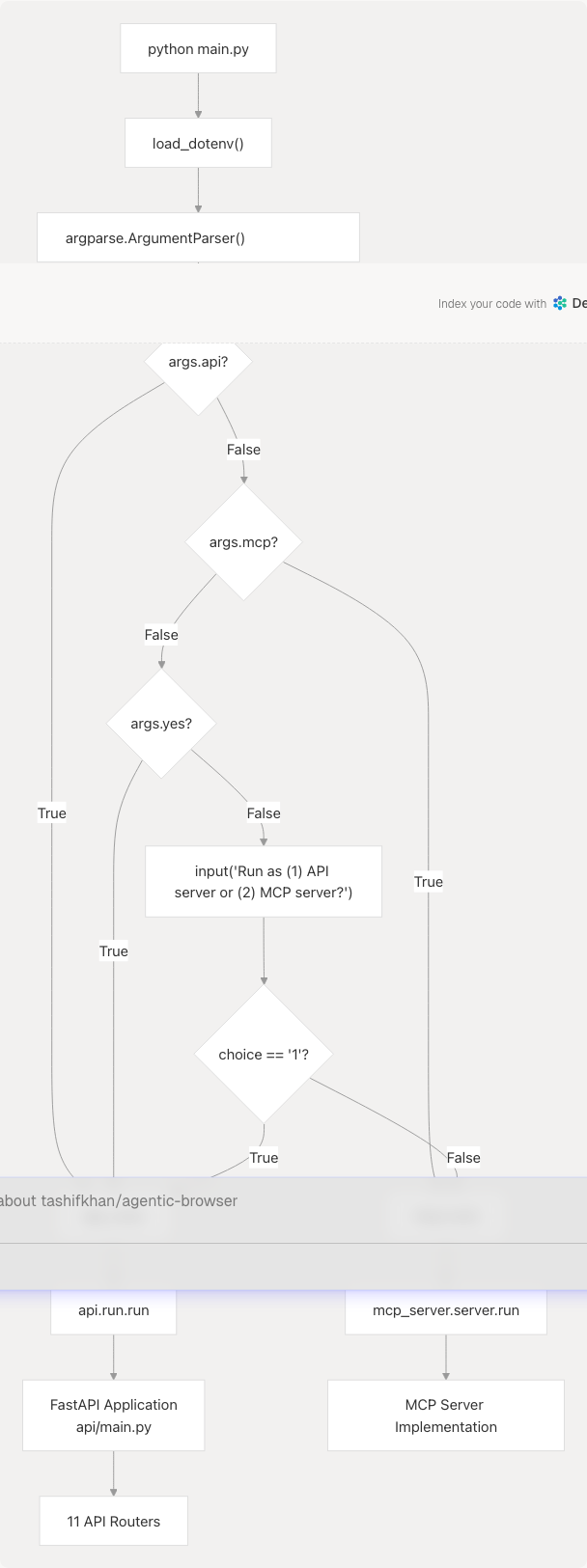
Sources: main.py7-53
Code Entity Mapping
The startup process involves the following code entities:
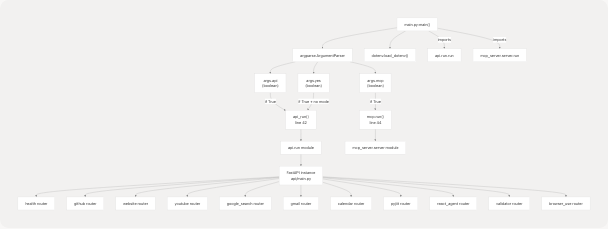
Sources: main.py1-53
Environment Variable Loading
The application loads environment variables from a .env file at startup using load_dotenv() from the python-dotenv library. This occurs before any command-line parsing or mode selection.
# Line 8 in main.py
load_dotenv()
This ensures all API keys, LLM provider credentials, and configuration settings are available regardless of which mode the application runs in. The .env file must contain:
- LLM provider API keys (Google, OpenAI, Anthropic, etc.)
- External service credentials (Tavily, GitHub, Google OAuth)
- Server configuration (host, port, log levels)
For detailed environment variable documentation, see Configuration and Environment Variables.
Sources: main.py5-8
Common Execution Scenarios
Scenario 1: Development with API Server
For local development with the REST API:
python main.py --api
This starts the FastAPI application, typically accessible at http://localhost:8000 with interactive API documentation at http://localhost:8000/docs.
Scenario 2: MCP Server for Agent Integration
For running as an MCP server to integrate with other agent systems:
python main.py --mcp
Scenario 3: Automated Deployment
For CI/CD pipelines or containerized deployments where interactive prompts are not possible:
python main.py --yes
This defaults to API server mode without requiring user input.
Scenario 4: First-Time Interactive Use
For users unsure which mode to use:
python main.py
The interactive prompt guides the user through mode selection.
Sources: main.py41-53
Entry Point Implementation Details
Argument Parser Configuration
The main() function creates an ArgumentParser with a mutually exclusive group for mode selection:
parser = argparse.ArgumentParser(
    description="Start API or MCP server",
)

group = parser.add_mutually_exclusive_group()

group.add_argument("-a", "--api", action="store_true", help="Run as API server")
group.add_argument("-m", "--mcp", action="store_true", help="Run as MCP server")
parser.add_argument("-y", "--yes", action="store_true",
                   help="Non-interactive: default to API if no mode provided")
The mutually exclusive group ensures that specifying both --api and --mcp simultaneously results in an error, preventing ambiguous mode selection.
Sources: main.py11-37
Mode Selection Logic
The decision tree for mode selection follows this priority:
- Explicit API mode (
args.api == True) → Executeapi_run() - Explicit MCP mode (
args.mcp == True) → Executemcp.run() - Non-interactive mode (
args.yes == Truewith no mode) → Executeapi_run()(default) - Interactive mode (no flags) → Prompt user and execute based on input
if args.api:
    api_run()
elif args.mcp:
    mcp.run()
else:
    if args.yes:
        api_run()
    else:
        choice = input("Run as (1) API server or (2) MCP server? Enter 1 or 2: ")
        if choice == "1":
            api_run()
        else:
            mcp.run()
Sources: main.py41-53
Module Import Strategy
The entry point imports both server implementations at the module level:
from mcp_server import server as mcp
from api.run import run as api_run
This ensures:
- Import errors are detected immediately at startup
- Both codepaths are validated even if only one mode is used
- The entry point remains simple and readable
Sources: main.py1-2
Integration with Other Systems
API Server Mode Integration
When running in API mode, the application exposes HTTP endpoints for:
- React Agent - Conversational AI with tool use (see React Agent Architecture)
- Browser Use Agent - Script generation for automation (see Browser Use Agent and Script Generation)
- Service Integrations - GitHub, YouTube, Gmail, Calendar, PyJIIT (see API Routers)
- Web Processing - Content extraction and validation (see Web Search and Content Processing)
MCP Server Mode Integration
When running in MCP mode, the application provides agent orchestration capabilities for integration with MCP-compatible systems. The MCP protocol enables standardized communication between AI agents and tools.
Sources: Based on high-level architecture diagrams
Troubleshooting
Common Issues
| Issue | Symptom | Solution |
|---|---|---|
Missing .env file |
API key errors or startup failures | Ensure .env file exists in project root (see Configuration and Environment Variables) |
| Port already in use | API server fails to bind | Change port in .env or stop conflicting process |
| Import errors | ModuleNotFoundError on startup |
Verify all dependencies installed (see Installation and Dependencies) |
| Permission denied | Cannot execute main.py |
Ensure file has execute permissions or use python main.py |
Verifying Startup
For API mode, verify successful startup by accessing:
- Health check:
GET http://localhost:8000/api/health - API documentation:
http://localhost:8000/docs
For MCP mode, verify logs indicate successful MCP server initialization.
Sources: Based on common deployment patterns