Request Models
This page documents the Pydantic request models that define type-safe API contracts for the Agentic Browser system. These models validate and deserialize incoming HTTP request bodies across all API routers, ensuring data integrity and providing clear schemas for client implementations.
For response models, see Response Models. For the API routers that consume these models, see API Routers.
Overview
The request models are organized in the models/requests/ directory and implement validation using Pydantic v2. All models use strict type checking, field validation, and alias support to handle variations in client-side field naming conventions (e.g., camelCase vs snake_case).
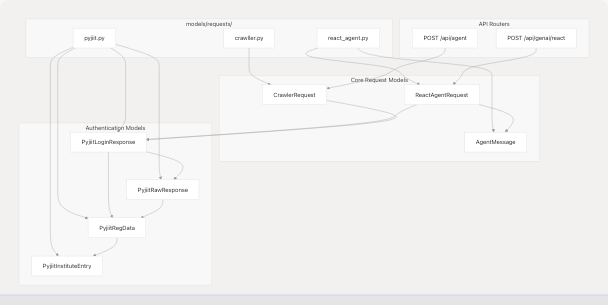
Sources: models/requests/react_agent.py1-45 models/requests/crawller.py1-27 models/requests/pyjiit.py1-91
React Agent Request Models
ReactAgentRequest
The ReactAgentRequest model defines the input schema for the React Agent endpoint at POST /api/genai/react. This model supports conversational AI with tool use, including optional authentication for Gmail, Calendar, and PyJIIT integrations.
| Field | Type | Required | Description |
|---|---|---|---|
messages |
List[AgentMessage] |
Yes | Conversation history with minimum 1 message |
google_access_token |
Optional[str] |
No | OAuth token for Gmail/Calendar access |
pyjiit_login_response |
Optional[PyjiitLoginResponse] |
No | PyJIIT session for webportal queries |
Field Aliases:
google_access_tokenacceptsgoogle_acces_token(typo tolerance)pyjiit_login_responseacceptspyjiit_login_responce(typo tolerance)
The model uses Pydantic's AliasChoices to support common misspellings, improving client compatibility. The populate_by_name configuration allows both the primary name and aliases during deserialization.
Sources: models/requests/react_agent.py27-44
AgentMessage
The AgentMessage model represents individual messages in the conversation history. It supports four message roles aligned with the LangChain message types used by the React Agent system.
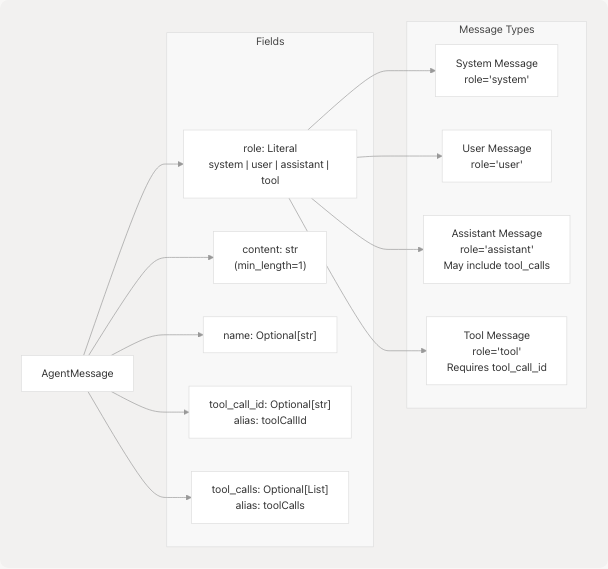
Key Behaviors:
contentis always required and must be non-empty after whitespace strippingtool_call_idis serialized astoolCallIdfor JSON responses (camelCase)tool_callsis serialized astoolCallsand contains structured tool invocation data- The
str_strip_whitespaceconfiguration automatically removes leading/trailing spaces
Tool Message Pattern:
When the React Agent's LLM decides to invoke tools, it generates an assistant message with tool_calls populated. After tool execution, the results are appended as tool messages with matching tool_call_id values. This enables the ReAct loop described in React Agent Architecture.
Sources: models/requests/react_agent.py10-24
Crawler Request Model
CrawlerRequest
The CrawlerRequest model defines the input schema for the Browser Use Agent endpoint at POST /api/agent. This endpoint generates structured JSON action plans for browser automation tasks.
| Field | Type | Required | Description |
|---|---|---|---|
question |
str |
Yes | User task description for script generation |
chat_history |
Optional[list[dict[str, Any]]] |
No | Previous conversation context (default: empty list) |
google_access_token |
Optional[str] |
No | OAuth token for Gmail/Calendar access |
pyjiit_login_response |
Optional[PyjiitLoginResponse] |
No | PyJIIT session for webportal queries |
Structural Similarity:
Notice that CrawlerRequest shares the authentication fields (google_access_token, pyjiit_login_response) with ReactAgentRequest, including identical alias configurations. This consistency enables tool reuse across both agent systems.
Differences from ReactAgentRequest:
- Uses
question: strinstead ofmessages: List[AgentMessage]for simpler single-turn interactions chat_historyuses raw dictionaries instead of typedAgentMessageobjects- Primarily used for script generation rather than conversational tool use
Sources: models/requests/crawller.py8-26
PyJIIT Authentication Models
The PyJIIT models represent the authentication state for JIIT (Jaypee Institute of Information Technology) webportal access. These models are nested within ReactAgentRequest and CrawlerRequest to enable authenticated queries to student data.
Model Hierarchy

Sources: models/requests/pyjiit.py9-91
PyjiitLoginResponse
The top-level authentication model containing both the raw webportal response and flattened convenience fields.
Key Fields:
raw_response: Complete webportal response preserved for debuggingregdata: Registration metadata duplicated at top level for conveniencetoken: JWT token required for authenticated API callsexpiry: Automatically parsed from the JWT payload for session managementinstitute/instituteid: Selected campus for multi-institute accounts
Usage Pattern:
After successful PyJIIT authentication through the OAuth flow (see PyJIIT Webportal Integration), the client receives a PyjiitLoginResponse. This entire object is then passed to subsequent agent requests (ReactAgentRequest or CrawlerRequest) to enable the pyjiit_agent tool.
Sources: models/requests/pyjiit.py54-90
PyjiitRegData
Contains the registration and session metadata returned by the webportal's authentication endpoint.
Critical Fields:
clientid: Session identifier used in subsequent API callstoken: JWT token for authenticationmemberid: Unique member identifieruserid: User identifier (often enrollment number)institutelist: Available campuses for multi-institute accountsmembertype: User role (e.g., 'S' for student)
Sources: models/requests/pyjiit.py14-44
PyjiitRawResponse
Wrapper for the raw JSON response from the webportal, containing regdata and optional linking identifiers.
Sources: models/requests/pyjiit.py47-51
PyjiitInstituteEntry
Represents a single institute option in multi-campus scenarios.
| Field | Description |
|---|---|
label |
Human-readable institute name (e.g., "JIIT Noida") |
value |
Institute identifier code used in API requests |
Sources: models/requests/pyjiit.py9-11
Common Patterns and Design Decisions
Field Aliasing Strategy
Both ReactAgentRequest and CrawlerRequest implement typo-tolerant field aliasing using Pydantic's AliasChoices:
# Tolerates: google_access_token, google_acces_token
google_access_token: Optional[str] = Field(
    default=None,
    validation_alias=AliasChoices("google_access_token", "google_acces_token"),
    serialization_alias="google_access_token",
)

# Tolerates: pyjiit_login_response, pyjiit_login_responce
pyjiit_login_response: Optional[PyjiitLoginResponse] = Field(
    default=None,
    validation_alias=AliasChoices("pyjiit_login_response", "pyjiit_login_responce"),
    serialization_alias="pyjiit_login_response",
)
This design prevents client errors due to common spelling mistakes while maintaining canonical field names for serialization.
Sources: models/requests/react_agent.py29-40 models/requests/crawller.py13-24
Authentication Context Pattern
The shared authentication fields create a consistent pattern for tool availability:
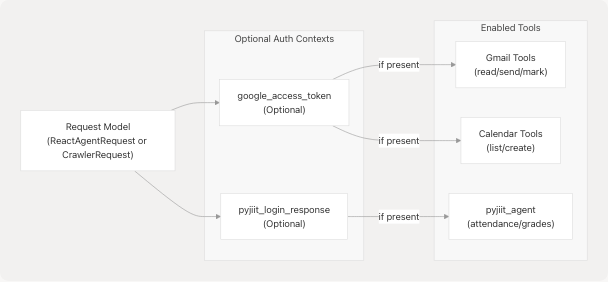
This pattern enables dynamic tool construction in the agent system. If authentication context is absent, the corresponding tools are excluded from the agent's tool list. See Dynamic Tool Construction and Context Management for implementation details.
Sources: models/requests/react_agent.py29-40 models/requests/crawller.py13-24
Whitespace Normalization
Models use str_strip_whitespace: True in their configuration to automatically clean user input:
model_config = {
    "populate_by_name": True,
    "str_strip_whitespace": True,
}
This prevents validation errors from accidental leading/trailing spaces in text fields.
Sources: models/requests/react_agent.py21-24
Request Model Flow Through System
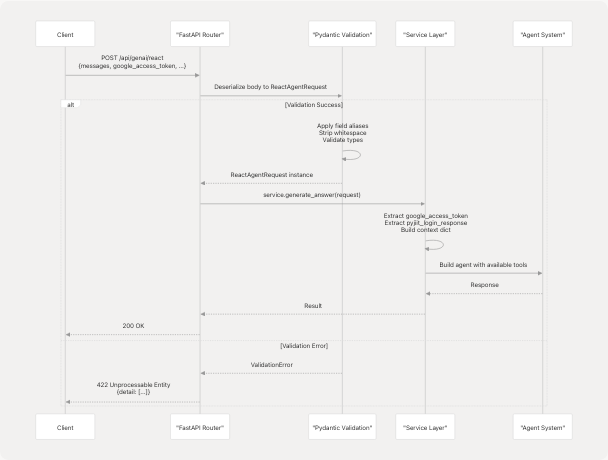
Key Points:
- FastAPI automatically deserializes JSON bodies using type hints
- Pydantic validation occurs before any service logic executes
- Validation errors produce detailed 422 responses with field-level error messages
- Services receive fully validated model instances with normalized data
Sources: models/requests/react_agent.py1-45 models/requests/crawller.py1-27
Summary Table
| Model | File | Primary Consumers | Key Features |
|---|---|---|---|
ReactAgentRequest |
models/requests/react_agent.py27-44 | React Agent Router | Typed message list, conversation history |
AgentMessage |
models/requests/react_agent.py10-24 | ReactAgentRequest |
4 role types, tool call support |
CrawlerRequest |
models/requests/crawller.py8-26 | Browser Use Agent Router | Simple question string, raw chat history |
PyjiitLoginResponse |
models/requests/pyjiit.py54-90 | Both agent requests | JWT token, session metadata, expiry tracking |
PyjiitRegData |
models/requests/pyjiit.py14-44 | PyjiitLoginResponse |
Registration data, institute list |
PyjiitRawResponse |
models/requests/pyjiit.py47-51 | PyjiitLoginResponse |
Raw webportal response wrapper |
PyjiitInstituteEntry |
models/requests/pyjiit.py9-11 | PyjiitRegData |
Institute selection data |
Sources: models/requests/react_agent.py1-45 models/requests/crawller.py1-27 models/requests/pyjiit.py1-91