Browser Use Agent and Script Generation
This document describes the Browser Use Agent system, which generates structured JSON action plans for browser automation. The system accepts natural language goals and optional DOM context, then uses an LLM to produce validated, executable browser automation scripts. These scripts are consumed by the Browser Extension (see 5) to perform automated web interactions.
For conversational AI agent capabilities with dynamic tool selection, see React Agent Architecture. For the browser extension that executes these generated scripts, see Browser Extension.
Purpose and Architecture
The Browser Use Agent is a stateless script generation service that translates user goals into structured action sequences. Unlike the React Agent which engages in multi-turn reasoning with tool calls, the Browser Use Agent performs single-shot generation of complete automation plans.
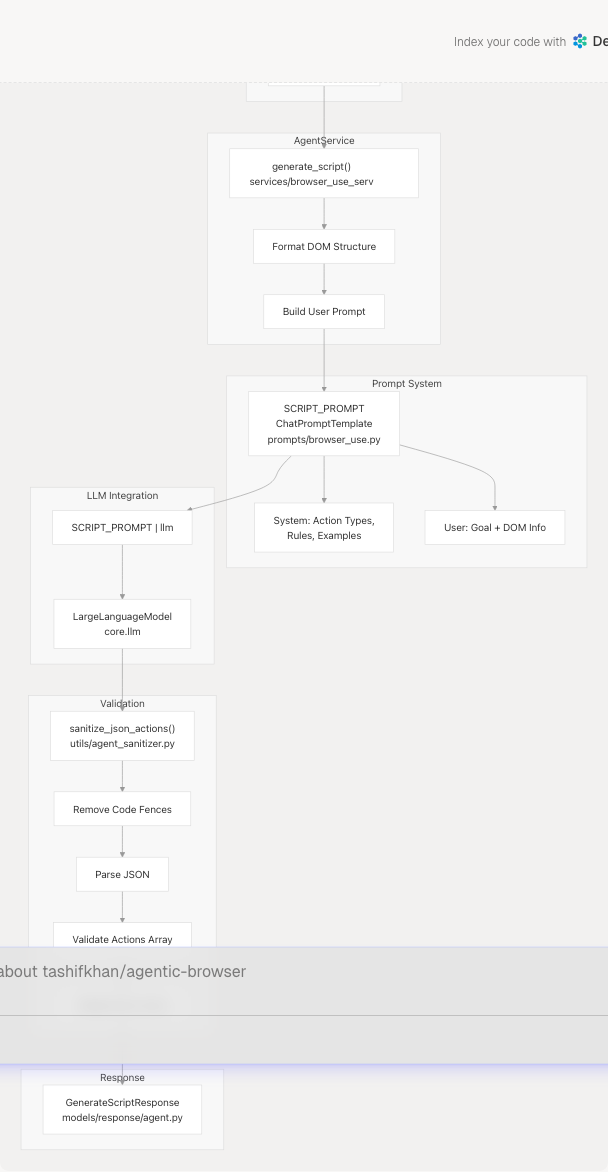
Sources: routers/browser_use.py1-51 services/browser_use_service.py1-96 prompts/browser_use.py1-138 utils/agent_sanitizer.py1-119
Request Flow and API Contract
The Browser Use Agent exposes a single endpoint at /generate-script that accepts a GenerateScriptRequest and returns a GenerateScriptResponse.
Request Model
| Field | Type | Required | Description |
|---|---|---|---|
goal |
string | Yes | Natural language description of the automation task |
target_url |
string | No | Starting URL for the automation (default: "") |
dom_structure |
dict | No | Parsed DOM information from the current page |
constraints |
dict | No | Additional constraints or parameters |
The dom_structure dictionary, when provided, contains:
url: Current page URLtitle: Page titleinteractive: Array of interactive elements with attributes (tag,id,class,type,placeholder,name,ariaLabel,text)
Sources: models/requests/agent.py1-10
Response Model
| Field | Type | Description |
|---|---|---|
ok |
bool | Whether generation succeeded |
action_plan |
dict | Structured JSON action plan (if successful) |
error |
string | Error message (if failed) |
problems |
list[string] | Validation problems (if validation failed) |
raw_response |
string | Truncated LLM response for debugging (if validation failed) |
Sources: models/response/agent.py1-11
Endpoint Implementation
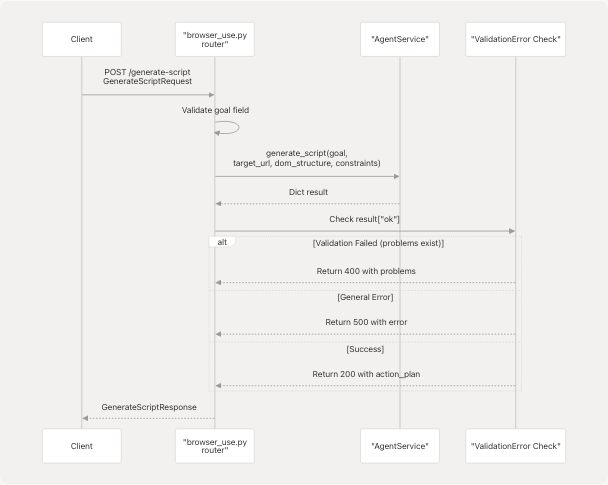
The router at routers/browser_use.py16-51 performs initial validation, then delegates to AgentService. The service returns a dictionary that the router transforms into a GenerateScriptResponse. The router distinguishes between validation failures (problems present) and general errors.
Sources: routers/browser_use.py16-51
Service Layer: AgentService
The AgentService class in services/browser_use_service.py implements the core script generation logic in its generate_script method.
DOM Structure Formatting
The service formats the dom_structure dictionary into a human-readable text block for the LLM prompt:
=== PAGE INFORMATION ===
URL: [url]
Title: [title]

=== INTERACTIVE ELEMENTS (N found) ===

1. input id="email" type="email" placeholder="Enter email"
   Text: [text content]

2. button class="submit-btn" type="submit"
   Text: Submit
The service limits interactive elements to 30 to avoid exceeding token limits services/browser_use_service.py34-51 Each element displays relevant attributes: tag, id, class, type, placeholder, name, ariaLabel, and truncated text content.
Sources: services/browser_use_service.py22-52
Prompt Construction
The service constructs a detailed user prompt that includes:
- Goal and Context: The user's goal, target URL, and constraints
- DOM Information: Formatted interactive elements (if provided)
- Action Type Guidance: Instructions to analyze whether the goal requires DOM actions, tab control actions, or both
- Search-Specific Instructions: Critical guidance for handling search queries using direct URL construction
The prompt explicitly warns against opening chrome://newtab or about:blank and then attempting DOM actions, as these pages do not support scripting services/browser_use_service.py53-69
Sources: services/browser_use_service.py53-69
LLM Invocation
The service uses a LangChain chain composition pattern:
chain = SCRIPT_PROMPT | llm
response = await chain.ainvoke({"input": user_prompt})
The SCRIPT_PROMPT is a ChatPromptTemplate that combines system instructions with the user prompt. The llm object is the global LLM instance from core.llm services/browser_use_service.py74-77 The chain asynchronously invokes the LLM and extracts the content from the response.
Sources: services/browser_use_service.py72-77
Prompt Engineering
The SCRIPT_PROMPT in prompts/browser_use.py is a comprehensive ChatPromptTemplate that provides detailed instructions for the LLM. The prompt is structured in multiple sections:
Action Categories
The prompt defines two distinct action categories:
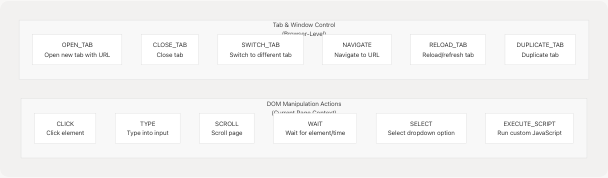
Sources: prompts/browser_use.py14-27 utils/agent_sanitizer.py4-17
JSON Format Examples
The prompt provides concrete examples for common scenarios:
- DOM Action Example: Typing into a textarea using a specific selector
- Tab Control Example: Opening a new tab with a search URL
- Search Example (Preferred): Direct URL construction for search queries
- Combined Example: Opening a real website followed by DOM interactions
Each example demonstrates proper JSON structure with required fields (type, selector, value, url, etc.) and optional description fields prompts/browser_use.py28-88
Sources: prompts/browser_use.py28-88
Critical Rules
The prompt defines critical rules in four categories:
| Rule Category | Key Points |
|---|---|
| Intent Analysis | Distinguish between tab control needs vs. DOM interaction needs |
| DOM Action Rules | Study DOM structure carefully; prefer IDs > data attributes > classes; never use DOM actions on chrome:// URLs |
| Tab Control Rules | Specify required/optional fields for each tab control action type |
| Search Handling | Critical: Construct full search URL in OPEN_TAB action; never open blank tab then type (fails on chrome:// pages) |
The search handling rules are emphasized as critical because attempting DOM actions on chrome://newtab will fail prompts/browser_use.py89-116
Sources: prompts/browser_use.py89-119
Selector Strategy
The prompt instructs the LLM to use the provided DOM structure to craft precise selectors, with a preference hierarchy:
IDs > data attributes > specific classes > tag+type combinations
It also recommends using placeholder, name, or aria-label attributes when available for more robust selection prompts/browser_use.py95-99
Sources: prompts/browser_use.py95-99
Action Validation and Sanitization
The sanitize_json_actions function in utils/agent_sanitizer.py performs comprehensive validation of the LLM-generated action plan.
Validation Process
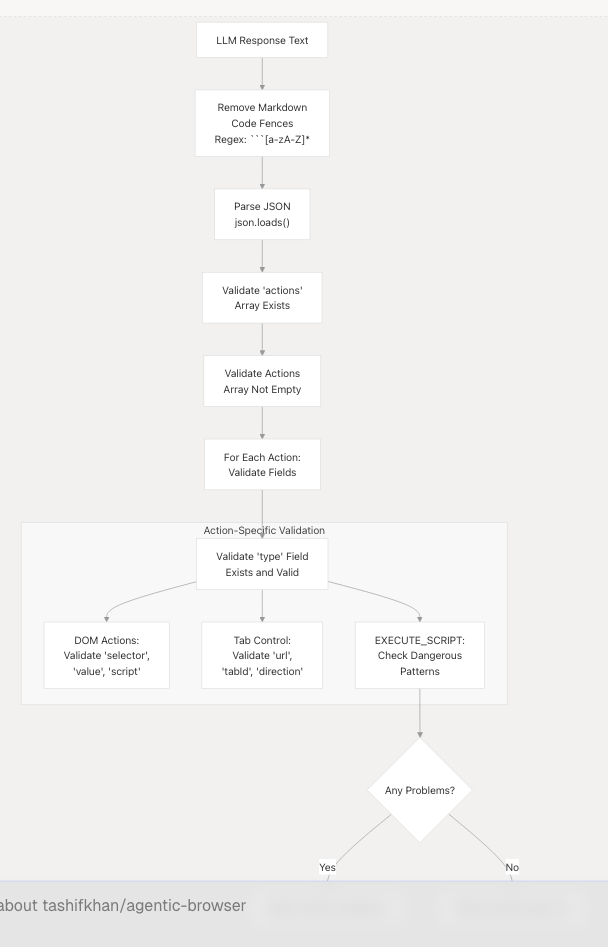
Sources: utils/agent_sanitizer.py20-96
Validation Rules
The validator enforces different rules based on action type:
| Action Type | Required Fields | Additional Validation |
|---|---|---|
CLICK, TYPE, SELECT |
selector |
TYPE also requires value |
EXECUTE_SCRIPT |
script |
Checks for dangerous patterns: eval(, new Function, innerHTML =, outerHTML = |
OPEN_TAB, NAVIGATE |
url |
- |
SWITCH_TAB |
tabId OR direction |
- |
CLOSE_TAB, RELOAD_TAB, DUPLICATE_TAB |
- | Fields are optional |
The validator maintains two constant lists defining valid action types:
DOM_ACTIONSutils/agent_sanitizer.py5: Actions requiring page contextTAB_CONTROL_ACTIONSutils/agent_sanitizer.py8-15: Browser-level actions
Sources: utils/agent_sanitizer.py4-90
Security Checks
For EXECUTE_SCRIPT actions, the validator performs basic security checks for dangerous patterns utils/agent_sanitizer.py63-74:
dangerous = ["eval(", "new Function", "innerHTML =", "outerHTML ="]
If any of these patterns are detected in the script, a problem is added to the validation results. This provides a basic layer of protection against code injection, though the primary security boundary is the browser extension's execution context.
Sources: utils/agent_sanitizer.py63-74
Response Generation and Error Handling
The service returns structured responses that the router transforms into GenerateScriptResponse objects.
Success Response
When validation succeeds, the service returns:
{
    "ok": True,
    "action_plan": {
        "actions": [
            {"type": "CLICK", "selector": "...", "description": "..."},
            # ... more actions
        ]
    }
}
Sources: services/browser_use_service.py91
Validation Failure Response
When the action plan fails validation, the service returns:
{
    "ok": False,
    "error": "Action plan failed validation.",
    "problems": [
        "Action 0: missing 'selector' field",
        "Action 2: invalid type 'INVALID_ACTION'"
    ],
    "raw_response": "[first 1000 chars of LLM response]"
}
The raw_response is truncated to 1000 characters for debugging purposes services/browser_use_service.py83-89
Sources: services/browser_use_service.py82-89
Exception Response
When an exception occurs during generation, the service returns:
{
    "ok": False,
    "error": "[exception message]"
}
The service logs the full exception with traceback using logger.exception() services/browser_use_service.py93-95
Sources: services/browser_use_service.py93-95
Router Error Handling
The router distinguishes between different error types and returns appropriate HTTP status codes:
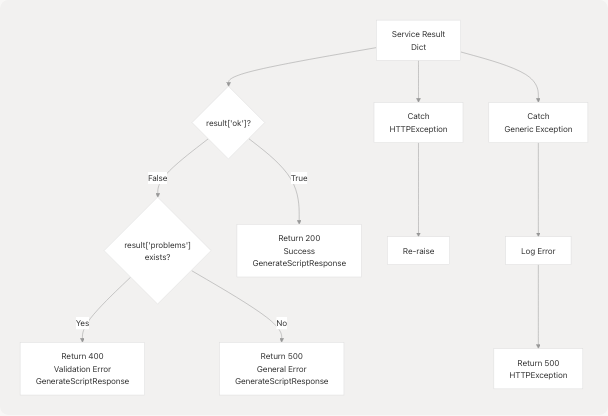
However, the current implementation at routers/browser_use.py32-44 returns the GenerateScriptResponse with the error fields populated rather than raising HTTP exceptions for validation errors. This allows clients to programmatically access the problems array.
Sources: routers/browser_use.py20-50
Integration with Browser Extension
The generated action plans are consumed by the Browser Extension's background script, which executes the actions sequentially. The extension interprets the JSON action plan and dispatches each action to the appropriate handler.
For DOM actions (CLICK, TYPE, SCROLL, WAIT, SELECT, EXECUTE_SCRIPT), the extension uses browser.scripting.executeScript to inject and execute code in the page context. For tab control actions (OPEN_TAB, CLOSE_TAB, SWITCH_TAB, NAVIGATE, RELOAD_TAB, DUPLICATE_TAB), the extension uses browser.tabs API methods.
See Browser Extension for details on how the extension executes these generated scripts.
Sources: Based on high-level architecture diagrams; specific extension implementation details are in the Browser Extension section
LLM Provider Flexibility
The Browser Use Agent uses the global llm instance from core.llm services/browser_use_service.py4 which is a LargeLanguageModel instance that abstracts over multiple providers. The system can use any configured provider (Google Gemini, OpenAI, Anthropic, Ollama, Deepseek, OpenRouter) without changes to the Browser Use Agent code.
See LLM Integration Layer for details on the multi-provider abstraction.
Sources: services/browser_use_service.py4 high-level architecture diagrams