Overview
- .gitignore
- .python-version
- LICENSE
- README.md
- core/config.py
- main.py
- pyproject.toml
- routers/browser_use.py
- tools/google_search/__init__.py
- tools/google_search/seach_agent.py
- uv.lock
Purpose and Scope
This document provides a high-level introduction to the Agentic Browser system, a model-agnostic web automation platform that combines AI reasoning with browser interaction capabilities. The system operates in two distinct modes: as a FastAPI-based REST API server for HTTP-based interactions, and as an MCP (Model Context Protocol) server for agent orchestration. This page covers the system's architecture, operating modes, and core capabilities.
For detailed information about specific components:
- Installation and setup procedures: see Getting Started
- FastAPI backend implementation: see Python Backend API
- AI agent architecture and reasoning: see Agent Intelligence System
- Browser extension implementation: see Browser Extension
Sources: README.md1-118 main.py1-58 pyproject.toml1-33
System Architecture Overview
The Agentic Browser implements a modular architecture with three primary operational layers:
- Entry Layer: Dual-mode entry points via
main.pysupporting both API server and MCP server modes - Intelligence Layer: LangGraph-based agent orchestration with 11+ specialized tools for web automation, content processing, and external service integration
- Execution Layer: Browser extension with TypeScript frontend and Python Flask backend for DOM manipulation and web interaction
The system is designed around two key architectural principles:
- Model Agnosticism: Support for multiple LLM providers (Google Gemini, OpenAI, Anthropic, Ollama, Deepseek, OpenRouter) through a unified abstraction layer
- Bring Your Own Keys (BYOKeys): No vendor lock-in; users supply their own API keys via environment variables
Sources: main.py1-58 README.md20-33 pyproject.toml7-28
System Entry Points and Modes
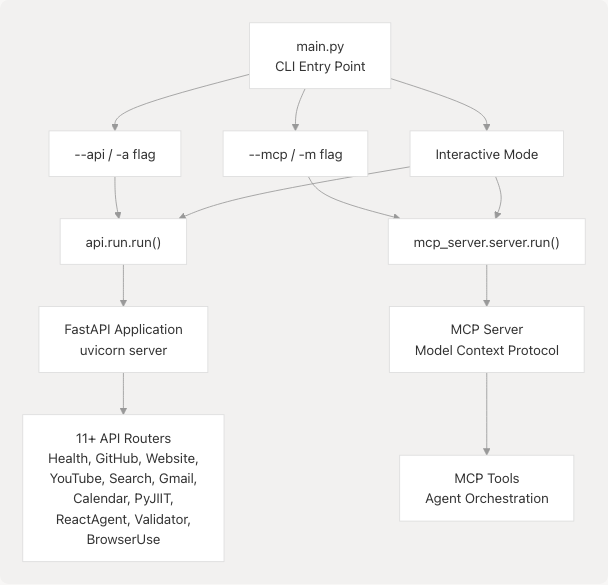
Diagram: Entry Point Architecture
The application entry point is defined in main.py11-57 with the following execution paths:
| Mode | Invocation | Function Called | Purpose |
|---|---|---|---|
| API Server | python main.py --api |
api.run.run() |
Starts FastAPI server with REST endpoints |
| MCP Server | python main.py --mcp |
mcp_server.server.run() |
Starts Model Context Protocol server |
| Interactive | python main.py |
User prompted | Prompts user to select mode |
| Default Non-Interactive | python main.py --yes |
api.run.run() |
Defaults to API mode |
Sources: main.py11-57 pyproject.toml30-32
Core Dependencies and Technology Stack
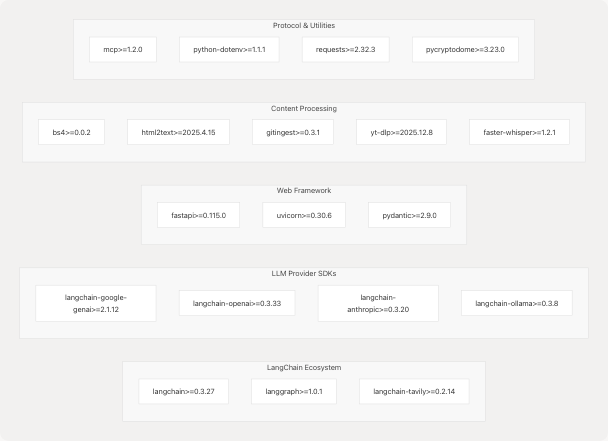
Diagram: Dependency Graph by Category
The system is built on the following technology stack:
| Category | Technologies | Purpose |
|---|---|---|
| Agent Orchestration | LangChain, LangGraph | Multi-step reasoning, tool orchestration, state management |
| LLM Providers | langchain-google-genai, langchain-openai, langchain-anthropic, langchain-ollama | Model-agnostic LLM access |
| Web Framework | FastAPI, Uvicorn, Pydantic | REST API server, request validation |
| Search & Retrieval | langchain-tavily, googlesearch-python | Web search integration |
| Content Extraction | BeautifulSoup4, html2text, gitingest | HTML parsing, repository crawling |
| Media Processing | yt-dlp, faster-whisper | YouTube subtitle/transcript extraction |
| Protocol | mcp | Model Context Protocol compliance |
| Security | pycryptodome, python-dotenv | Encryption, environment variable management |
Sources: pyproject.toml7-28 uv.lock10-58
Dual-Mode Architecture
API Server Mode
When launched with --api, the system starts a FastAPI application that exposes HTTP endpoints for:
- Service Integration Routers: GitHub repository analysis, YouTube video processing, website content extraction, Gmail operations, Google Calendar management, PyJIIT webportal access
- Agent Routers: React Agent for conversational AI with tool use, Browser Use Agent for script generation
- Utility Routers: Health monitoring, website validation for prompt injection detection
The API server listens on the host and port defined in environment variables BACKEND_HOST and BACKEND_PORT (defaults: 0.0.0.0:5454).
Sources: core/config.py8-11 README.md59-68
MCP Server Mode
When launched with --mcp, the system starts a Model Context Protocol server that provides agent orchestration capabilities through the MCP framework. This mode is designed for integration with MCP-compliant clients and enables structured agent-to-agent communication.
Sources: main.py43-44 README.md29 pyproject.toml20
Core Capabilities
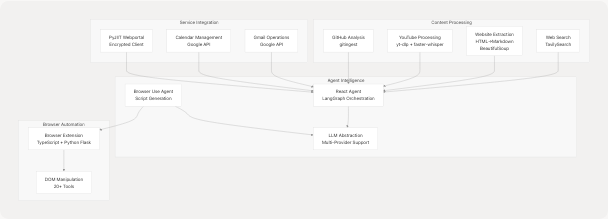
Diagram: Core Capabilities by Category
The system provides the following integrated capabilities:
1. AI-Assisted Web Automation
- Conversational Agent: React Agent with multi-turn reasoning using LangGraph state machines
- Script Generation: Browser Use Agent generates structured JSON action plans for browser automation
- Tool Orchestration: Dynamic tool selection based on available authentication context
2. Content Extraction and Processing
- Web Search: Integration with TavilySearch API for web search and content retrieval (tools/google_search/seach_agent.py11-62)
- Website Processing: HTML to Markdown conversion with BeautifulSoup for content extraction
- GitHub Repository Analysis: Repository crawling and Q&A using gitingest
- YouTube Video Processing: Subtitle/transcript extraction using yt-dlp and faster-whisper
3. External Service Integration
- Gmail: Email reading, sending, and management via Google API with OAuth token handling
- Google Calendar: Event listing and creation
- PyJIIT Webportal: Encrypted session management and attendance data retrieval
4. Model-Agnostic LLM Support
The system implements a unified LargeLanguageModel abstraction layer supporting:
- Google Gemini (via
langchain-google-genai) - OpenAI GPT models (via
langchain-openai) - Anthropic Claude (via
langchain-anthropic) - Ollama local models (via
langchain-ollama) - Deepseek and OpenRouter (via OpenAI-compatible API)
All API keys are managed through environment variables defined in .env files, ensuring no vendor lock-in.
Sources: pyproject.toml7-28 README.md34-55 tools/google_search/seach_agent.py1-84 routers/browser_use.py1-51
Configuration and Environment
The system loads configuration from environment variables using python-dotenv. Key configuration parameters include:
| Variable | Purpose | Default | Source |
|---|---|---|---|
ENV |
Environment (development/production) | development |
core/config.py8 |
DEBUG |
Debug logging level | True in development |
core/config.py9 |
BACKEND_HOST |
API server host | 0.0.0.0 |
core/config.py10 |
BACKEND_PORT |
API server port | 5454 |
core/config.py11 |
GOOGLE_API_KEY |
Google services API key | Required for Gemini/Gmail/Calendar | core/config.py14 |
TAVILY_API_KEY |
Web search API key | Required for web search | Implicit in tavily-search |
OPENAI_API_KEY |
OpenAI API access | Required for GPT models | LangChain convention |
ANTHROPIC_API_KEY |
Anthropic API access | Required for Claude models | LangChain convention |
Logging is configured based on the DEBUG setting, with logging.DEBUG level in development and logging.INFO in production (core/config.py17-18).
Sources: core/config.py1-26 main.py7-8
Repository Structure
The project follows a modular structure with clear separation of concerns:
agentic-browser/
├── main.py                     # CLI entry point with mode selection
├── pyproject.toml              # Project dependencies and metadata
├── uv.lock                     # Locked dependency versions
├── core/
│   └── config.py               # Configuration and logging setup
├── api/
│   ├── main.py                 # FastAPI application
│   └── run.py                  # API server runner
├── routers/                    # FastAPI route handlers
│   ├── browser_use.py          # Browser Use Agent endpoint
│   └── ...                     # Other routers (GitHub, Gmail, etc.)
├── services/                   # Business logic layer
│   ├── browser_use_service.py  # Script generation service
│   └── ...                     # Other services
├── tools/                      # Reusable tool modules
│   ├── google_search/          # Web search integration
│   └── ...                     # Other tools
├── models/                     # Pydantic data models
│   ├── requests/               # Request models
│   └── response/               # Response models
├── mcp_server/                 # MCP server implementation
│   └── server.py               # MCP server entry point
└── extension/                  # Browser extension
    ├── background/             # TypeScript background scripts
    ├── content/                # Content scripts
    └── backend_service.py      # Python Flask backend
The architecture follows a layered pattern:
- Entry Layer:
main.py→api.runormcp_server.server - Router Layer: FastAPI routers in
routers/directory - Service Layer: Business logic in
services/directory - Tool Layer: Reusable utilities in
tools/directory - Model Layer: Pydantic schemas in
models/directory
Sources: main.py1-58 routers/browser_use.py1-51 tools/google_search/seach_agent.py1-84