Tool Layer
The Tool Layer provides reusable, testable implementations for external API interactions and data processing. These modules sit below the Service Layer and encapsulate low-level operations for Gmail, Calendar, YouTube, GitHub, PyJIIT webportal access, and web content processing. Tools are designed to be stateless and composable, handling authentication, API calls, data transformation, and error handling.
For information about how the Service Layer uses these tools, see Service Layer Architecture. For agent-specific tool wrappers used by the React Agent, see Agent Tool System.
Tool Layer Architecture

Sources: tools/gmail/__init__.py1-12 tools/calendar/__init__.py1-8 tools/youtube_utils/__init__.py1-14 tools/pyjiit/__init__.py1-2
Gmail Tools
The Gmail tools provide OAuth-based access to Gmail API operations. All functions accept an access_token parameter for authentication.
| Function | Module | Purpose |
|---|---|---|
list_unread() |
tools.gmail.list_unread_emails |
Fetch unread emails with metadata |
mark_read() |
tools.gmail.mark_email_read |
Mark specific message as read |
send_email() |
tools.gmail.send_email |
Send email via Gmail API |
get_latest_emails() |
tools.gmail.fetch_latest_mails |
Fetch most recent inbox messages |
Gmail API Integration
The get_latest_emails() function demonstrates the typical pattern:
tools/gmail/fetch_latest_mails.py4-42
Key characteristics:
- Uses Gmail REST API v1 endpoints (
/users/me/messages) - Requires Bearer token authentication via
Authorizationheader - Fetches message list, then retrieves full details per message
- Extracts headers (Subject, From, Date) and snippet from payload
- Returns structured list of email dictionaries
Sources: tools/gmail/__init__.py1-12 tools/gmail/fetch_latest_mails.py1-61
Calendar Tools
The Calendar tools provide Google Calendar API access for event management.
Event Retrieval
tools/calendar/get_calender_events.py6-23
Features:
- Fetches upcoming events via
/calendars/primary/eventsendpoint - Uses
timeMinparameter with current UTC timestamp to filter future events - Orders results by
startTimewithsingleEvents=Truefor recurring event expansion - Returns list of event items from API response
Event Creation
tools/calendar/create_calender_events.py6-40
Implementation details:
- Requires
summary,start_time,end_timein ISO 8601 format - Supports optional
descriptionfield - Uses UTC timezone for all timestamps
- Returns created event JSON including
htmlLinkfor calendar view
Sources: tools/calendar/get_calender_events.py1-52 tools/calendar/create_calender_events.py1-70 tools/calendar/__init__.py1-8
YouTube Tools
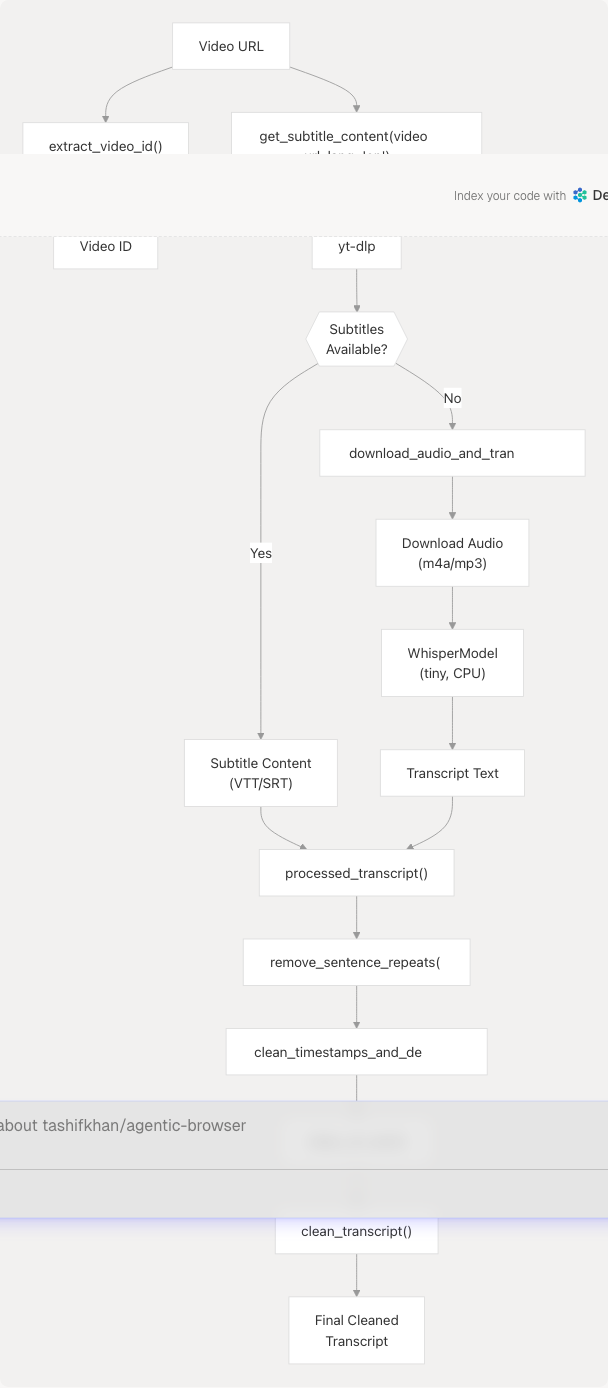
The YouTube tools provide video metadata extraction, subtitle retrieval, and audio transcription fallback.
Video ID Extraction
tools/youtube_utils/extract_id.py8-23
Supported formats:
- Standard YouTube URLs:
youtube.com/watch?v=VIDEO_ID - Short URLs:
youtu.be/VIDEO_ID - Handles both
www.youtube.comandyoutube.comhostnames
Subtitle and Transcription Pipeline
tools/youtube_utils/get_subs.py8-89
Process flow:
-
Primary path: Uses
yt-dlpto download subtitles (auto-generated or manual)- Configures
writesubtitles=True,writeautomaticsub=True - Requests VTT/SRT formats with language preference
- Skips video download with
skip_download=True
- Configures
-
Fallback path: If subtitles unavailable, transcribes audio
- Downloads audio using
yt-dlpwithFFmpegExtractAudiopostprocessor - Converts to MP3 format for compatibility
- Uses
faster-whisperwithtinymodel on CPU with INT8 quantization - Returns full transcript text
- Downloads audio using
Transcript Cleaning Pipeline
tools/youtube_utils/transcript_generator/__init__.py11-16
Multi-stage processing:
-
clean_transcript()tools/youtube_utils/transcript_generator/clean.py22-66- Removes VTT/SRT timestamp lines matching
\d{2}:\d{2}:\d{2}[.,]\d{3} --> \d{2}:\d{2}:\d{2}[.,]\d{3} - Strips VTT headers (
WEBVTT,Kind:,Language:) - Removes inline timestamps
<\d{2}:\d{2}:\d{2}[.,]\d{3}> - Removes cue tags
</?c.*?>and speaker tags<v ...></v> - Deduplicates consecutive identical lines
- Merges lines into paragraphs separated by blank lines
- Removes VTT/SRT timestamp lines matching
-
clean_srt_text()tools/youtube_utils/transcript_generator/srt.py4-29- Removes full timestamp lines with literal
\\n\\nsequences - Strips align directives like
align:start position:0% - Converts literal backslash-n (
\\n) to real newlines
- Removes full timestamp lines with literal
-
clean_timestamps_and_dedupe()tools/youtube_utils/transcript_generator/timestamp.py10-31- Removes timestamp arrow patterns
- Removes inline cue timestamps
- Deduplicates lines using set tracking
-
remove_sentence_repeats()tools/youtube_utils/transcript_generator/duplicate.py4-25- Collapses consecutive repeated sentences
- Handles partial matches where line N is prefix of line N+1
Sources: tools/youtube_utils/get_subs.py1-178 tools/youtube_utils/extract_id.py1-24 tools/youtube_utils/transcript_generator/__init__.py1-22 tools/youtube_utils/transcript_generator/clean.py1-67 tools/youtube_utils/transcript_generator/srt.py1-30 tools/youtube_utils/transcript_generator/timestamp.py1-32 tools/youtube_utils/transcript_generator/duplicate.py1-26
PyJIIT Webportal Tools
The PyJIIT tools provide a comprehensive client for the JIIT Webportal API, including authentication, encryption, and academic data retrieval.
Architecture Components

Webportal Class
tools/pyjiit/wrapper.py119-127
The Webportal class is the main entry point for all webportal operations. It maintains a WebportalSession instance for authentication state.
Authentication decorator:
The @authenticated decorator ensures methods are called with valid session, checking for NotLoggedIn exception.
Session Management
WebportalSession (Pydantic model):
- Stores authentication tokens and user metadata
- Parses response JSON to extract:
token,memberid,userid,instituteid,clientid - Decodes JWT token to extract expiry timestamp (with fallback on error)
- Provides
get_headers()method returningAuthorization: Bearer {token}andLocalNameheader
Encryption System
The webportal requires AES encryption for all payloads and a dynamic LocalName header.
tools/pyjiit/encryption.py10-23
Key generation:
- Format:
qa8y{DATE_SEQ}ty1pnwhereDATE_SEQis date-derived - Uses AES CBC mode with fixed IV:
dcek9wb8frty1pnm - Key rotates daily at 0000 hrs IST
LocalName header:
- Format: Base64-encoded encrypted value of
{RANDOM_4}{DATE_SEQ}{RANDOM_5} - Required for every HTTP request
- Generated per-request to prevent replay attacks
tools/pyjiit/encryption.py48-53
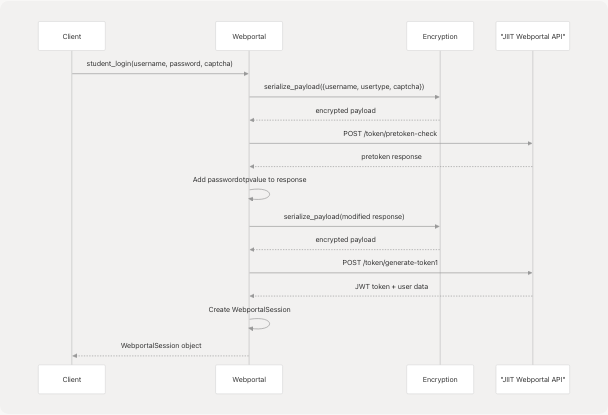
Payload serialization:
- Converts Python dict → JSON string → encrypted bytes → Base64 string
- Used for login credentials and sensitive query parameters
Authentication Flow
Key API Methods
| Method | Purpose | Returns |
|---|---|---|
get_attendance_meta() |
Fetch attendance metadata | AttendanceMeta with semesters and headers |
get_attendance(header, semester) |
Get detailed attendance for semester | Dict with subject-wise attendance |
get_registered_semesters() |
List all registered semesters | List of Semester objects |
get_registered_subjects_and_faculties(semester) |
Get subjects and faculty for semester | Registrations object |
get_exam_events(semester) |
Get exam events for semester | List of ExamEvent objects |
get_exam_schedule(exam_event) |
Get exam timetable | Dict with exam schedule |
download_marks(semester) |
Download marks PDF | Raw PDF bytes |
get_grade_card(semester) |
Get grade card | Dict with grades |
get_sgpa_cgpa(stynumber) |
Get SGPA/CGPA | Dict with GPA data |
All authenticated methods:
- Use
@authenticateddecorator to validate session - Add
Authorization: Bearer {token}andLocalNameheaders automatically - Raise
SessionExpiredon 401 status - Raise
APIErroron non-Success response status
tools/pyjiit/wrapper.py256-282
Example: get_attendance() demonstrates typical pattern:
- Build payload with session identifiers and query parameters
- Serialize payload using encryption module
- Make POST request with authenticated headers
- Return parsed response
Sources: tools/pyjiit/wrapper.py1-646 tools/pyjiit/encryption.py1-60 tools/pyjiit/default.py1-9 tools/pyjiit/__init__.py1-2
Tool Integration Patterns
Context-Based Authentication
Tools requiring authentication accept credential parameters directly:
# Gmail/Calendar: OAuth token
get_calendar_events(access_token="...")
send_email(access_token="...", ...)

# PyJIIT: Session object
webportal = Webportal(session=pyjiit_session)
webportal.get_attendance(...)
Services inject credentials from request context or persistent storage.
Error Handling
Tools raise domain-specific exceptions for API errors:
| Module | Exception Types |
|---|---|
| PyJIIT | NotLoggedIn, SessionExpired, LoginError, APIError, AccountAPIError |
| YouTube | yt_dlp.utils.DownloadError, generic Exception with error messages |
| Gmail/Calendar | Generic Exception with HTTP status and response text |
Services catch and transform these into HTTP error responses.
Stateless Design
Tools maintain no internal state beyond constructor parameters:
- Gmail/Calendar: Pure functions accepting tokens per-call
- YouTube: Pure functions accepting URLs per-call
- PyJIIT:
Webportalclass storesWebportalSessionbut no mutable state- Session is immutable after construction
- Each method call is independent
This enables:
- Easy testing with mock credentials
- Concurrent usage across multiple requests
- Clean separation from service layer business logic
Sources: tools/gmail/fetch_latest_mails.py4-42 tools/calendar/get_calender_events.py6-23 tools/youtube_utils/get_subs.py8-89 tools/pyjiit/wrapper.py119-127