Python Backend API
Purpose and Scope
This document covers the Python backend API server built with FastAPI, including its architecture, router-service-tool layered design, and core dependencies. The backend provides HTTP endpoints for AI-assisted web automation, external service integrations, and agent orchestration.
For information about the agent intelligence system and LangGraph workflows, see Agent Intelligence System. For browser extension functionality, see Browser Extension. For running the application in different modes, see Running the Application.
Overview
The Python backend is a FastAPI-based HTTP server that exposes REST endpoints for interacting with various external services and AI agents. It operates in API mode when launched with the --api flag via main.py
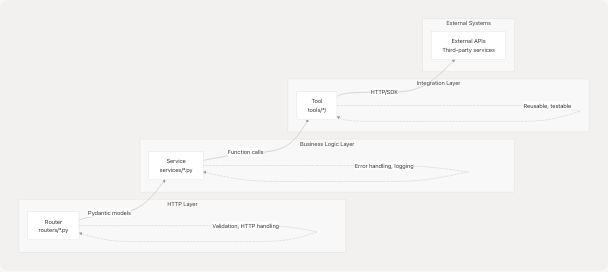
The backend implements a clean three-tier architecture:
- Routers: Handle HTTP request/response mechanics and input validation
- Services: Encapsulate business logic and error handling
- Tools: Provide reusable implementations for external API interactions
All components share a common configuration system and LLM abstraction layer, enabling model-agnostic AI capabilities across the application.
Sources: api/main.py1-45 high-level architecture diagrams
FastAPI Application Structure
The main FastAPI application is defined in api/main.py12 with the title "Agentic Browser API" and version "0.1.0". The application includes 11 distinct routers, each handling a specific domain:

Router Registration
Routers are imported from the routers package and included with specific URL prefixes:
| Router | Import Name | URL Prefix | Purpose |
|---|---|---|---|
| Health | health_router |
/api/genai/health |
Health checks and status |
| GitHub | github_router |
/api/genai/github |
Repository crawling and Q&A |
| Website | website_router |
/api/genai/website |
Web content extraction |
| YouTube | youtube_router |
/api/genai/youtube |
Video subtitle/transcript processing |
| Google Search | google_search_router |
/api/google-search |
Web search via Tavily |
| Gmail | gmail_router |
/api/gmail |
Email operations |
| Calendar | calendar_router |
/api/calendar |
Google Calendar integration |
| PyJIIT | pyjiit_router |
/api/pyjiit |
JIIT webportal access |
| React Agent | react_agent_router |
/api/genai/react |
Conversational AI with tool use |
| Validator | website_validator_router |
/api/validator |
Prompt injection detection |
| Browser Use | browser_use_router |
/api/agent |
Browser automation script generation |
The router registration happens at api/main.py28-38 using FastAPI's include_router() method.
Sources: api/main.py12-45 routers/__init__.py1-30
Three-Tier Architecture Pattern
The backend follows a consistent three-tier pattern across all feature verticals:
Layer Responsibilities
Router Layer (routers/)
- Define FastAPI route handlers with HTTP methods (GET, POST, etc.)
- Validate incoming requests using Pydantic models
- Handle HTTP-specific concerns (status codes, headers)
- Call service layer methods
- Transform service responses into HTTP responses
Service Layer (services/)
- Implement business logic independent of HTTP concerns
- Coordinate multiple tool calls if needed
- Handle errors and exceptions
- Provide logging for debugging
- Abstract away implementation details from routers
Tool Layer (tools/)
- Provide reusable functions for external API interactions
- Implement protocol-specific logic (HTTP requests, SDK calls)
- Return data in consistent formats
- Can be used by both services and agent tools
- Independently testable
Sources: High-level architecture diagrams, general project structure
Core Dependencies
The backend relies on several key Python packages defined in pyproject.toml1-33:
Web Framework
- fastapi (>=0.115.0): Modern async web framework with automatic API documentation
- uvicorn (>=0.30.6): ASGI server for running FastAPI applications
- pydantic[email] (>=2.9.0): Data validation using Python type annotations
AI and LangChain Ecosystem
- langchain (>=0.3.27): Framework for building LLM applications
- langchain-google-genai (>=2.1.12): Google Gemini integration
- langchain-openai (>=0.3.33): OpenAI GPT integration
- langchain-anthropic (>=0.3.20): Anthropic Claude integration
- langchain-ollama (>=0.3.8): Local LLM support via Ollama
- langgraph (>=1.0.1): State graph orchestration for agents
- langchain-tavily (>=0.2.14): Web search integration
External Service Integrations
- gitingest (>=0.3.1): GitHub repository crawling
- yt-dlp (>=2025.12.8): YouTube video downloading and metadata extraction
- faster-whisper (>=1.2.1): Speech-to-text transcription
- googlesearch-python (>=1.3.0): Google search functionality
Web Scraping and Processing
- bs4 (>=0.0.2): BeautifulSoup for HTML parsing
- html2text (>=2025.4.15): HTML to Markdown conversion
- requests (>=2.32.3): HTTP client library
Utilities
- python-dotenv (>=1.1.1): Environment variable management
- pycryptodome (>=3.23.0): Cryptographic operations for PyJIIT
- mcp (>=1.2.0): Model Context Protocol support
The full dependency tree with transitive dependencies is locked in uv.lock
Sources: pyproject.toml1-33 uv.lock1-58
Configuration and Logging
The backend uses a centralized configuration system defined in core/config.py
Environment Variables
Configuration is loaded from .env files using python-dotenv:
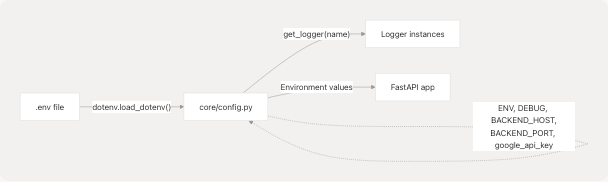
Key configuration variables at core/config.py8-14:
ENV: Environment name (default: "development")DEBUG: Debug mode flag (auto-set based on ENV)BACKEND_HOST: Server bind address (default: "0.0.0.0")BACKEND_PORT: Server port (default: 5454)GOOGLE_API_KEY: API key for Google services
Logging System
The logging system provides consistent log formatting across all modules:
-
Basic Configuration (core/config.py17-18):
- Log level set to
DEBUGin development,INFOin production - Global configuration via
logging.basicConfig()
- Log level set to
-
Logger Factory (core/config.py22-25):
get_logger(name)function creates module-specific loggers- All loggers inherit the configured log level
- Usage pattern:
logger = get_logger(__name__)
Example usage in tools/google_search/seach_agent.py6-8:
from core.config import get_logger
logger = get_logger(__name__)
Sources: core/config.py1-26
Entry Point and Application Startup
The FastAPI application can be started in API mode through the main entry point:
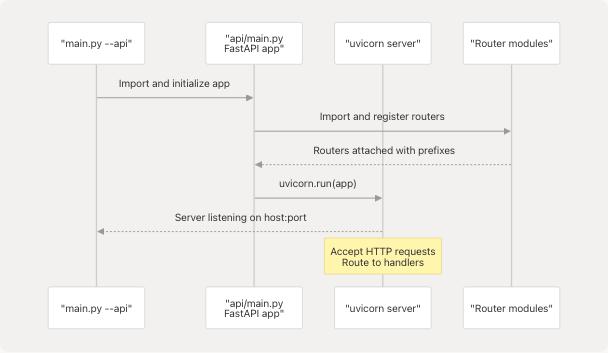
The application initialization sequence:
- Import Phase: FastAPI app instance created at api/main.py12
- Router Registration: All routers imported and included at api/main.py14-38
- Server Start: Uvicorn launches the ASGI server with the app
- Request Handling: Incoming HTTP requests routed to appropriate handlers
Root Endpoint
A simple root endpoint is defined at api/main.py42-44 that returns application metadata:
- Returns JSON with
nameandversionfields - Accessible at
GET / - Useful for health checks and API discovery
Sources: api/main.py1-45
Example: Web Search Flow
To illustrate the three-tier architecture in action, here's how a web search request flows through the system:
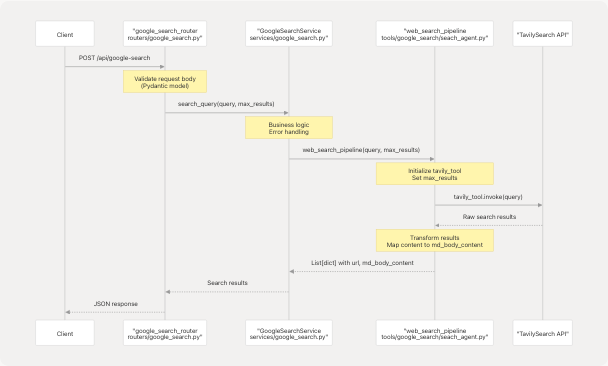
The web_search_pipeline function at tools/google_search/seach_agent.py14-62:
- Initializes the
TavilySearchtool from LangChain - Configures
max_resultsparameter - Invokes the search with the query
- Transforms Tavily's response format to match expected schema
- Returns list of dictionaries with
url,md_body_content, andtitlefields
This pattern demonstrates:
- Separation of concerns: Each layer has a distinct responsibility
- Reusability: The
web_search_pipelinetool can be called by services or agent tools - Testability: Each layer can be tested independently
- Consistency: All feature verticals follow this same pattern
Sources: tools/google_search/seach_agent.py1-84 high-level architecture diagrams
Related Documentation
For detailed information about specific components:
- Router details: See API Routers and its subsections
- Service layer patterns: See Service Layer Architecture
- Tool implementations: See Tool Layer
- Agent system: See Agent Intelligence System for React Agent and Browser Use Agent
- LLM integration: See LLM Integration Layer for multi-provider support
- Project structure: See Project Structure and Dependencies for directory organization
Sources: Table of contents structure