Agent Intelligence System
The Agent Intelligence System is the core AI orchestration layer of the Agentic Browser. It provides two primary agent workflows: the React Agent for conversational AI with dynamic tool selection, and the Browser Use Agent for generating structured browser automation scripts. This document focuses on the React Agent architecture, tool system, and LLM integration. For Browser Use Agent implementation details, see Browser Use Agent and Script Generation. For individual tool implementations, see Agent Tool System.
System Architecture Overview
The Agent Intelligence System is built around LangGraph's state machine framework, which enables the ReAct (Reason + Act) pattern where the LLM iteratively decides whether to call tools or provide a final answer.
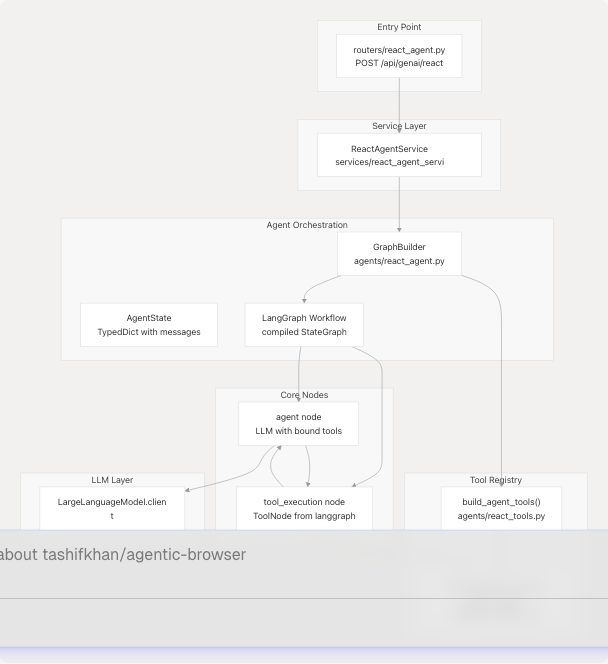
Sources: agents/react_agent.py agents/react_tools.py services/react_agent_service.py routers/react_agent.py
React Agent Workflow
LangGraph State Machine
The React Agent uses a cyclic graph with two nodes: agent (LLM reasoning) and tool_execution (tool invocation). The tools_condition function determines whether the LLM's response contains tool calls.
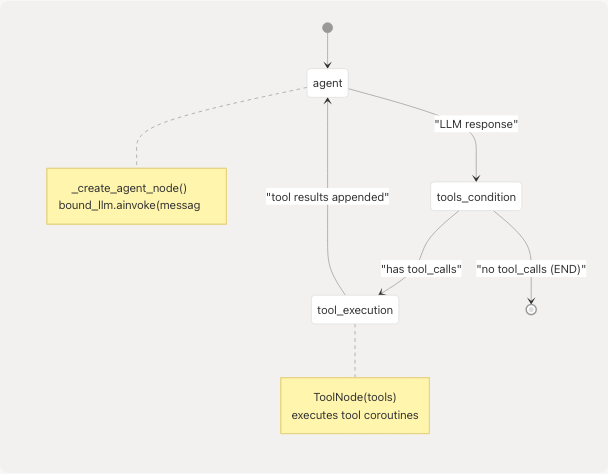
Implementation Details:
The GraphBuilder class constructs the workflow in agents/react_agent.py138-176:
class GraphBuilder:
    def buildgraph(self):
        agent_node = _create_agent_node(self.tools)

        workflow = StateGraph(AgentState)
        workflow.add_node("agent", agent_node)
        workflow.add_node("tool_execution", ToolNode(self.tools))
        workflow.add_edge(START, "agent")
        workflow.add_conditional_edges(
            "agent",
            tools_condition,
            {
                "tools": "tool_execution",
                END: END,
            },
        )
        workflow.add_edge("tool_execution", "agent")
        return workflow.compile()
The agent node is created by _create_agent_node() agents/react_agent.py123-136 which binds the tool schemas to the LLM:
def _create_agent_node(tools: Sequence[StructuredTool]):
    bound_llm = _llm.bind_tools(list(tools))

    async def _agent_node(state: AgentState, **_):
        messages = list(state["messages"])
        if not messages or not isinstance(messages[0], SystemMessage):
            messages = [_system_message] + messages
        response = await bound_llm.ainvoke(messages)
        return {"messages": [response]}

    return _agent_node
Sources: agents/react_agent.py123-176
Agent State and Message Management
AgentState TypedDict
The workflow state is defined as a TypedDict with a single field: messages, which is a sequence of LangChain BaseMessage objects. The add_messages reducer automatically appends new messages.
class AgentState(TypedDict):
    messages: Annotated[Sequence[BaseMessage], add_messages]
Message Conversion System
The system converts between API-friendly message dictionaries and LangChain message objects:
API Message Format (AgentMessagePayload):
| Field | Type | Description |
|---|---|---|
role |
"system", "user", "assistant", "tool" |
Message role |
content |
str |
Message content |
name |
str (optional) |
Speaker/tool name |
tool_call_id |
str (optional) |
For tool messages |
tool_calls |
list[dict] (optional) |
For assistant messages with tool invocations |
Conversion Functions:
_payload_to_langchain()agents/react_agent.py61-77: Converts API payloads to LangChain messages (HumanMessage,AIMessage,ToolMessage,SystemMessage)_langchain_to_payload()agents/react_agent.py80-120: Converts LangChain messages back to API payloads_normalise_content()agents/react_agent.py52-58: Ensures message content is always a string (JSON-encodes complex objects)
Sources: agents/react_agent.py40-120
Agent Tools System
Core Tool Definitions
All agent tools are defined as StructuredTool instances in agents/react_tools.py Each tool has:
- A unique name (e.g.,
github_agent) - A description for the LLM to understand when to use it
- An async coroutine implementation
- A Pydantic
args_schemafor input validation
Complete Tool Registry:
| Tool Name | Purpose | Input Schema | Requires Auth |
|---|---|---|---|
github_agent |
Answer questions about GitHub repositories | GitHubToolInput |
No |
websearch_agent |
Search the web and summarize top results | WebSearchToolInput |
No |
website_agent |
Fetch and analyze web pages | WebsiteToolInput |
No |
youtube_agent |
Answer questions about YouTube videos | YouTubeToolInput |
No |
gmail_agent |
Fetch recent Gmail messages | GmailToolInput |
Yes (Google token) |
gmail_send_email |
Send emails via Gmail | GmailSendEmailInput |
Yes (Google token) |
gmail_list_unread |
List unread Gmail messages | GmailListUnreadInput |
Yes (Google token) |
gmail_mark_read |
Mark Gmail messages as read | GmailMarkReadInput |
Yes (Google token) |
calendar_agent |
Retrieve Google Calendar events | CalendarToolInput |
Yes (Google token) |
calendar_create_event |
Create new calendar events | CalendarCreateEventInput |
Yes (Google token) |
pyjiit_agent |
Fetch attendance from JIIT webportal | PyjiitAttendanceInput |
Yes (PyJIIT session) |
browser_action_agent |
Execute browser automation actions | (defined in tools/browser_use) |
No |
Tool Input Schemas
Each tool uses Pydantic models for type-safe input validation. Example schemas:
GitHubToolInput agents/react_tools.py61-67:
class GitHubToolInput(BaseModel):
    url: HttpUrl = Field(..., description="Full URL to a public GitHub repository.")
    question: str = Field(..., description="Question about the repository.")
    chat_history: Optional[list[dict[str, Any]]] = Field(
        default=None,
        description="Optional chat history as a list of {role, content} maps.",
    )
GmailSendEmailInput agents/react_tools.py114-124:
class GmailSendEmailInput(BaseModel):
    to: EmailStr = Field(..., description="Recipient email address.")
    subject: str = Field(..., min_length=1, description="Email subject line.")
    body: str = Field(..., min_length=1, description="Plain-text body content.")
    access_token: Optional[str] = Field(
        default=None,
        description="OAuth access token with Gmail send scope. "
                   "If omitted, a pre-configured token will be used when available.",
    )
Sources: agents/react_tools.py61-210
Dynamic Tool Construction
Context-Based Tool Assembly
The build_agent_tools() function dynamically constructs the tool list based on the authentication context provided by the user. This allows the agent to access Gmail, Calendar, and PyJIIT tools only when credentials are available.
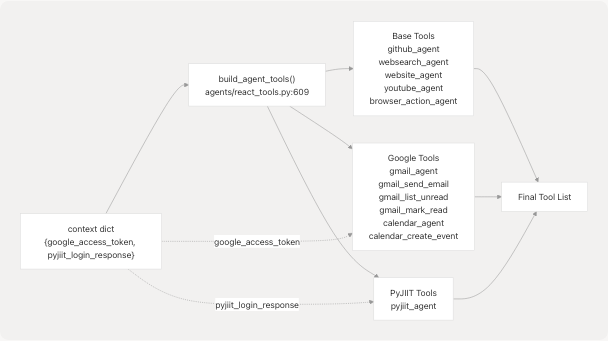
Implementation agents/react_tools.py609-699:
def build_agent_tools(context: Optional[Dict[str, Any]] = None) -> list[StructuredTool]:
    ctx: Dict[str, Any] = dict(context or {})
    google_token = ctx.get("google_access_token") or ctx.get("google_acces_token")
    pyjiit_payload = ctx.get("pyjiit_login_response") or ctx.get("pyjiit_login_responce")

    tools: list[StructuredTool] = [
        github_agent,
        websearch_agent,
        website_agent,
        youtube_agent,
        browser_action_agent,
    ]

    if google_token:
        tools.append(
            StructuredTool(
                name=gmail_agent.name,
                description=gmail_agent.description,
                coroutine=partial(_gmail_tool, _default_token=google_token),
                args_schema=GmailToolInput,
            )
        )
        # ... similar pattern for other Google tools

    if pyjiit_payload:
        tools.append(
            StructuredTool(
                name=pyjiit_agent.name,
                description=pyjiit_agent.description,
                coroutine=partial(_pyjiit_attendance_tool, _default_payload=pyjiit_payload),
                args_schema=PyjiitAttendanceInput,
            )
        )

    return tools
functools.partial Pattern
The system uses functools.partial to "bake in" authentication credentials as default arguments to tool coroutines. This allows the LLM to call authenticated tools without needing to pass tokens explicitly in every invocation.
For example, _gmail_tool agents/react_tools.py279-300 accepts an _default_token keyword argument:
async def _gmail_tool(
    access_token: Optional[str] = None,
    max_results: int = 5,
    *,
    _default_token: Optional[str] = None,
) -> str:
    token = access_token or _default_token
    if not token:
        return "Unable to fetch Gmail messages because no Google access token was provided."
    # ... rest of implementation
When build_agent_tools() creates the Gmail tool for a user with a token, it uses partial(_gmail_tool, _default_token=google_token) agents/react_tools.py629 so the LLM doesn't need to provide the token.
Sources: agents/react_tools.py609-699 agents/react_tools.py279-300
Tool Implementations
GitHub Tool
Tool Name: github_agent
Implementation: agents/react_tools.py217-230
The GitHub tool converts a repository URL to markdown using convert_github_repo_to_markdown() from tools/github_crawler/convertor.py then invokes an LLM chain with the repository content, tree structure, and summary.
async def _github_tool(url: HttpUrl, question: str, chat_history: Optional[list[dict]] = None) -> str:
    repo_data = await convert_github_repo_to_markdown(url)
    history = _format_chat_history(chat_history)
    payload = {
        "question": question,
        "text": repo_data.content,
        "tree": repo_data.tree,
        "summary": repo_data.summary,
        "chat_history": history,
    }
    response = await asyncio.to_thread(github_chain.invoke, payload)
    return _ensure_text(response)
Web Search Tool
Tool Name: websearch_agent
Implementation: agents/react_tools.py233-247
Uses the Tavily search API via web_search_pipeline() from tools/google_search/seach_agent.py to fetch and summarize web results:
async def _websearch_tool(query: str, max_results: int = 5) -> str:
    bounded = max(1, min(10, max_results))
    results = await asyncio.to_thread(web_search_pipeline, query, None, bounded)
    if not results:
        return "No web results were found."

    snippets: list[str] = []
    for item in results[:bounded]:
        url = item.get("url", "")
        text = (item.get("md_body_content") or "").strip().replace("\n", " ")
        if len(text) > 320:
            text = text[:320].rstrip() + "..."
        snippets.append(f"URL: {url}\nSummary: {text}")

    return "\n\n".join(snippets)
Website Tool
Tool Name: website_agent
Implementation: agents/react_tools.py250-262
Fetches a web page, converts it to markdown using markdown_fetcher(), and answers questions about it:
async def _website_tool(url: HttpUrl, question: str, chat_history: Optional[list[dict]] = None) -> str:
    markdown = await asyncio.to_thread(markdown_fetcher, str(url))
    history = _format_chat_history(chat_history)
    response = await asyncio.to_thread(
        get_website_answer,
        website_chain,
        question,
        markdown,
        history,
    )
    return _ensure_text(response)
YouTube Tool
Tool Name: youtube_agent
Implementation: agents/react_tools.py265-276
Extracts video transcripts and answers questions using the youtube_chain:
async def _youtube_tool(url: HttpUrl, question: str, chat_history: Optional[list[dict]] = None) -> str:
    history = _format_chat_history(chat_history)
    response = await asyncio.to_thread(
        get_youtube_answer,
        youtube_chain,
        question,
        str(url),
        history,
    )
    return _ensure_text(response)
Gmail Tools
Tool Names: gmail_agent, gmail_send_email, gmail_list_unread, gmail_mark_read
Implementations: agents/react_tools.py279-375
All Gmail tools follow the same pattern:
- Accept an optional
access_tokenparameter - Fall back to
_default_token(injected viafunctools.partial) - Return an error message if no token is available
- Call the appropriate Gmail function from tools/gmail/
Example: _gmail_tool agents/react_tools.py279-300:
async def _gmail_tool(
    access_token: Optional[str] = None,
    max_results: int = 5,
    *,
    _default_token: Optional[str] = None,
) -> str:
    token = access_token or _default_token
    if not token:
        return "Unable to fetch Gmail messages because no Google access token was provided."

    bounded = max(1, min(25, max_results))

    try:
        messages = await asyncio.to_thread(get_latest_emails, token, max_results=bounded)
        return _ensure_text({"messages": messages})
    except Exception as exc:
        return f"Failed to fetch Gmail messages: {exc}"
Calendar Tools
Tool Names: calendar_agent, calendar_create_event
Implementations: agents/react_tools.py378-435
Calendar tools use the Google Calendar API via tools/calendar/ functions. They follow the same authentication pattern as Gmail tools.
PyJIIT Tool
Tool Name: pyjiit_agent
Implementation: agents/react_tools.py438-521
The PyJIIT tool fetches attendance data from the JIIT webportal. It:
- Accepts an optional
session_payloadparameter or uses_default_payload - Constructs a
WebportalSessionfrom the payload - Fetches attendance metadata and hardcoded semester mappings
- Returns processed attendance data with subject codes and percentages
async def _pyjiit_attendance_tool(
    registration_code: Optional[str] = None,
    session_payload: Optional[Dict[str, Any]] = None,
    *,
    _default_payload: Optional[Dict[str, Any]] = None,
) -> str:
    payload = session_payload or _default_payload
    if not payload:
        return "Unable to fetch attendance because no PyJIIT login session was provided."

    # ... session construction and attendance fetching logic
Sources: agents/react_tools.py217-521
LLM Integration
The agent system uses the LargeLanguageModel abstraction from core/llm.py to support multiple LLM providers. The LLM client is instantiated once and reused across all agent invocations.
Initialization agents/react_agent.py36:
_llm = LargeLanguageModel().client
System Prompt agents/react_agent.py25-34:
DEFAULT_SYSTEM_PROMPT = (
    "You are a helpful AI assistant that maintains conversation context and "
    "remembers useful information shared by users. Use the available tools "
    "when they can improve the answer, otherwise reply directly. "
    "Credentials such as Google access tokens and PyJIIT login sessions are provided "
    "automatically; never request them from the user. If a request involves JIIT "
    "attendance or portal data, call the 'pyjiit_agent' tool immediately using the "
    "existing session. If that session fails, report that the login session expired "
    "and ask the user to refresh it via the secure flow—do not ask for usernames or passwords."
)
The system prompt is prepended to every conversation agents/react_agent.py130-131:
if not messages or not isinstance(messages[0], SystemMessage):
    messages = [_system_message] + messages
For LLM provider configuration and multi-provider support details, see LLM Integration Layer.
Sources: agents/react_agent.py25-36 agents/react_agent.py126-133
Complete Execution Flow
The following sequence diagram shows the complete flow from HTTP request to agent response:
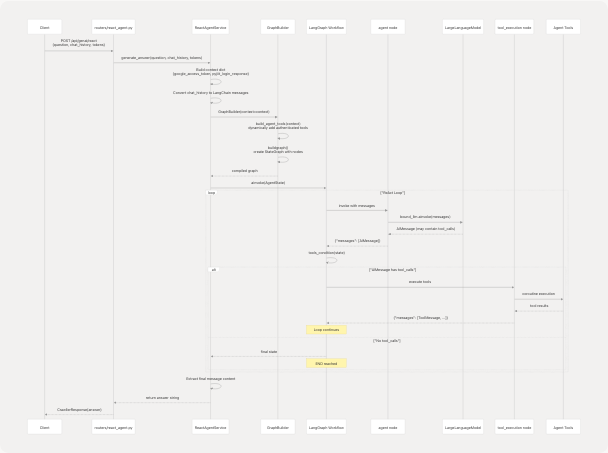
Key Steps:
- Request Handling routers/react_agent.py18-36: The router receives the request and extracts
question,chat_history, and authentication tokens - Context Construction services/react_agent_service.py23-34: The service builds a context dictionary with
google_access_tokenandpyjiit_login_response - Graph Building services/react_agent_service.py36: Creates a
GraphBuilderwith the context, which dynamically assembles the tool list - Message Conversion services/react_agent_service.py40-56: Converts API-style chat history to LangChain messages
- Agent Invocation services/react_agent_service.py75: Invokes the compiled graph with the initial state
- ReAct Loop: The graph cycles between the
agentnode (LLM reasoning) andtool_executionnode (tool invocation) until the LLM provides a final answer - Response Extraction services/react_agent_service.py77-80: Extracts the content of the final message from the output state
Sources: routers/react_agent.py18-36 services/react_agent_service.py15-91 agents/react_agent.py138-176
Error Handling
Tool-Level Error Handling
Each tool implementation wraps its logic in a try-except block and returns error messages as strings rather than raising exceptions. This allows the LLM to see the error and potentially retry or adjust its approach.
Example from agents/react_tools.py294-300:
try:
    messages = await asyncio.to_thread(get_latest_emails, token, max_results=bounded)
    return _ensure_text({"messages": messages})
except Exception as exc:
    return f"Failed to fetch Gmail messages: {exc}"
Service-Level Error Handling
The ReactAgentService catches all exceptions and returns a user-friendly error message services/react_agent_service.py85-91:
except Exception as exc:
    logger.error("Error generating react agent answer: %s", exc)
    return (
        "I apologize, but I encountered an error processing your question. "
        "Please try again."
    )
This ensures that the API always returns a 200 OK response with an error message string, rather than raising HTTP exceptions.
Sources: agents/react_tools.py294-300 services/react_agent_service.py85-91
Integration Points
API Endpoint
Route: POST /api/genai/react
Handler: routers/react_agent.py18-54
Request Model: CrawlerRequest from models/requests/crawller.py
Response Model: CrawllerResponse from models/response/crawller.py
Service Layer
Class: ReactAgentService from services/react_agent_service.py14-92
Primary Method: generate_answer(question, chat_history, google_access_token, pyjiit_login_response)
Agent Module
Classes:
GraphBuilderagents/react_agent.py138-176: Constructs the LangGraph workflowAgentStateagents/react_agent.py40-41: TypedDict defining the workflow state
Functions:
build_agent_tools()agents/react_tools.py609-699: Dynamic tool construction based on context_create_agent_node()agents/react_agent.py123-136: Creates the agent node with bound LLM
Sources: routers/react_agent.py services/react_agent_service.py agents/react_agent.py agents/react_tools.py