Browser Extension
The Browser Extension is a WXT-based TypeScript extension providing frontend browser automation capabilities. It operates independently from the main Python API server with its own Flask backend for secure credential management. The extension features a sidepanel chat interface, a background service worker with 26+ browser automation tools, and content scripts for DOM manipulation.
The extension architecture consists of three main components:
- Frontend UI: React-based sidepanel for user interaction (see Extension Architecture Overview)
- Background Script: Message router and browser automation engine (see Background Script and Message Handling and Browser Automation Tools)
- Backend Service: Python Flask server for OAuth flows and Gemini API integration (see Extension Backend Service)
For information about the main Python backend API that can also be used independently, see Python Backend API. For details on the agent intelligence system, see Agent Intelligence System.
High-Level Architecture
The extension implements a message-passing architecture where the React UI communicates with the background script, which orchestrates browser automation and external API calls.
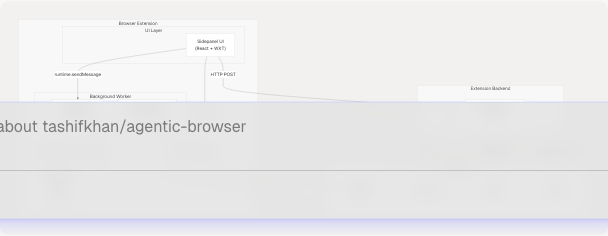
Key Design Decisions:
- Dual Backend Model: The extension has its own Flask backend (
backend_service.py) separate from the main FastAPI server. This handles OAuth token exchange securely without exposing client secrets to the extension code. - Message-Based Communication: All communication between UI and background uses
browser.runtime.sendMessage()with typed message payloads. - Script Injection Pattern: DOM operations use
browser.scripting.executeScript()rather than persistent content scripts for better security and isolation.
Sources: extension/entrypoints/background.ts17-156 extension/backend_service.py1-229
Component Directory Structure
The extension follows the WXT framework's entrypoint-based structure:
extension/
├── entrypoints/
│   ├── sidepanel/           # React UI components
│   │   ├── AgentExecutor.tsx
│   │   ├── UnifiedSettingsMenu.tsx
│   │   └── lib/
│   │       └── agent-map.ts
│   ├── utils/               # Shared utilities
│   │   ├── parseAgentCommand.ts
│   │   └── executeAgent.ts
│   ├── background.ts        # Service worker
│   └── content.ts          # Content script
├── backend_service.py       # Flask backend server
└── wxt.config.ts           # WXT configuration
| Entrypoint Type | File | Purpose |
|---|---|---|
| Sidepanel | sidepanel/AgentExecutor.tsx |
Main chat interface (see Extension Architecture Overview) |
| Background | background.ts |
Message routing and 26+ browser tools (see Background Script and Message Handling) |
| Content Script | content.ts |
DOM manipulation (injected on demand) |
| Backend Service | backend_service.py |
OAuth and Gemini API proxy (see Extension Backend Service) |
Sources: extension/entrypoints/background.ts1-50 extension/backend_service.py1-50
Integration with Backend APIs
The extension integrates with two separate backend services:
Main Python API (FastAPI)
The extension can call the main FastAPI server for agent operations. Connection details are stored in browser.storage.local under the baseUrl key. The UI constructs HTTP requests to endpoints like:
/api/genai/react- React Agent with tool use/api/gmail/*- Gmail operations/api/calendar/*- Calendar operations/api/genai/youtube- YouTube analysis/api/genai/website- Website analysis
The executeAgent() utility at extension/entrypoints/utils/executeAgent.ts17-127 handles request construction, credential injection, and response formatting. See Extension Architecture Overview for details on the command system and request flow.
Extension Flask Backend
The extension includes a standalone Flask backend at extension/backend_service.py that provides:
- OAuth Token Exchange:
/exchange-code,/refresh-tokenfor Google OAuth (lines 36-112) - GitHub OAuth:
/github/exchange-codefor GitHub authentication (lines 115-159) - Gemini Chat API:
/chatendpoint proxying requests to Google Gemini API (lines 162-202)
This separation ensures OAuth client secrets never leak to the extension code. The Flask server must be started separately: python backend_service.py.
Environment Variables Required:
| Variable | Purpose | Used By |
|---|---|---|
GOOGLE_CLIENT_SECRET |
Google OAuth client secret | /exchange-code, /refresh-token |
GITHUB_CLIENT_ID |
GitHub OAuth app ID | /github/exchange-code |
GITHUB_CLIENT_SECRET |
GitHub OAuth app secret | /github/exchange-code |
GEMINI_API_KEY |
Google Gemini API key | /chat |
Sources: extension/backend_service.py1-229 extension/entrypoints/utils/executeAgent.ts17-127
Browser Automation Capabilities
The extension provides 26+ browser automation tools implemented in the background script. These tools can be invoked via the EXECUTE_AGENT_TOOL message type. The tools fall into several categories:
DOM Interaction Tools
- GET_PAGE_INFO: Extract page metadata (URL, title, media, forms)
- EXTRACT_DOM: Build recursive DOM tree structure
- CLICK: Click elements by selector
- TYPE: Type text into inputs, textareas, or contenteditable elements
- FILL_FORM: Fill multiple form fields and optionally submit
- SELECT_DROPDOWN: Select dropdown options by value, text, or index
- HOVER: Trigger hover events on elements
Element Query Tools
- WAIT_FOR_ELEMENT: Poll until element exists/visible/hidden
- FIND_ELEMENTS: Find all elements matching selector with metadata
- GET_ELEMENT_TEXT: Extract text content from element
- GET_ELEMENT_ATTRIBUTES: Get all attributes of an element
Navigation Tools
- NAVIGATE: Navigate to URL and wait for page load
- GO_BACK: Navigate backward in history
- GO_FORWARD: Navigate forward in history
- RELOAD_TAB: Reload current tab
- SCROLL: Scroll page or to specific element
Tab Management Tools
- OPEN_TAB: Open new tab with URL
- CLOSE_TAB: Close specified tab
- SWITCH_TAB: Switch to tab by ID or direction (next/previous)
- DUPLICATE_TAB: Duplicate current tab
- GET_ALL_TABS: List all open tabs
Data Extraction Tools
- SCREENSHOT: Capture visible page area
- GET_COOKIES: Retrieve session/auth cookies
- SET_COOKIE: Set cookie value
- GET_LOCAL_STORAGE: Read localStorage keys
- SET_LOCAL_STORAGE: Write localStorage keys
Advanced Tools
- EXECUTE_SCRIPT: Execute arbitrary JavaScript in page context
All tools are implemented at extension/entrypoints/background.ts893-1700 and use either browser.scripting.executeScript() for DOM operations or browser.tabs.* APIs for browser-level operations. See Browser Automation Tools for detailed implementation of each tool.
Sources: extension/entrypoints/background.ts893-1026 extension/entrypoints/background.ts1030-1700
Communication Patterns
The extension implements two primary communication patterns:
Extension to Backend Communication
User commands flow from the UI to external APIs:
Title: Extension to Backend API Flow
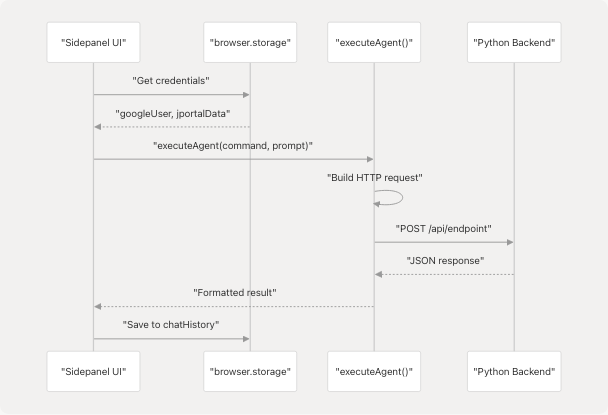
The executeAgent() function at extension/entrypoints/utils/executeAgent.ts17-127 handles credential injection, URL extraction, and payload construction. See Extension Architecture Overview for detailed request flow.
Internal Message Passing
Background script handles messages from UI and content scripts:
Title: Internal Extension Message Flow
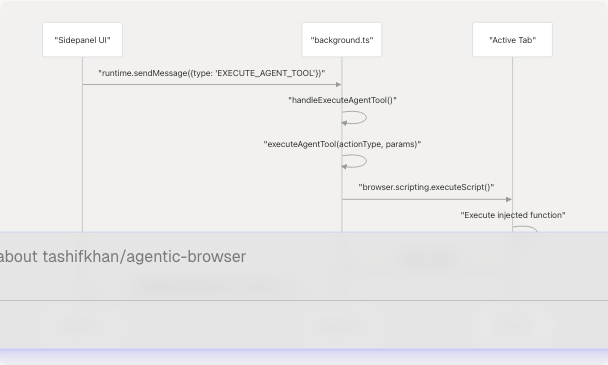
The background script's message router at extension/entrypoints/background.ts24-128 supports 8 message types. See Background Script and Message Handling for complete message type documentation.
Sources: extension/entrypoints/utils/executeAgent.ts17-127 extension/entrypoints/background.ts24-128 extension/entrypoints/background.ts516-539
Storage Schema
The extension uses browser.storage.local for persistent state. Key storage keys:
| Storage Key | Type | Purpose | Set By |
|---|---|---|---|
chatHistory |
ChatMessage[] |
Conversation messages | AgentExecutor |
googleUser |
{token, email, name, picture} |
Google OAuth state | Settings UI |
baseUrl |
string |
Python backend URL | Settings UI |
jportalId |
string |
JIIT portal username | Settings UI |
jportalPass |
string |
JIIT portal password | Settings UI |
jportalData |
object |
JIIT session data | Settings UI after login |
tabsData |
TabsData |
Current tab information | background.ts |
allTabsUrls |
TabInfo[] |
All open tabs | background.ts |
activeTabUrl |
TabInfo |
Currently active tab | background.ts |
totalTabs |
number |
Tab count | background.ts |
Chat history persistence logic at extension/Extension/entrypoints/sidepanel/AgentExecutor.tsx53-77:
- Loads on component mount
- Saves on every
chatHistoryupdate viauseEffect - Cleared by "New Chat" button at extension/Extension/entrypoints/sidepanel/AgentExecutor.tsx352-362
Sources: extension/Extension/entrypoints/sidepanel/AgentExecutor.tsx53-77 extension/Extension/entrypoints/utils/executeAgent.ts29-54 extension/Extension/entrypoints/background.ts867-882
UI Rendering
The AgentExecutor component renders a modern chat interface with three main sections:
Empty State
At extension/Extension/entrypoints/sidepanel/AgentExecutor.tsx429-434 shown when chatHistory.length === 0:
- Displays "Mention tabs to add context" message
- Shows example mention card at extension/Extension/entrypoints/sidepanel/AgentExecutor.tsx415-425 with rotated styling
Chat Container
At extension/Extension/entrypoints/sidepanel/AgentExecutor.tsx435-466 displays conversation:
- Maps over
chatHistoryarray - Renders user messages with
.chat-message.userclass - Renders assistant messages with
.chat-message.assistantclass - Shows typing indicator during execution at extension/Extension/entrypoints/sidepanel/AgentExecutor.tsx453-464
- Auto-scrolls to bottom via ref at extension/Extension/entrypoints/sidepanel/AgentExecutor.tsx79-84
Composer
At extension/Extension/entrypoints/sidepanel/AgentExecutor.tsx480-550 handles input:
- Quick action pills: "Summarize", "Explain", "Analyze" at extension/Extension/entrypoints/sidepanel/AgentExecutor.tsx470-478
- Slash menu for command suggestions at extension/Extension/entrypoints/sidepanel/AgentExecutor.tsx482-497
- Mention menu for quick actions at extension/Extension/entrypoints/sidepanel/AgentExecutor.tsx499-515
- Input field with left/right icon buttons at extension/Extension/entrypoints/sidepanel/AgentExecutor.tsx517-549
- Send button with arrow icon, disabled when executing or input empty
All styling is inline at extension/Extension/entrypoints/sidepanel/AgentExecutor.tsx552-676 using dark gradient theme with blur effects.
Sources: extension/Extension/entrypoints/sidepanel/AgentExecutor.tsx407-676
Environment Configuration
The extension reads configuration from environment variables via Vite:
VITE_API_URL: Base URL for Python backend, used at extension/Extension/entrypoints/utils/executeAgent.ts38- Falls back to empty string if not set
The .gitignore at extension/.gitignore42-44 excludes .env files from version control to protect secrets.
Sources: extension/Extension/entrypoints/utils/executeAgent.ts38 extension/.gitignore42-44