Backend Architecture
Purpose and Scope
This document describes the FastAPI backend architecture of TalentSync, including the application structure, API versioning strategy, service organization, AI/ML integration patterns, and dependency management. The backend follows a service-oriented architecture with clear separation between route handlers, business logic services, and external agent integrations.
For information about specific AI services (Resume Analysis, ATS Evaluation, etc.), see Backend Services. For LLM integration patterns and prompt engineering, see LLM Integration & Prompt Engineering. For deployment configuration, see Deployment & Infrastructure.
High-Level Application Structure
The TalentSync backend uses two application entry points representing different architectural iterations:
- Monolithic Entry Point - backend/server.py containing FastAPI app initialization, model loading, and core resume analysis logic in a single file
- Modular Entry Point - backend/app/main.py with router-based architecture and clean service separation
The modular structure (app/main.py) is the current production architecture and follows these organizational principles:
backend/
├── server.py                    # Legacy monolithic entry point
├── app/
│   ├── main.py                 # Production entry point (v1.5.8)
│   ├── routes/                 # API route handlers
│   ├── services/               # Business logic layer
│   ├── agents/                 # External data gathering
│   ├── models/                 # Pydantic schemas
│   └── core/                   # Shared infrastructure
├── pyproject.toml              # Dependency definitions
└── uv.lock                     # Locked dependencies
Sources: backend/server.py1-70 backend/app/main.py1-149
FastAPI Application Initialization
Application Entry Point
The production FastAPI application is initialized in app/main.py:

Diagram: FastAPI Application and Router Registration Structure
The application uses app.include_router() to register multiple routers, each handling a specific domain or API version. All routes accept wildcard CORS origins for development flexibility.
Sources: backend/app/main.py4-148
API Versioning Strategy
The backend implements a dual-versioning strategy where services are exposed through both v1 (file-based) and v2 (text-based) API endpoints:
| Feature | v1 API Path | v2 API Path | Input Method |
|---|---|---|---|
| Resume Analysis | /api/v1/analyze_resume |
/api/v2/analyze_resume |
v1: File upload, v2: Raw text |
| Cold Mail Generator | /api/v1/generate_cold_mail |
/api/v2/generate_cold_mail |
v1: File + form, v2: Text + JSON |
| Hiring Assistant | /api/v1/hiring_assistant |
/api/v2/hiring_assistant |
v1: File + questions, v2: Text + JSON |
| ATS Evaluation | /api/v1/ats_evaluation |
/api/v2/ats_evaluation |
v1: File + JD, v2: Text + JD |
| Tailored Resume | /api/v1/tailored_resume |
/api/v2/tailored_resume |
v1: File + job, v2: Text + job |
Key Architectural Decisions:
- v1 APIs accept
multipart/form-datawith file uploads using FastAPI'sUploadFile - v2 APIs accept
application/jsonwith resume text directly in request body - Both versions share the same service layer (
app/services/) but have separate route handlers - v2 APIs reduce overhead by eliminating file parsing step for clients that already have text
Sources: backend/app/main.py22-148
Service Layer Architecture
The service layer implements business logic separate from HTTP concerns. Each service module encapsulates a specific AI-powered feature:
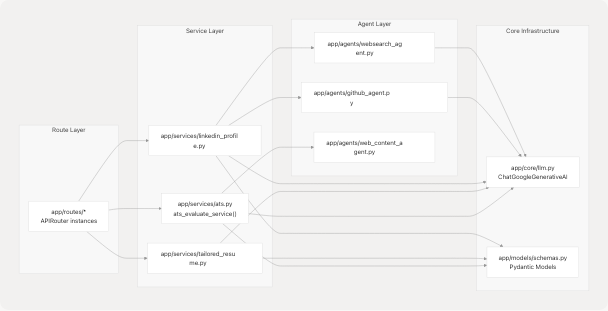
Diagram: Service Layer Dependencies and Data Flow
Service Responsibilities:
- ats.py - Evaluates resume-to-JD compatibility, fetches JD content via web agent if URL provided, invokes LangGraph-based evaluator
- tailored_resume.py - Generates job-specific resume analysis by calling resume generator with web research context
- linkedin_profile.py - Creates comprehensive LinkedIn presence content including profile sections and suggested posts
Each service follows this pattern:
- Validate inputs using Pydantic models
- Gather external data via agents if needed
- Invoke LLM with structured prompts
- Parse and validate LLM output
- Return structured response models
Sources: backend/app/services/ats.py1-214 backend/app/services/tailored_resume.py1-90 backend/app/services/linkedin_profile.py1-408
Agent System
The agent system provides specialized capabilities for external data gathering and content extraction:
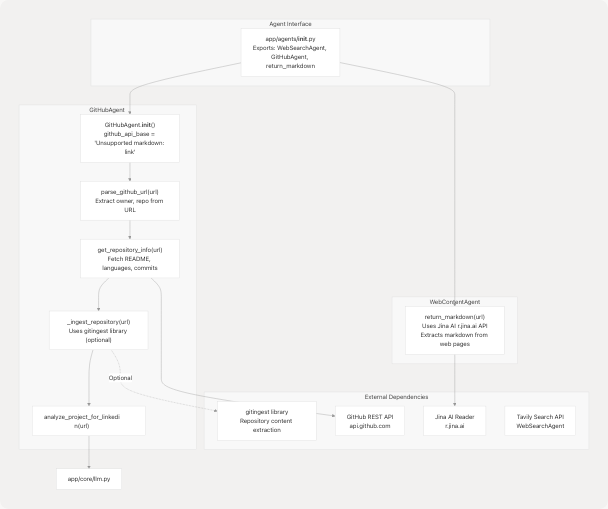
Diagram: Agent System Architecture and External Service Integration
GitHubAgent Implementation Details
The GitHubAgent class (backend/app/agents/github_agent.py49-409) provides GitHub repository analysis:
| Method | Purpose | Returns |
|---|---|---|
parse_github_url(url) |
Extracts owner/repo from various GitHub URL formats | Dict[str, str] with owner, repo |
get_repository_info(url) |
Fetches metadata via GitHub API (stars, forks, languages, README) | Dict[str, Any] |
_ingest_repository(url) |
Deep code analysis via gitingest (optional dependency) | Optional[IngestedContent] |
analyze_project_for_linkedin(url) |
Generates LinkedIn-friendly project insights using LLM | Dict[str, Any] |
Optional Deep Ingestion:
The agent attempts to use the gitingest library for comprehensive repository analysis. If unavailable, it gracefully falls back to basic GitHub API data:
# Conditional import pattern
try:
    from gitingest import ingest_async as _gitingest_async
    _HAS_GITINGEST = True
    _HAS_GITINGEST_ASYNC = True
except ImportError:
    try:
        from gitingest import ingest as _gitingest_sync
        _HAS_GITINGEST = True
        _HAS_GITINGEST_ASYNC = False
    except ImportError:
        _HAS_GITINGEST = False
When available, _ingest_repository() returns structured IngestedContent with tree structure, summary, and full content (truncated to 5MB for safety).
Sources: backend/app/agents/github_agent.py1-418 backend/app/agents/__init__.py1-14
LLM Integration Infrastructure
Core LLM Configuration
The LLM is initialized in the legacy server.py as a global singleton:
llm = None
try:
    google_api_key = os.getenv("GOOGLE_API_KEY")
    if not google_api_key:
        print("Warning: GOOGLE_API_KEY not found in .env...")
    else:
        llm = ChatGoogleGenerativeAI(
            model="gemini-2.0-flash",
            google_api_key=google_api_key,
            temperature=0.1,
        )
except Exception as e:
    print(f"Error initializing Google Generative AI: {e}...")
Key Configuration:
- Model:
gemini-2.0-flash(Google's Gemini 2.0 Flash model) - Temperature:
0.1(low temperature for consistent, deterministic outputs) - Provider: LangChain's
ChatGoogleGenerativeAIwrapper
The modular architecture likely mirrors this pattern in app/core/llm.py (not shown in provided files).
LangChain Integration
The backend uses LangChain for prompt templating and LLM orchestration:
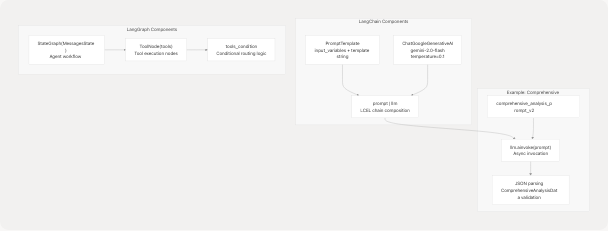
Diagram: LangChain and LangGraph Integration Patterns
Prompt Template Examples:
The codebase defines multiple prompt templates for different purposes:
- comprehensive_analysis_prompt_v2 (backend/server.py373-453) - Extracts structured resume data into
ComprehensiveAnalysisDatamodel - tips_generator_prompt (backend/server.py465-500) - Generates resume and interview tips
- format_analyse_prompt (backend/server.py503-601) - Two-phase cleaning and analysis
Each template follows this pattern:
prompt_template_str = """
You are an expert resume analyzer...

Input:
- Raw Resume Text:
```text
{extracted_resume_text}
Instructions:
- Extract name, email, contact...
- Infer predicted_field...
- Build skills_analysis...
Output: Return ONLY a single JSON object... """
prompt = PromptTemplate( input_variables=["extracted_resume_text", "basic_info_json"], template=prompt_template_str, )
**Sources:** <FileRef file-url="https://github.com/harleenkaur28/AI-Resume-Parser/blob/b2bbd83d/backend/server.py#L68-L86" min=68 max=86 file-path="backend/server.py">Hii</FileRef> <FileRef file-url="https://github.com/harleenkaur28/AI-Resume-Parser/blob/b2bbd83d/backend/server.py#L373-L601" min=373 max=601 file-path="backend/server.py">Hii</FileRef> <FileRef file-url="https://github.com/harleenkaur28/AI-Resume-Parser/blob/b2bbd83d/backend/experiment/exp.ipynb#L1-L177" min=1 max=177 file-path="backend/experiment/exp.ipynb">Hii</FileRef>

---

## ML Models and NLP Pipeline

### Traditional ML Components

The backend loads pre-trained scikit-learn models for resume classification:

```mermaid
graph LR
    subgraph "Model Files"
        CLF["best_model.pkl<br/>Trained classifier<br/>25 job categories"]
        TFIDF["tfidf.pkl<br/>TF-IDF vectorizer<br/>Text feature extraction"]
    end

    subgraph "NLP Pipeline"
        SpacyLoad["spacy.load('en_core_web_sm')<br/>English language model"]
        NLTKData["NLTK data<br/>stopwords, punkt<br/>backend/app/model/nltk_data/"]
    end

    subgraph "Text Processing Functions"
        CleanResume["clean_resume(txt)<br/>1. Remove URLs, mentions<br/>2. Remove punctuation<br/>3. Lemmatization (spacy)<br/>4. Remove stopwords (NLTK)"]
        ExtractText["extract_text_from_pdf(file)<br/>PyPDF2.PdfReader<br/>Iterates all pages"]
        ProcessDoc["process_document(bytes, filename)<br/>Handles: .txt, .md, .pdf, .docx"]
    end

    subgraph "Prediction Pipeline"
        InputText["Raw resume text"]
        Clean["clean_resume()"]
        Vectorize["tfidf_vectorizer.transform()"]
        Predict["clf.predict()"]
        Category["Predicted job category<br/>e.g., 'Java Developer'"]
    end

    CLF --> Predict
    TFIDF --> Vectorize
    SpacyLoad --> CleanResume
    NLTKData --> CleanResume

    InputText --> ProcessDoc
    ProcessDoc --> ExtractText
    ExtractText --> Clean
    Clean --> Vectorize
    Vectorize --> Predict
    Predict --> Category
Diagram: ML Classification Pipeline and NLP Processing Flow
Model Loading and Initialization
Models are loaded using pickle at application startup:
clf = pickle.load(
    open(
        os.path.join(
            os.path.dirname(__file__),
            "app",
            "model",
            "best_model.pkl",
        ),
        "rb",
    )
)
tfidf_vectorizer = pickle.load(
    open(
        os.path.join(
            os.path.dirname(__file__),
            "app",
            "model",
            "tfidf.pkl",
        ),
        "rb",
    )
)
NLP Initialization:
nlp = spacy.load("en_core_web_sm")  # English language model
nltk.download("punkt", download_dir=NLTK_DATA_PATH)
nltk.download("stopwords", download_dir=NLTK_DATA_PATH)
stop_words = set(stopwords.words("english"))
Text Extraction and Cleaning
The clean_resume() function (backend/server.py738-749) implements a multi-stage cleaning pipeline:
- URL Removal:
re.sub(r"https\\S+", "", txt) - Mention/Hashtag Removal:
re.sub(r"@\\S+|#\\S+", "", cleantxt) - Punctuation Removal:
re.sub(r"[^\w\s]", "", cleantxt) - Lemmatization: Uses spaCy's
token.lemma_to convert words to base form - Stopword Removal: Filters common English words using NLTK stopwords
The process_document() function (backend/server.py764-792) handles multiple file formats:
- .txt, .md: Direct UTF-8 decoding
- .pdf: PyPDF2's
PdfReaderwith page iteration - .docx: python-docx's
Documentwith paragraph extraction
Sources: backend/server.py702-792 backend/server.py714-735
Data Models and Validation
Pydantic Schema Organization
The app/models/schemas.py module defines comprehensive data models using Pydantic:
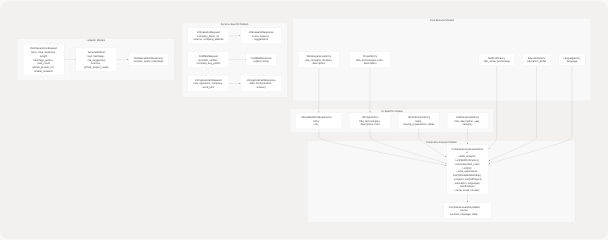
Diagram: Pydantic Model Hierarchy and Relationships
Key Model Categories
| Category | Models | Purpose |
|---|---|---|
| Resume Data | WorkExperienceEntry, ProjectEntry, SkillProficiency, EducationEntry, LanguageEntry |
Raw extracted data from resumes |
| UI-Optimized | UIDetailedWorkExperienceEntry, UIProjectEntry, UICertificationEntry, UIAchievementEntry |
Frontend-friendly formatted data |
| Composite | ComprehensiveAnalysisData, ComprehensiveAnalysisResponse |
Complete resume analysis results |
| Service Requests | JDEvaluatorRequest, ColdMailRequest, HiringAssistantRequest, PostGenerationRequest |
Service input validation |
| Service Responses | JDEvaluatorResponse, ColdMailResponse, HiringAssistantResponse, PostGenerationResponse |
Structured service outputs |
Validation Features
All models leverage Pydantic's validation capabilities:
- Field Constraints:
Field(ge=1, le=10)for numeric ranges,Field(min_length=1)for strings - Optional Fields:
Optional[str] = Nonewith default values - Lists with Limits:
Field(default_factory=list, max_items=5)for bounded collections - Custom Validators: Type coercion and business logic validation
- Datetime Handling:
Field(default_factory=lambda: datetime.now(timezone.utc))
Example Model with Rich Validation:
class PostGenerationRequest(BaseModel):
    topic: str
    tone: Optional[str] = None
    audience: Optional[List[str]] = None
    length: Optional[Literal["Short", "Medium", "Long", "Any"]] = "Medium"
    hashtags_option: Optional[str] = "suggest"
    post_count: int = Field(default=3, ge=1, le=5)
    emoji_level: int = Field(default=1, ge=0, le=3)
    github_project_url: Optional[HttpUrl] = None
    enable_research: bool = Field(
        default=True,
        description="Enable web research for topic insights"
    )
Sources: backend/app/models/schemas.py1-499
Middleware and Cross-Cutting Concerns
CORS Configuration
Both application entry points configure permissive CORS middleware for development:
app.add_middleware(
    CORSMiddleware,
    allow_origins=["*"],          # All origins allowed
    allow_credentials=True,        # Cookies/auth headers allowed
    allow_methods=["*"],           # All HTTP methods
    allow_headers=["*"],           # All headers allowed
)
This configuration should be restricted in production to specific frontend origins.
Error Handling Pattern
Services follow a consistent error handling pattern:
- Validation Errors: Raised as
HTTPException(status_code=400, detail=str(validation_error)) - Service Errors: Logged and wrapped as
HTTPException(status_code=500, detail="...") - Optional Failures: Gracefully degraded (e.g., optional gitingest failing returns
None)
Example from ATS Service:
try:
    JDEvaluatorRequest(
        company_name=company_name,
        company_website_content=company_website,
        jd=jd_text,
        resume=resume_text,
    )
except ValidationError as ve:
    logger.warning("ATS evaluation validation error", extra={...})
    raise HTTPException(status_code=400, detail=str(ve))

except Exception as e:
    logger.exception("ATS evaluation failed", extra={...})
    raise HTTPException(status_code=500, detail=f"ATS evaluation failed: {e}")
Sources: backend/server.py59-65 backend/app/main.py10-16 backend/app/services/ats.py76-213
Dependency Management
Package Manager: uv
The project uses uv as the Python package manager (modern Rust-based alternative to pip/poetry):
- Manifest: backend/pyproject.toml defines project metadata and dependencies
- Lockfile: backend/uv.lock pins exact versions for reproducible builds
- Python Version:
>=3.13required
Core Dependencies
| Category | Key Packages | Purpose |
|---|---|---|
| Web Framework | fastapi>=0.115.12, uvicorn>=0.34.3, python-multipart>=0.0.20 |
API server and file handling |
| AI/LLM | langchain>=0.3.25, langchain-google-genai>=2.1.5, google-genai>=1.46.0, langgraph>=0.2.38 |
LLM orchestration and agent workflows |
| ML/NLP | scikit-learn>=1.7.0, spacy, nltk, sentence-transformers>=5.0.0 |
Traditional ML and text processing |
| Database | asyncpg>=0.30.0, motor>=3.7.1 |
PostgreSQL (async), MongoDB (async) |
| Document Processing | pymupdf>=1.26.5, pymupdf4llm>=0.0.27, python-docx (via PyPDF2) |
PDF and DOCX extraction |
| External Services | tavily-python>=0.7.12, langchain-tavily>=0.2.11, gitingest>=0.3.1 |
Web search and repository ingestion |
| Data Validation | pydantic>=2.11.5, pydantic-settings>=2.9.1 |
Request/response validation |
| Vector Search | faiss-cpu>=1.11.0 |
Efficient similarity search |
Custom Dependency Sources
The spaCy English model is loaded from a direct URL:
[tool.uv.sources]
en-core-web-sm = { url = "https://github.com/explosion/spacy-models/releases/download/en_core_web_sm-3.8.0/en_core_web_sm-3.8.0-py3-none-any.whl" }
This ensures the specific model version is available without requiring separate spacy download commands.
Sources: backend/pyproject.toml1-40 backend/uv.lock1-96 backend/requirements.txt1-121
Configuration and Environment Variables
Required Environment Variables
The backend requires the following environment variables (loaded via python-dotenv):
| Variable | Purpose | Used By |
|---|---|---|
GOOGLE_API_KEY |
Google Gemini API authentication | All LLM services |
TAVILY_API_KEY |
Tavily search API authentication | WebSearchAgent (optional) |
DATABASE_URL |
PostgreSQL connection string | Database operations |
Loading Pattern:
from dotenv import load_dotenv
load_dotenv()

google_api_key = os.getenv("GOOGLE_API_KEY")
if not google_api_key:
    print("Warning: GOOGLE_API_KEY not found...")
else:
    llm = ChatGoogleGenerativeAI(
        model="gemini-2.0-flash",
        google_api_key=google_api_key,
        temperature=0.1,
    )
NLTK Data Path Configuration
NLTK data is stored locally to avoid download on every startup:
NLTK_DATA_PATH = os.path.join(
    os.path.dirname(__file__),
    "app",
    "model",
    "nltk_data",
)

if not os.path.exists(NLTK_DATA_PATH):
    os.makedirs(NLTK_DATA_PATH)

nltk.data.path.append(NLTK_DATA_PATH)
This ensures offline operation after initial data download.
Sources: backend/server.py47-86 backend/server.py660-710
Summary
The TalentSync backend architecture demonstrates several key patterns:
- Dual Entry Points: Monolithic legacy (
server.py) vs. modular production (app/main.py) - API Versioning: v1 (file-based) and v2 (text-based) routes sharing service layer
- Service-Oriented Design: Clear separation between routes, services, agents, and core infrastructure
- AI/ML Hybrid: Traditional ML (scikit-learn) for classification + LLM (Gemini 2.0) for semantic analysis
- Agent System: Specialized agents for GitHub analysis, web search, and content extraction
- Structured Validation: Comprehensive Pydantic models throughout request/response pipeline
- Graceful Degradation: Optional dependencies (gitingest, Tavily) fail safely
The architecture enables rapid feature development through composable services while maintaining type safety and clear API contracts.