Role Selection & Management
- frontend/app/api/auth/[...nextauth]/route.ts
- frontend/app/api/auth/update-role/route.ts
- frontend/app/select-role/page.tsx
- frontend/middleware.ts
Purpose and Scope
This document covers the role selection and management system that assigns users to either the "User" (job seeker) or "Admin" (recruiter) role after authentication. This system ensures that all authenticated users have an assigned role before accessing protected application features.
For information about the authentication flow prior to role selection, see Login & OAuth. For details on how middleware enforces role-based access control, see Middleware & Route Protection.
System Overview
The role selection system operates as a mandatory post-authentication step for users who have successfully logged in but have not yet been assigned a role. The system prevents access to protected routes until a role is selected and enforces automatic redirects based on role state.
Role Types
| Role ID (UI) | Role Name (Database) | Description | Access Level |
|---|---|---|---|
user |
User |
Job seekers using resume analysis, cold mail, hiring assistant | Standard user features |
admin |
Admin |
Recruiters managing candidates, bulk processing, ATS evaluation | Administrative + recruiter features |
Sources: frontend/app/api/auth/update-role/route.ts26-28
Role Selection Flow
Sources: frontend/middleware.ts14-31 frontend/app/select-role/page.tsx26-67
Role Selection Page Component
The /select-role page is a client component that presents users with a choice between the "User" and "Recruiter" roles.
Component Structure
The page is implemented in frontend/app/select-role/page.tsx and uses the following key hooks:
useSession()- Accesses and updates the NextAuth sessionuseRouter()- Handles navigation after role selectionuseState()- Manages selected role, loading state, and errors
Initial Role Check
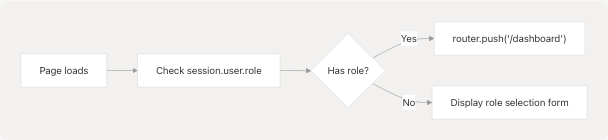
The component automatically redirects users who already have a role assigned:
useEffect(() => {
    // If user already has a role, redirect to dashboard
    if (session?.user && (session.user as any).role) {
        router.push("/dashboard");
    }
}, [session, router]);
Sources: frontend/app/select-role/page.tsx26-31
Role Selection UI
The interface presents two radio button options using shadcn/ui components:
| Component | Usage | Props |
|---|---|---|
RadioGroup |
Container for role options | value, onValueChange |
RadioGroupItem |
Individual role option | value="user" or value="admin" |
Label |
Role title and description | Associated with radio button |
Button |
Submit selection | Disabled when no role selected |
Sources: frontend/app/select-role/page.tsx93-149
Role Update API Endpoint
Request Flow
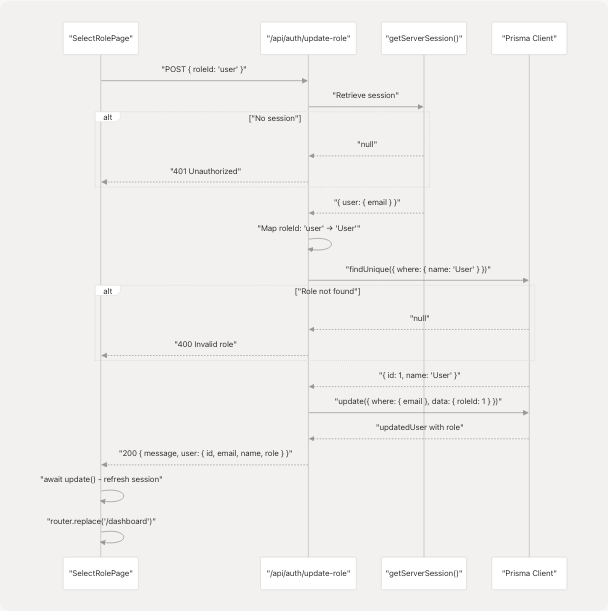
Sources: frontend/app/api/auth/update-role/route.ts6-64 frontend/app/select-role/page.tsx43-57
Endpoint Implementation
The API route at frontend/app/api/auth/update-role/route.ts handles role assignment:
Authentication Check
const session = await getServerSession(authOptions);

if (!session?.user?.email) {
  return NextResponse.json(
    { error: "Unauthorized" },
    { status: 401 }
  );
}
Sources: frontend/app/api/auth/update-role/route.ts8-15
Role ID Mapping
The endpoint maps the frontend role identifiers to database role names:
// Map incoming roleId to actual Role.name in database
// UI sends "user" or "admin"; in DB we store roles as "User" and "Admin"
const roleName = roleId === "user" ? "User" : "Admin";
This mapping ensures consistency between the UI convention (lowercase) and the database schema (capitalized).
Sources: frontend/app/api/auth/update-role/route.ts26-28
Database Update
const role = await prisma.role.findUnique({
  where: { name: roleName }
});

const updatedUser = await prisma.user.update({
  where: { email: session.user.email },
  data: { roleId: role.id },
  include: { role: true }
});
Sources: frontend/app/api/auth/update-role/route.ts29-45
Middleware Enforcement
The middleware at frontend/middleware.ts enforces role requirements across the application.
Role State Detection and Redirect Logic
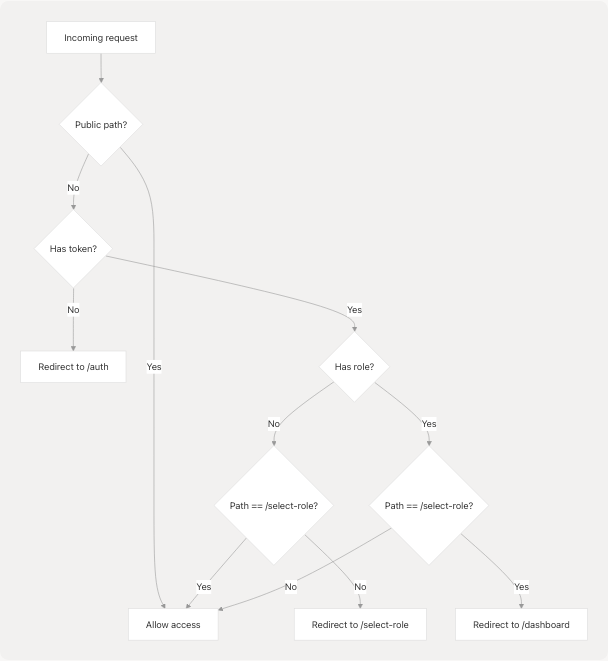
Sources: frontend/middleware.ts4-34
Middleware Implementation Details
The middleware uses NextAuth's withAuth wrapper and implements two key checks:
1. No Role Redirect
If an authenticated user has no role and is not already on /select-role, redirect them:
if (
  token &&
  !token.role &&
  pathname !== "/select-role" &&
  pathname !== "/auth" &&
  pathname !== "/" &&
  !pathname.startsWith("/api/") &&
  !pathname.startsWith("/_next/") &&
  !pathname.includes(".")
) {
  return NextResponse.redirect(new URL("/select-role", req.url));
}
Sources: frontend/middleware.ts14-26
2. Has Role Redirect
If a user with a role attempts to access /select-role, redirect to dashboard:
if (token && token.role && pathname === "/select-role") {
  return NextResponse.redirect(new URL("/dashboard", req.url));
}
This prevents users from re-selecting their role after it has been assigned.
Sources: frontend/middleware.ts28-31
Authorization Callback
The middleware's authorization callback determines whether a request should proceed:
authorized: ({ token, req }) => {
  const { pathname } = req.nextUrl;

  // Allow access to public pages
  if (
    pathname === "/" ||
    pathname === "/about" ||
    pathname === "/auth" ||
    pathname.startsWith("/auth/verify-email") ||
    // ... other public paths
  ) {
    return true;
  }

  // For select-role page, require authentication but not role
  if (pathname === "/select-role") {
    return !!token;
  }

  // For protected pages, require authentication and role
  return !!token;
}
Sources: frontend/middleware.ts36-64
Session Update Mechanism
After the role is assigned via the API, the client must update its NextAuth session to reflect the change.
Session Update Process
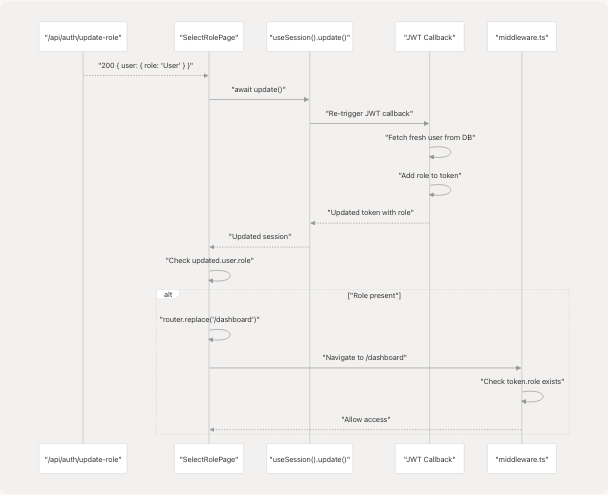
Sources: frontend/app/select-role/page.tsx51-57
Client-Side Update Code
The role selection handler ensures the session is updated before navigation:
if (response.ok) {
  // Refresh the session so middleware sees the new role immediately
  const updated = await update();
  // Navigate only after we confirm role is present in session
  if (updated?.user && (updated.user as any).role) {
    router.replace("/dashboard");
  }
}
The update() function triggers NextAuth to re-fetch the session, which in turn triggers the JWT callback to refresh the token with the latest user data including the newly assigned role. The navigation to /dashboard only occurs after confirming the role is present in the updated session.
Sources: frontend/app/select-role/page.tsx51-57
Data Model Integration
Database Schema
The role selection system interacts with the following database models:
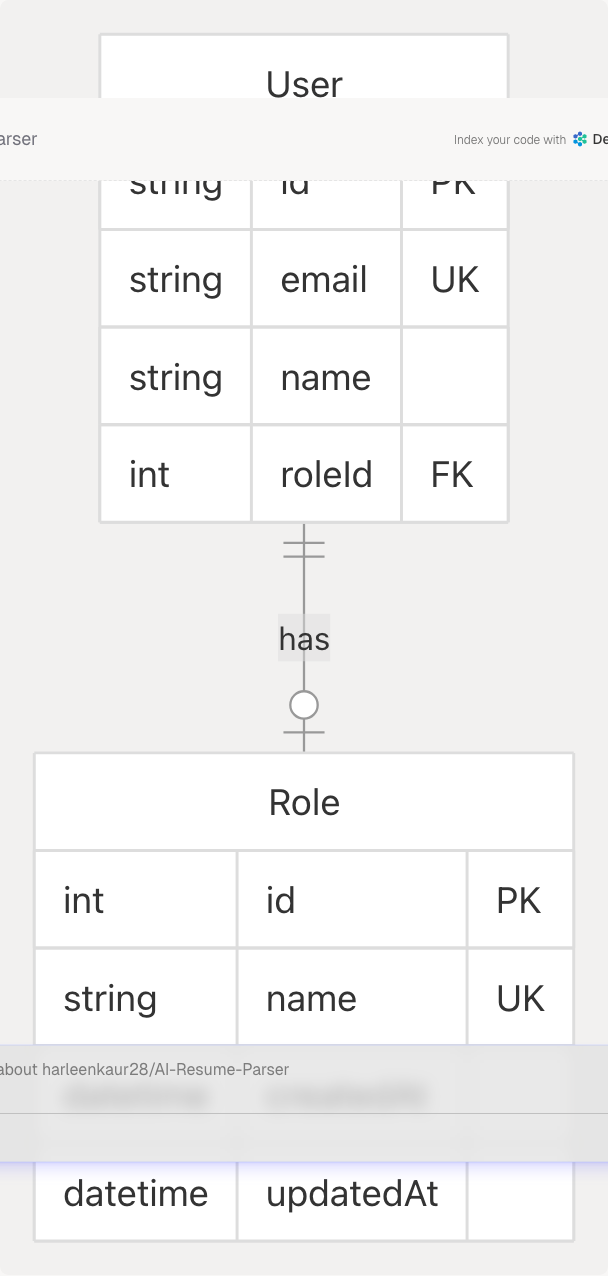
Prisma Queries
The role update endpoint executes two sequential queries:
-
Find Role by Name:
await prisma.role.findUnique({ where: { name: roleName } })
-
Update User with Role ID:
await prisma.user.update({ where: { email: session.user.email }, data: { roleId: role.id }, include: { role: true } })
The include: { role: true } ensures the response contains the full role object, not just the role ID.
Sources: frontend/app/api/auth/update-role/route.ts29-45
Error Handling
The system implements error handling at multiple levels:
API Level Errors
| Status Code | Condition | Response |
|---|---|---|
| 401 | No session or email | { error: "Unauthorized" } |
| 400 | Missing roleId | { error: "Role ID is required" } |
| 400 | Invalid role | { error: "Invalid role" } |
| 500 | Database or server error | { error: "Internal server error" } |
Sources: frontend/app/api/auth/update-role/route.ts10-62
Client Level Errors
The role selection page handles errors with user feedback:
try {
  const response = await fetch("/api/auth/update-role", {
    method: "POST",
    headers: { "Content-Type": "application/json" },
    body: JSON.stringify({ roleId: selectedRole }),
  });

  if (response.ok) {
    // Success flow...
  } else {
    const errorData = await response.json();
    setError(errorData.error || "Failed to update role");
  }
} catch (error) {
  setError("Something went wrong. Please try again.");
} finally {
  setIsLoading(false);
}
Sources: frontend/app/select-role/page.tsx42-66
Summary
The role selection system ensures that every authenticated user has an assigned role before accessing protected features. The system combines:
- UI Component (
/select-rolepage) - Presents role options with descriptions - API Endpoint (
/api/auth/update-role) - Updates the user's role in the database - Middleware (
middleware.ts) - Enforces role requirements and automatic redirects - Session Management - Updates NextAuth session to reflect role changes immediately
The system uses automatic redirects to guide users through the role selection flow and prevents access to protected routes until a role is assigned. The middleware ensures that users with roles cannot re-access the role selection page, maintaining role assignment integrity.
Sources: frontend/app/select-role/page.tsx frontend/app/api/auth/update-role/route.ts frontend/middleware.ts