Environment Configuration
Purpose and Scope
This document covers the environment variable configuration and management across the TalentSync platform. It details all configuration settings required for the frontend (Next.js), backend (FastAPI), and database (PostgreSQL) services, including build-time versus runtime variable handling, Docker Compose integration, and security best practices.
For information about the Docker images that consume these variables, see Docker Images & Build Process. For deployment automation that sets these variables, see CI/CD Pipeline. For monitoring configuration specifically, see Monitoring & Analytics.
Environment Variable Categories
The TalentSync platform uses environment variables across three main categories, each with distinct loading mechanisms and security considerations.
Build-Time vs Runtime Variables
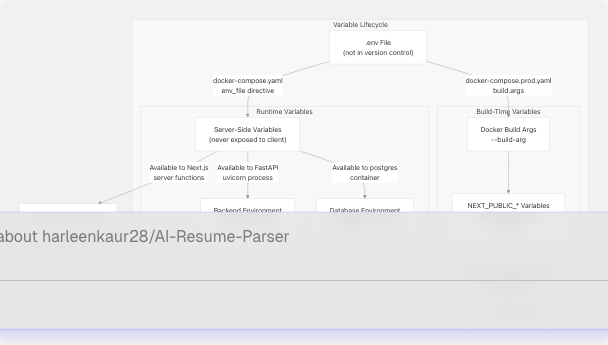
Sources: docker-compose.yaml1-78 docker-compose.prod.yaml1-66 frontend/Dockerfile9-18
Variable Naming Conventions
| Prefix | Visibility | Loading Mechanism | Example |
|---|---|---|---|
NEXT_PUBLIC_* |
Client & Server | Build-time embedded | NEXT_PUBLIC_POSTHOG_KEY |
NEXTAUTH_* |
Server only | Runtime from .env | NEXTAUTH_SECRET |
POSTGRES_* |
Database container | Runtime from .env | POSTGRES_PASSWORD |
GOOGLE_* / GITHUB_* |
Server only | Runtime from .env | GOOGLE_CLIENT_ID |
EMAIL_* |
Server only | Runtime from .env | EMAIL_SERVER_HOST |
| (no prefix) | Service-specific | Runtime from .env | DATABASE_URL, BACKEND_URL |
Sources: frontend/Dockerfile10-18 docker-compose.prod.yaml38-40
Frontend Environment Configuration
The Next.js frontend requires environment variables for authentication, external service integration, and inter-service communication. Variables are loaded through multiple mechanisms depending on their purpose.
NextAuth Configuration
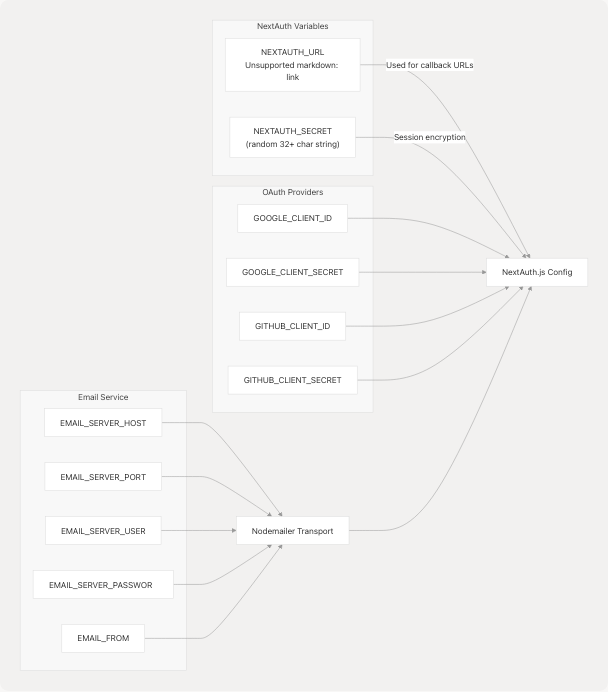
Sources: docker-compose.yaml58-62 docker-compose.prod.yaml44-48
Authentication Variables
| Variable | Purpose | Set At | Example Value |
|---|---|---|---|
NEXTAUTH_URL |
Base URL for OAuth callbacks and session management | Runtime (overridden in docker-compose) | https://talentsync.tashif.codes |
NEXTAUTH_SECRET |
JWT encryption key for session tokens | Runtime (.env file) | (generated random string) |
GOOGLE_CLIENT_ID |
Google OAuth application ID | Runtime (.env file) | 123456789-abc.apps.googleusercontent.com |
GOOGLE_CLIENT_SECRET |
Google OAuth application secret | Runtime (.env file) | (secret string) |
GITHUB_CLIENT_ID |
GitHub OAuth application ID | Runtime (.env file) | Iv1.abc123def456 |
GITHUB_CLIENT_SECRET |
GitHub OAuth application secret | Runtime (.env file) | (secret string) |
Sources: docker-compose.yaml58-62 frontend/Dockerfile100-125
PostHog Analytics Configuration
PostHog environment variables are unique in that they must be available at both build-time (embedded in client bundle) and runtime (for server-side tracking).
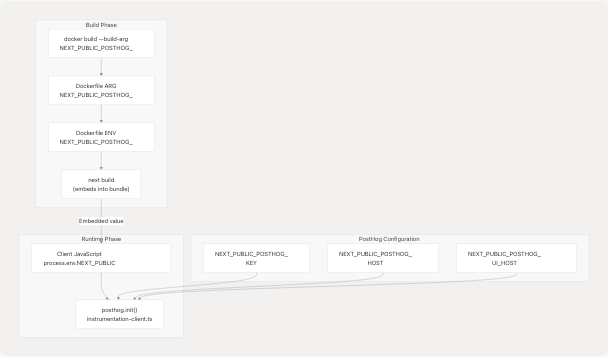
Sources: docker-compose.prod.yaml38-40 frontend/Dockerfile10-18 frontend/instrumentation-client.ts1-12
The PostHog configuration in frontend/instrumentation-client.ts3-11 demonstrates runtime usage:
const key = process.env.NEXT_PUBLIC_POSTHOG_KEY
const apiHost = '/ph'
const uiHost = "https://eu.posthog.com"

posthog.init(key as string, {
  api_host: apiHost,
  ui_host: uiHost,
})
Note that apiHost is hardcoded to /ph to route through a Next.js rewrite proxy, while key and uiHost come from environment variables.
Sources: frontend/instrumentation-client.ts4-11
Inter-Service Communication
| Variable | Purpose | Docker Compose Value | Local Development Value |
|---|---|---|---|
BACKEND_URL |
FastAPI backend endpoint | http://backend:8000 (internal DNS) |
http://localhost:8000 |
DATABASE_URL |
PostgreSQL connection string | postgresql://${POSTGRES_USER}:${POSTGRES_PASSWORD}@db:5432/${POSTGRES_DB}?schema=public |
postgresql://user:pass@localhost:5432/db?schema=public |
The BACKEND_URL variable is critical for frontend-to-backend API calls. In Docker Compose, it uses internal Docker network DNS resolution docker-compose.yaml60:
BACKEND_URL: http://backend:8000 # Internal communication to backend service
Sources: docker-compose.yaml28-29 docker-compose.yaml59-60 docker-compose.prod.yaml24 docker-compose.prod.yaml47-48
Backend Environment Configuration
The FastAPI backend requires environment variables for AI/ML service integration, database connectivity, and external API access.
AI/ML Service API Keys
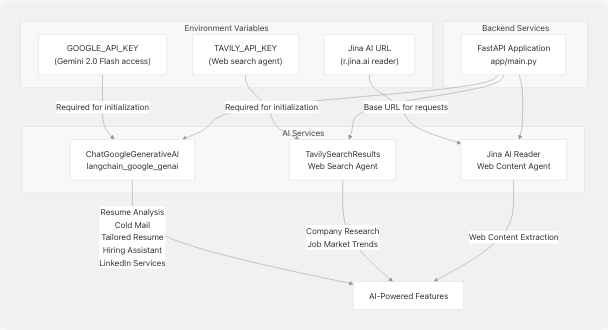
Sources: docker-compose.yaml24-32
Backend-Specific Environment Variables
| Variable | Purpose | Security Level | Usage |
|---|---|---|---|
GOOGLE_API_KEY |
Google Generative AI (Gemini 2.0 Flash) authentication | Critical secret | All LLM-powered services |
TAVILY_API_KEY |
Tavily web search API authentication | Secret | Web search agent for company research |
DATABASE_URL |
PostgreSQL connection string | Secret | Prisma/SQLAlchemy database operations |
NLTK_DATA |
NLTK data directory path | Configuration | Set in Dockerfile: /app/model/nltk_data |
The backend Dockerfile sets the NLTK_DATA environment variable at backend/Dockerfile6:
ENV NLTK_DATA=/app/model/nltk_data
This ensures NLP models (lemmatization, stopwords) load correctly from the pre-packaged directory.
Sources: backend/Dockerfile4-6 docker-compose.yaml27-32
Database Environment Configuration
PostgreSQL container configuration uses standard environment variables defined by the postgres:16 Docker image.
PostgreSQL Environment Variables
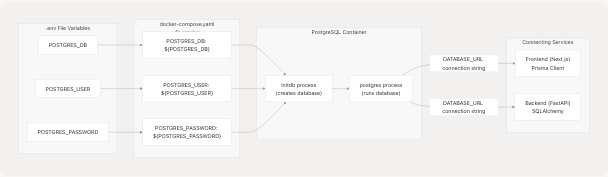
Sources: docker-compose.yaml4-17 docker-compose.prod.yaml2-14
Database Connection String Construction
The DATABASE_URL variable is constructed from the PostgreSQL variables at docker-compose.yaml28-29:
DATABASE_URL: "postgresql://${POSTGRES_USER}:${POSTGRES_PASSWORD}@db:5432/${POSTGRES_DB}?schema=public"
This connection string uses:
- Host:
db(Docker Compose service name for internal DNS resolution) - Port:
5432(default PostgreSQL port) - Schema:
public(Prisma schema namespace)
The same pattern is repeated for the frontend at docker-compose.yaml59
Sources: docker-compose.yaml28-29 docker-compose.yaml59 docker-compose.prod.yaml24 docker-compose.prod.yaml47
Docker Compose Environment Management
Docker Compose provides multiple mechanisms for passing environment variables to containers, used strategically across the TalentSync stack.
Environment Variable Loading Strategy
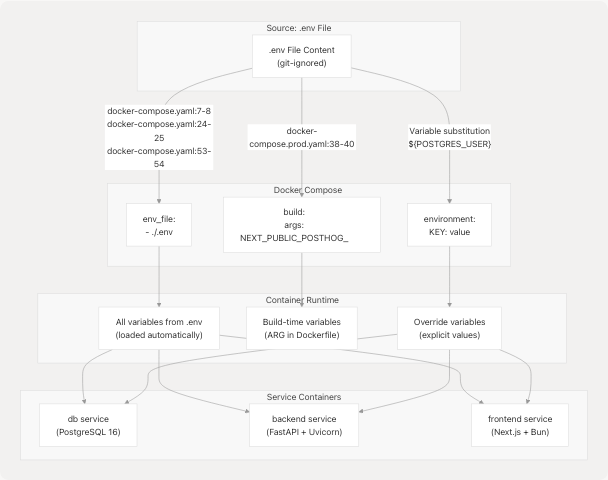
Sources: docker-compose.yaml7-8 docker-compose.yaml24-25 docker-compose.yaml53-54 docker-compose.prod.yaml37-40
Environment Loading Mechanisms Comparison
| Mechanism | Location | Purpose | Example |
|---|---|---|---|
env_file: |
docker-compose.yaml7-8 | Load all variables from .env file | env_file: - ./.env |
environment: |
docker-compose.yaml9-13 | Explicitly set or override variables | POSTGRES_DB: ${POSTGRES_DB} |
build.args: |
docker-compose.prod.yaml37-40 | Pass variables to Docker build process | NEXT_PUBLIC_POSTHOG_KEY: ${NEXT_PUBLIC_POSTHOG_KEY} |
${VAR} substitution |
docker-compose.yaml28 | Reference .env variables in compose file | ${POSTGRES_USER} |
Production vs Development Configuration
The production configuration docker-compose.prod.yaml1-66 differs from development docker-compose.yaml1-78 in several key ways:
| Aspect | Development (docker-compose.yaml) | Production (docker-compose.prod.yaml) |
|---|---|---|
| Networks | Single TalentSync bridge network |
Internal network + external nginxproxyman_network |
| Frontend Ports | Exposed 3000:3000 |
Not exposed (accessed via Nginx proxy) |
| Build Args | Empty args: {} |
PostHog variables passed as build args |
NEXTAUTH_URL |
https://talentsync.tashif.codes |
https://talentsync.tashif.codes |
The production setup uses an external Nginx Proxy Manager network docker-compose.prod.yaml64-66:
networks:
  talentsync_internal_network:
    driver: bridge
  nginxproxyman_network:
    external: true
    name: nginx-proxy-manager_nginxproxyman
This allows Nginx to proxy requests to the frontend while keeping the backend isolated on the internal network.
Sources: docker-compose.yaml74-76 docker-compose.prod.yaml61-66
Security Best Practices
.env File Exclusion
The .env file containing sensitive credentials is excluded from version control and Docker builds through multiple mechanisms:
- Git Exclusion:
.gitignoreprevents.envfrom being committed - Docker Build Exclusion: frontend/.dockerignore7-12 lists all
.envvariants:
# Environment files
.env
.env.local
.env.development.local
.env.test.local
.env.production.local
This ensures secrets are never baked into Docker images.
Sources: frontend/.dockerignore7-12
Build-Time vs Runtime Secret Handling
The frontend Dockerfile includes extensive comments on proper secret handling frontend/Dockerfile100-125:
# --- Environment Variable Notes ---
# The Next.js application will require various environment variables at runtime,
# such as those defined in your .env file (e.g., NEXTAUTH_URL, NEXTAUTH_SECRET, DATABASE_URL, etc.).
#
# How to provide them to the Docker container:
# 1. Using 'docker run -e VARNAME=value ...' for each variable.
# 2. Using 'docker run --env-file ./path/to/your/.env.production ...' to pass a file with variable definitions.
#
# Do NOT bake sensitive secrets directly into the Docker image by copying the .env file or using hardcoded ENV instructions for secrets.
Variable Security Classification
| Security Level | Variable Type | Handling | Example |
|---|---|---|---|
| Public | Client-embedded analytics | Build-time ARG → ENV | NEXT_PUBLIC_POSTHOG_KEY |
| Server Secret | OAuth credentials, API keys | Runtime only via env_file | GOOGLE_CLIENT_SECRET, NEXTAUTH_SECRET |
| Critical Secret | Database passwords, AI API keys | Runtime only via env_file, encrypted in transit | POSTGRES_PASSWORD, GOOGLE_API_KEY |
Sources: frontend/Dockerfile100-125
Variable Lifecycle Across System
The complete lifecycle of environment variables from development to production deployment:
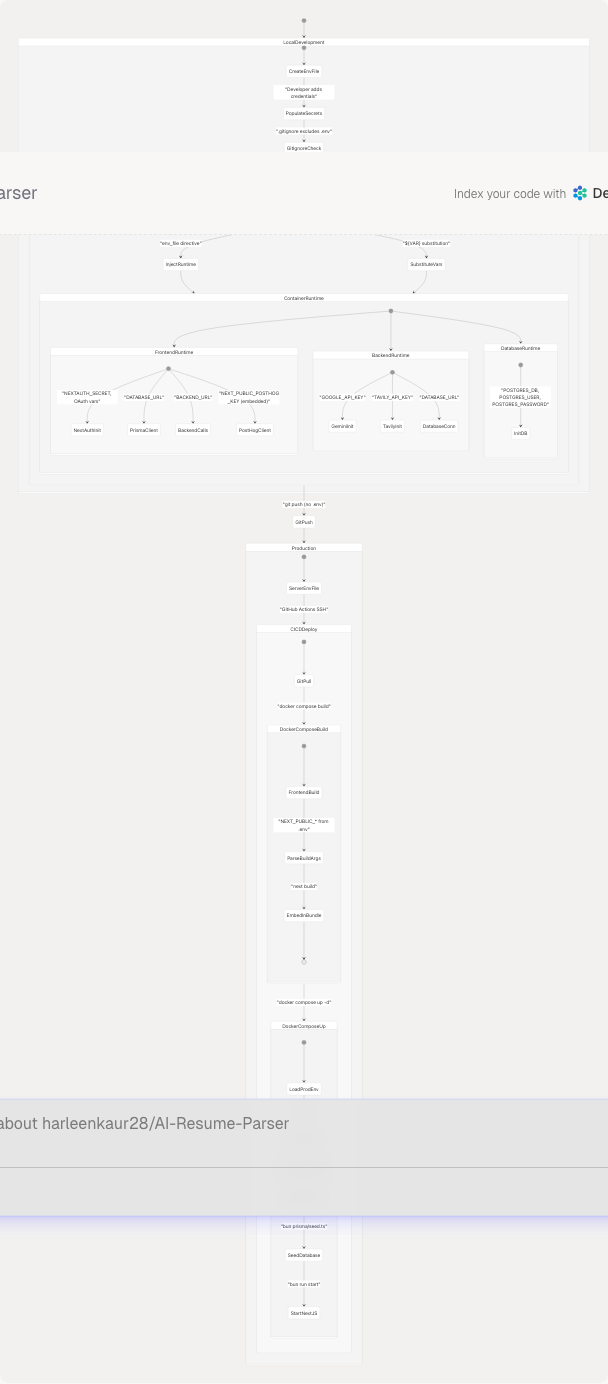
Sources: docker-compose.yaml1-78 docker-compose.prod.yaml1-66 frontend/Dockerfile1-125 backend/Dockerfile1-33
Environment Variable Reference Table
Complete Variable Inventory
| Variable | Service | Type | Security | Source |
|---|---|---|---|---|
NEXTAUTH_URL |
Frontend | Runtime | Public | docker-compose.yaml58 |
NEXTAUTH_SECRET |
Frontend | Runtime | Critical Secret | .env file |
DATABASE_URL |
Frontend, Backend | Runtime | Secret | Constructed docker-compose.yaml28 |
BACKEND_URL |
Frontend | Runtime | Configuration | docker-compose.yaml60 |
GOOGLE_CLIENT_ID |
Frontend | Runtime | Secret | .env file |
GOOGLE_CLIENT_SECRET |
Frontend | Runtime | Critical Secret | .env file |
GITHUB_CLIENT_ID |
Frontend | Runtime | Secret | .env file |
GITHUB_CLIENT_SECRET |
Frontend | Runtime | Critical Secret | .env file |
EMAIL_SERVER_HOST |
Frontend | Runtime | Configuration | .env file |
EMAIL_SERVER_PORT |
Frontend | Runtime | Configuration | .env file |
EMAIL_SERVER_USER |
Frontend | Runtime | Secret | .env file |
EMAIL_SERVER_PASSWORD |
Frontend | Runtime | Critical Secret | .env file |
EMAIL_FROM |
Frontend | Runtime | Configuration | .env file |
NEXT_PUBLIC_POSTHOG_KEY |
Frontend | Build-time | Public | docker-compose.prod.yaml38 |
NEXT_PUBLIC_POSTHOG_HOST |
Frontend | Build-time | Public | docker-compose.prod.yaml40 |
NEXT_PUBLIC_POSTHOG_UI_HOST |
Frontend | Build-time | Public | docker-compose.prod.yaml39 |
GOOGLE_API_KEY |
Backend | Runtime | Critical Secret | .env file |
TAVILY_API_KEY |
Backend | Runtime | Secret | .env file |
NLTK_DATA |
Backend | Build-time | Configuration | backend/Dockerfile6 |
POSTGRES_DB |
Database | Runtime | Configuration | docker-compose.yaml11 |
POSTGRES_USER |
Database | Runtime | Secret | docker-compose.yaml12 |
POSTGRES_PASSWORD |
Database | Runtime | Critical Secret | docker-compose.yaml13 |
NODE_ENV |
Frontend | Runtime | Configuration | docker-compose.yaml56 |
PYTHONUNBUFFERED |
Backend | Build-time | Configuration | backend/Dockerfile5 |
Sources: docker-compose.yaml1-78 docker-compose.prod.yaml1-66 frontend/Dockerfile1-125 backend/Dockerfile1-33