Monitoring & Analytics
Purpose and Scope
This document describes the monitoring and analytics infrastructure implemented in TalentSync. The system uses PostHog for product analytics and user behavior tracking. This page covers the client-side integration, proxy configuration, environment setup, and deployment considerations for the analytics system.
For information about deployment infrastructure, see Deployment & Infrastructure. For environment configuration details, see Environment Configuration.
Analytics Architecture Overview
TalentSync implements a privacy-focused analytics solution using PostHog EU Cloud, with a custom reverse proxy configuration to ensure reliable data collection by bypassing ad-blockers and tracking prevention mechanisms.
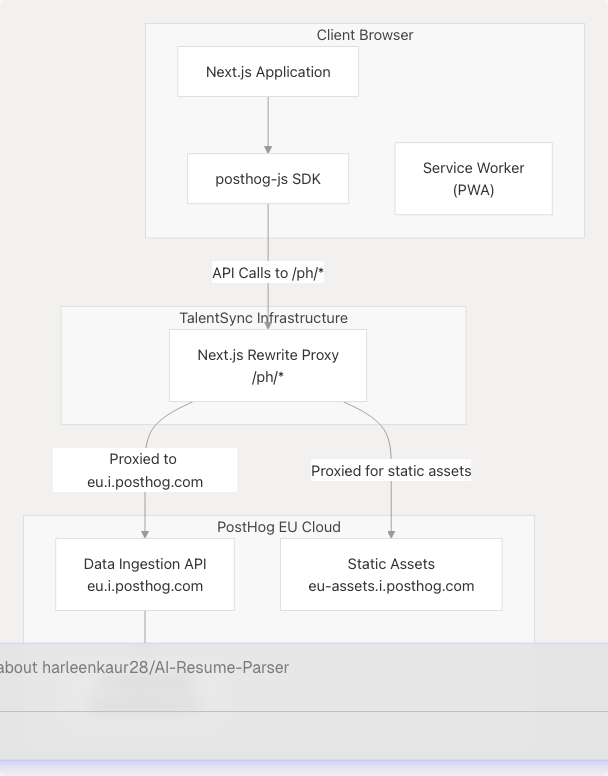
Key Design Decisions:
| Aspect | Implementation | Rationale |
|---|---|---|
| Analytics Provider | PostHog EU Cloud | GDPR compliance, self-hostable alternative available |
| Region | EU (eu.i.posthog.com) | Data residency compliance for European users |
| Proxy Strategy | Next.js rewrites | Bypasses ad-blockers, first-party data collection |
| SDK | posthog-js v1.279.0 | Official client-side JavaScript SDK |
| Initialization | Client-side only | Browser-only analytics, no server-side tracking |
Sources: frontend/package.json72 frontend/instrumentation-client.ts1-12 frontend/next.config.js65-76
PostHog Client-Side Integration
Initialization Configuration
PostHog is initialized on the client side using the instrumentation-client.ts file, which is automatically loaded by Next.js when the application starts in the browser.
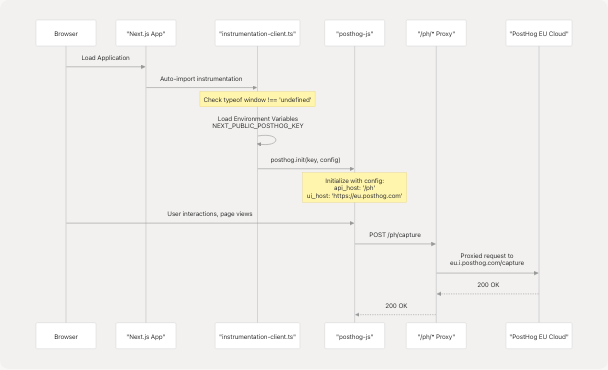
Implementation Details:
The initialization occurs in frontend/instrumentation-client.ts1-12:
- Browser-only initialization: Uses
typeof window !== 'undefined'check at line 3 - API host: Set to
/ph(local proxy path) at line 5 - UI host: Set to
https://eu.posthog.comat line 6 - Project key: Retrieved from
NEXT_PUBLIC_POSTHOG_KEYenvironment variable at line 4
Sources: frontend/instrumentation-client.ts1-12
Proxy Configuration for Ad-Blocker Bypass
Next.js Rewrite Rules
To ensure reliable analytics collection, TalentSync implements a reverse proxy using Next.js rewrites. This makes PostHog API calls appear as first-party requests, preventing ad-blockers from interfering.
Proxy Routing Table:
| Source Path | Destination | Purpose |
|---|---|---|
/ph/static/:path* |
https://eu-assets.i.posthog.com/static/:path* |
PostHog SDK static assets (JS files, etc.) |
/ph/:path* |
https://eu.i.posthog.com/:path* |
Data ingestion API endpoints |
Configuration:
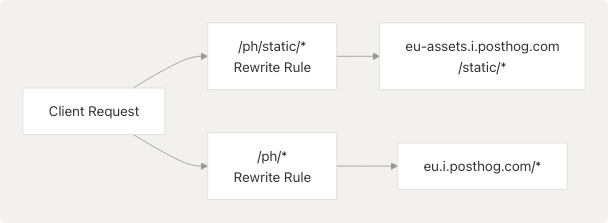
The rewrite configuration is defined in frontend/next.config.js65-76:
- Static assets rewrite at lines 67-70: Handles PostHog SDK files and resources
- API rewrite at lines 71-74: Handles all data collection endpoints
- Trailing slash support at line 78: Required for PostHog API compatibility (
skipTrailingSlashRedirect: true)
Why This Matters:
- Ad-blocker Evasion: Requests to
/ph/*appear as first-party, not blocked - Performance: Reduced DNS lookups, requests go through Next.js infrastructure
- Security: Single domain origin, no CORS issues
- Privacy: Data collection happens under your own domain
Sources: frontend/next.config.js65-78
Environment Variables and Configuration
Build-Time vs Runtime Variables
PostHog configuration uses build-time environment variables (prefixed with NEXT_PUBLIC_) that are embedded into the client-side JavaScript bundle during the Next.js build process.
PostHog Environment Variables:
| Variable | Type | Default | Purpose |
|---|---|---|---|
NEXT_PUBLIC_POSTHOG_KEY |
Build-time | (required) | PostHog project API key for authentication |
NEXT_PUBLIC_POSTHOG_HOST |
Build-time | https://eu.i.posthog.com |
PostHog data ingestion endpoint |
NEXT_PUBLIC_POSTHOG_UI_HOST |
Build-time | https://eu.posthog.com |
PostHog web UI dashboard URL |
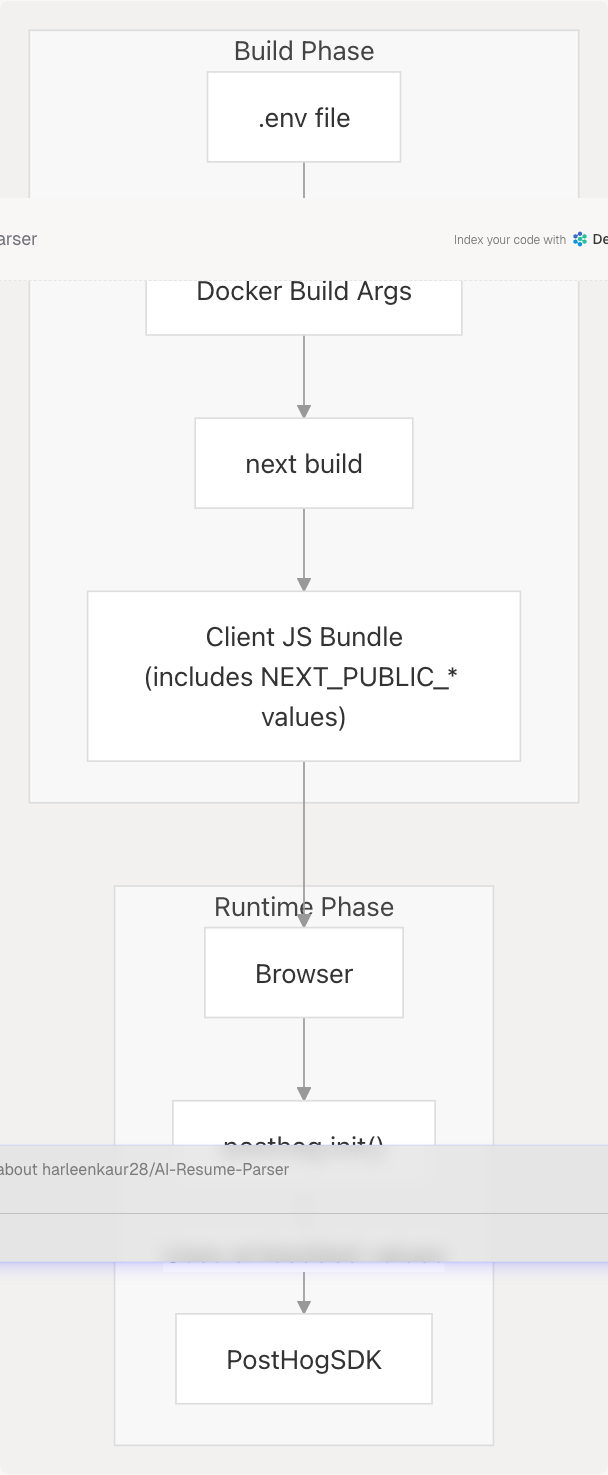
Docker Build Configuration
The Dockerfile explicitly declares these variables as build arguments to ensure they are available during the Next.js build:
From frontend/Dockerfile10-18:
- ARG declarations at lines 10-12: Define build arguments
- ENV declarations at lines 16-18: Make them available as environment variables during build
- These values are baked into the client bundle by Next.js
Docker Compose Configuration
In production deployment, these values are passed during the Docker build process:
From docker-compose.prod.yaml37-40:
args:
  NEXT_PUBLIC_POSTHOG_KEY: ${NEXT_PUBLIC_POSTHOG_KEY}
  NEXT_PUBLIC_POSTHOG_UI_HOST: ${NEXT_PUBLIC_POSTHOG_UI_HOST:-https://eu.posthog.com}
  NEXT_PUBLIC_POSTHOG_HOST: ${NEXT_PUBLIC_POSTHOG_HOST:-https://eu.i.posthog.com}
Sources: frontend/Dockerfile10-18 docker-compose.prod.yaml37-40 frontend/instrumentation-client.ts4-6
Webpack Configuration for Browser Compatibility
PostHog's client-side SDK may attempt to import Node.js modules, which causes issues in browser builds. The Next.js configuration includes Webpack customizations to prevent these errors.

Configuration Details from frontend/next.config.js18-62:
Client-Side Build Only
The Webpack modifications apply only when !isServer (line 25), ensuring Node.js modules remain available in server-side builds.
Three-Layer Protection
-
Alias Configuration (lines 28-37): Maps
node:*imports tofalsenode:child_process,node:fs,node:net,node:tls,node:crypto,node:path
-
Fallback Configuration (lines 39-47): Provides fallbacks for plain module names
child_process,fs,net,tls,crypto,path
-
Module Replacement Plugin (lines 49-61): Rewrites
node:xxxsyntax toxxxsyntax- Prevents Webpack's
UnhandledSchemeErrorfornode:URI scheme - Allows alias/fallback rules to apply correctly
- Prevents Webpack's
Why This Is Necessary:
PostHog's JavaScript SDK may transitively depend on packages that check for Node.js module availability, causing build errors in browser environments. This configuration safely excludes those modules from the client bundle.
Sources: frontend/next.config.js18-62
Analytics Data Flow
Event Collection and Transmission
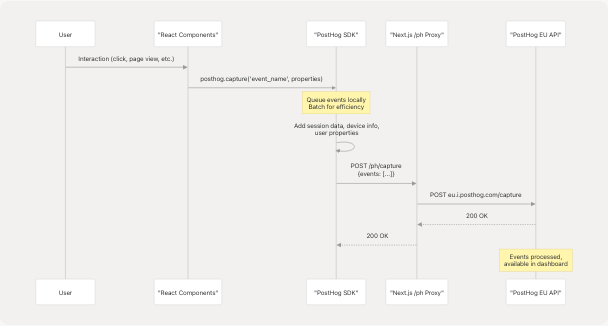
Event Types Automatically Tracked:
| Event Type | Description | Trigger |
|---|---|---|
$pageview |
Page navigation | Automatic on route change |
$pageleave |
User leaves page | Automatic on navigation/close |
$autocapture |
Element interactions | Clicks, form submissions (if enabled) |
| Custom Events | Application-specific | Manual posthog.capture() calls |
Session Management:
- PostHog SDK maintains session state in browser localStorage
- Session includes: device type, browser, OS, referrer, UTM parameters
- User identity can be set via
posthog.identify(userId)
Sources: frontend/instrumentation-client.ts8-11
Dependency Management
PostHog SDK Package
The PostHog JavaScript SDK is declared as a production dependency in the frontend application:
From frontend/package.json72:
"posthog-js": "^1.279.0"
SDK Capabilities:
- Event capture and batching
- Session recording (configurable)
- Feature flags support
- A/B testing infrastructure
- User identification and properties
- Automatic browser metadata collection
Bundle Size Consideration:
The PostHog SDK adds approximately ~50-60 KB (minified + gzipped) to the client bundle. The proxy configuration ensures SDK scripts are cached effectively.
Sources: frontend/package.json72 frontend/bun.lock61
Production Deployment Configuration
Multi-Stage Docker Build
The production Docker image ensures PostHog environment variables are available at build time:
Build Stage (frontend/Dockerfile1-48):
- Builder stage uses
oven/bun:1base image - Build arguments declared at lines 10-12 for PostHog variables
- Environment variables set at lines 16-18 to expose to Next.js build
- Next.js build at line 48 embeds these values into client bundle
Runtime Stage (frontend/Dockerfile52-98):
- Runner stage uses
oven/bun:1-slimfor smaller image size - No runtime environment variables needed for PostHog (already embedded)
- Application started with
bun run startat line 98
Docker Compose Integration
From docker-compose.prod.yaml33-55:
The frontend service configuration:
- Build args at lines 37-40: Pass PostHog variables from
.envfile - Environment at line 45: Production Node environment
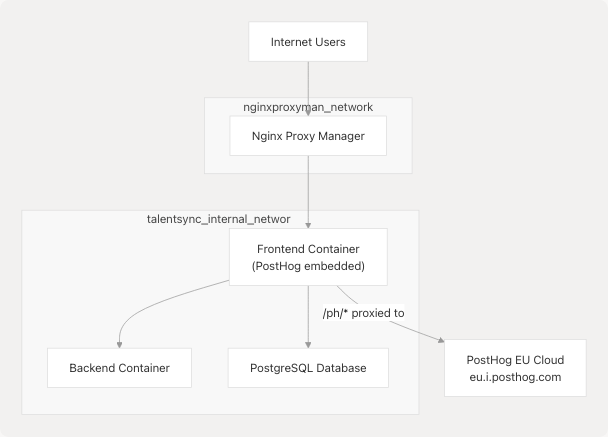
- Networks at lines 53-55: Connected to both internal network and nginx proxy
Network Architecture:
Sources: frontend/Dockerfile10-18 frontend/Dockerfile52-98 docker-compose.prod.yaml33-55
Security and Privacy Considerations
Data Privacy
| Aspect | Implementation | Compliance |
|---|---|---|
| Data Region | EU Cloud (eu.i.posthog.com) | GDPR-compliant data residency |
| IP Anonymization | Configurable in PostHog dashboard | Privacy-enhancing option |
| PII Collection | Not collected by default | Manual identification opt-in |
| Data Retention | Configurable per PostHog plan | Controlled retention periods |
First-Party Data Collection
The proxy configuration at /ph/* ensures:
- Same-Origin Policy Compliance: All requests appear to originate from
talentsync.tashif.codes - Cookie Scope: PostHog cookies are first-party cookies under your domain
- Browser Storage: localStorage and sessionStorage use your domain origin
Client-Side Only Tracking
Analytics runs exclusively in the browser:
- No server-side tracking: Backend does not send events to PostHog
- User control: Users can disable JavaScript to prevent tracking
- Transparency: All analytics code is client-visible
Configuration Check:
From frontend/instrumentation-client.ts3:
if (typeof window !== 'undefined') {
  // PostHog only initialized in browser context
}
This guard ensures PostHog never attempts to initialize during server-side rendering.
Sources: frontend/instrumentation-client.ts3-11 frontend/next.config.js65-76
Troubleshooting and Debugging
Common Issues
| Issue | Cause | Solution |
|---|---|---|
| PostHog not initializing | Missing NEXT_PUBLIC_POSTHOG_KEY |
Ensure variable is set during build |
| Events not appearing | Ad-blocker interference | Verify /ph/* proxy is working |
| Build failures | Node.js module errors | Check Webpack config at next.config.js18-62 |
| CORS errors | Incorrect proxy setup | Verify rewrite rules at next.config.js65-76 |
Verification Steps
-
Check Environment Variables:
- Ensure
NEXT_PUBLIC_POSTHOG_KEYis in.envfile - Verify it's passed as build arg in
docker-compose.prod.yaml
- Ensure
-
Verify Proxy Configuration:
- Open browser DevTools → Network tab
- Look for requests to
/ph/capture - Should return 200 status, not 404 or CORS errors
-
Confirm Initialization:
- Open browser console
- Type
posthogto inspect the initialized object - Should show PostHog instance with configuration
-
Test Event Capture:
- Navigate between pages
- Check PostHog dashboard for
$pageviewevents - Verify events appear within 1-2 minutes
Sources: frontend/instrumentation-client.ts1-12 frontend/next.config.js65-78
Summary
TalentSync's monitoring and analytics infrastructure provides:
- Privacy-focused analytics via PostHog EU Cloud with GDPR compliance
- Reliable data collection through first-party proxy configuration
- Zero runtime configuration with build-time environment embedding
- Production-ready deployment via Docker multi-stage builds
- Ad-blocker resistant tracking through Next.js rewrites
The system is designed for minimal overhead, strong privacy protection, and easy maintenance while providing comprehensive product analytics capabilities.