Text Extraction & Cleaning
Purpose and Scope
This document describes the text extraction and cleaning subsystem within the Resume Analysis Service. It covers how raw resume files (PDF, DOCX, TXT) are converted into clean, structured text suitable for downstream processing by ML classifiers and LLM-based analysis.
For information about the ML classification pipeline that follows text extraction, see ML Classification Pipeline. For comprehensive LLM-based analysis, see Comprehensive Analysis with LLM.
Overview
Text extraction and cleaning is the foundational step in the resume analysis pipeline. Raw resume documents arrive in various formats and contain inconsistent formatting, special characters, URLs, and artifacts from PDF/DOCX conversion. This subsystem normalizes all inputs into clean, lemmatized text that preserves semantic content while removing noise.
The process operates in three stages:
- Format-specific extraction - Converting binary/structured formats to plain text
- Regex-based cleaning - Removing URLs, special characters, and artifacts
- NLP-based normalization - Lemmatization and stopword removal using Spacy and NLTK
An optional fourth stage uses Google Gemini LLM to reformat extracted text into professional resume structure, though this is computationally expensive and reserved for cases where raw extraction produces poor quality output.
Architecture Overview
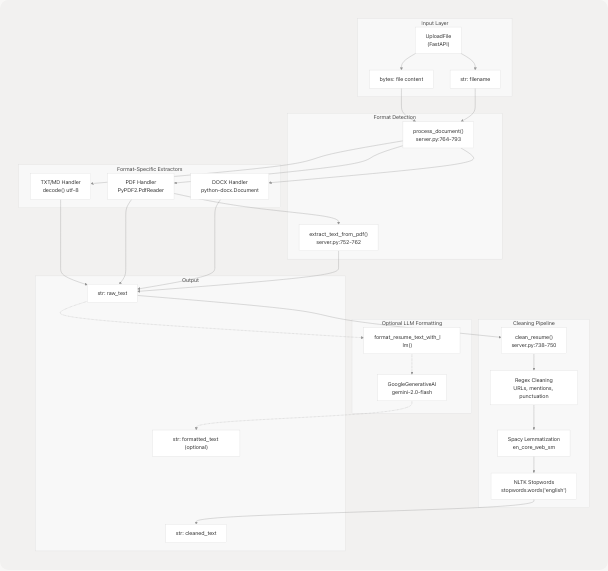
Sources: backend/server.py738-898
File Format Support
The system supports four file formats with dedicated extraction handlers:
| Format | Extension | Handler | Library | Line Reference |
|---|---|---|---|---|
| Plain Text | .txt |
UTF-8 decode | Python built-in | server.py769-770 |
| Markdown | .md |
UTF-8 decode | Python built-in | server.py769-770 |
.pdf |
PdfReader |
PyPDF2 | server.py772-775 | |
| Word Document | .docx |
Document |
python-docx | server.py777-780 |
Format Detection
Format detection is performed via file extension matching in the process_document() function:
file_extension = os.path.splitext(file_name)[1].lower()
Invalid or unsupported formats return None and are rejected at the API layer.
Sources: backend/server.py764-793
Text Extraction Pipeline
PDF Extraction
PDF text extraction uses the PyPDF2 library with page-by-page iteration:

The extract_text_from_pdf() function (server.py752-762) handles the extraction:
- Wraps bytes in
io.BytesIOfor file-like interface - Iterates all pages using
PdfReader.pages - Concatenates text with
page.extract_text() or "" - Returns empty string if extraction fails
Sources: backend/server.py752-762 backend/server.py772-775
DOCX Extraction
Word document extraction uses the python-docx library to iterate paragraphs:
doc = Document(io.BytesIO(file_bytes))
for para in doc.paragraphs:
    raw_text += para.text + "\n"
Each paragraph is extracted sequentially and newlines are preserved to maintain document structure.
Sources: backend/server.py777-780
TXT/MD Extraction
Plain text and Markdown files are decoded directly from bytes:
raw_text = file_bytes.decode()
UTF-8 encoding is assumed. Decoding errors result in exceptions caught at the API layer.
Sources: backend/server.py769-770
Text Cleaning Pipeline
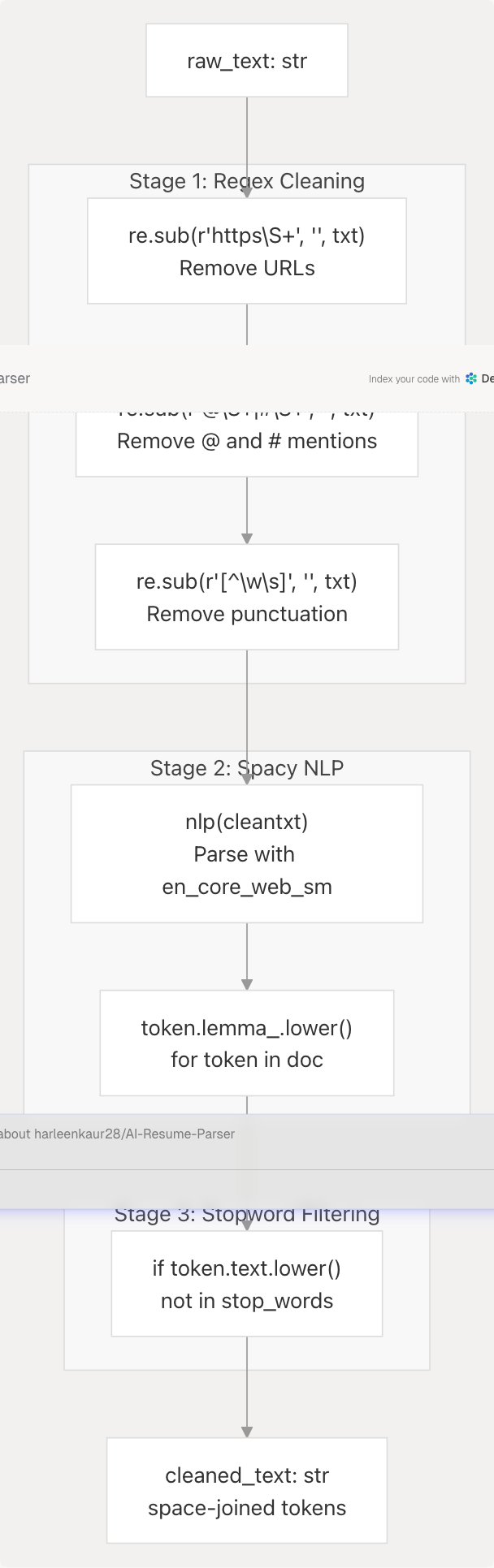
The clean_resume() function (server.py738-750) applies a multi-stage cleaning process to extracted text:
Stage 1: Regex Cleaning
Three regex substitutions remove unwanted patterns:
- URL Removal -
r"https\\S+"pattern removes all HTTPS URLs - Mention Removal -
r"@\\S+|#\\S+"removes Twitter-style @ mentions and hashtags - Punctuation Removal -
r"[^\w\s]"keeps only alphanumeric characters and whitespace
Sources: backend/server.py740-742
Stage 2: Spacy Lemmatization
The en_core_web_sm Spacy model (server.py702) provides:
- Part-of-speech tagging
- Dependency parsing
- Lemmatization (converting words to base form: "running" → "run")
Each token is converted to lowercase lemma: token.lemma_.lower()
Sources: backend/server.py744-746
Stage 3: NLTK Stopword Removal
English stopwords from NLTK corpus are filtered:
stop_words = set(stopwords.words("english"))
tokens = [token.lemma_.lower() for token in doc
          if token.text.lower() not in stop_words]
This removes common words like "the", "is", "at", "which" that carry minimal semantic value for classification.
Sources: backend/server.py711 backend/server.py745-746
Output Format
The cleaned tokens are joined with spaces:
return " ".join(tokens)
Example transformation:
| Stage | Text |
|---|---|
| Raw | "I'm working at Google Inc. Visit https://google.com for more info!" |
| After Regex | "Im working at Google Inc Visit googol com for more info" |
| After Lemma | "i be work at google inc visit google com for more info" |
| After Stopwords | "work google inc visit google info" |
Sources: backend/server.py749
Optional LLM-Based Formatting
The format_resume_text_with_llm() function (server.py795-898) provides advanced resume formatting using Google Gemini when raw extraction produces poorly structured output.
When LLM Formatting is Used
This expensive operation is triggered only for:
- Resumes with severe formatting issues from PDF extraction
- Documents where structural information is critical
- Cases where
ComprehensiveAnalysisDatageneration requires clean input
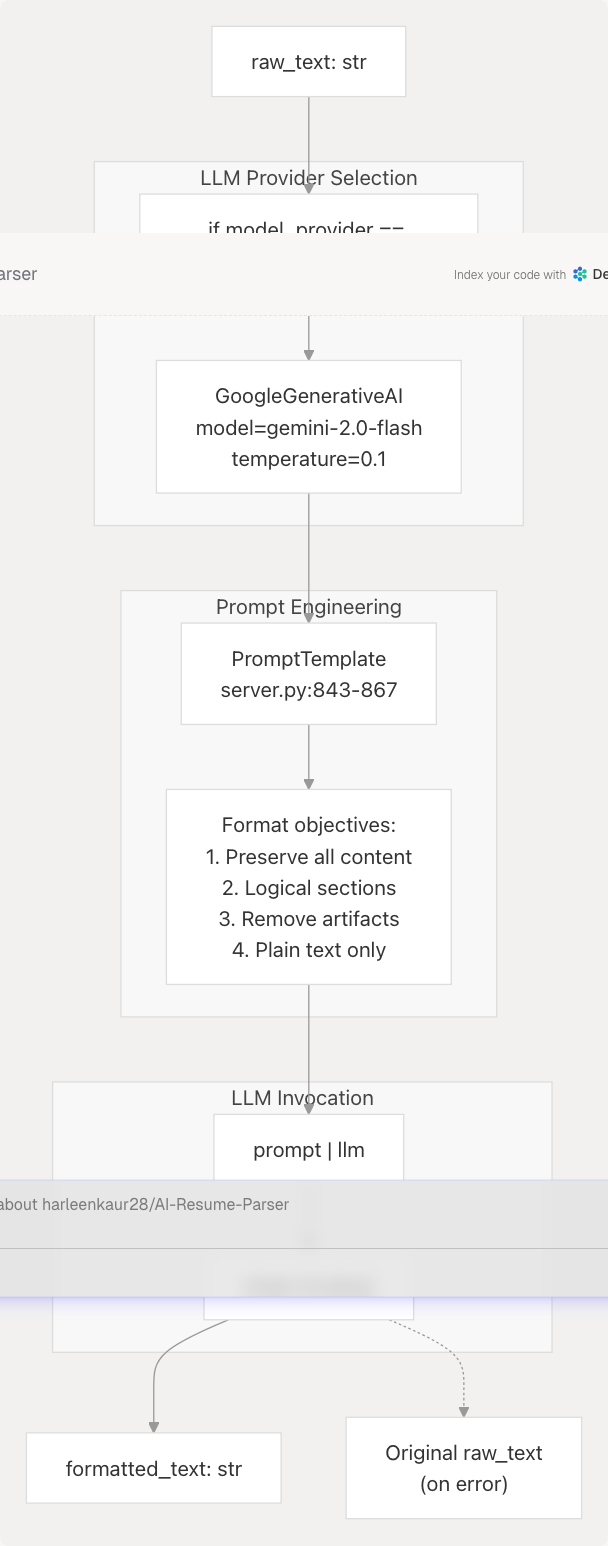
LLM Formatting Process
Prompt Template
The formatting prompt (server.py843-867) instructs the LLM to:
- Preserve all key information - Experience, education, skills, projects, contact info
- Logical presentation - Organize sections consistently (Contact, Summary, Experience, Education, Skills, Projects)
- Clarity and readability - Correct spacing, consistent formatting
- Remove artifacts - Eliminate "Page 1 of 2", file paths, watermarks
- Conciseness - Optimize phrasing without altering meaning
- Plain text output - No commentary, preamble, or markdown
Error Handling
The function implements graceful fallback:
- API key validation errors → return original text
- Rate limit errors → return original text with warning
- Authentication errors → return original text with warning
- All exceptions caught and logged
Sources: backend/server.py795-898
Dependencies and Configuration
Python Libraries
| Library | Purpose | Version Constraint | Configuration |
|---|---|---|---|
PyPDF2 |
PDF text extraction | Not specified | None required |
python-docx |
DOCX parsing | Via docx import |
None required |
spacy |
NLP pipeline | Not specified | Model: en_core_web_sm |
nltk |
Stopwords corpus | >=3.9.1 |
Data dir: backend/app/model/nltk_data |
re |
Regex operations | Built-in | None required |
Sources: backend/server.py1-50 backend/pyproject.toml1-40
NLTK Data Initialization
NLTK data is downloaded on startup to a custom directory:
NLTK_DATA_PATH = os.path.join(
    os.path.dirname(__file__),
    "app",
    "model",
    "nltk_data",
)
nltk.data.path.append(NLTK_DATA_PATH)
nltk.download("punkt", download_dir=NLTK_DATA_PATH)
nltk.download("stopwords", download_dir=NLTK_DATA_PATH)
stop_words = set(stopwords.words("english"))
This ensures consistent tokenization and stopword data across deployments.
Sources: backend/server.py660-711
Spacy Model Loading
The English core model is loaded once at module import:
nlp = spacy.load("en_core_web_sm")
The model must be installed separately:
python -m spacy download en_core_web_sm
Or via the project's pyproject.toml which includes it as a URL dependency from the Spacy models repository.
Sources: backend/server.py702 backend/pyproject.toml19 backend/pyproject.toml39
Integration with Resume Analysis Pipeline
The cleaned text output flows into downstream components:
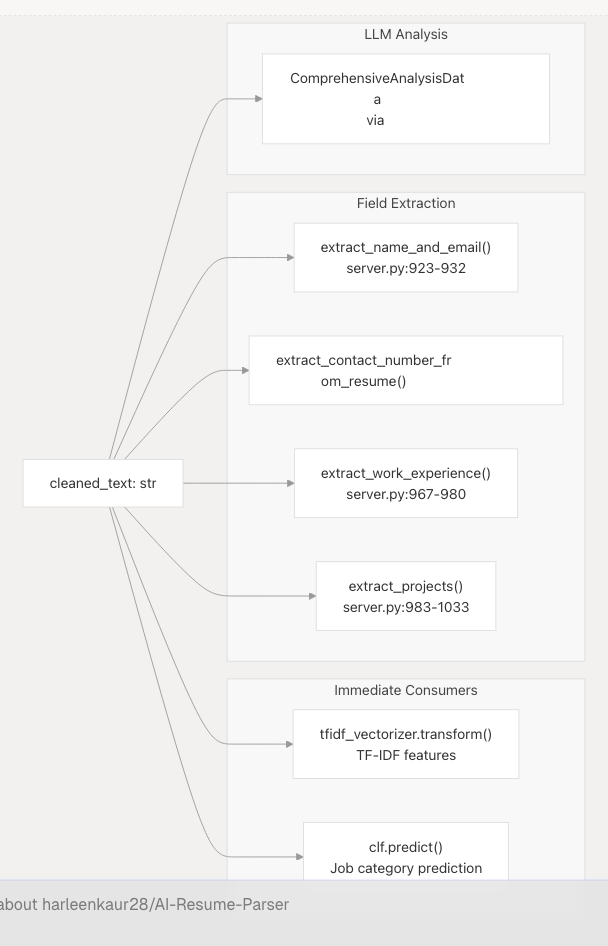
Cleaned text is used by:
- TF-IDF Vectorizer for numerical feature extraction (see ML Classification Pipeline)
- Regex extractors for structured field parsing
- LLM prompts for semantic analysis (see Comprehensive Analysis with LLM)
Raw text is preserved and used by:
- LLM comprehensive analysis for richer context
- Field extractors that require original formatting (dates, company names)
Sources: backend/server.py738-1033
Performance Characteristics
| Operation | Typical Duration | Bottleneck |
|---|---|---|
| PDF Extraction (10-page resume) | 100-300ms | PyPDF2 page iteration |
| DOCX Extraction (5-page resume) | 50-150ms | python-docx paragraph parsing |
| Regex Cleaning | 5-10ms | Minimal overhead |
| Spacy NLP Processing | 200-500ms | Model inference |
| NLTK Stopword Filtering | 5-10ms | Set lookup |
| Total (no LLM) | 300-900ms | Spacy lemmatization |
| LLM Formatting (optional) | 2-5 seconds | Gemini API latency |
The cleaning pipeline is CPU-bound and runs synchronously. For high-throughput scenarios, consider:
- Caching cleaned text keyed by file hash
- Parallel processing of multiple uploads
- Skipping Spacy if classification accuracy is acceptable without lemmatization
Sources: backend/server.py738-898
Error Handling and Edge Cases
Supported Error Scenarios
| Scenario | Handling | User Impact |
|---|---|---|
| Unsupported file type | Return None from process_document() |
HTTP 400 from API endpoint |
| Corrupted PDF | PyPDF2 raises exception | Caught at API layer, returns error |
| Empty file | Returns empty string | Validation error from downstream |
| Non-UTF8 TXT file | Decode raises UnicodeDecodeError |
Caught at API layer |
| Missing Spacy model | spacy.load() raises OSError |
Application fails to start |
| NLTK data missing | Downloads on first import | Startup delay (30-60s) |
| LLM API failure | Returns original raw text | Processing continues with unformatted text |
Validation
Resume validity is checked by is_valid_resume() (server.py901-920):
resume_keywords = [
    "Experience", "Education", "Skills", "Profile",
    "Work History", "Projects", "Certifications"
]
if any(re.search(keyword, text, re.I) for keyword in resume_keywords):
    return True
return False
Documents without common resume sections are rejected.
Sources: backend/server.py901-920
Summary
The text extraction and cleaning subsystem provides a robust, multi-format document processing pipeline that:
- Handles 4 document formats - PDF, DOCX, TXT, MD with dedicated extractors
- Applies 3-stage cleaning - Regex → Spacy lemmatization → NLTK stopword removal
- Optionally formats with LLM - Google Gemini for severe formatting issues
- Validates output - Ensures extracted text contains resume-like content
- Integrates seamlessly - Provides clean text to ML classifiers and LLM analyzers
This preprocessing is critical for downstream accuracy, as noisy input degrades both ML classification and LLM-based analysis.
Sources: backend/server.py738-920