Tailored Resume Service
Purpose and Scope
The Tailored Resume Service optimizes candidate resumes for specific job roles and companies using AI-powered analysis and web research. The service accepts a resume and job context (role, company, job description), performs ATS evaluation to identify gaps, enriches the resume with company-specific insights via web search, and returns a structured, optimized resume that matches the ComprehensiveAnalysisData schema.
For general resume analysis without job-specific tailoring, see Resume Analysis Service. For ATS evaluation without resume modification, see ATS Evaluation Service.
Sources: backend/app/services/tailored_resume.py1-90 backend/app/services/resume_generator/graph.py1-240
Overview
The Tailored Resume Service is a multi-stage AI pipeline that:
- Evaluates the original resume against the job description using ATS scoring
- Fetches and analyzes company website content
- Performs web research about the company and role
- Uses a LangGraph-based agent with tool-calling capabilities to generate an optimized resume
- Returns structured JSON matching the
ComprehensiveAnalysisDataPydantic model
The service is exposed via the tailor_resume() async function in backend/app/services/tailored_resume.py and internally delegates to run_resume_pipeline() in backend/app/services/resume_generator/graph.py.
Sources: backend/app/services/tailored_resume.py20-89 backend/app/services/resume_generator/graph.py72-235
Architecture and Data Flow
End-to-End Pipeline
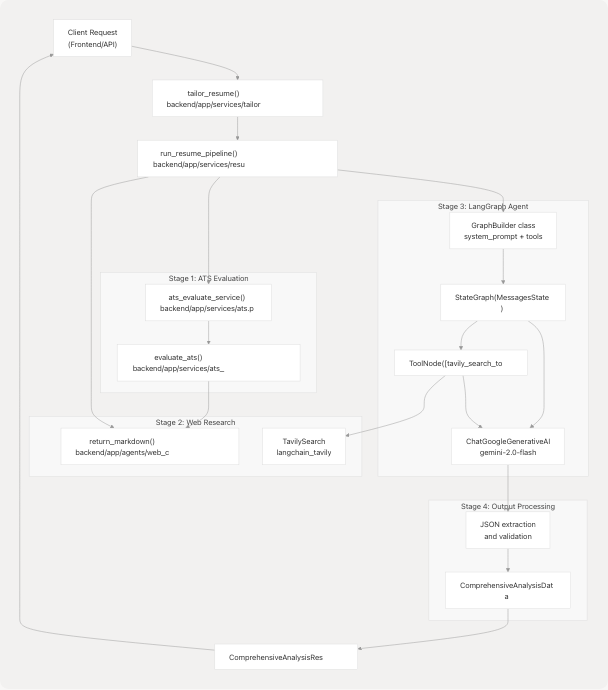
Diagram: Multi-Stage Tailored Resume Pipeline
This diagram shows the four main stages: ATS evaluation for gap analysis, web research for company context, LangGraph agent execution with tool-calling, and output processing with schema validation.
Sources: backend/app/services/tailored_resume.py20-89 backend/app/services/resume_generator/graph.py72-235 backend/app/services/ats.py24-213
Request and Response Models
TailoredResumeRequest
The service accepts requests via the TailoredResumeRequest Pydantic model:
| Field | Type | Required | Description |
|---|---|---|---|
resume_text |
str |
Yes | Original resume text (extracted from PDF/DOCX/TXT) |
job |
str |
Yes | Target job role (e.g., "Software Engineer") |
company_name |
str |
No | Company name for research |
company_website |
str |
No | Company website URL for content extraction |
job_description |
str |
No | Full job description text |
Sources: backend/app/models/schemas.py445-451
TailoredResumeResponse
The service returns a TailoredResumeResponse wrapper containing:
| Field | Type | Description |
|---|---|---|
success |
bool |
Operation success flag (default: True) |
message |
str |
Status message (default: "Tailored resume generated successfully") |
tailored_resume |
str |
JSON string of tailored resume (serialized ComprehensiveAnalysisData) |
However, the internal service function tailor_resume() returns ComprehensiveAnalysisResponse which wraps the ComprehensiveAnalysisData model directly:
| Field | Type | Description |
|---|---|---|
success |
bool |
Operation success flag |
message |
str |
Status or error message |
data |
ComprehensiveAnalysisData |
Structured resume analysis data |
cleaned_text |
str (optional) |
Raw LLM output if parsing failed |
Sources: backend/app/models/schemas.py453-457 backend/app/models/schemas.py137-142
Service Entry Point
tailor_resume() Function
The main service function is defined at backend/app/services/tailored_resume.py20-89:
async def tailor_resume(
    resume_text: str,
    job_role: str,
    company_name: Optional[str] = None,
    company_website: Optional[str] = None,
    job_description: Optional[str] = None,
) -> ComprehensiveAnalysisResponse
Workflow:
- Input Validation: Checks if
resume_textis non-empty; defaultsjob_roleto "Software Engineer" if not provided - Pipeline Execution: Calls
generate_tailored_resume()(alias forrun_resume_pipeline()) - Output Parsing: Attempts to parse the LLM response as JSON
- Error Handling: Returns graceful error payloads if JSON parsing fails or unexpected response types received
- Schema Validation: Validates parsed JSON against
ComprehensiveAnalysisDatausing Pydantic'smodel_validate()orparse_obj()
Error Scenarios:
- Invalid JSON from LLM: Returns response with
success=False, error message, and raw text incleaned_text - Unexpected response type: Returns error with message "Unexpected response type from resume generator"
- Pipeline errors: Returns error message from parsed result if present
Sources: backend/app/services/tailored_resume.py20-89
Pipeline Implementation: run_resume_pipeline()
The core pipeline is implemented in backend/app/services/resume_generator/graph.py72-235:
Pipeline Stages Diagram
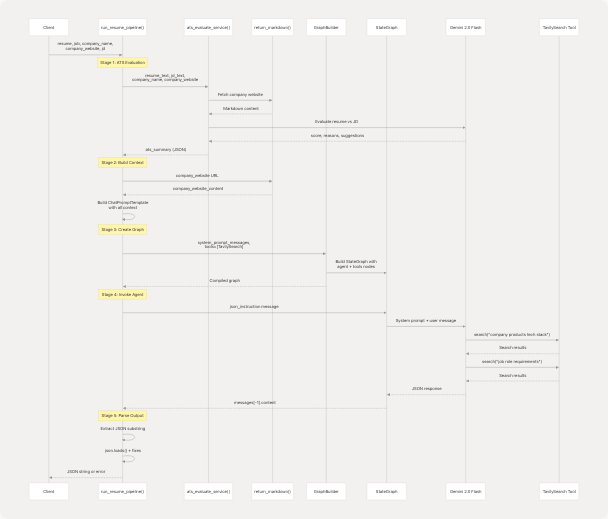
Diagram: Sequence of Operations in run_resume_pipeline()
Sources: backend/app/services/resume_generator/graph.py72-235
Stage 1: ATS Evaluation
The pipeline begins by calling ats_evaluate_service() to identify gaps and improvement areas:
ats_result = await ats_evaluate_service(
    resume_text=resume,
    jd_text=jd,
    jd_link=None,
    company_name=company_name,
    company_website=company_website,
)

ats_summary = json.dumps({
    "score": int(getattr(ats_result, "score", 0)),
    "message": getattr(ats_result, "message", "") or "",
    "reasons_for_the_score": getattr(ats_result, "reasons_for_the_score", []),
    "suggestions": getattr(ats_result, "suggestions", []),
}, indent=2)
If ATS evaluation fails, an error summary is created but the pipeline continues. The ATS summary provides the LLM with specific improvement suggestions to incorporate.
Sources: backend/app/services/resume_generator/graph.py86-113
Stage 2: Company Research
Company website content is fetched using the Jina AI-powered markdown extractor:
company_website_content = (
    return_markdown(company_website) if company_website else ""
)
This provides contextual information about the company's products, tech stack, and values.
Sources: backend/app/services/resume_generator/graph.py116-118 backend/app/agents/web_content_agent.py4-22
Stage 3: Prompt Construction
A comprehensive prompt template is built with all available context:
prompt = ChatPromptTemplate.from_template(
    """
    You are a resume expert. The ML model predicted the job of {job} at {company_name}.
    Given the resume below, the company's website content, the job description,
    and the ATS evaluation summary, highlight and improve the resume's impact
    and tailor it for this role.
    Use the given tools to search for relevant details and to align the resume
    with the company's products, tech stack, and values.

    Company: {company_name}

    Company website content:
    {company_website_content}

    Job description:
    {jd}

    ATS evaluation (score, reasons, suggestions, and message):
    {ats_summary}

    Resume:
    {resume}

    Use the ATS "suggestions" and "reasons_for_the_score" to modify
    the resume where relevant.
    At the end, return only a single JSON object strictly matching
    the ComprehensiveAnalysisData schema.
    """
).partial(
    company_name=company_name or "",
    company_website_content=company_website_content,
    jd=jd or "",
    ats_summary=ats_summary,
)
Sources: backend/app/services/resume_generator/graph.py121-149
Stage 4: Graph Construction with Tools
The GraphBuilder class creates a LangGraph state machine with tool-calling capabilities:
tavily_search_tool = TavilySearch(max_results=max_tool_results, topic="general")
tools = [tavily_search_tool]

system_prompt_messages = prompt.format_messages(
    resume=resume,
    job=job,
)

builder = GraphBuilder(
    system_prompt_messages=system_prompt_messages,
    tools=tools,
    model_name=model_name,
)
graph = builder()
The GraphBuilder binds the Tavily search tool to the LLM, allowing the agent to perform web searches during resume optimization.
Sources: backend/app/services/resume_generator/graph.py152-165
Stage 5: Agent Execution with Strict JSON Instructions
A detailed JSON instruction message is sent to the agent, specifying the exact schema:
json_instruction = (
    "Return only a single valid JSON object (no extra text). "
    "The JSON must match the ComprehensiveAnalysisData Pydantic model "
    "defined in app/models/schemas.py. "
    "Specifically include the following top-level keys (use these exact names):\n"
    "- skills_analysis: array of objects with keys 'skill_name' (string) "
    "  and 'percentage' (int)\n"
    "- recommended_roles: array of strings\n"
    "- languages: array of objects with key 'language' (string)\n"
    "- education: array of objects with key 'education_detail' (string)\n"
    "- work_experience: array of objects each with 'role' (string), "
    "  'company_and_duration' (string), and 'bullet_points' (array of strings)\n"
    "- projects: array of objects with 'title' (string), "
    "  'technologies_used' (array of strings), and 'description' (string)\n"
    # ... (full schema specification continues)
    "Only include these keys. If a field is empty, return an empty array "
    "or null for optional strings. Ensure all strings are properly quoted "
    "and the output is strictly valid JSON."
)

response = graph.invoke({
    "messages": [HumanMessage(content=json_instruction)]
})
Sources: backend/app/services/resume_generator/graph.py168-197
Stage 6: JSON Extraction and Validation
The LLM response is parsed with fallback strategies:
text = response["messages"][-1].content.strip()

# Extract JSON substring
start = text.find("{")
end = text.rfind("}")
json_text = text[start:end+1] if start != -1 and end != -1 else text

# Attempt to parse
try:
    parsed = json.loads(json_text)
    return json.dumps(parsed, indent=2)
except Exception:
    # Try naive fixes: convert single quotes to double quotes
    try:
        fixed = json_text.replace("'", '"')
        # Add quotes around unquoted keys
        fixed = re.sub(r"(?<=[\{\s,])([A-Za-z0-9_+-]+)\s*:\s", r'"\1": ', fixed)
        parsed = json.loads(fixed)
        return json.dumps(parsed, indent=2)
    except Exception:
        return json.dumps({
            "error": "failed to parse model output as JSON",
            "raw": text
        }, indent=2)
This multi-layer parsing strategy handles common LLM formatting issues like single quotes, unquoted keys, or extra narrative text.
Sources: backend/app/services/resume_generator/graph.py198-234
GraphBuilder Implementation
Class Structure
The GraphBuilder class at backend/app/services/resume_generator/graph.py26-70 provides a reusable pattern for creating LangGraph state machines:
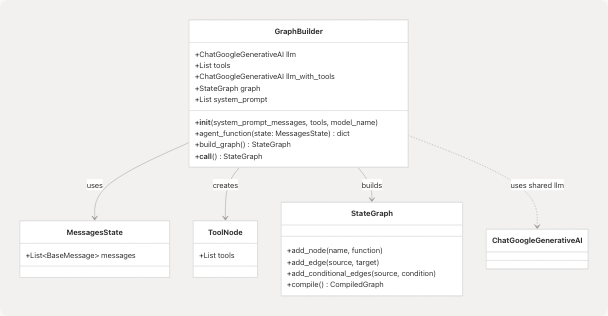
Diagram: GraphBuilder Class Relationships
Sources: backend/app/services/resume_generator/graph.py26-70
Graph Topology
The build_graph() method creates the following state machine:
Diagram: LangGraph State Machine for Tailored Resume Generation
The agent can call the Tavily search tool multiple times before producing a final response. Each tool call results in a new message being added to the state, and the agent re-invokes the LLM with the accumulated context.
Sources: backend/app/services/resume_generator/graph.py57-66
agent_function() Implementation
The agent node prepends system prompt messages to user messages:
def agent_function(self, state: MessagesState):
    user_question = state["messages"]
    input_question = [*self.system_prompt] + user_question
    response = self.llm_with_tools.invoke(input_question)
    return {"messages": [response]}
This ensures the comprehensive prompt context (resume, JD, ATS summary, company info) is always available to the LLM during tool-calling loops.
Sources: backend/app/services/resume_generator/graph.py51-55
Integration with Other Services
ATS Evaluation Integration
The tailored resume service depends heavily on the ATS evaluator:
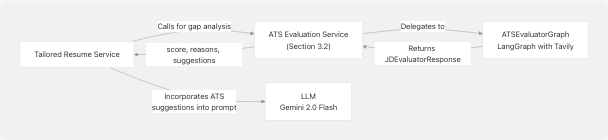
Diagram: ATS Evaluation Dependency
The ATS evaluation results are serialized as JSON and included in the system prompt, instructing the LLM to address specific gaps and apply suggested improvements.
Sources: backend/app/services/resume_generator/graph.py86-113 backend/app/services/ats.py24-213
Web Content Agent Integration
Company website content is fetched via the Jina AI agent:
| Component | Purpose | Implementation |
|---|---|---|
return_markdown() |
Extract markdown from URLs | Uses https://r.jina.ai/ proxy service |
| Timeout | Request timeout | 5000ms (5 seconds) |
| Error Handling | Network failures | Returns empty string on exceptions |
Sources: backend/app/agents/web_content_agent.py4-22
Tavily Search Tool Integration
The TavilySearch tool from langchain_tavily enables the agent to perform web searches:
tavily_search_tool = TavilySearch(
    max_results=max_tool_results,  # Default: 3
    topic="general"
)
During execution, the LLM can invoke this tool to search for:
- Company products and tech stack
- Role-specific requirements and trends
- Industry best practices
- Keyword optimization strategies
Sources: backend/app/services/resume_generator/graph.py152-153
ComprehensiveAnalysisData Schema
The tailored resume output must match the ComprehensiveAnalysisData Pydantic model defined at backend/app/models/schemas.py114-135:
Schema Structure
| Field | Type | Description |
|---|---|---|
skills_analysis |
List[SkillProficiency] |
Skills with proficiency percentages |
recommended_roles |
List[str] |
Job roles aligned with resume |
languages |
List[LanguageEntry] |
Spoken/programming languages |
education |
List[EducationEntry] |
Education details |
work_experience |
List[UIDetailedWorkExperienceEntry] |
Work history with bullet points |
projects |
List[UIProjectEntry] |
Projects with tech stack |
publications |
List[UIPublicationEntry] |
Academic publications |
positions_of_responsibility |
List[UIPositionOfResponsibilityEntry] |
Leadership positions |
certifications |
List[UICertificationEntry] |
Professional certifications |
achievements |
List[UIAchievementEntry] |
Awards and achievements |
name |
Optional[str] |
Candidate name |
email |
Optional[str] |
Contact email |
contact |
Optional[str] |
Phone number |
linkedin |
Optional[str] |
LinkedIn URL |
github |
Optional[str] |
GitHub URL |
blog |
Optional[str] |
Blog URL |
portfolio |
Optional[str] |
Portfolio URL |
predicted_field |
Optional[str] |
ML-predicted job category |
Nested Models
Key nested models used in the schema:
class SkillProficiency(BaseModel):
    skill_name: str
    percentage: int

class UIDetailedWorkExperienceEntry(BaseModel):
    role: str
    company_and_duration: str
    bullet_points: List[str]

class UIProjectEntry(BaseModel):
    title: str
    technologies_used: List[str]
    live_link: Optional[str]
    repo_link: Optional[str]
    description: str
Sources: backend/app/models/schemas.py55-135
Error Handling and Edge Cases
Validation Errors
The tailor_resume() service handles multiple error scenarios:
- Empty Resume Text: Returns
ComprehensiveAnalysisResponsewithsuccess=Falseand empty data - JSON Decode Failures: Returns response with
cleaned_textfield containing raw LLM output - Unexpected Response Types: Returns error message "Unexpected response type from resume generator"
- Pydantic Validation Errors: Uses try-except for both
model_validate()(Pydantic v2) andparse_obj()(Pydantic v1) for compatibility
Sources: backend/app/services/tailored_resume.py29-86
ATS Evaluation Failures
If ATS evaluation fails, the pipeline continues with an error summary:
except Exception as e:
    ats_summary = json.dumps({
        "error": "ATS evaluation failed",
        "detail": str(e),
    })
This graceful degradation ensures that resume tailoring can proceed even without ATS insights.
Sources: backend/app/services/resume_generator/graph.py107-113
JSON Parsing Fallbacks
The pipeline implements a three-tier parsing strategy:
- Primary: Standard
json.loads()on extracted substring - Secondary: Replace single quotes with double quotes, add quotes to unquoted keys using regex
- Tertiary: Return error object with raw LLM output
This handles common LLM formatting issues without failing the entire request.
Sources: backend/app/services/resume_generator/graph.py206-234
Configuration and Environment
Required Environment Variables
| Variable | Purpose | Used By |
|---|---|---|
GOOGLE_API_KEY |
Google Gemini API authentication | LLM initialization |
TAVILY_API_KEY |
Tavily search API | TavilySearch tool (optional) |
LLM Configuration
The service uses the shared LLM instance from app.core.llm:
from app.core.llm import llm
from app.core.llm import MODEL_NAME  # "gemini-2.0-flash-exp"
If the shared LLM is unavailable, GraphBuilder falls back to creating a new instance:
if llm:
    self.llm = llm
else:
    self.llm = ChatGoogleGenerativeAI(model=model_name)
Sources: backend/app/services/resume_generator/graph.py16-18 backend/app/services/resume_generator/graph.py40-43
Tavily Search Configuration
The Tavily tool is initialized with default parameters that can be overridden:
max_results: 3 (configurable viamax_tool_resultsparameter)topic: "general"search_depth: Controlled by Tavily client initialization in the tool
Sources: backend/app/services/resume_generator/graph.py152-153
Performance Considerations
Async Execution
Both the service entry point and pipeline are fully async:
async def tailor_resume(...) -> ComprehensiveAnalysisResponse
async def run_resume_pipeline(...) -> str
This allows non-blocking execution in the FastAPI event loop.
Multiple LLM Calls
The pipeline involves several LLM invocations:
- ATS Evaluation: 1-2 LLM calls (one for scoring, possibly one for Tavily tool use)
- Company Website Fetch: No LLM (uses Jina AI HTTP endpoint)
- Resume Tailoring: 1+ LLM calls (depending on number of Tavily tool invocations)
Total processing time typically ranges from 8-15 seconds depending on:
- Number of tool calls made by the agent
- Complexity of resume and job description
- Network latency for Tavily and Jina AI services
Sources: backend/app/services/tailored_resume.py20-26 backend/app/services/resume_generator/graph.py72-80
Usage Example
Typical API Flow
from app.services.tailored_resume import tailor_resume

# Service call
response = await tailor_resume(
    resume_text="John Doe\nSoftware Engineer\n...",
    job_role="Senior Full Stack Developer",
    company_name="TechCorp",
    company_website="https://techcorp.com",
    job_description="We are looking for a senior developer with React and Python experience..."
)

# Check success
if response.success:
    tailored_data = response.data
    print(f"Skills: {tailored_data.skills_analysis}")
    print(f"Work Experience: {tailored_data.work_experience}")
else:
    print(f"Error: {response.message}")
    print(f"Raw output: {response.cleaned_text}")
Expected Output Structure
The response.data field contains a fully populated ComprehensiveAnalysisData object with:
- Enhanced skills_analysis: Optimized for the target role with proficiency percentages
- Tailored work_experience: Bullet points rewritten to emphasize relevant achievements
- Aligned projects: Descriptions highlighting technologies mentioned in the JD
- Recommended_roles: Including the target role and related positions
- Contact information: Preserved from original resume
Sources: backend/app/services/tailored_resume.py20-89 backend/app/models/schemas.py114-135