Hiring Assistant
This document describes the Hiring Assistant feature, an AI-powered interview preparation tool that generates personalized answers to interview questions based on the user's resume and target role. The page is located at /dashboard/hiring-assistant and provides job seekers with tailored responses for common and custom interview questions.
For information about the backend service that powers this feature, see 3.4. For cold email generation, see 4.5.4. For the detailed analysis view that feeds data into this feature, see 4.5.3.
Overview
The Hiring Assistant page enables users to generate AI-powered interview answers by providing:
- Their resume (from saved resumes or new upload)
- Target role and company information
- A list of interview questions (custom or from common templates)
- Optional company knowledge and company URL for context enrichment
The feature uses the /api/gen-answer endpoint which invokes the backend's HiringService to generate role-specific, personalized answers using Google Gemini 2.0 Flash.
Sources: frontend/app/dashboard/hiring-assistant/page.tsx1-579
Page Architecture
Component Structure
The page is built using a three-column responsive layout with specialized components for each section:
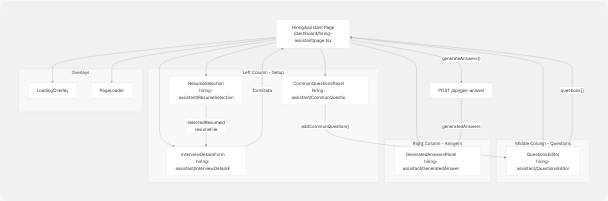
Sources: frontend/app/dashboard/hiring-assistant/page.tsx419-548
State Management
Primary State Variables
The HiringAssistant component manages multiple categories of state:
| State Category | Variables | Purpose |
|---|---|---|
| Loading States | isPageLoading, isGenerating |
Control UI loading indicators and disable actions |
| Generated Content | generatedAnswers |
Object mapping questions to AI-generated answers |
| Resume Selection | resumeFile, resumeText, isPreloaded, resumeSelectionMode |
Handle resume upload or selection |
| Resume List | userResumes, selectedResumeId, isLoadingResumes, showResumeDropdown |
Manage existing resumes dropdown |
| Questions | questions |
Array of interview question strings |
| Form Data | formData |
Contains role, company, word_limit, user_company_knowledge, company_url |
interface HiringAssistantRequest {
  resume_file: File;
  role: string;
  company: string;
  questions_list: string[];
  word_limit: number;
  user_company_knowledge?: string;
  company_url?: string;
}

interface HiringAssistantResponse {
  success: boolean;
  message: string;
  data: { [key: string]: string };  // question -> answer mapping
}

interface UserResume {
  id: string;
  customName: string;
  uploadDate: string;
  candidateName?: string;
  predictedField?: string;
}
Sources: frontend/app/dashboard/hiring-assistant/page.tsx19-41 frontend/app/dashboard/hiring-assistant/page.tsx44-72
Resume Selection Modes
The feature supports two resume input modes controlled by resumeSelectionMode:
"existing"- Select from previously uploaded and analyzed resumes"upload"- Upload a new resume file (PDF, DOC, DOCX, TXT, MD)
The ResumeSelection component renders different UI based on the active mode:
- Existing mode: Displays a dropdown with
userResumesfetched from/api/gen-answerGET - Upload mode: Shows a drag-and-drop file upload area
Sources: frontend/app/dashboard/hiring-assistant/page.tsx59-61 frontend/app/dashboard/hiring-assistant/page.tsx88-106
Data Pre-population from Resume Analysis
The page checks localStorage on mount for pre-populated data from the Resume Analysis feature:
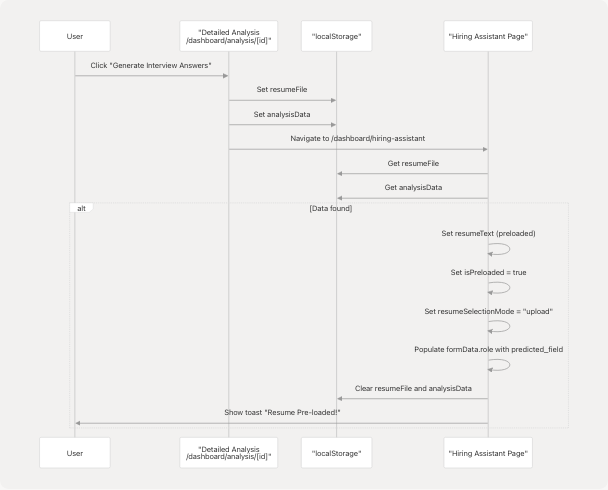
This flow enables seamless navigation from the analysis view to interview preparation without requiring the user to re-upload their resume.
Sources: frontend/app/dashboard/hiring-assistant/page.tsx125-173
Interview Question Management
Common Questions
The page provides 10 pre-defined common interview questions users can quickly add:
const commonQuestions = [
  "Tell me about yourself.",
  "Why do you want to work for our company?",
  "What are your greatest strengths?",
  "What is your biggest weakness?",
  "Where do you see yourself in 5 years?",
  "Why are you leaving your current job?",
  "Describe a challenging project you worked on.",
  "How do you handle stress and pressure?",
  "What motivates you?",
  "Do you have any questions for us?",
];
Sources: frontend/app/dashboard/hiring-assistant/page.tsx74-85
Question Operations
| Function | Parameters | Description |
|---|---|---|
addQuestion() |
None | Appends empty string to questions array |
removeQuestion(index) |
index: number |
Removes question at index (minimum 1 question required) |
updateQuestion(index, value) |
index: number, value: string |
Updates question text at index |
addCommonQuestion(question) |
question: string |
Adds common question if not already in list |
Sources: frontend/app/dashboard/hiring-assistant/page.tsx203-223
Answer Generation Flow
Validation and Request Construction
The generateAnswers() function performs multi-step validation before sending the request:
- Resume validation: Check based on
resumeSelectionMode"existing": EnsureselectedResumeIdis set"upload": EnsureresumeFileexists (orisPreloaded)
- Form validation: Require
roleandcompany - Questions validation: Filter and require at least one non-empty question
FormData Construction
const formDataToSend = new FormData();

// Resume data based on mode
if (resumeSelectionMode === "existing") {
  formDataToSend.append("resumeId", selectedResumeId);
} else {
  formDataToSend.append("file", resumeFile!);
}

// Required fields
formDataToSend.append("role", formData.role);
formDataToSend.append("company_name", formData.company);
formDataToSend.append("word_limit", formData.word_limit.toString());
formDataToSend.append("questions", JSON.stringify(validQuestions));

// Optional fields
if (formData.user_company_knowledge) {
  formDataToSend.append("user_knowledge", formData.user_company_knowledge);
}
if (formData.company_url) {
  formDataToSend.append("company_url", formData.company_url);
}
Sources: frontend/app/dashboard/hiring-assistant/page.tsx225-300
API Integration
Endpoints
The Hiring Assistant interacts with /api/gen-answer via two operations:
| Method | Purpose | Request Format | Response Format |
|---|---|---|---|
GET |
Fetch user's saved resumes | None | { success: bool, data: { resumes: UserResume[] } } |
POST |
Generate interview answers | FormData with resume, role, company, questions |
{ success: bool, message: string, data: { [question: string]: answer: string } } |
Request Flow
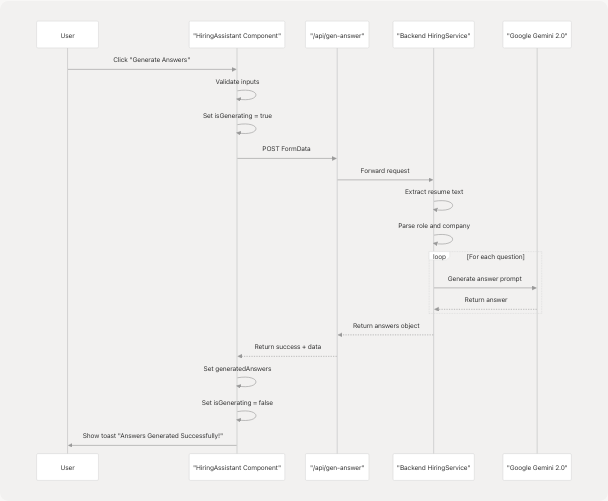
Sources: frontend/app/dashboard/hiring-assistant/page.tsx302-330
User Interactions
Copy and Download Functions
The generated answers can be exported in two ways:
Copy to Clipboard:
const copyToClipboard = async (text: string) => {
  try {
    await navigator.clipboard.writeText(text);
    toast({ title: "Copied!", description: "Answer copied to clipboard." });
  } catch (error) {
    toast({ title: "Copy Failed", variant: "destructive" });
  }
};
Download as Text File:
const downloadAsText = () => {
  let content = `Interview Answers for ${formData.role} at ${formData.company}\n\n`;
  Object.entries(generatedAnswers).forEach(([question, answer]) => {
    content += `Q: ${question}\n\nA: ${answer}\n\n---\n\n`;
  });

  const blob = new Blob([content], { type: "text/plain" });
  const url = URL.createObjectURL(blob);
  const a = document.createElement("a");
  a.href = url;
  a.download = "interview-answers.txt";
  // ... trigger download
};
Sources: frontend/app/dashboard/hiring-assistant/page.tsx333-365
UI Layout and Responsive Design
Grid Layout
The page uses a responsive 3-column grid on large screens, stacking vertically on mobile:
// lg:grid-cols-3 gap-6 lg:gap-8
<div className="grid grid-cols-1 lg:grid-cols-3 gap-6 lg:gap-8 lg:items-start">
  {/* Column 1: Interview Details + Common Questions */}
  <div className="lg:col-span-1">
    <Card>...</Card>
    <CommonQuestionsPanel />
  </div>

  {/* Column 2: Questions Editor */}
  <div className="lg:col-span-1">
    <QuestionsEditor />
  </div>

  {/* Column 3: Generated Answers */}
  <div className="lg:col-span-1">
    <GeneratedAnswersPanel />
  </div>
</div>
Sources: frontend/app/dashboard/hiring-assistant/page.tsx419-549
Loading States
Two loading overlays provide feedback during operations:
PageLoader: Full-screen initial page load (100ms delay)LoadingOverlay: Semi-transparent overlay during answer generation with "Generating answers..." text
Sources: frontend/app/dashboard/hiring-assistant/page.tsx370-373
Form Data Structure
The formData state object contains all interview context:
| Field | Type | Required | Default | Description |
|---|---|---|---|---|
role |
string |
Yes | "" |
Target job role/title |
company |
string |
Yes | "" |
Target company name |
word_limit |
number |
No | 150 |
Maximum words per answer |
user_company_knowledge |
string |
No | "" |
User's existing knowledge about the company |
company_url |
string |
No | "" |
Company website URL for context gathering |
The role field is automatically populated from analysisData.predicted_field when data is pre-loaded from localStorage.
Sources: frontend/app/dashboard/hiring-assistant/page.tsx65-71 frontend/app/dashboard/hiring-assistant/page.tsx150-154
Error Handling and Validation
The component implements comprehensive validation at multiple levels:
Client-Side Validation
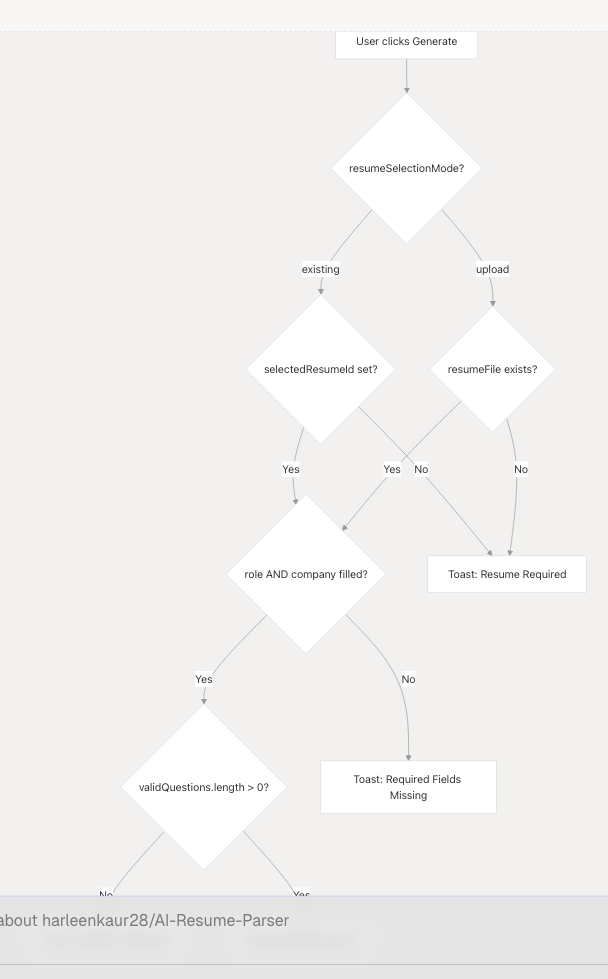
Sources: frontend/app/dashboard/hiring-assistant/page.tsx226-273
Toast Notifications
All user feedback is delivered through the useToast hook with standardized messages:
| Trigger | Toast Type | Title | Description |
|---|---|---|---|
| Resume pre-loaded | Success | "Resume Pre-loaded!" | "Your resume and details have been automatically filled..." |
| Missing resume | Destructive | "Resume Required" | "Please select a resume from your saved resumes." |
| Missing form fields | Destructive | "Required Fields Missing" | "Please fill in the role and company name." |
| No questions | Destructive | "Questions Required" | "Please add at least one interview question." |
| Generation success | Success | "Answers Generated Successfully!" | "Your interview answers have been generated..." |
| Generation failure | Destructive | "Generation Failed" | Error message from API or generic error |
| Copy success | Default | "Copied!" | "Answer copied to clipboard." |
| Copy failure | Destructive | "Copy Failed" | "Could not copy to clipboard." |
Sources: frontend/app/dashboard/hiring-assistant/page.tsx162-166 frontend/app/dashboard/hiring-assistant/page.tsx229-327 frontend/app/dashboard/hiring-assistant/page.tsx333-346
Complete Data Flow
End-to-End Sequence
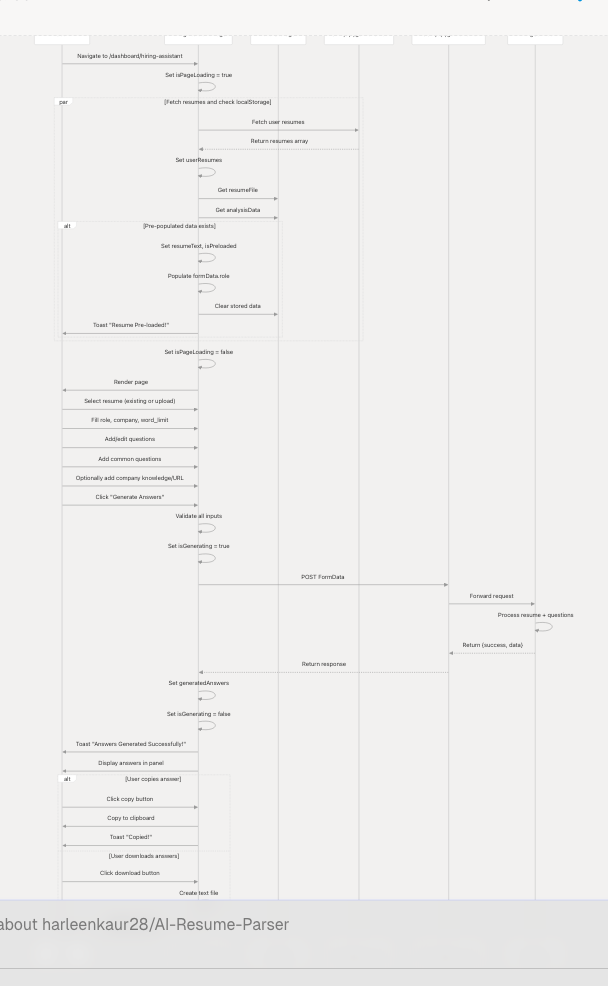
Sources: frontend/app/dashboard/hiring-assistant/page.tsx125-330
Key Component Dependencies
The Hiring Assistant page imports and uses the following components:
| Component | Path | Purpose |
|---|---|---|
Button |
@/components/ui/button |
Primary action buttons |
Card, CardContent, CardHeader, CardTitle |
@/components/ui/card |
Container components |
Loader |
@/components/ui/loader |
Loading spinners |
useToast |
@/hooks/use-toast |
Toast notifications |
ResumeSelection |
@/components/hiring-assistant/ResumeSelection |
Resume input UI |
InterviewDetailsForm |
@/components/hiring-assistant/InterviewDetailsForm |
Form for role, company, etc. |
CommonQuestionsPanel |
@/components/hiring-assistant/CommonQuestionsPanel |
Quick-add questions |
QuestionsEditor |
@/components/hiring-assistant/QuestionsEditor |
Add/edit/remove questions |
GeneratedAnswersPanel |
@/components/hiring-assistant/GeneratedAnswersPanel |
Display generated answers |
LoadingOverlay |
@/components/hiring-assistant/LoadingOverlay |
Full-screen loading state |
PageLoader |
@/components/hiring-assistant/PageLoader |
Initial page load indicator |
Sources: frontend/app/dashboard/hiring-assistant/page.tsx1-17
Styling and Animations
The page uses consistent styling patterns:
- Background:
bg-gradient-to-br from-[#222831] via-[#31363F] to-[#222831] - Cards:
backdrop-blur-xl bg-white/5 border border-white/10 - Primary color:
#76ABAE(teal) for highlights and buttons - Text colors:
#EEEEEEfor primary text, with opacity variations for secondary text
Animations are implemented using Framer Motion:
- Initial load: Fade-in with staggered delays for columns
- Button hover: Scale to 1.01
- Button tap: Scale to 0.99
- Generate button loading: Pulsing background gradient with spinning loader
Sources: frontend/app/dashboard/hiring-assistant/page.tsx372-575