Main Dashboard
Purpose and Scope
This document describes the Main Dashboard page (frontend/app/dashboard/page.tsx109-1738), which serves as the central hub for authenticated users in the TalentSync platform. The Main Dashboard displays user statistics, recent activity, and provides quick access to all major features including resume analysis, cold mail generation, and hiring assistant tools.
For information about navigation to this page, see Middleware & Route Protection. For details about individual feature pages accessible from this dashboard, see Resume Upload & Analysis, Cold Mail Generator, and Hiring Assistant.
Overview
The Main Dashboard is implemented as a Next.js client component that orchestrates multiple UI sections and modals to provide a comprehensive view of the user's activity and quick access to platform features. The page is protected by NextAuth authentication and automatically redirects unauthenticated users to the login page.
Sources: frontend/app/dashboard/page.tsx1-15 frontend/app/dashboard/page.tsx109-145
Component Architecture
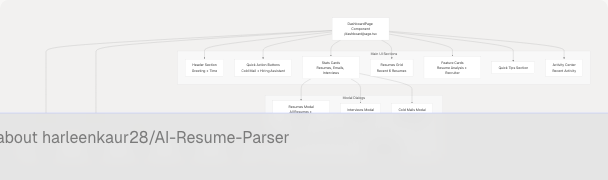
Sources: frontend/app/dashboard/page.tsx109-1738
Data Types and State Management
Primary Data Structures
The dashboard component manages several TypeScript interfaces that define the shape of data retrieved from API endpoints:
| Interface | Purpose | Key Fields |
|---|---|---|
DashboardData |
Main dashboard data container | user, stats, recentActivity, resumes |
InterviewSession |
Interview practice session | id, role, companyName, questionsAndAnswers |
ColdMailSession |
Cold email generation session | id, recipientName, companyName, emails |
Sources: frontend/app/dashboard/page.tsx57-107
State Variables
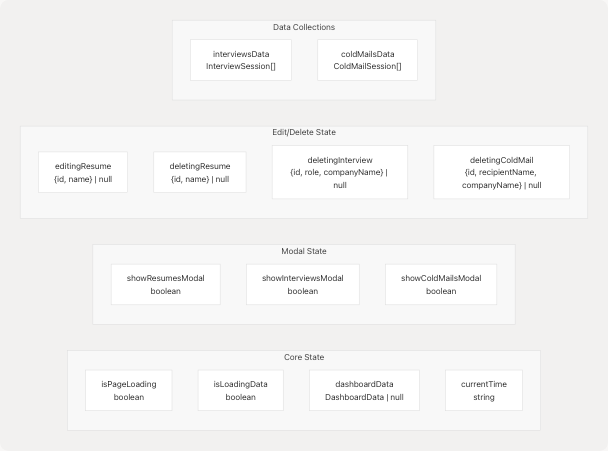
Sources: frontend/app/dashboard/page.tsx112-144
Data Fetching and API Integration
Dashboard Data Flow
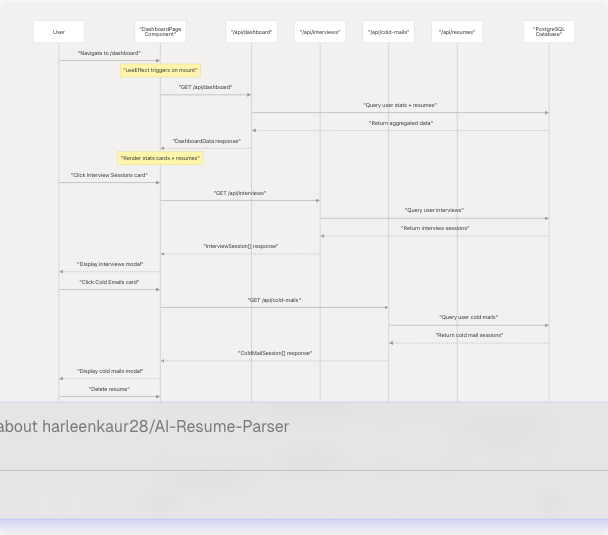
Sources: frontend/app/dashboard/page.tsx147-172 frontend/app/dashboard/page.tsx175-228
API Endpoints Used
| Endpoint | Method | Purpose | Response Type |
|---|---|---|---|
/api/dashboard |
GET | Fetch user stats, recent activity, and resumes | DashboardData |
/api/interviews |
GET | Fetch all interview sessions | InterviewSession[] |
/api/interviews?id={id} |
DELETE | Delete interview session | {success: boolean} |
/api/cold-mails |
GET | Fetch all cold mail sessions | ColdMailSession[] |
/api/cold-mails?id={id} |
DELETE | Delete cold mail session | {success: boolean} |
/api/resumes?id={id} |
DELETE | Delete resume and analyses | {success: boolean} |
/api/resumes?id={id} |
PATCH | Rename resume | {success: boolean} |
Sources: frontend/app/dashboard/page.tsx147-377
UI Sections
Header Section with Dynamic Greeting
The header section displays a personalized greeting based on the current time of day and shows the current time in a badge component.
| Time Range | Greeting |
|---|---|
| 00:00 - 11:59 | "Good morning" |
| 12:00 - 16:59 | "Good afternoon" |
| 17:00 - 23:59 | "Good evening" |
The greeting function uses the local browser time to determine the appropriate message:
Sources: frontend/app/dashboard/page.tsx393-415 frontend/app/dashboard/page.tsx497-531
Stats Cards with Interactive Actions
Three primary stats cards display aggregate metrics and serve as navigation triggers to detailed modal views:
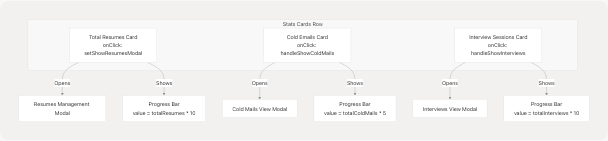
Sources: frontend/app/dashboard/page.tsx557-686
Quick Action Buttons
Two prominent call-to-action buttons provide direct navigation to the most-used features:
| Button | Route | Icon | Purpose |
|---|---|---|---|
| Cold Mail Generator | /dashboard/cold-mail |
Mail |
Generate personalized cold emails |
| Hiring Assistant | /dashboard/hiring-assistant |
Users |
Get interview Q&A assistance |
Sources: frontend/app/dashboard/page.tsx534-554
Resumes Grid Display
The dashboard displays up to 6 recent resumes in a responsive grid layout. Each resume card includes:
- Custom name
- Upload date
- Predicted field (job category) badge
- Candidate name (if extracted)
- "View Analysis" button linking to
/dashboard/analysis/{id}
If more than 6 resumes exist, a "View All Resumes" button appears to open the full resumes modal.
Sources: frontend/app/dashboard/page.tsx688-786
Feature Cards
Two feature cards promote different user paths:
Resume Analysis Card
- Highlights: ATS Compatibility Check, Skill Gap Analysis, Industry-Specific Recommendations
- Action: Links to
/dashboard/seekerfor resume upload
For Recruiters Card
- Highlights: Smart Candidate Matching, Bulk Resume Processing, Interview Question Generator
- Action: Links to
/dashboard/recruiterfor recruiter tools
Sources: frontend/app/dashboard/page.tsx789-890
Activity Center
The Activity Center displays recent user actions across all features. Each activity item includes:
- Type-specific icon (FileText, Mail, Users)
- Title and description
- Date of activity
When no activity exists, the component displays an empty state with call-to-action buttons.
Sources: frontend/app/dashboard/page.tsx951-1051 frontend/app/dashboard/page.tsx380-391
Modal Dialogs
Resumes Management Modal
The resumes modal provides full CRUD operations for user resumes:
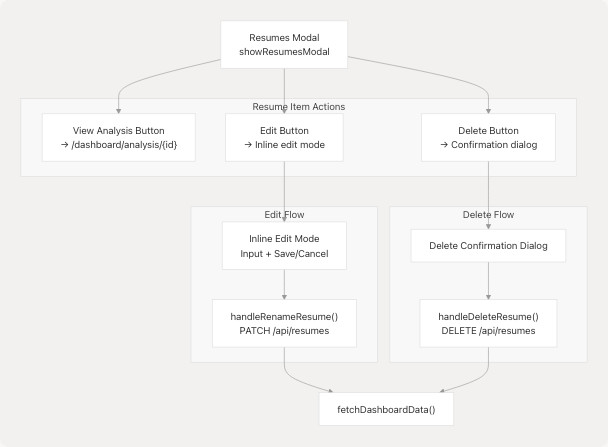
Sources: frontend/app/dashboard/page.tsx1056-1230 frontend/app/dashboard/page.tsx260-285 frontend/app/dashboard/page.tsx346-377
Interviews Modal
Displays all interview practice sessions with full Q&A content. Each session shows:
- Role and company name
- Creation timestamp
- Number of questions
- Expandable Q&A pairs with copy-to-clipboard functionality
- Delete button per session
Key Functions:
fetchInterviews(): Retrieves all interview sessions from/api/interviewshandleDeleteInterview(): Deletes session viaDELETE /api/interviews?id={id}copyToClipboard(): Copies individual answers to system clipboard
Sources: frontend/app/dashboard/page.tsx1297-1442 frontend/app/dashboard/page.tsx175-200 frontend/app/dashboard/page.tsx288-314
Cold Mails Modal
Displays all cold email generation sessions with email content. Each session shows:
- Recipient name and designation
- Company name
- Creation timestamp
- Multiple emails with subject and body
- Copy-to-clipboard functionality
- Delete button per session
Key Functions:
fetchColdMails(): Retrieves all cold mail sessions from/api/cold-mailshandleDeleteColdMail(): Deletes session viaDELETE /api/cold-mails?id={id}copyToClipboard(): Copies subject + body to system clipboard
Sources: frontend/app/dashboard/page.tsx1444-1601 frontend/app/dashboard/page.tsx203-228 frontend/app/dashboard/page.tsx317-343
User Interaction Workflows
Resume Rename Workflow
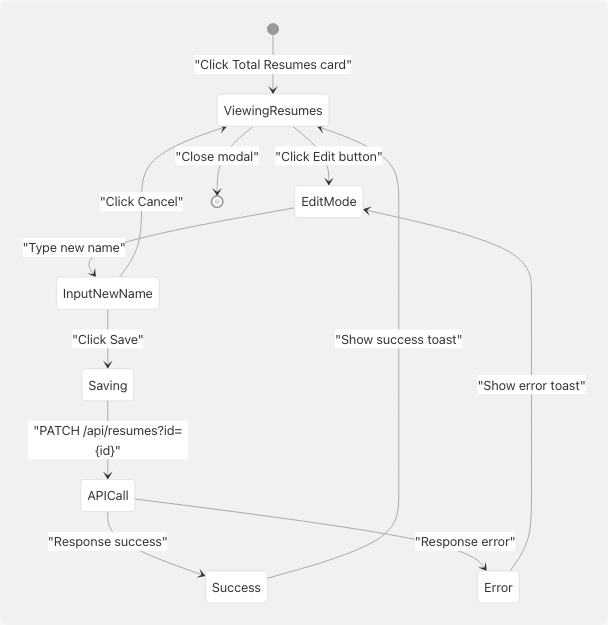
Sources: frontend/app/dashboard/page.tsx1117-1146 frontend/app/dashboard/page.tsx346-377
Delete Operation Workflow
All delete operations (resumes, interviews, cold mails) follow a consistent pattern:
- User clicks delete button on item
- Confirmation dialog opens with item details
- User confirms or cancels
- If confirmed:
- API DELETE request sent to appropriate endpoint
- Success toast displayed
- Dashboard data refreshed via
fetchDashboardData() - Affected modal data refreshed (if applicable)
Sources: frontend/app/dashboard/page.tsx1233-1295 frontend/app/dashboard/page.tsx1603-1668 frontend/app/dashboard/page.tsx1670-1735
Animation and Visual Effects
The dashboard uses Framer Motion (motion from framer-motion) for smooth transitions:
| Animation Type | Element | Configuration |
|---|---|---|
| Page Load | Full page overlay | initial: {opacity: 1}, exit: {opacity: 0} |
| Section Fade-in | Cards and sections | initial: {opacity: 0, y: 20}, staggered delays |
| Modal Open/Close | All modals | initial: {opacity: 0, scale: 0.95} |
| Activity Items | Recent activity list | Staggered fade-in with delay: index * 0.1 |
Background effects include animated gradient blobs with pulsing animations:
Sources: frontend/app/dashboard/page.tsx448-458 frontend/app/dashboard/page.tsx462-467
Authentication and Route Protection
The dashboard implements multiple layers of authentication checking:
- NextAuth Session Check: Uses
useSession()hook to verify authentication status - Automatic Redirect: Unauthenticated users redirected to
/authviauseEffect - Loading States: Displays loader overlays during session loading
- Session Data: Accesses user information via
session.userfor display
Sources: frontend/app/dashboard/page.tsx110 frontend/app/dashboard/page.tsx418-422 frontend/app/dashboard/page.tsx436-444
Component Dependencies
The dashboard imports and utilizes numerous UI components from the project's component library:
| Component Category | Components Used |
|---|---|
| shadcn/ui Core | Button, Card, CardContent, CardDescription, CardHeader, CardTitle, Badge, Progress, Input, Label |
| Custom Components | Loader, LoaderOverlay |
| Icons (lucide-react) | 30+ icons including FileText, Users, Mail, Trash2, Edit, Eye, Copy, X |
| Layout | Dialog, DialogContent, DialogHeader, DialogTitle, etc. |
| Hooks | useSession, useRouter, useToast |
Sources: frontend/app/dashboard/page.tsx1-55
Performance Considerations
The dashboard implements several performance optimizations:
- Lazy Loading: Modal content fetched only when modals are opened
- Conditional Rendering: Heavy sections rendered only after page load animation completes
- Optimistic UI: Loading states prevent user interaction during data fetches
- Data Refresh Strategy: Targeted refreshes after mutations (e.g., only affected data refreshed after delete)
- Pagination: Resumes grid shows only 6 items initially, with "View All" for the rest
Sources: frontend/app/dashboard/page.tsx425-434 frontend/app/dashboard/page.tsx231-234 frontend/app/dashboard/page.tsx237-240