Cold Mail Generator Service
Purpose and Scope
The Cold Mail Generator Service provides AI-powered personalized cold email generation for job seekers reaching out to recruiters or hiring managers. The service analyzes resume content, incorporates company research, and generates professional email subject lines and body content tailored to the recipient and target company.
This page covers the cold email generation and editing functionality. For interview preparation features, see Hiring Assistant Service. For resume analysis that feeds into this service, see Resume Analysis Service.
Overview
The Cold Mail Generator Service offers two primary capabilities:
- Email Generation: Creates personalized cold emails from scratch using resume data and recipient information
- Email Editing: Refines previously generated emails based on user feedback and edit instructions
The service is implemented in two versions:
- V1: Accepts file uploads (PDF, DOCX, TXT) and processes them into resume text
- V2: Accepts pre-processed resume text directly (used when resume is already analyzed)
Both versions leverage Google's Gemini LLM via LangChain prompt chains and optionally integrate company research data to enhance personalization.
Service Architecture
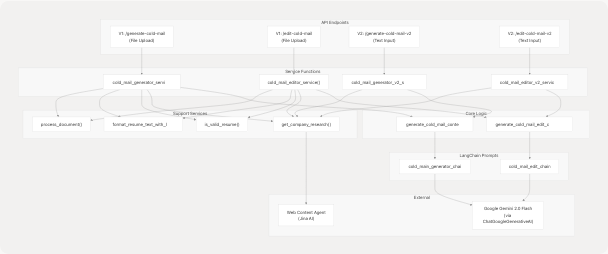
Request and Response Models
ColdMailRequest
The ColdMailRequest model defines the input parameters for cold email generation:
| Field | Type | Required | Description |
|---|---|---|---|
recipient_name |
str |
Yes | Name of the person being emailed |
recipient_designation |
str |
Yes | Job title/designation of the recipient |
company_name |
str |
Yes | Company the recipient works for |
sender_name |
str |
Yes | Name of the email sender (job seeker) |
sender_role_or_goal |
str |
Yes | Primary goal or target role |
key_points_to_include |
str |
Yes | Key achievements/points to highlight |
additional_info_for_llm |
str |
No | Additional context for the LLM |
company_url |
str |
No | Company website URL for research |
ColdMailResponse
The ColdMailResponse model contains the generated email content:
| Field | Type | Description |
|---|---|---|
success |
bool |
Operation status (default: true) |
message |
str |
Status message |
subject |
str |
Generated email subject line |
body |
str |
Generated email body content |
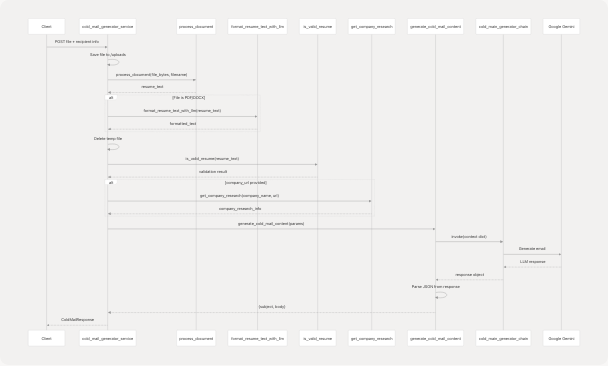
V1 Service Flow (File Upload)
Email Generation with File Upload
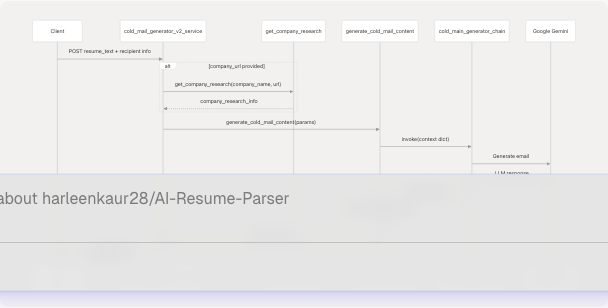
V2 Service Flow (Text-based)
The V2 services skip file processing and operate directly on resume text, making them more efficient when the resume has already been analyzed:
Email Editing Flow
The editing services allow users to refine generated emails by providing specific edit instructions:
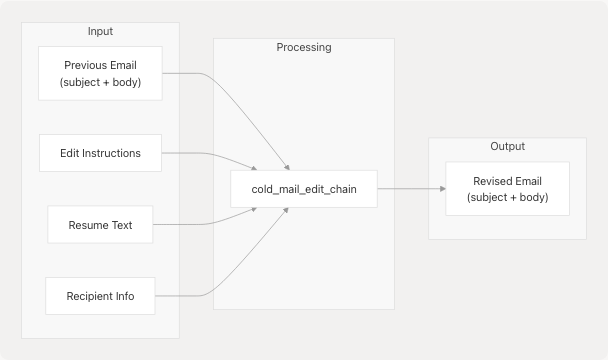
The edit chain receives all original parameters plus:
previous_email_subject: The previously generated subjectprevious_email_body: The previously generated bodyedit_instructions: User's requested changes
Core Generation Logic
generate_cold_mail_content
The generate_cold_mail_content() function is the core logic for email generation:
Input Parameters:
resume_text: Processed resume contentrecipient_name,recipient_designation,company_name: Recipient detailssender_name,sender_role_or_goal: Sender detailskey_points_to_include: Achievements to highlightadditional_info_for_llm: Extra contextcompany_research: Research data from web search
Process:
- Invokes
cold_main_generator_chainwith all parameters - Receives LLM response (various formats possible)
- Parses JSON to extract
subjectandbodyfields - Returns dictionary with email content
generate_cold_mail_edit_content
Similar to generation but includes edit-specific parameters:
Additional Parameters:
previous_email_subject: Original subject lineprevious_email_body: Original email bodyedit_instructions: User's requested changes
Uses cold_mail_edit_chain instead of the generation chain.
Response Parsing Strategy
The service implements a robust JSON parsing strategy to handle various LLM response formats:
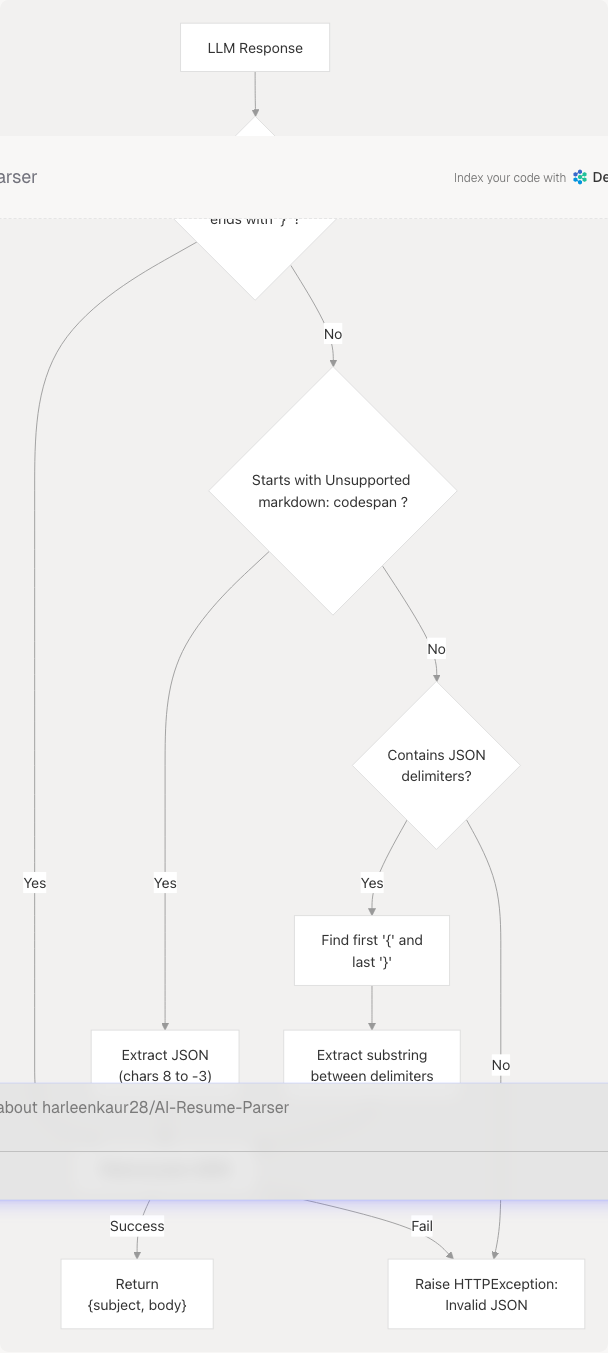
Handled Formats:
- Pure JSON:
{"subject": "...", "body": "..."} - Markdown Code Block:
```json\n{...}\n``` - Mixed Content: Text containing JSON delimiters
{...}
This multi-strategy approach ensures robustness against various LLM output formats.
Company Research Integration
The service optionally enriches email generation with company research data:
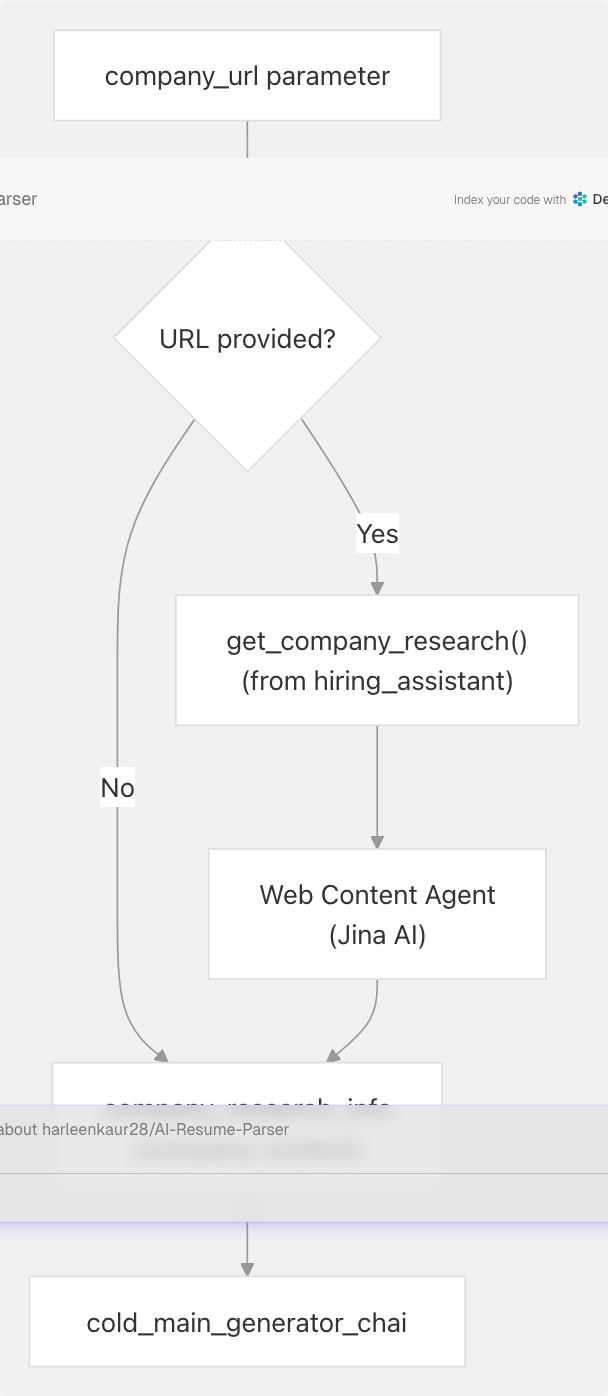
The get_company_research() function:
- Takes company name and URL
- Uses Web Content Agent to extract website content
- Returns summarized company information
- Data is passed to LLM for context-aware email generation
File Processing Pipeline (V1 Only)

File Handling Details:
- Temporary files saved to
backend/uploads/temp_cold_mail_{filename} process_document()extracts text based on file type- LLM formatting applied only to PDF/DOCX (not MD/TXT)
- Files deleted after processing to avoid storage buildup
Error Handling
The service implements comprehensive error handling:
| Error Type | HTTP Status | Condition |
|---|---|---|
| LLM Unavailable | 503 | llm object is None |
| Unsupported File | 400 | process_document() returns None |
| Invalid Resume | 400 | is_valid_resume() fails |
| JSON Parse Failure | 500 | LLM response not parseable |
| General Errors | 500 | Any other exception |
All errors return ErrorResponse model with descriptive messages.
Error Response Format:
ErrorResponse(
    success=False,
    message="Error description",
    error_detail="Detailed error info"
)
LLM Integration
Prompt Chains
The service uses two LangChain prompt chains:
- cold_main_generator_chain: Main email generation
- cold_mail_edit_chain: Email editing/refinement
Both chains are imported from the app.data.prompt module and invoke Google Gemini via the shared llm instance.
Chain Invocation:
response = cold_main_generator_chain.invoke({
    "resume_text": resume_text,
    "recipient_name": recipient_name,
    "recipient_designation": recipient_designation,
    "company_name": company_name,
    "sender_name": sender_name,
    "sender_role_or_goal": sender_role_or_goal,
    "key_points_to_include": key_points_to_include,
    "additional_info_for_llm": additional_info_for_llm,
    "company_research": company_research,
})
LLM Configuration
The service uses the shared LLM instance from app.core.llm:
- Model:
gemini-2.0-flash(viaChatGoogleGenerativeAI) - Temperature: 0.1 (for consistent, focused output)
- Provider: Google Generative AI
Service Comparison Table
| Feature | V1 (File Upload) | V2 (Text Input) |
|---|---|---|
| Input Method | UploadFile object |
Pre-processed str |
| File Processing | Yes (PDF/DOCX/TXT) | No |
| Text Formatting | Yes (LLM-based) | No (assumes pre-formatted) |
| Resume Validation | Yes | No |
| Temp File Management | Yes | No |
| Use Case | First-time upload | Resume already analyzed |
| Performance | Slower (file I/O) | Faster (no file ops) |
| API Endpoints | /generate-cold-mail /edit-cold-mail |
/generate-cold-mail-v2 /edit-cold-mail-v2 |
Dependencies
The Cold Mail Generator Service depends on:
| Dependency | Purpose | Source |
|---|---|---|
process_document |
Extract text from files | app.services.process_resume |
format_resume_text_with_llm |
Clean/format resume text | app.services.data_processor |
is_valid_resume |
Validate resume content | app.services.process_resume |
get_company_research |
Fetch company info | app.services.hiring_assiatnat |
cold_main_generator_chain |
Main generation prompt | app.data.prompt.cold_mail_gen |
cold_mail_edit_chain |
Edit prompt | app.data.prompt.cold_mail_editor |
llm |
Google Gemini instance | app.core.llm |
ColdMailRequest |
Request validation | app.models.schemas |
ColdMailResponse |
Response structure | app.models.schemas |
ErrorResponse |
Error formatting | app.models.schemas |
Usage Patterns
Pattern 1: Generate from Previously Analyzed Resume
When a resume has already been analyzed (stored in database), use V2:
- Fetch resume text from database
- Call
cold_mail_generator_v2_service()with text - Return generated email to frontend
- Frontend can save to database or allow editing
Pattern 2: Generate from New Upload
When user uploads a new resume file, use V1:
- Accept file upload
- Call
cold_mail_generator_service()with file - Service processes, validates, and generates
- Return email content
Pattern 3: Iterative Refinement
For editing generated emails:
- User reviews generated email
- Provides edit instructions (e.g., "make it shorter", "add more technical details")
- Call
cold_mail_editor_v2_service()with original params + edit instructions - Service generates refined version
- Can repeat until satisfied