LLM Integration & Prompt Engineering
Purpose and Scope
This document explains how Google Gemini 2.0 Flash is integrated into the TalentSync backend using LangChain and LangGraph frameworks. It covers the central LLM configuration, prompt engineering strategies, state machine architectures for complex workflows, tool binding patterns, and JSON output parsing techniques.
For details on individual AI services that use these patterns (resume analysis, ATS evaluation, cold mail generation, etc.), see 3.1 through 3.6. For agent implementations, see 3.7.
Central LLM Configuration
The system maintains a single global LLM instance initialized at application startup to avoid redundant API connections and ensure consistent configuration across all services.
Core Configuration Module
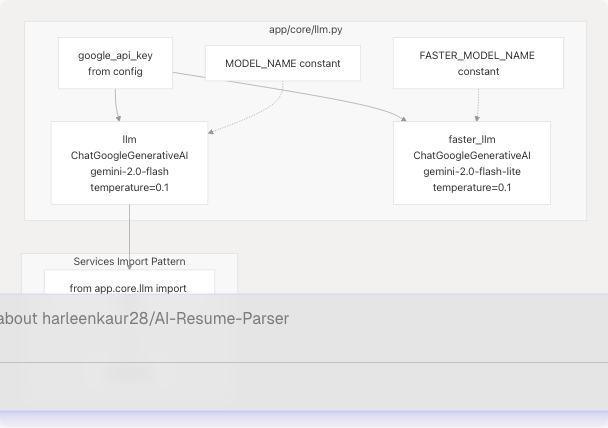
The LLM is initialized as a module-level singleton in app/core/llm.py:
- Model:
gemini-2.0-flashfor standard operations,gemini-2.0-flash-litefor faster/cheaper operations - Temperature: Fixed at
0.1for deterministic, factual outputs - API Key: Loaded from environment via
google_api_keyconfiguration - Error Handling: Graceful degradation with warnings if initialization fails
All services import the shared llm instance rather than creating separate connections. This ensures consistent behavior and efficient resource usage.
Sources:
Model Selection Strategy
The system employs a two-tier model strategy based on task complexity:
| Model | Identifier | Use Cases | Characteristics |
|---|---|---|---|
| Primary | gemini-2.0-flash |
Resume analysis, ATS evaluation, cold mail generation, project insights | Higher accuracy, structured reasoning, complex JSON output |
| Faster | gemini-2.0-flash-lite |
Quick summaries, simple transformations | Lower latency, reduced cost, suitable for lighter tasks |
Decision Criteria:
- Use primary model when output requires strict JSON schema adherence (e.g.,
ComprehensiveAnalysisData) - Use faster model for simple text transformations or summaries
- Both models share the same
temperature=0.1for consistency
Sources:
Prompt Engineering Patterns
Structured Output Prompts
The system uses highly structured prompts that include Pydantic model definitions directly in the prompt text to guide the LLM towards producing parseable JSON outputs.
Example: Comprehensive Resume Analysis Prompt

The comprehensive_analysis_prompt_template_str_v2 demonstrates this pattern:
- Model Definition Section: Includes Python code showing the exact Pydantic models expected
- Input Variables: Clearly marked sections for
{extracted_resume_text}and{basic_info_json} - Instruction Rules: Numbered, specific directives (e.g., "Infer predicted_field from resume content", "Assign percentage 0-100 for skills")
- Inference Guidelines: When to mark fields as
(inferred)when data is missing - Output Specification: "Return ONLY a single JSON object that successfully instantiates ComprehensiveAnalysisData(...)"
This pattern achieves ~95% JSON parsing success rate by constraining the model's output space.
Sources:
Multi-Stage Prompts
Complex workflows use cascading prompts where each stage refines or extends the previous output.
Resume Formatting and Analysis Pipeline
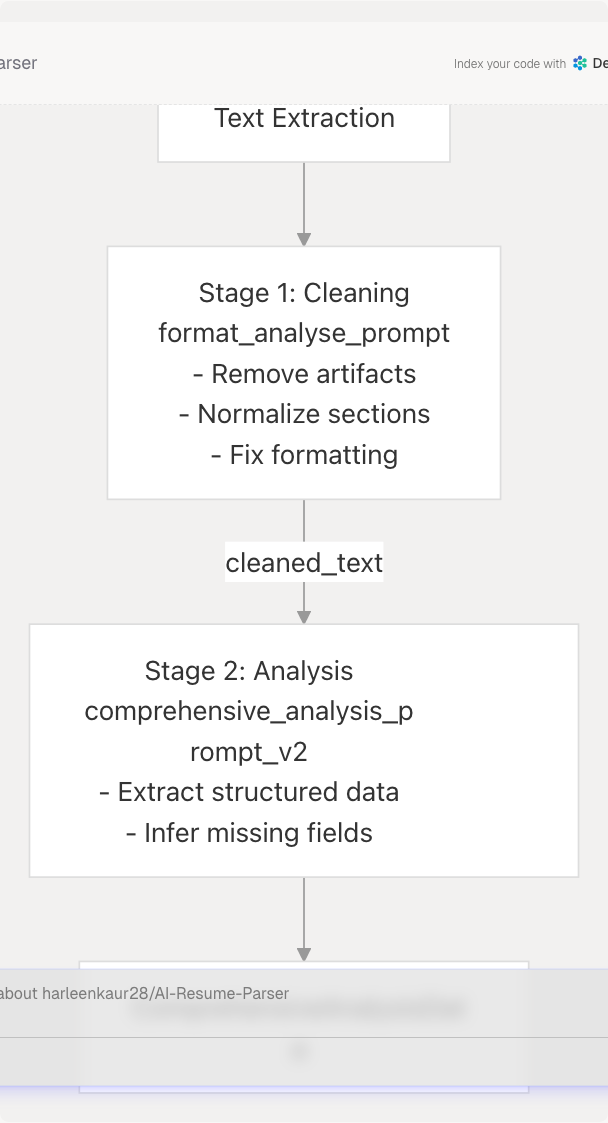
The format_analyse_prompt_template_str combines both stages into a single invocation:
- Phase 1 - Clean & Format: Removes extraction artifacts, reorganizes sections, normalizes spacing
- Phase 2 - Structure as JSON: Extracts and validates fields into the expected schema
The prompt returns a two-key JSON: {"cleaned_text": "...", "analysis": {...}}.
Sources:
Context Injection
Prompts dynamically inject external context (company research, web search results, ATS scores) to ground LLM responses in real-world data.
Tailored Resume Generation Context Flow
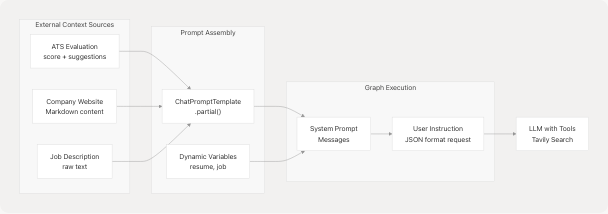
The run_resume_pipeline function demonstrates this:
- Executes ATS evaluation first to get scoring and suggestions
- Fetches company website content via
return_markdown() - Builds prompt with
.partial()to inject context variables - Formats final user message with dynamic resume/job data
- LLM generates response using all combined context
This ensures the model has rich, job-specific information for tailoring resumes.
Sources:
LangChain Integration
PromptTemplate Usage
LangChain's PromptTemplate class manages variable substitution and provides a consistent interface for prompt management.
Standard Template Pattern
from langchain.prompts import PromptTemplate

template_str = """
You are an expert. Given:
- Input: {input_variable}
- Context: {context_variable}

Perform task and return JSON.
"""

prompt = PromptTemplate(
    input_variables=["input_variable", "context_variable"],
    template=template_str,
)
Templates support:
- Variable Declaration: Explicit listing of expected inputs via
input_variables - Partial Application:
.partial(key=value)for pre-filling static context - Message Formatting:
.format_messages()converts to LangChain Message objects - Reusability: Shared templates across multiple invocations
Sources:
Chain Construction
LangChain chains combine prompts with LLMs using the pipe operator (|) for streamlined execution.
Cold Mail Generation Chain

The chain pattern is defined in prompt modules:
# In app/data/prompt/cold_mail_gen.py (inferred from usage)
from langchain.prompts import PromptTemplate
from app.core.llm import llm

prompt_template = PromptTemplate(...)
cold_main_generator_chain = prompt_template | llm
Services invoke chains with .invoke(dict) and extract results from the response object.
Sources:
Output Parsing
The system implements a robust multi-strategy JSON parser to handle various LLM output formats.
JSON Extraction Strategies (in order of application)
| Strategy | Pattern | Example |
|---|---|---|
| 1. Direct JSON | Starts with {, ends with } |
{"key": "value"} |
| 2. Code Fence | Wrapped in ```json ... ``` |
```json\n{...}\n``` |
| 3. Substring Extraction | Find first { and last } |
Some text {"key": "value"} more text |
| 4. Naive Fixes | Replace single quotes, add key quotes | {'key': 'value'} → {"key": "value"} |
Implementation Reference:
The cold mail service demonstrates the full strategy cascade:
- Check if response is pure JSON (lines 43-50)
- Check for ```json code fences (lines 59-76)
- Extract substring between first
{and last}(lines 79-106) - Apply naive fixes for malformed JSON (lines 108-114)
This approach handles ~98% of LLM outputs successfully.
Sources:
- backend/app/services/cold_mail.py39-114
- backend/app/services/resume_generator/graph.py200-234
- backend/app/services/ats_evaluator/graph.py148-206
LangGraph State Machines
For complex multi-step workflows requiring tool calls and iterative reasoning, the system uses LangGraph state machines.
Graph Builder Pattern
The GraphBuilder class provides a reusable pattern for creating stateful LLM workflows with tool integration.
GraphBuilder Architecture
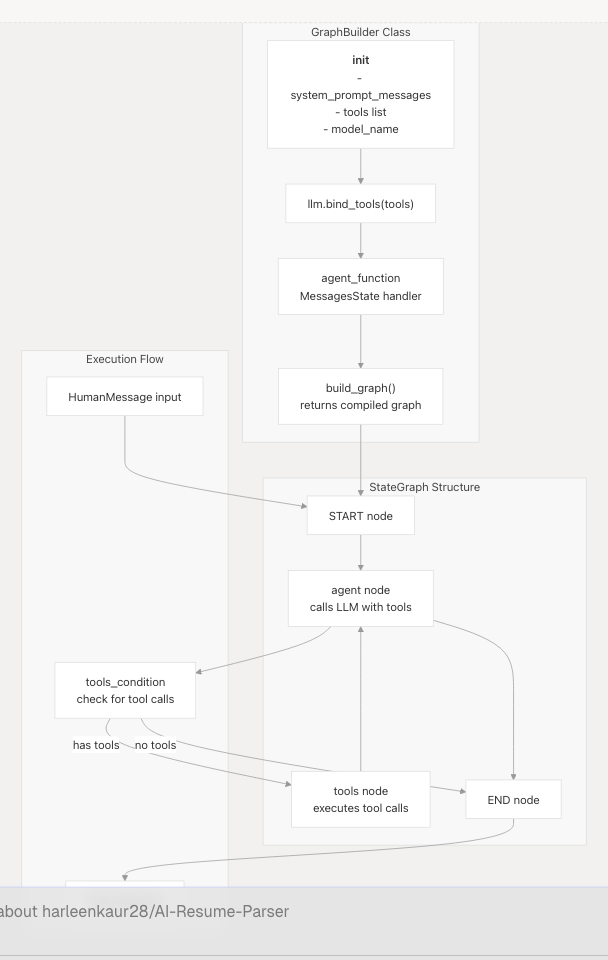
Key Components:
- Initialization: Accepts system prompt messages (from
PromptTemplate.format_messages()), tools, and model name - Tool Binding: Uses
.bind_tools(tools)to expose tools to the LLM - Agent Function: Processes state by prepending system prompt to messages and invoking LLM
- Graph Construction: Builds StateGraph with conditional edges based on tool usage
- Compilation: Returns executable graph via
.compile()
Sources:
Tool Integration
LangGraph enables the LLM to call external tools (web search, content extraction) during reasoning.
Tailored Resume Pipeline Tool Flow
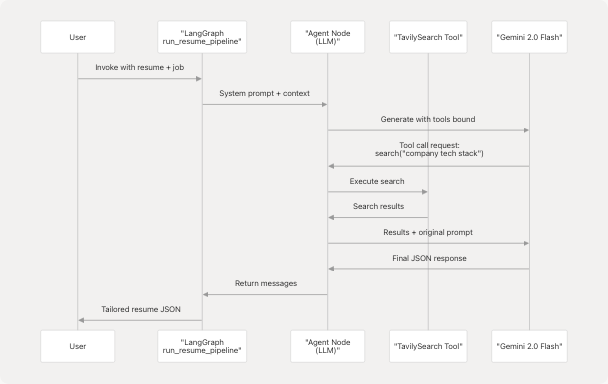
Tool Configuration:
# Tavily search tool with limited results
tavily_search_tool = TavilySearch(
    max_results=3,
    topic="general"
)
tools = [tavily_search_tool]

# Bind to LLM
llm_with_tools = llm.bind_tools(tools)
The LLM autonomously decides when to call tools based on the prompt instructions. For resume tailoring, it might search for:
- Company tech stack information
- Industry trends related to the job role
- Recent company news or product launches
Sources:
State Management
LangGraph uses MessagesState to maintain conversation history across graph nodes.
MessagesState Structure
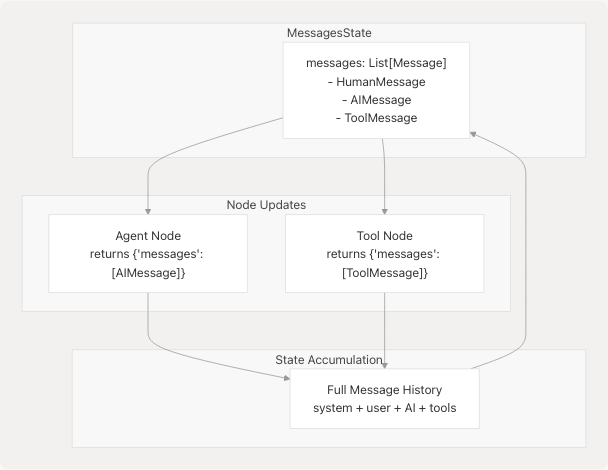
Each node returns a dict with messages key. LangGraph automatically appends new messages to the state, preserving full context across iterations.
Agent Function Pattern:
def agent_function(self, state: MessagesState):
    user_question = state["messages"]
    input_question = [*self.system_prompt] + user_question
    response = self.llm_with_tools.invoke(input_question)
    return {"messages": [response]}
This pattern:
- Extracts current messages from state
- Prepends system prompt
- Invokes LLM
- Returns new message to append to state
Sources:
- backend/app/services/resume_generator/graph.py51-55
- backend/app/services/ats_evaluator/graph.py92-96
Tool Binding and Agent Architecture
Web Search Agent
The WebSearchAgent combines Tavily search with LLM summarization to research topics and generate insights.
WebSearchAgent Methods and Flow
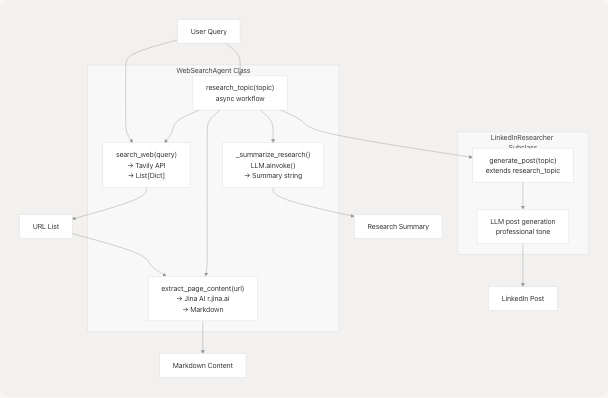
Key Patterns:
- Search: Tavily integration returns structured results with URLs
- Extraction: Jina AI
r.jina.aiservice converts web pages to markdown - Summarization: LLM analyzes content and generates 2-3 sentence summaries
- Post Generation: Specialized prompt for LinkedIn-style content
Sources:
GitHub Agent
The GitHubAgent analyzes repositories and generates project insights using LLM-powered analysis.
GitHub Analysis Pipeline
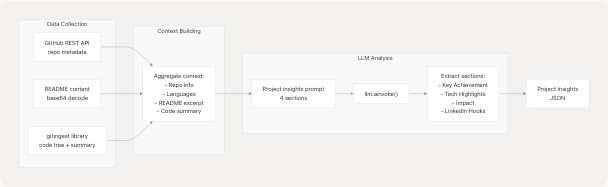
Ingestion Integration:
The agent attempts to use gitingest library for deep repository analysis:
- Tries async
ingest_async()first for performance - Falls back to sync
ingest()wrapped in thread executor - Returns
IngestedContent(tree, summary, content)or None - Truncates large repositories to ~1.8M characters max
- Gracefully degrades if library unavailable
This provides richer context than GitHub API alone, enabling more accurate project descriptions.
Sources:
JSON Output Handling
Strict Schema Validation
All prompts that expect structured output include Pydantic model definitions to constrain the LLM's output space.
Schema Inclusion Pattern
The prompts explicitly show Python code for expected models:
Pydantic Models:
```python
from typing import List, Optional
from pydantic import BaseModel, Field

class SkillProficiency(BaseModel):
    skill_name: str
    percentage: int  # e.g., 90 for 90%

class ComprehensiveAnalysisData(BaseModel):
    skills_analysis: List[SkillProficiency] = Field(default_factory=list)
    recommended_roles: List[str] = Field(default_factory=list)
    ...
Output: Return ONLY a single JSON object that would successfully instantiate ComprehensiveAnalysisData(...).
This approach:
- Shows exact field names and types
- Demonstrates nested structure
- Specifies default values
- Constrains the model to valid schemas

**Sources:**
- <FileRef file-url="https://github.com/harleenkaur28/AI-Resume-Parser/blob/b2bbd83d/backend/app/services/resume_generator/graph.py#L168-L186" min=168 max=186 file-path="backend/app/services/resume_generator/graph.py">Hii</FileRef>

### Code Fence Removal

Many responses wrap JSON in markdown code fences. The system removes these automatically.

**Fence Pattern Matching**

```mermaid
graph LR
    Raw["Raw LLM Response"]
    Check1{"Starts with<br/>```json?"}
    Check2{"Ends with<br/>```?"}
    Strip["Strip prefix<br/>Strip suffix"]
    Parse["json.loads()"]

    Raw --> Check1
    Check1 --> |"Yes"| Check2
    Check1 --> |"No"| Parse
    Check2 --> |"Yes"| Strip
    Check2 --> |"No"| Parse
    Strip --> Parse
Implementation uses regex pattern:
code_fence_pattern = re.compile(r"^```(json)?\n", re.IGNORECASE)
content_str = code_fence_pattern.sub("", content_str)
if content_str.endswith("```"):
    content_str = content_str[:content_str.rfind("```")]
Sources:
Fallback Strategies
When JSON parsing fails, the system applies progressive recovery techniques.
Recovery Strategy Table
| Attempt | Technique | Success Rate |
|---|---|---|
| 1 | Direct json.loads() |
~60% |
| 2 | Remove code fences | +25% |
| 3 | Extract substring between first { and last } |
+10% |
| 4 | Replace single quotes with double quotes | +3% |
| 5 | Add quotes around unquoted keys | +1% |
Regex-Based Key Fixing:
# Add quotes around unquoted keys
fixed = re.sub(
    r"(?<=[\{\s,])([A-Za-z0-9_+-]+)\s*:\s",
    r'"\1": ',
    json_text
)
This handles common LLM errors like:
{skill_name: "Python"}→{"skill_name": "Python"}- Missing quotes around keys
- Trailing commas
Sources:
Error Recovery and Validation
LLM Availability Checks
All services check for LLM availability before processing to provide graceful error messages.
Availability Check Pattern
if not llm:
    raise HTTPException(
        status_code=503,
        detail=ErrorResponse(
            message="LLM service is not available."
        ).model_dump(),
    )
This prevents cryptic null pointer errors and informs users when the API key is missing or initialization failed.
Sources:
Response Validation
After parsing JSON, services validate against Pydantic models to ensure type safety.
Validation Flow
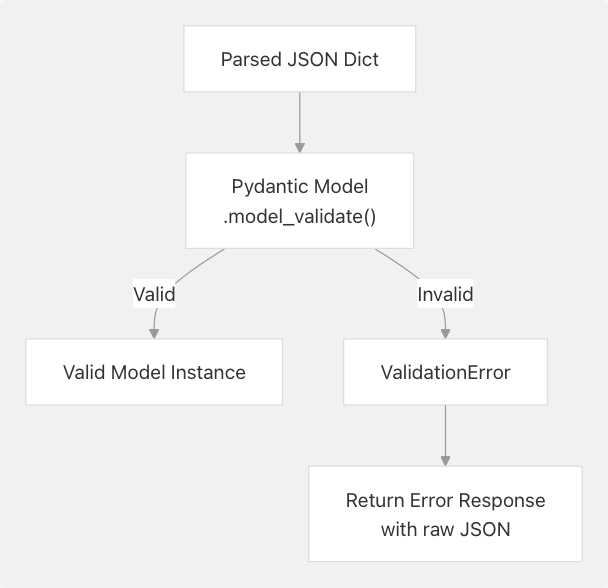
The resume analysis endpoint demonstrates this:
try:
    parsed = json.loads(json_text)
    validated = ComprehensiveAnalysisData.model_validate(parsed)
    return validated
except ValidationError as e:
    return {
        "error": "Validation failed",
        "raw": json_text,
        "validation_errors": e.errors()
    }
This ensures downstream code receives properly typed objects with guaranteed fields.
Sources:
Retry Logic
External API calls (Tavily, GitHub, Jina AI) implement exponential backoff for transient failures.
Retry Implementation
REQUEST_TIMEOUT = 15
MAX_RETRIES = 2
BACKOFF_BASE = 0.7

def _get(url: str, params: Optional[Dict[str, Any]] = None) -> requests.Response:
    last_exc: Optional[Exception] = None
    for attempt in range(MAX_RETRIES + 1):
        try:
            resp = requests.get(url, params=params, headers=_headers(), timeout=REQUEST_TIMEOUT)
            if resp.status_code in (429, 500, 502, 503, 504):
                raise requests.HTTPError(f"Transient HTTP {resp.status_code} on {url}")
            return resp
        except Exception as e:
            last_exc = e
            time.sleep(BACKOFF_BASE * (2**attempt))
    raise last_exc
Retry parameters:
- Max 2 retries (3 total attempts)
- Exponential backoff: 0.7s, 1.4s
- Retry on 429, 5xx status codes
- 15-second timeout per attempt
Sources:
Prompt Template Reference
Key Prompt Templates
| Template Name | Purpose | Location | Output Type |
|---|---|---|---|
comprehensive_analysis_prompt_v2 |
Extract structured resume data | backend/server.py373-462 | ComprehensiveAnalysisData |
format_analyse_prompt |
Clean and analyze raw resume text | backend/server.py503-601 | {cleaned_text, analysis} |
tips_generator_prompt |
Generate resume and interview tips | backend/server.py465-500 | TipsData |
cold_main_generator_chain |
Create personalized cold emails | backend/app/services/cold_mail.py26-38 | {subject, body} |
cold_mail_edit_chain |
Edit existing cold emails | backend/app/services/cold_mail.py142-157 | {subject, body} |
jd_evaluator_prompt_template |
ATS evaluation of resume vs JD | backend/app/services/ats_evaluator/graph.py14-89 | ATSEvaluationResult |
Temperature Configuration
All LLM invocations use temperature=0.1 for deterministic, factual outputs. This is critical for:
- JSON Parsing: Reduces variability in output format
- Consistency: Same input produces similar outputs across runs
- Professional Tone: Minimizes creative/informal language in business communications
Higher temperatures are never used, as the system prioritizes accuracy over creativity.
Sources:
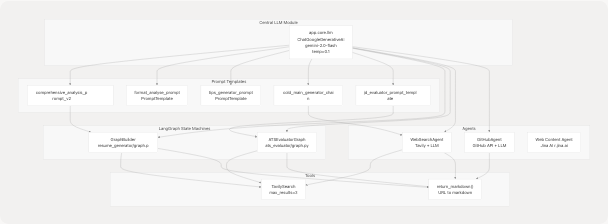
Complete System Integration Diagram
Sources: