Next.js Configuration & Dependencies
Purpose and Scope
This document covers the Next.js configuration and dependency management for the TalentSync frontend application. It details the setup in next.config.js, all production and development dependencies, PWA (Progressive Web App) configuration, analytics integration, Webpack customizations, and build processes.
For information about the overall frontend architecture and page routing structure, see Frontend Architecture. For deployment and Docker build configuration, see Docker Images & Build Process. For analytics behavior tracking, see Monitoring & Analytics.
Next.js Configuration Architecture
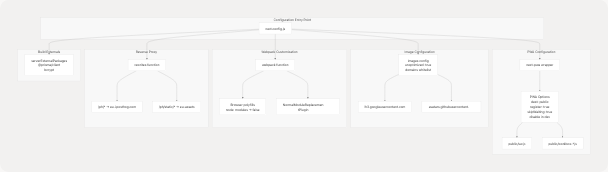
The Next.js application is configured through next.config.js which applies several critical customizations including PWA capabilities, image optimization, PostHog analytics proxying, and Webpack modifications for browser compatibility.
Configuration Flow Diagram
Sources: frontend/next.config.js1-81
Key Configuration Objects
The configuration is built using the withPWA higher-order function that wraps the base Next.js configuration:
| Configuration Section | Purpose | Key Settings |
|---|---|---|
| PWA | Enable Progressive Web App features | dest: "public", register: true, skipWaiting: true, disabled in development |
| ESLint | Build-time linting behavior | ignoreDuringBuilds: true |
| Images | Image optimization and external domains | unoptimized: true, OAuth provider domains whitelisted |
| Server Externals | Prevent bundling of server-only packages | @prisma/client, bcrypt |
| Webpack | Browser compatibility patches | Node.js polyfill removal, node: scheme handling |
| Rewrites | Reverse proxy for analytics | PostHog API proxying to avoid ad blockers |
| Trailing Slash | URL handling | skipTrailingSlashRedirect: true for PostHog compatibility |
Sources: frontend/next.config.js1-81
Core Dependencies
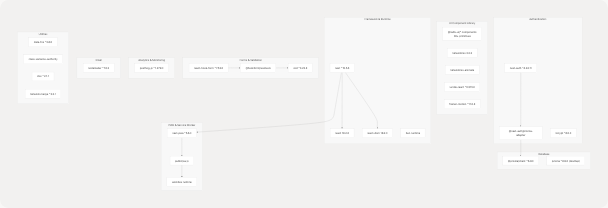
The application uses Bun as the package manager and runtime. Dependencies are defined in package.json and locked in bun.lock.
Dependency Categories Diagram
Sources: frontend/package.json1-98
Production Dependencies Table
| Category | Package | Version | Purpose |
|---|---|---|---|
| Framework | next |
^15.5.6 | React framework with SSR/SSG |
react |
18.2.0 | UI library | |
react-dom |
18.2.0 | React DOM renderer | |
| Auth | next-auth |
^4.24.11 | Authentication system with OAuth |
@next-auth/prisma-adapter |
^1.0.7 | Database adapter for NextAuth | |
bcrypt |
^6.0.0 | Password hashing | |
| Database | @prisma/client |
^6.9.0 | ORM client |
prisma |
^6.9.0 | Schema management CLI | |
| UI Components | @radix-ui/* |
^1.x | 30+ accessible primitives (dialog, dropdown, etc.) |
lucide-react |
^0.515.0 | Icon library | |
framer-motion |
^11.0.8 | Animation library | |
tailwindcss |
3.3.3 | Utility-first CSS framework | |
| Forms | react-hook-form |
^7.53.0 | Form state management |
@hookform/resolvers |
^3.9.0 | Validation resolvers | |
zod |
^3.23.8 | Schema validation | |
| PWA | next-pwa |
^5.6.0 | Progressive Web App plugin |
| Analytics | posthog-js |
^1.279.0 | Product analytics client |
nodemailer |
^7.0.3 | Email sending library | |
| Utilities | date-fns |
^3.6.0 | Date manipulation |
sharp |
^0.34.2 | Image optimization | |
sonner |
^1.5.0 | Toast notifications |
Sources: frontend/package.json17-88
Development Dependencies
| Package | Version | Purpose |
|---|---|---|
@types/bcrypt |
^5.0.2 | TypeScript types for bcrypt |
@types/bun |
latest | TypeScript types for Bun runtime |
tsx |
^4.20.2 | TypeScript execution for scripts |
Sources: frontend/package.json90-93
Progressive Web App (PWA) Configuration
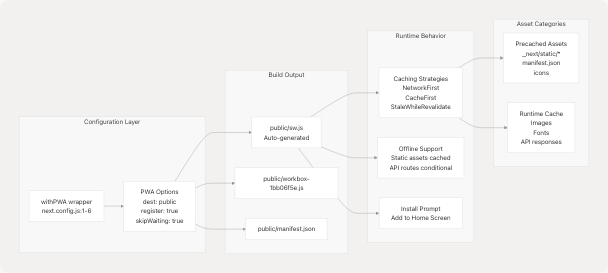
The application is configured as a PWA using the next-pwa package, enabling offline capabilities, app installation, and caching strategies through Workbox.
PWA Architecture
Sources: frontend/next.config.js1-6 frontend/public/sw.js1-2 frontend/public/workbox-1bb06f5e.js1-2
PWA Configuration Details
The withPWA wrapper in next.config.js configures:
const withPWA = require("next-pwa")({
  dest: "public",           // Service worker output directory
  register: true,           // Auto-register service worker
  skipWaiting: true,        // Activate new SW immediately
  disable: process.env.NODE_ENV === "development" // Disabled in dev
});
Key PWA Features:
- Automatic Service Worker Generation: Next.js build automatically generates
public/sw.jswith Workbox runtime - Precaching: All static assets in
_next/static/*, manifest, and icons are precached during installation - Skip Waiting: New service worker activates immediately without waiting for old tabs to close
- Development Bypass: PWA features disabled in development mode to avoid caching issues
Sources: frontend/next.config.js1-6
Workbox Caching Strategies
The generated service worker implements multiple caching strategies for different asset types:
| Asset Type | Strategy | Cache Name | Max Entries | Max Age |
|---|---|---|---|---|
Start URL (/) |
NetworkFirst | start-url |
N/A | N/A |
| Google Fonts Webfonts | CacheFirst | google-fonts-webfonts |
4 | 365 days |
| Google Fonts Stylesheets | StaleWhileRevalidate | google-fonts-stylesheets |
4 | 7 days |
| Static Fonts | StaleWhileRevalidate | static-font-assets |
4 | 7 days |
| Images (jpg, png, svg, etc.) | StaleWhileRevalidate | static-image-assets |
64 | 1 day |
| Next.js Images | StaleWhileRevalidate | next-image |
64 | 1 day |
| Audio (mp3, wav, ogg) | CacheFirst | static-audio-assets |
32 | 1 day |
| Video (mp4) | CacheFirst | static-video-assets |
32 | 1 day |
| JavaScript | StaleWhileRevalidate | static-js-assets |
32 | 1 day |
| CSS | StaleWhileRevalidate | static-style-assets |
32 | 1 day |
| Next.js Data | StaleWhileRevalidate | next-data |
32 | 1 day |
| API Routes (non-auth) | NetworkFirst | apis |
16 | 1 day |
| Cross-Origin | NetworkFirst | cross-origin |
32 | 1 hour |
Sources: frontend/public/sw.js1-2 frontend/public/workbox-1bb06f5e.js1-2
PostHog Analytics Integration
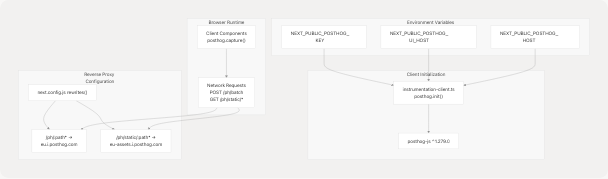
PostHog is integrated for product analytics and user behavior tracking. The configuration includes client-side initialization and a reverse proxy to bypass ad blockers.
PostHog Integration Architecture
Sources: frontend/instrumentation-client.ts1-12 frontend/next.config.js65-79
Client-Side Initialization
PostHog is initialized in instrumentation-client.ts which runs on the client:
posthog.init(key as string, {
  api_host: apiHost,    // "/ph" (proxied)
  ui_host: uiHost,      // "https://eu.posthog.com"
})
The initialization:
- Uses
NEXT_PUBLIC_POSTHOG_KEYwhich is embedded at build time - Routes API calls through
/phto avoid ad blockers - Points UI features to the EU PostHog instance
Sources: frontend/instrumentation-client.ts3-11
Reverse Proxy Configuration
The rewrites function in next.config.js creates a reverse proxy:
async rewrites() {
  return [
    {
      source: "/ph/static/:path*",
      destination: "https://eu-assets.i.posthog.com/static/:path*"
    },
    {
      source: "/ph/:path*",
      destination: "https://eu.i.posthog.com/:path*"
    }
  ];
}
This configuration:
- Proxies all
/ph/*requests to PostHog's EU data ingestion endpoint - Proxies static assets from
/ph/static/*to PostHog's CDN - Prevents ad blockers from blocking PostHog since requests appear same-origin
- Requires
skipTrailingSlashRedirect: truefor compatibility
Sources: frontend/next.config.js65-79
Webpack Customizations
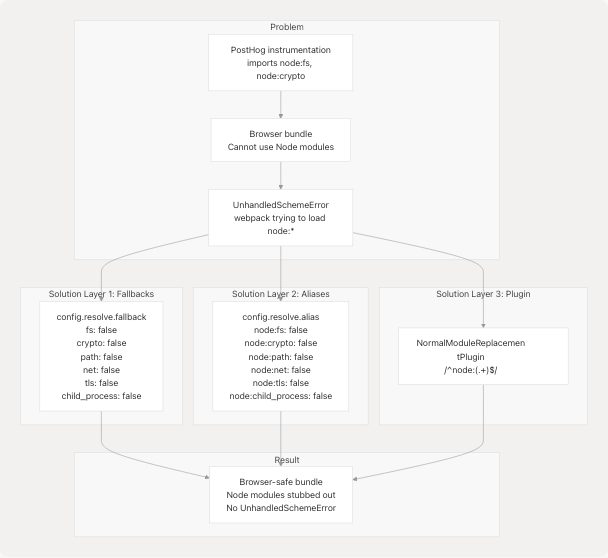
The Next.js configuration includes custom Webpack modifications to handle Node.js module compatibility issues in browser bundles, particularly for PostHog instrumentation.
Webpack Configuration Flow
Sources: frontend/next.config.js18-64
Webpack Configuration Code
The configuration uses a three-layer approach for browser compatibility:
Layer 1 - Fallback Configuration:
config.resolve.fallback = {
  ...(config.resolve.fallback || {}),
  child_process: false,
  fs: false,
  net: false,
  tls: false,
  crypto: false,
  path: false,
};
Layer 2 - Alias Configuration:
config.resolve.alias = {
  ...(config.resolve.alias || {}),
  "node:child_process": false,
  "node:fs": false,
  "node:net": false,
  "node:tls": false,
  "node:crypto": false,
  "node:path": false,
};
Layer 3 - Module Replacement Plugin:
new webpack.NormalModuleReplacementPlugin(/^node:(.+)$/, (resource) => {
  if (resource.request && typeof resource.request === "string") {
    resource.request = resource.request.replace(/^node:/, "");
  }
})
This configuration only applies when !isServer to ensure server-side code can still use Node.js modules.
Sources: frontend/next.config.js25-61
Build and Development Scripts
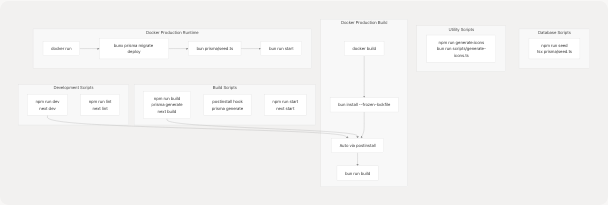
The application defines several NPM scripts for development, building, and database management.
Script Execution Flow
Sources: frontend/package.json5-15 frontend/Dockerfile42-48 docker-compose.prod.yaml49
Script Definitions
| Script | Command | Purpose |
|---|---|---|
dev |
next dev |
Start development server on port 3000 |
build |
prisma generate && next build |
Generate Prisma client and build production bundle |
postinstall |
prisma generate |
Auto-run after dependency installation |
start |
next start |
Start production server |
lint |
next lint |
Run ESLint checks |
seed |
tsx prisma/seed.ts |
Seed database with initial data |
generate:icons |
bun run scripts/generate-icons.ts |
Generate icon assets |
Sources: frontend/package.json5-12
Prisma Seed Configuration
The package.json includes a prisma section that configures the seed script:
"prisma": {
  "seed": "tsx prisma/seed.ts"
}
This allows running prisma db seed to execute the TypeScript seed file.
Sources: frontend/package.json14-16
Environment Variables
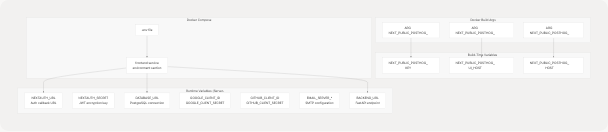
The application requires both build-time and runtime environment variables.
Environment Variable Categories
Sources: frontend/Dockerfile10-18 docker-compose.prod.yaml42-48
Build-Time Variables (NEXT_PUBLIC_*)
These variables are embedded into the client-side JavaScript bundle during next build:
| Variable | Default | Purpose |
|---|---|---|
NEXT_PUBLIC_POSTHOG_KEY |
(required) | PostHog project API key |
NEXT_PUBLIC_POSTHOG_UI_HOST |
https://eu.posthog.com |
PostHog UI host |
NEXT_PUBLIC_POSTHOG_HOST |
/ph |
PostHog API host (proxied) |
These must be provided as Docker build arguments:
ARG NEXT_PUBLIC_POSTHOG_KEY
ARG NEXT_PUBLIC_POSTHOG_UI_HOST
ARG NEXT_PUBLIC_POSTHOG_HOST

ENV NEXT_PUBLIC_POSTHOG_KEY=$NEXT_PUBLIC_POSTHOG_KEY
ENV NEXT_PUBLIC_POSTHOG_UI_HOST=$NEXT_PUBLIC_POSTHOG_UI_HOST
ENV NEXT_PUBLIC_POSTHOG_HOST=$NEXT_PUBLIC_POSTHOG_HOST
Sources: frontend/Dockerfile10-18 docker-compose.prod.yaml37-40
Runtime Variables (Server-Only)
These variables are required at runtime but not embedded in the client bundle:
| Variable | Purpose | Example |
|---|---|---|
NODE_ENV |
Environment mode | production |
NEXTAUTH_URL |
NextAuth callback URL | https://talentsync.tashif.codes |
NEXTAUTH_SECRET |
JWT signing secret | (random string) |
DATABASE_URL |
PostgreSQL connection | postgresql://user:pass@db:5432/dbname |
BACKEND_URL |
FastAPI service URL | http://backend:8000 |
GOOGLE_CLIENT_ID |
Google OAuth client ID | (from Google Console) |
GOOGLE_CLIENT_SECRET |
Google OAuth secret | (from Google Console) |
GITHUB_CLIENT_ID |
GitHub OAuth client ID | (from GitHub) |
GITHUB_CLIENT_SECRET |
GitHub OAuth secret | (from GitHub) |
EMAIL_SERVER_HOST |
SMTP host | smtp.gmail.com |
EMAIL_SERVER_PORT |
SMTP port | 587 |
EMAIL_SERVER_USER |
SMTP username | Email address |
EMAIL_SERVER_PASSWORD |
SMTP password | App password |
EMAIL_FROM |
Sender email | noreply@domain.com |
Sources: frontend/Dockerfile100-125 docker-compose.prod.yaml44-48
Production Build Process
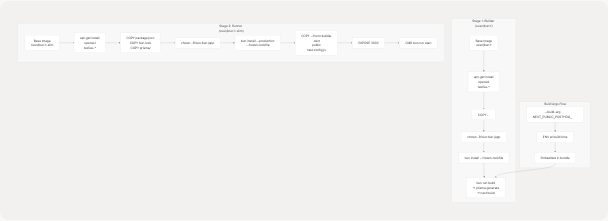
The production build uses a multi-stage Docker build to create an optimized image.
Docker Build Stages
Sources: frontend/Dockerfile1-99
Build Stage (Builder)
The builder stage frontend/Dockerfile2-48 performs the following steps:
- Base Image: Uses
oven/bun:1with full Node.js environment - System Dependencies: Installs OpenSSL and TeXLive packages for LaTeX compilation
- File Copy: Copies all application source files
- Permissions: Changes ownership to
bun:bunuser for security - Dependencies: Runs
bun install --frozen-lockfileto install all dependencies - Build: Executes
bun run buildwhich:- Runs
prisma generateto generate Prisma client - Runs
next buildto create production bundle - Generates service worker via
next-pwa
- Runs
Sources: frontend/Dockerfile2-48
Runtime Stage (Runner)
The runner stage frontend/Dockerfile50-98 creates the final production image:
- Base Image: Uses
oven/bun:1-slimfor smaller image size - System Dependencies: Installs minimal runtime dependencies (OpenSSL, TeXLive)
- Copy Metadata: Copies
package.json,bun.lock, and Prisma schema - Production Dependencies: Installs only production dependencies with
--productionflag - Copy Built Assets: Copies compiled
.nextdirectory,publicfolder, and config from builder - Expose Port: Exposes port 3000
- Start Command: Runs
bun run startwhich executesnext start
Sources: frontend/Dockerfile50-98
Docker Compose Production Setup
The production deployment docker-compose.prod.yaml33-55 orchestrates the frontend container:
frontend:
  build:
    context: ./frontend
    dockerfile: Dockerfile
    args:
      NEXT_PUBLIC_POSTHOG_KEY: ${NEXT_PUBLIC_POSTHOG_KEY}
      NEXT_PUBLIC_POSTHOG_UI_HOST: ${NEXT_PUBLIC_POSTHOG_UI_HOST:-https://eu.posthog.com}
      NEXT_PUBLIC_POSTHOG_HOST: ${NEXT_PUBLIC_POSTHOG_HOST:-https://eu.i.posthog.com}
  environment:
    NODE_ENV: production
    NEXTAUTH_URL: https://talentsync.tashif.codes
    DATABASE_URL: "postgresql://${POSTGRES_USER}:${POSTGRES_PASSWORD}@db:5432/${POSTGRES_DB}?schema=public"
    BACKEND_URL: http://backend:8000
  command: sh -c "bunx prisma migrate deploy && bun prisma/seed.ts && bun run start"
The startup command sequence:
bunx prisma migrate deploy- Apply database migrationsbun prisma/seed.ts- Seed database with initial databun run start- Start Next.js production server
Sources: docker-compose.prod.yaml33-55
CI/CD Integration
The GitHub Actions deployment workflow .github/workflows/deploy.yaml1-42 automates the build and deployment process:
- name: Deploy to VPS
  script: |
    cd ${{ env.VPS_PROJECT_PATH }}
    git pull origin main
    docker compose -f docker-compose.prod.yaml build
    docker compose -f docker-compose.prod.yaml up -d --force-recreate
This workflow:
- Triggers on push to
mainbranch - SSHs into the production VPS
- Pulls latest code from Git
- Rebuilds Docker images (including frontend)
- Recreates containers with new images
- Runs database migrations and seeding automatically via
commanddirective
Sources: .github/workflows/deploy.yaml22-41
Summary
The Next.js frontend configuration provides:
- PWA Capabilities: Offline support, app installation, and advanced caching via next-pwa and Workbox
- Analytics Integration: PostHog product analytics with reverse proxy to bypass ad blockers
- Browser Compatibility: Webpack customizations to handle Node.js module imports in browser bundles
- Build Optimization: Multi-stage Docker builds with Bun runtime for fast builds and small images
- Database Integration: Prisma ORM with automatic client generation and migration support
- Authentication: NextAuth with OAuth providers and email verification
- UI Framework: Comprehensive Radix UI component library with Tailwind CSS styling
The configuration balances developer experience (fast builds with Bun, hot reload in dev) with production optimization (minimal runtime image, static asset caching, environment security).
Sources: frontend/next.config.js1-81 frontend/package.json1-98 frontend/Dockerfile1-125 docker-compose.prod.yaml33-55