Account Management
This document describes the Account Management page, a frontend component that allows users to view and manage their account settings, profile information, security settings, and account deletion. This page provides different functionality based on the user's authentication method (email/password vs OAuth providers like Google or GitHub).
For authentication flows and session management, see Authentication System. For role-based access control, see Role Selection & Management.
Purpose and Scope
The Account Management page serves as the central hub for user account operations. It provides:
- Profile Information Display: Shows user name, email, role, and profile picture
- Avatar Management: Upload/change profile pictures (email users only; OAuth users' avatars are managed by their provider)
- Security Settings: Password reset functionality for email-authenticated users
- Account Deletion: Complete account removal with cascading deletion of all associated data
- Authentication Method Display: Shows the active authentication method
- Quick Actions: Navigation shortcuts and sign-out functionality
Sources: frontend/app/account/page.tsx1-792
Page Structure and Components
The Account Management page is implemented as a Next.js client component located at /account. It uses NextAuth for session management and displays different UI elements based on the user's authentication provider.
Component Architecture Diagram
Sources: frontend/app/account/page.tsx44-792 frontend/components/avatar-upload.tsx1-179 frontend/components/ui/avatar.tsx1-121
Authentication Method Detection
The page differentiates between email-authenticated users and OAuth users by examining the user's profile image URL:
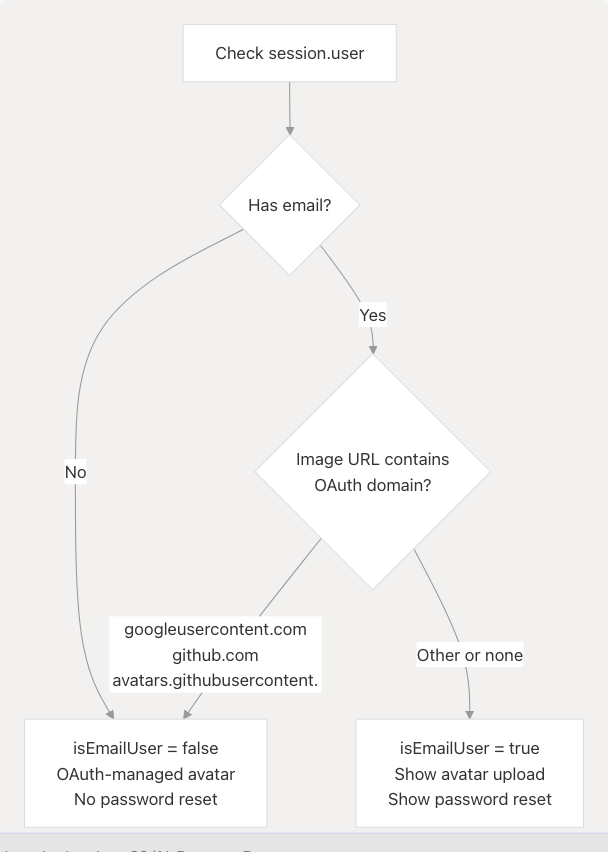
Sources: frontend/app/account/page.tsx58-63
Profile Information Management
Profile Display
The Profile Information Card displays the user's basic account details including name, email, role, and profile picture. The role is displayed as "Recruiter" if the user's role is "Admin", otherwise it shows the actual role value.
| Field | Icon | Data Source | Display Logic |
|---|---|---|---|
| Profile Picture | Avatar | session.user.image or avatarUrl state |
Different UI for email vs OAuth users |
| Name | User | session.user.name |
Displayed as-is or "Not provided" |
session.user.email |
Displayed as-is or "Not provided" | ||
| Role | Shield | (session.user as any).role |
"Recruiter" if "Admin", else actual role or "Not assigned" |
Sources: frontend/app/account/page.tsx226-295
Avatar Management Flow
The avatar management system behaves differently based on authentication method:
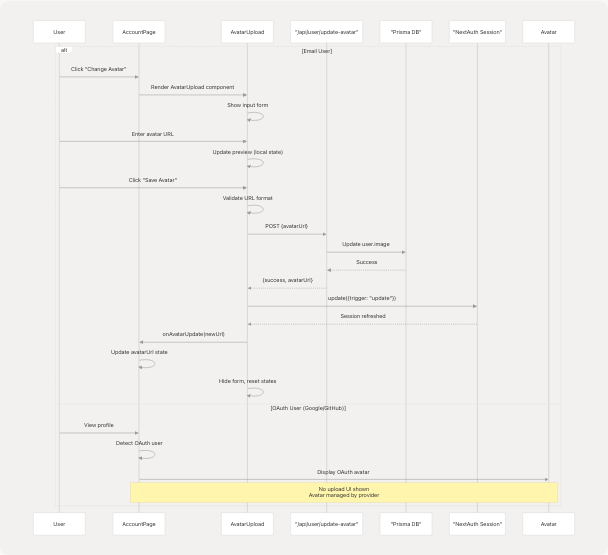
Sources: frontend/app/account/page.tsx238-265 frontend/components/avatar-upload.tsx22-178
Avatar Component with Proxy Support
The Avatar component implements retry logic and CORS workaround for OAuth provider images:
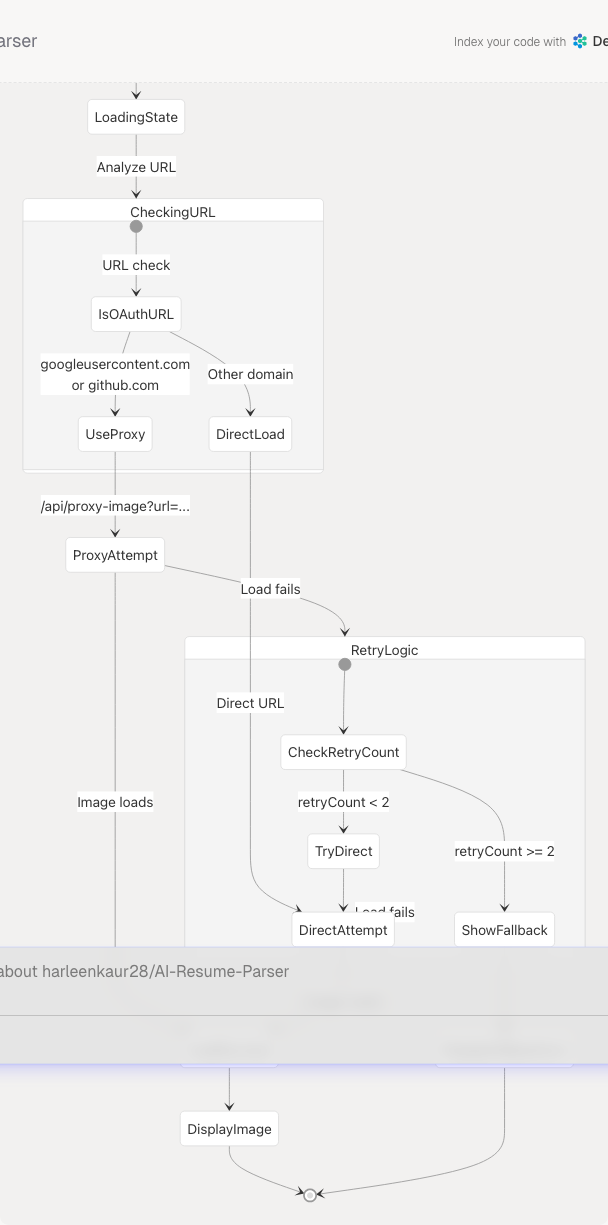
Sources: frontend/components/ui/avatar.tsx12-120 frontend/app/api/proxy-image/route.ts1-91
Account Security
Password Reset Flow
Password reset is only available to email-authenticated users. OAuth users' passwords are managed by their respective providers.
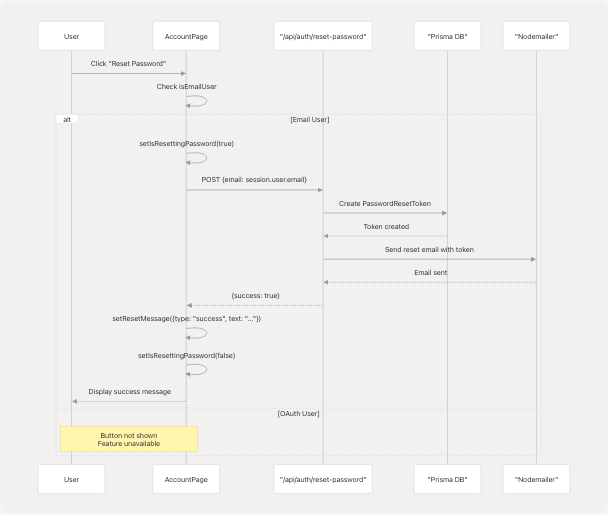
Sources: frontend/app/account/page.tsx82-121 frontend/app/account/page.tsx346-379
Authentication Method Display
The Account Security Card displays the active authentication method with appropriate labels:
| Authentication Type | Detection Logic | Display Label | Additional Features |
|---|---|---|---|
| Google OAuth | session.user.image contains "googleusercontent" |
"Google OAuth" | No password reset |
| GitHub OAuth | session.user.image contains "github" |
"GitHub OAuth" | No password reset |
| Email Sign-in | All other cases | "Email Sign-in" | Password reset available |
Sources: frontend/app/account/page.tsx329-343
Account Deletion
Deletion Confirmation Flow
Account deletion requires explicit user confirmation by typing "DELETE" to prevent accidental data loss:
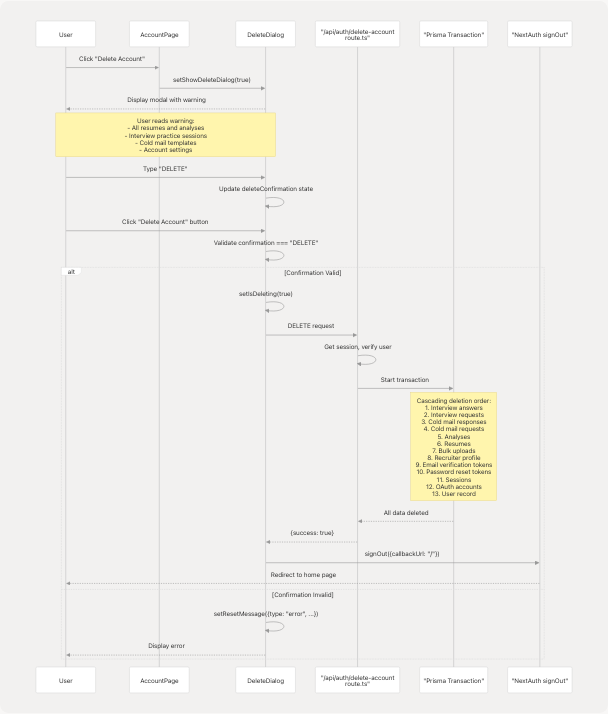
Sources: frontend/app/account/page.tsx123-157 frontend/app/account/page.tsx636-789 frontend/app/api/auth/delete-account/route.ts1-151
Cascading Deletion Logic
The account deletion API implements a transactional cascading delete to maintain referential integrity:

Sources: frontend/app/api/auth/delete-account/route.ts42-134
Page Loading and Navigation
Loading States
The page implements multiple loading states for better user experience:
| State Variable | Purpose | Duration | UI Effect |
|---|---|---|---|
status === "loading" |
NextAuth session loading | Until session resolved | Full-page "Loading..." message |
isPageLoading |
Initial page render | 100ms | Full-page loader with animation |
isResettingPassword |
Password reset in progress | API call duration | Disabled button with spinner |
isDeleting |
Account deletion in progress | API call + transaction | Disabled button with spinner |
Sources: frontend/app/account/page.tsx47-76 frontend/app/account/page.tsx159-187
Navigation and Quick Actions
The page provides navigation elements and quick actions:
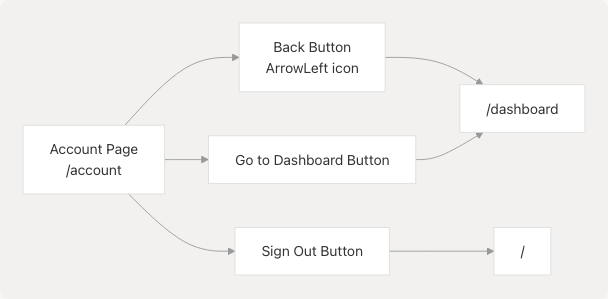
Sources: frontend/app/account/page.tsx196-206 frontend/app/account/page.tsx419-433 frontend/app/account/page.tsx78-80
Future Features (Coming Soon)
BYOAW & Model Selector Card
The page includes a preview of an upcoming feature for "Bring Your Own AI Weights" (BYOAW) and model selection. This card is currently disabled with a "Coming Soon" overlay.
Planned features include:
- AI Model Provider Selection: OpenAI, Claude (Anthropic), Gemini (Google)
- API Configuration: Custom API keys and endpoints
- Model Settings: Temperature and max tokens configuration
- Connection Testing: Validate API credentials before saving
The UI structure is already implemented but overlaid with a disabled state:
Sources: frontend/app/account/page.tsx438-629
Data Flow Summary
Complete Account Management Data Flow
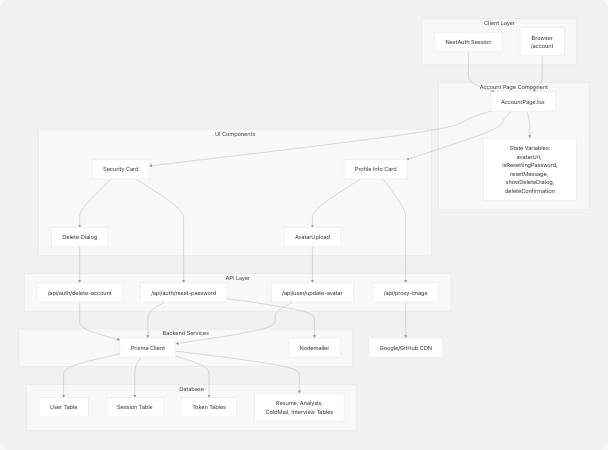
Sources: frontend/app/account/page.tsx1-792 frontend/components/avatar-upload.tsx1-179 frontend/app/api/auth/delete-account/route.ts1-151 frontend/app/api/proxy-image/route.ts1-91
Key Code Entities
Main Component
- Component:
AccountPagefrontend/app/account/page.tsx44-792 - Route:
/account(Next.js App Router) - Hooks:
useSession,useRouter
State Management
isPageLoading: Initial page load animation stateavatarUrl: Stores updated avatar URL after uploadisResettingPassword: Password reset operation in progressresetMessage: Success/error messages for operationsshowDeleteDialog: Controls delete confirmation modal visibilitydeleteConfirmation: User input for deletion confirmationisDeleting: Account deletion operation in progress
Helper Functions
isEmailUserfrontend/app/account/page.tsx59-63: Determines if user authenticated with email (vs OAuth)handleSignOut()frontend/app/account/page.tsx78-80: Signs out user and redirects to homehandlePasswordReset()frontend/app/account/page.tsx82-121: Initiates password reset flowhandleDeleteAccount()frontend/app/account/page.tsx123-157: Processes account deletion with validation
API Routes
POST /api/user/update-avatar: Updates user profile picturePOST /api/auth/reset-password: Sends password reset emailDELETE /api/auth/delete-account: Permanently deletes user account and data frontend/app/api/auth/delete-account/route.ts6-150GET /api/proxy-image: Proxies OAuth provider images to avoid CORS frontend/app/api/proxy-image/route.ts5-90
Sub-Components
AvatarUploadfrontend/components/avatar-upload.tsx22-178: Avatar URL input and previewAvatarfrontend/components/ui/avatar.tsx12-120: Profile picture display with fallbackCardcomponents: Various card layouts for different sectionsDialog: Modal for delete confirmation
Sources: frontend/app/account/page.tsx1-792 frontend/components/avatar-upload.tsx1-179 frontend/components/ui/avatar.tsx1-121 frontend/app/api/auth/delete-account/route.ts1-151 frontend/app/api/proxy-image/route.ts1-91