Docker Images & Build Process
Purpose and Scope
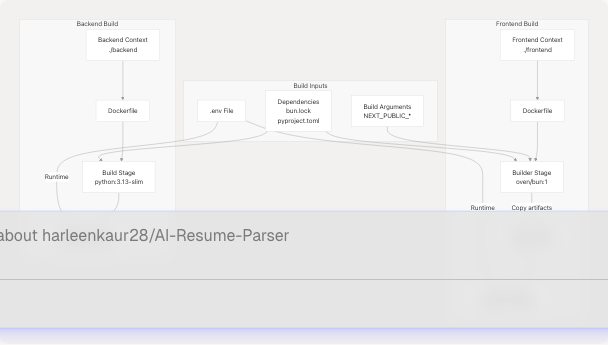
This document describes the Docker image build configurations for TalentSync's frontend and backend services, including the multi-stage build process, dependency management, environment variable handling, and optimization techniques. For information about how these images are orchestrated together, see Docker Compose Setup. For CI/CD deployment automation, see CI/CD Pipeline.
Overview
TalentSync uses two custom Docker images:
| Image | Base Image | Build Strategy | Final Size Optimization |
|---|---|---|---|
| Frontend | oven/bun:1 → oven/bun:1-slim |
Multi-stage build | Slim runner image, production deps only |
| Backend | python:3.13-slim |
Single-stage build | Slim base, uv package manager |
Both images are built from their respective Dockerfiles and orchestrated via Docker Compose configurations.
Build Process Flow
Frontend Docker Image
Multi-Stage Build Architecture
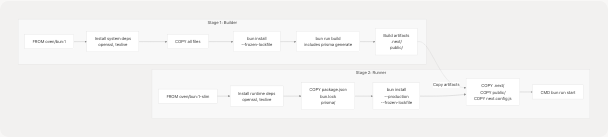
The frontend uses a two-stage build to minimize final image size while maintaining all build-time dependencies.
Stage Architecture
Builder Stage
The builder stage (frontend/Dockerfile2-48) uses the full oven/bun:1 image and performs the complete build process:
FROM oven/bun:1 AS builder
Key operations:
- System dependencies installation (frontend/Dockerfile22-30): Installs
opensslfor Prisma andtexlivepackages for PDF generation capabilities - Build argument handling (frontend/Dockerfile10-18): Accepts
NEXT_PUBLIC_*variables as build args and converts them to environment variables for Next.js to embed in the client bundle - File copying (frontend/Dockerfile33): Copies entire application context
- Ownership setup (frontend/Dockerfile36-39): Changes ownership to
bunuser for security - Dependency installation (frontend/Dockerfile43): Runs
bun install --frozen-lockfileto ensure reproducible builds - Application build (frontend/Dockerfile48): Executes
bun run build, which includesprisma generateandnext build
Build Arguments
The builder stage accepts three build arguments for embedding into the Next.js bundle:
| Argument | Purpose | Embedded At |
|---|---|---|
NEXT_PUBLIC_POSTHOG_KEY |
PostHog analytics project key | Build time |
NEXT_PUBLIC_POSTHOG_UI_HOST |
PostHog UI host URL | Build time |
NEXT_PUBLIC_POSTHOG_HOST |
PostHog API host URL | Build time |
These are passed via docker-compose.prod.yaml (docker-compose.prod.yaml37-40).
Runner Stage
The runner stage (frontend/Dockerfile50-98) uses the slim image variant to reduce final image size:
FROM oven/bun:1-slim AS runner
Optimization techniques:
- Slim base image:
oven/bun:1-slimincludes only runtime essentials - Selective copying: Only copies necessary files from builder:
package.jsonandbun.lock(frontend/Dockerfile71-72)prisma/directory for database operations (frontend/Dockerfile73).next/build output (frontend/Dockerfile87)public/static assets (frontend/Dockerfile88)next.config.jsfor runtime configuration (frontend/Dockerfile91)
- Production dependencies only (frontend/Dockerfile84):
bun install --production --frozen-lockfileexcludes devDependencies - Non-root user: Runs as
bunuser (frontend/Dockerfile80) for security
Runtime command:
CMD ["bun", "run", "start"]
This is overridden in docker-compose.yaml (docker-compose.yaml63) to run migrations and seeding before starting:
sh -c "bunx prisma migrate deploy && bun prisma/seed.ts && bun run start"
Environment Variable Handling
The frontend image requires two types of environment variables:
1. Build-time variables (NEXT_PUBLIC_*)
These must be available during docker build and are embedded into the JavaScript bundle:

Specified in docker-compose.prod.yaml37-40:
args:
  NEXT_PUBLIC_POSTHOG_KEY: ${NEXT_PUBLIC_POSTHOG_KEY}
  NEXT_PUBLIC_POSTHOG_UI_HOST: ${NEXT_PUBLIC_POSTHOG_UI_HOST:-https://eu.posthog.com}
  NEXT_PUBLIC_POSTHOG_HOST: ${NEXT_PUBLIC_POSTHOG_HOST:-https://eu.i.posthog.com}
2. Runtime variables
These are provided when the container starts and include:
| Variable | Purpose | Source |
|---|---|---|
NEXTAUTH_URL |
NextAuth callback URL | docker-compose.prod.yaml46 |
NEXTAUTH_SECRET |
Session encryption key | .env file |
DATABASE_URL |
Prisma connection string | Composed from POSTGRES_* vars |
BACKEND_URL |
Internal backend service URL | docker-compose.prod.yaml48 |
| OAuth credentials | Google/GitHub OAuth | .env file |
| Email settings | Nodemailer configuration | .env file |
Runtime variables are loaded via env_file (docker-compose.prod.yaml42-43) and explicit environment overrides.
Backend Docker Image
Build Process
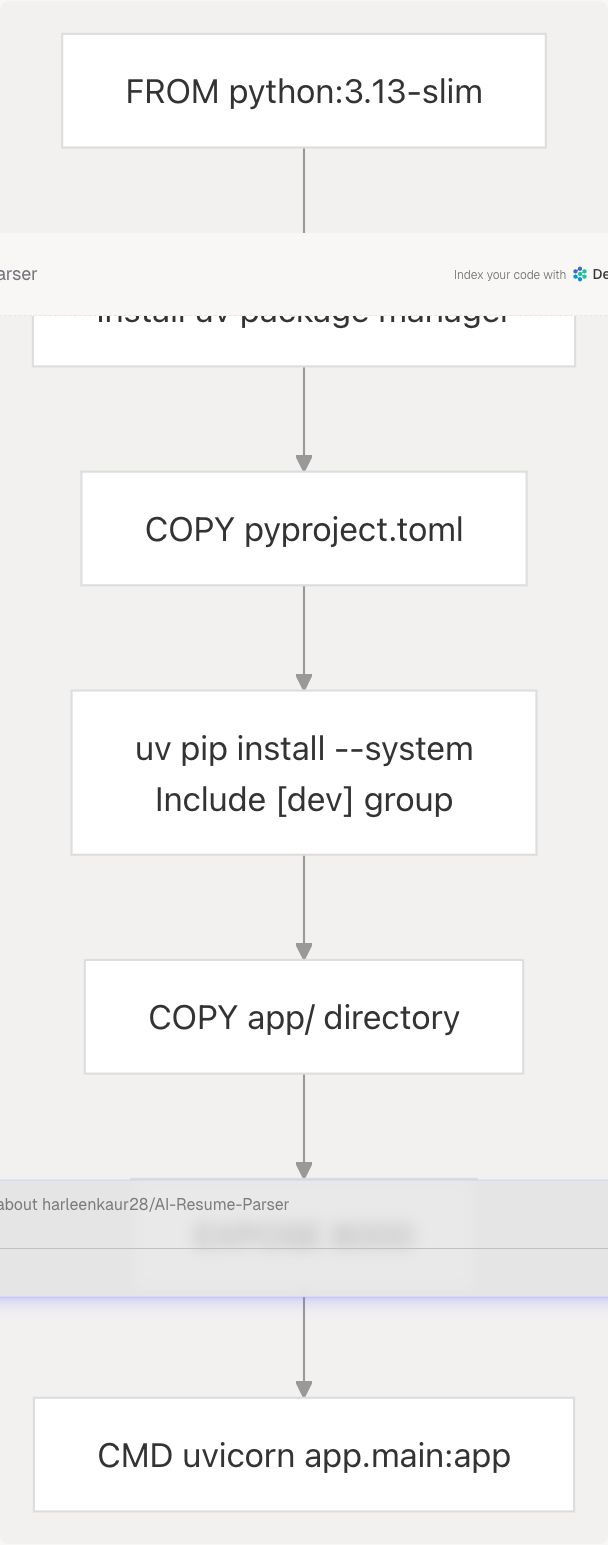
The backend uses a single-stage build with the slim Python base image:
Build stages:
-
Base image selection (backend/Dockerfile2): Uses
python:3.13-slimfor minimal footprint -
Environment configuration (backend/Dockerfile5-6):
ENV PYTHONUNBUFFERED=1
ENV NLTK_DATA=/app/model/nltk_data
-
uv package manager (backend/Dockerfile12): Installs
uvfor faster dependency resolution -
Dependency installation (backend/Dockerfile17-22):
- Copies
pyproject.tomlfirst for Docker layer caching - Runs
uv pip install --system --no-cache ".[dev]"to install all dependencies including uvicorn - Uses
--systemflag to install globally (no virtual env) - Uses
--no-cacheto reduce image size
- Copies
-
Application code (backend/Dockerfile25): Copies
app/directory containing all Python modules -
Runtime command (backend/Dockerfile32): Starts uvicorn server on all interfaces
Dependency Management
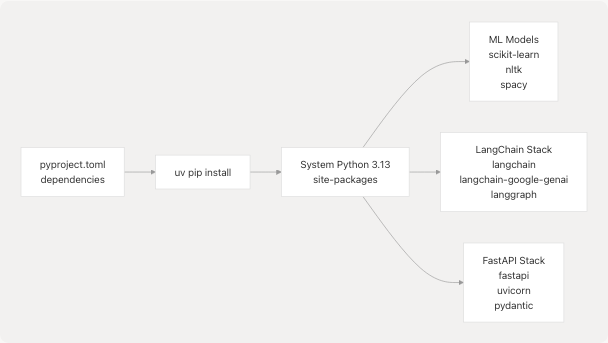
The backend uses pyproject.toml to define dependencies, with uv as the installer:
Key dependency groups:
- FastAPI & Uvicorn: Web framework and ASGI server (backend/Dockerfile20-22)
- LangChain ecosystem: LLM orchestration and agent frameworks
- ML libraries: scikit-learn, nltk, spacy for NLP processing
- File processing: PyPDF2, python-docx for resume parsing
The [dev] group is included to ensure uvicorn is available (backend/Dockerfile20).
Runtime Configuration
Environment variables:
ENV PYTHONUNBUFFERED=1
ENV NLTK_DATA=/app/model/nltk_data
PYTHONUNBUFFERED=1(backend/Dockerfile5): Forces Python stdout/stderr to be unbuffered for real-time logsNLTK_DATA(backend/Dockerfile6): Specifies location for NLTK data files
Volume mounts:
The backend requires a volume mount for file persistence (docker-compose.prod.yaml26):
volumes:
  - ./backend/uploads:/app/uploads
This persists uploaded resumes across container restarts.
Port exposure:
EXPOSE 8000
The backend listens on port 8000 internally (backend/Dockerfile28), which is accessed by the frontend via the internal Docker network as http://backend:8000.
Image Size Optimization
Both images employ multiple optimization strategies:
Frontend optimizations:
| Technique | Implementation | Size Impact |
|---|---|---|
| Multi-stage build | Separate builder and runner stages | ~60% reduction |
| Slim base image | oven/bun:1-slim vs oven/bun:1 |
~40% smaller base |
| Production dependencies | --production flag excludes devDependencies |
~30% fewer deps |
| Selective copying | Only copy built artifacts, not source | Minimal source code |
Backend optimizations:
| Technique | Implementation | Size Impact |
|---|---|---|
| Slim base image | python:3.13-slim vs python:3.13 |
~70% smaller base |
| No cache installs | --no-cache flag |
No pip cache layer |
| Layer ordering | Copy pyproject.toml before app code | Better layer caching |
| System install | --system avoids virtualenv overhead |
Slight reduction |
Build context optimization:
The .dockerignore file (frontend/.dockerignore1-53) excludes unnecessary files from the Docker build context:
node_modules/           # 44-52)Dependencies
.next/                  # Build output
.env*                   # Environment files
.git/                   # Git history
*.md                    # Documentation
**/*.test.*             # Tests
coverage/               # Test coverage
This reduces the amount of data sent to the Docker daemon during builds.
Integration with Docker Compose
The images are built and orchestrated by Docker Compose configurations:
Build configuration mapping:
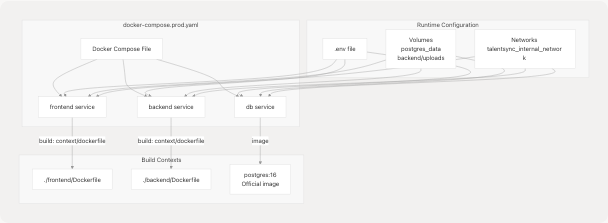
Service build specifications:
Frontend service (docker-compose.prod.yaml33-55):
frontend:
  build:
    context: ./frontend
    dockerfile: Dockerfile
    args:
      NEXT_PUBLIC_POSTHOG_KEY: ${NEXT_PUBLIC_POSTHOG_KEY}
      NEXT_PUBLIC_POSTHOG_UI_HOST: ${NEXT_PUBLIC_POSTHOG_UI_HOST:-https://eu.posthog.com}
      NEXT_PUBLIC_POSTHOG_HOST: ${NEXT_PUBLIC_POSTHOG_HOST:-https://eu.i.posthog.com}
Backend service (docker-compose.prod.yaml16-31):
backend:
  build:
    context: ./backend
    dockerfile: Dockerfile
Network architecture:
The production compose file (docker-compose.prod.yaml61-66) defines two networks:
- talentsync_internal_network: Internal bridge network for service-to-service communication
- nginxproxyman_network: External network for Nginx Proxy Manager integration (see Docker Compose Setup)
Build command:
To build all images:
docker compose -f docker-compose.prod.yaml build
To build a specific service:
docker compose -f docker-compose.prod.yaml build frontend
Build-Time vs Runtime Dependencies
Frontend dependencies:
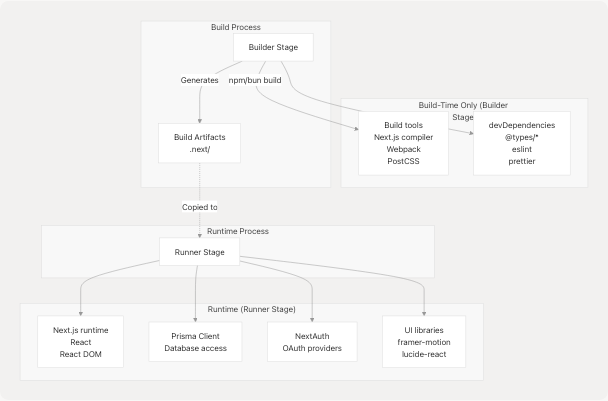
The multi-stage build ensures that build tools and devDependencies never make it into the final image.
Backend dependencies:
The backend includes all dependencies in a single stage (backend/Dockerfile20):
RUN uv pip install --system --no-cache ".[dev]"
This includes both runtime dependencies (FastAPI, LangChain) and the dev group (uvicorn server), as the server itself is technically a dev dependency.
Summary
Image characteristics:
| Aspect | Frontend | Backend |
|---|---|---|
| Build strategy | Multi-stage | Single-stage |
| Base image | oven/bun:1-slim |
python:3.13-slim |
| Package manager | bun | uv (pip) |
| Exposed port | 3000 | 8000 |
| User | bun (non-root) | root |
| Runtime command | bun run start |
uvicorn app.main:app |
| Build args | 3 (NEXT_PUBLIC_*) | None |
| Volume mounts | None | uploads/ |
Build optimization summary:
Both images prioritize:
- Minimal base images: Slim variants reduce attack surface and size
- Layer caching: Dependencies installed before app code for cache efficiency
- Production artifacts: Only necessary files included in final image
- Security: Frontend runs as non-root user
- Reproducibility: Lockfiles ensure consistent builds