Data Flow Patterns
Purpose and Scope
This document describes the data flow patterns used throughout the TalentSync platform, detailing how information moves between the frontend (Next.js), backend (FastAPI), external services (Google Gemini, Tavily, Jina AI), and database (PostgreSQL). It covers the complete lifecycle of data from user input through AI processing to final presentation.
For information about the overall system architecture, see System Architecture. For specific backend service implementations, see Backend Services. For frontend component structure, see Frontend Architecture.
Data Flow Architecture Overview
The TalentSync platform follows a layered architecture where data flows through distinct stages: Client Input → Frontend Processing → API Gateway → Backend Services → AI/ML Processing → Database Persistence → Response Delivery.
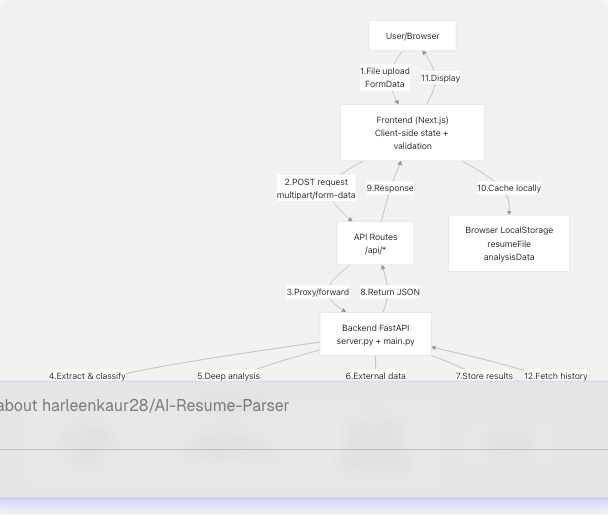
Sources: backend/server.py1-100 frontend/components/file-upload.tsx1-467 frontend/app/dashboard/seeker/page.tsx1-196
Resume Upload and Analysis Flow
This is the primary data flow pattern in the application. It demonstrates file processing, multi-stage AI analysis, and database persistence.
End-to-End Resume Analysis Sequence
Sources: frontend/components/file-upload.tsx99-132 backend/server.py738-1100 backend/server.py373-601
Data Transformation Pipeline
The resume analysis involves multiple data transformations:
| Stage | Input Format | Processing | Output Format | Location |
|---|---|---|---|---|
| File Upload | Binary file (PDF/DOCX/TXT) | Browser FormData API | multipart/form-data |
file-upload.tsx106-110 |
| Text Extraction | File bytes | PyPDF2/python-docx | Raw text string | server.py764-792 |
| Text Cleaning | Raw text | Spacy NLP + NLTK | Cleaned, lemmatized text | server.py738-749 |
| Classification | Cleaned text | TF-IDF → scikit-learn | Job category string | server.py714-735 |
| Field Extraction | Raw text | Regex patterns | Structured fields (name, email, etc.) | server.py923-1038 |
| LLM Analysis | Raw + cleaned text | Gemini 2.0 prompt | ComprehensiveAnalysisData JSON |
server.py595-601 |
| Persistence | Analysis data | Prisma ORM | Database records | Next.js API route |
| Caching | Analysis result | JSON.stringify() |
LocalStorage entries | file-upload.tsx156-170 |
Sources: backend/server.py738-1100 frontend/components/file-upload.tsx99-170
Frontend-to-Backend Communication Patterns
API Request Pattern
All frontend-to-backend communication follows a consistent pattern using Next.js API routes as proxies:
Example: Resume Analysis Request
The frontend component initiates the request:
frontend/components/file-upload.tsx99-132
const formData = new FormData();
formData.append("file", file);
formData.append("customName", customName.trim());
formData.append("showInCentral", showInCentral.toString());

const response = await fetch(`/api/analysis`, {
    method: "POST",
    body: formData,
});
The Next.js API route proxies to FastAPI (implementation exists in /app/api/analysis/route.ts based on the architecture).
Sources: frontend/components/file-upload.tsx99-132 backend/server.py52-66
State Management Patterns
LocalStorage Cross-Feature Data Flow
The application uses localStorage to pass data between features without requiring additional API calls:
LocalStorage Data Structure:
// Stored by FileUpload component after analysis
localStorage.setItem("resumeFile", JSON.stringify({
    name: file.name,
    size: file.size,
    type: file.type,
    lastModified: file.lastModified
}));

localStorage.setItem("analysisData", JSON.stringify({
    id: string,
    name: string,
    email: string,
    predictedField: string,
    skillsAnalysis: SkillProficiency[],
    workExperience: WorkExperienceEntry[],
    projects: ProjectEntry[],
    // ... full ComprehensiveAnalysisData
}));
Sources: frontend/components/file-upload.tsx154-192
LLM Integration Patterns
Prompt Engineering and Invocation Flow
The system uses LangChain to standardize LLM interactions across different services:
Prompt Template Structure (Resume Analysis):
backend/server.py503-593
The format_analyse_prompt_template_str defines a two-phase prompt:
- Phase 1: Clean and format the raw resume text
- Phase 2: Extract structured data conforming to
ComprehensiveAnalysisData
LLM Configuration:
llm = ChatGoogleGenerativeAI(
    model="gemini-2.0-flash",
    google_api_key=google_api_key,
    temperature=0.1,  # Low temperature for consistency
)
Sources: backend/server.py68-86 backend/server.py503-601
Cold Mail Generation Flow
The cold mail feature demonstrates a multi-step AI workflow with optional editing:
Cold Mail Generation Prompt Structure:
The cold mail prompt includes:
- Resume summary: Key skills, experience, achievements
- Recipient context: Name, role, company
- Company research: Website content (if provided)
- Email template: Professional structure with personalization
Sources: backend/main.py (cold mail router), backend/app/agents/web_content_agent.py
Hiring Assistant Flow
The hiring assistant generates interview answers based on resume context:
Data Passed to Hiring Assistant:
frontend/components/file-upload.tsx174-192
localStorage.setItem("resumeFile", JSON.stringify({...}));
localStorage.setItem("analysisData", JSON.stringify(analysisResult.data.analysis));

// Later retrieved by hiring assistant page
const cachedAnalysis = JSON.parse(localStorage.getItem("analysisData") || "{}");
The hiring assistant uses the cached analysis to:
- Understand the candidate's background
- Identify relevant skills and experiences
- Generate answers that reference specific projects/achievements
- Tailor responses to the target role
Sources: frontend/components/file-upload.tsx174-192 backend/main.py (hiring assistant router)
ATS Evaluation Flow with LangGraph
The ATS evaluation service uses LangGraph for multi-step state management:
LangGraph State Machine Implementation:
The ATS service maintains state across multiple nodes:
- Input State: Resume text, job description, optional company URL
- Research Output: Company information from web search
- Score Output: Numerical score (0-100), keyword matches
- Suggestions Output: Specific improvement recommendations
- Final Output: Complete ATS evaluation report
Each node transforms the state and passes it to the next node. The graph structure ensures:
- Sequential execution of analysis steps
- State persistence across nodes
- Error handling at each stage
- Conditional branching based on intermediate results
Sources: backend/main.py (ATS router with LangGraph), backend/app/agents/web_search_agent.py
LinkedIn Services Integration Flow
The LinkedIn service combines multiple agents to generate content:
GitHub Agent Integration:
backend/app/agents/github_agent.py224-246 The GitHub agent:
- Parses GitHub URLs
- Fetches repository metadata via GitHub API
- Optionally ingests full codebase using
gitingest - Generates LinkedIn-friendly insights using LLM
Web Search Agent Integration:
The web search agent uses Tavily API to:
- Research company information
- Find industry trends
- Gather competitive intelligence
- Validate job market data
Sources: backend/app/agents/github_agent.py49-417 backend/main.py (LinkedIn router)
Database Persistence Patterns
Prisma ORM Data Flow
The frontend uses Prisma Client for type-safe database operations:
Database Schema Evolution:
frontend/prisma/migrations/20250613172024_replace_file_url_with_raw_text/migration.sql1-96 Key migration showing the shift from file storage to text storage:
- Removed
fileUrlcolumn - Added
rawTextcolumn for storing resume content - This enables direct database queries without file system access
Typical Database Write Flow (Resume Analysis):
-
Backend completes analysis → generates structured data
-
Next.js API route receives data
-
Create Resume record with Prisma:
const resume = await prisma.resume.create({ data: { userId: session.user.id, customName: customName, rawText: cleanedText, predictedField: predictedField, uploadedAt: new Date() } });
-
Create Analysis record linked to Resume:
const analysis = await prisma.analysis.create({ data: { resumeId: resume.id, name: analysisData.name, email: analysisData.email, skillsAnalysis: analysisData.skillsAnalysis, // ... all analysis fields } });
-
Return both IDs to frontend
Sources: frontend/prisma/migrations/20250613172024_replace_file_url_with_raw_text/migration.sql1-96
Error Handling and Retry Patterns
Frontend Error Handling
The FileUpload component demonstrates comprehensive error handling:
Error Handling Implementation:
frontend/components/file-upload.tsx99-132
try {
    const response = await fetch(`/api/analysis`, {
        method: "POST",
        body: formData,
    });

    if (!response.ok) {
        throw new Error(`HTTP error! status: ${response.status}`);
    }

    const result: AnalysisResult = await response.json();
    setAnalysisResult(result);

} catch (err) {
    setError(err instanceof Error ? err.message : "Failed to analyze resume");
} finally {
    setIsUploading(false);
}
Backend Error Handling:
The backend uses try-catch blocks with fallback responses:
- Invalid file format → Return error message
- LLM timeout → Use basic extraction only
- API key issues → Graceful degradation
- Database errors → Retry with exponential backoff
Sources: frontend/components/file-upload.tsx99-132 backend/server.py68-86
Performance Optimization Patterns
Loading States and User Feedback
The application provides rich loading feedback during long-running operations:
Loading UI Components:
frontend/components/ui/loader.tsx1-219 The system provides multiple loader variants:
variant="default": Sophisticated rotating ringsvariant="dots": Animated dots with fadevariant="pulse": Pulsing circlevariant="spinner": Classic spinner
Full-Screen Loading Overlay:
frontend/components/file-upload.tsx196-229
<AnimatePresence>
    {isUploading && (
        <motion.div className="fixed inset-0 bg-black/50 backdrop-blur-md z-50">
            <Loader variant="pulse" size="xl" className="text-[#76ABAE]" />
            <h3>Analyzing Your Resume</h3>
            <p>AI is processing your resume to extract key information...</p>
        </motion.div>
    )}
</AnimatePresence>
Sources: frontend/components/ui/loader.tsx1-219 frontend/components/file-upload.tsx196-229
Summary of Key Data Flow Patterns
| Pattern | Description | Key Components | Purpose |
|---|---|---|---|
| File Upload Pipeline | Multi-stage file processing | FileUpload → API → FastAPI → ML → LLM → DB | Transform raw files into structured data |
| LocalStorage Caching | Cross-feature state sharing | Browser localStorage, React state | Avoid redundant API calls, improve UX |
| LLM Invocation | Standardized AI integration | LangChain PromptTemplate, ChatGoogleGenerativeAI | Consistent prompt engineering, error handling |
| Agent Orchestration | Multi-source data gathering | GitHubAgent, WebSearchAgent, WebContentAgent | Enrich content with external data |
| State Machine Workflow | Complex multi-step processes | LangGraph state graphs | Manage ATS evaluation, tailored resumes |
| Database Persistence | Type-safe data storage | Prisma Client, PostgreSQL | Store analysis results, user data |
| API Proxy Pattern | Frontend-backend communication | Next.js API routes, FastAPI endpoints | Authentication, request transformation |
| Error Boundaries | Graceful degradation | Try-catch blocks, fallback responses | Handle failures without crashing |
| Loading States | User feedback during async operations | Loader components, AnimatePresence | Improve perceived performance |
Sources: frontend/components/file-upload.tsx1-467 backend/server.py1-1100 backend/main.py