Cold Mail Generator
Purpose and Scope
The Cold Mail Generator is an AI-powered feature that enables users to create personalized cold emails for networking and job applications. This page documents the frontend implementation of the cold mail generation interface, including resume selection mechanisms, form handling, email generation workflows, and the edit/enhancement capabilities.
For backend cold mail generation service details including LLM integration and company research, see 3.3. For the shared resume selection pattern used across features, compare with the Hiring Assistant implementation at 4.5.5.
Component Architecture
The Cold Mail Generator page is structured as a multi-panel interface with distinct responsibilities for input collection, resume management, and output display.
Component Hierarchy
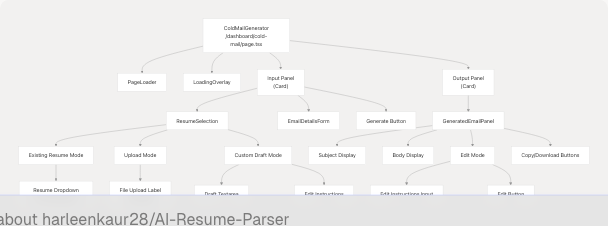
Sources: frontend/app/dashboard/cold-mail/page.tsx1-806 frontend/components/cold-mail/ResumeSelection.tsx1-697
State Management
The page maintains extensive state to handle the three-mode resume selection system, form data, generated content, and editing workflows.
State Variables
| State Variable | Type | Purpose |
|---|---|---|
isPageLoading |
boolean |
Controls initial page load animation |
isGenerating |
boolean |
Tracks email generation API call |
isEditing |
boolean |
Tracks email editing API call |
generatedEmail |
`object | null` |
resumeFile |
`File | null` |
resumeText |
string |
Preview text for uploaded file |
isPreloaded |
boolean |
Indicates resume was pre-populated from analysis |
editMode |
boolean |
Controls visibility of edit UI |
editInstructions |
string |
User instructions for editing email |
customDraft |
string |
User's pasted draft in custom draft mode |
customDraftEdited |
string |
Enhanced version of custom draft |
userResumes |
UserResume[] |
List of user's saved resumes |
selectedResumeId |
string |
ID of selected existing resume |
isLoadingResumes |
boolean |
Loading state for resume fetch |
showResumeDropdown |
boolean |
Controls resume dropdown visibility |
resumeSelectionMode |
`"existing" | "upload" |
formData |
object |
Email generation form fields |
Form Data Structure
interface FormData {
  recipient_name: string;
  recipient_designation: string;
  company_name: string;
  sender_name: string;
  sender_role_or_goal: string;
  key_points_to_include: string;
  additional_info_for_llm: string;
  company_url: string;
}
Sources: frontend/app/dashboard/cold-mail/page.tsx34-73
Resume Selection System
The Cold Mail Generator implements a three-mode resume selection system, allowing users to choose between existing resumes, upload new files, or provide custom drafts for enhancement.
Resume Selection Mode Toggle
The mode toggle is implemented as a segmented control using three buttons that switch the resumeSelectionMode state. Each mode renders different UI components and validation logic.
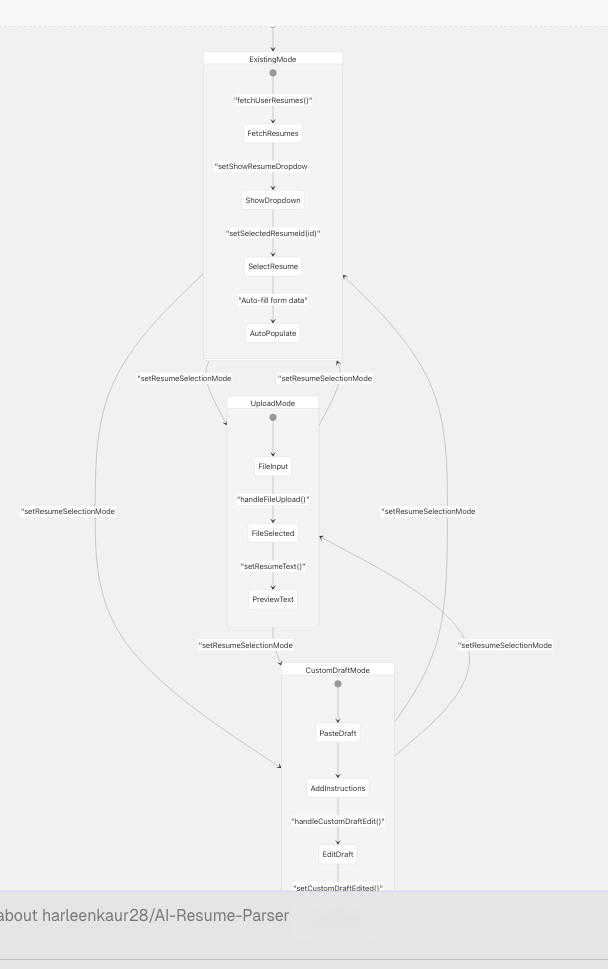
Sources: frontend/app/dashboard/cold-mail/page.tsx52-59 frontend/components/cold-mail/ResumeSelection.tsx107-138
Existing Resume Mode
In existing resume mode, the component fetches user's saved resumes via GET /api/cold-mail and displays them in a dropdown. Selecting a resume auto-populates form fields with candidate name and predicted field if available.
Dropdown Implementation:
- Uses
AnimatePresencefrom Framer Motion for smooth open/close animations frontend/components/cold-mail/ResumeSelection.tsx185-278 - Displays resume metadata: custom name, candidate name, predicted field, upload date frontend/components/cold-mail/ResumeSelection.tsx232-260
- Auto-populates
sender_nameandsender_role_or_goalwhen resume is selected frontend/components/cold-mail/ResumeSelection.tsx210-228
Upload Mode
Upload mode provides a drag-and-drop style file input accepting PDF, DOC, DOCX, TXT, and MD files. The file is stored in resumeFile state and a preview is generated.
File Preview Logic:
- For TXT/MD files: reads first 500 characters frontend/components/cold-mail/ResumeSelection.tsx87-93
- For binary files: shows filename and size frontend/components/cold-mail/ResumeSelection.tsx95-99
- Displays with green checkmark icon when file is loaded frontend/components/cold-mail/ResumeSelection.tsx308-331
Custom Draft Mode
Custom draft mode allows users to paste an existing email draft and provide enhancement instructions. This mode optionally accepts a resume (either selected or uploaded) to enhance the draft with resume-relevant information.
UI Components:
- Resume picker (optional) - same dropdown as existing mode frontend/components/cold-mail/ResumeSelection.tsx391-526
- File upload (optional) - same as upload mode frontend/components/cold-mail/ResumeSelection.tsx536-616
- Draft textarea - for pasting email draft frontend/components/cold-mail/ResumeSelection.tsx642-647
- Edit instructions textarea - for enhancement guidance frontend/components/cold-mail/ResumeSelection.tsx652-658
- "Edit My Draft" button - triggers
handleCustomDraftEdit()frontend/components/cold-mail/ResumeSelection.tsx660-678
Sources: frontend/components/cold-mail/ResumeSelection.tsx54-80 frontend/components/cold-mail/ResumeSelection.tsx385-692
Email Generation Flow
The email generation process involves validation, form data collection, API communication, and state updates.
Generation Sequence
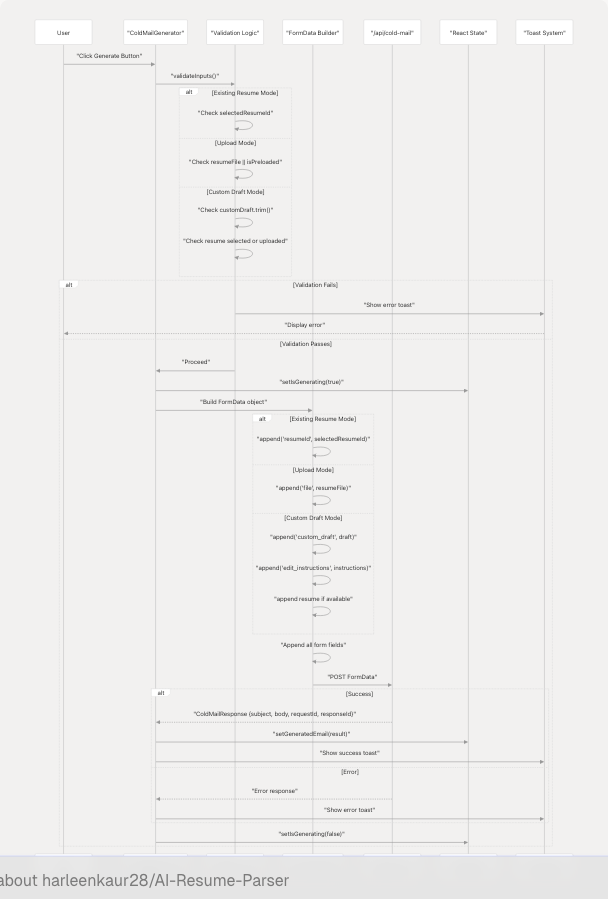
Sources: frontend/app/dashboard/cold-mail/page.tsx192-348
Validation Logic
The generateColdMail function implements mode-specific validation:
Existing Resume Mode Validation:
if (!selectedResumeId) {
  toast({
    title: "Resume Required",
    description: "Please select a resume from your saved resumes.",
    variant: "destructive"
  });
  return;
}
frontend/app/dashboard/cold-mail/page.tsx193-201
Upload Mode Validation:
- Must have
resumeFileorisPreloadedmust be true - If preloaded but no file re-uploaded, shows specific error frontend/app/dashboard/cold-mail/page.tsx202-220
Custom Draft Mode Validation:
- Draft text must be non-empty
- Requires either
selectedResumeIdorresumeFilefor enhancement frontend/app/dashboard/cold-mail/page.tsx221-240
Common Validation:
if (!formData.recipient_name || !formData.company_name || !formData.sender_name) {
  toast({
    title: "Required Fields Missing",
    description: "Please fill in recipient name, company name, and your name.",
    variant: "destructive"
  });
  return;
}
frontend/app/dashboard/cold-mail/page.tsx242-254
FormData Construction
The function builds a FormData object with multipart/form-data encoding for file uploads:
Resume Data Appending:
- Existing mode:
formDataToSend.append("resumeId", selectedResumeId)frontend/app/dashboard/cold-mail/page.tsx263 - Upload mode:
formDataToSend.append("file", resumeFile!)frontend/app/dashboard/cold-mail/page.tsx265 - Custom draft mode: appends resume if available, plus draft and instructions frontend/app/dashboard/cold-mail/page.tsx266-279
Form Fields Appending: All form data fields are appended individually frontend/app/dashboard/cold-mail/page.tsx281-302
Endpoint Selection:
- Custom draft mode uses
/api/cold-mail/editendpoint - Other modes use
/api/cold-mailendpoint frontend/app/dashboard/cold-mail/page.tsx305-308
Sources: frontend/app/dashboard/cold-mail/page.tsx192-348
Email Editing Feature
The editing feature allows users to modify generated emails or enhance custom drafts with AI-powered refinement based on natural language instructions.
Edit Workflow Diagram
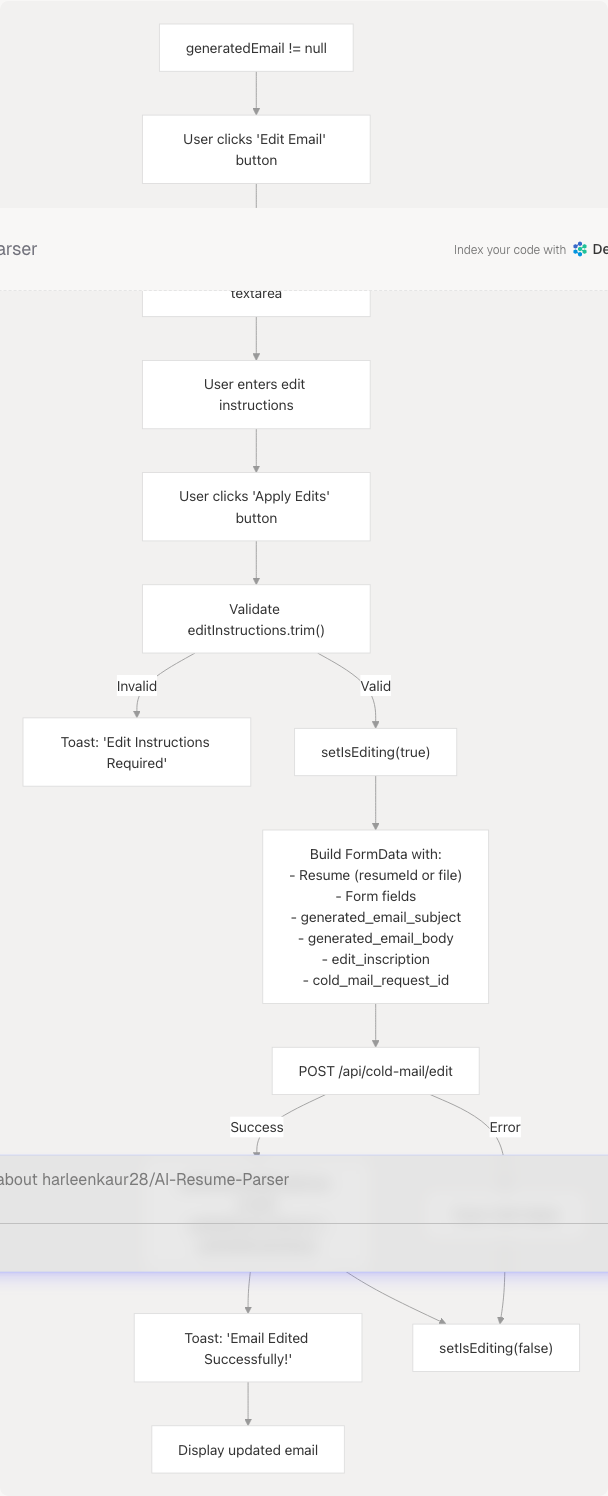
Sources: frontend/app/dashboard/cold-mail/page.tsx382-491
Edit Function Implementation
The editColdMail function handles editing of already-generated emails:
- Pre-checks: Verifies
generatedEmailexists andeditInstructionsis non-empty frontend/app/dashboard/cold-mail/page.tsx383-399 - Resume handling: Uses existing selection mode and resume state frontend/app/dashboard/cold-mail/page.tsx407-419
- FormData construction: Includes original email subject/body and edit instructions frontend/app/dashboard/cold-mail/page.tsx422-453
- API call: POST to
/api/cold-mail/editwith edit-specific fields frontend/app/dashboard/cold-mail/page.tsx455-458 - State updates: Updates generated email with new content, clears edit instructions, exits edit mode frontend/app/dashboard/cold-mail/page.tsx462-470
Custom Draft Enhancement
The handleCustomDraftEdit function enhances user-provided drafts:
Key Differences from Standard Edit:
- Operates on
customDraftinstead ofgeneratedEmail - Passes empty string for subject:
formDataToSend.append("generated_email_subject", "")frontend/app/dashboard/cold-mail/page.tsx548 - Uses
customDraftas body for enhancement frontend/app/dashboard/cold-mail/page.tsx549 - Updates
customDraftEditedstate with enhanced version frontend/app/dashboard/cold-mail/page.tsx558 - Also updates
generatedEmailso enhanced draft displays in output panel frontend/app/dashboard/cold-mail/page.tsx560-565
Sources: frontend/app/dashboard/cold-mail/page.tsx493-586
Pre-population Mechanism
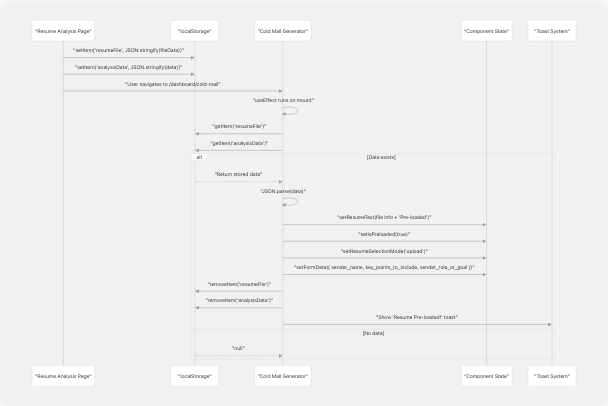
The Cold Mail Generator supports automatic pre-population of form fields and resume data when navigating from the Resume Analysis page.
Pre-population Flow
Sources: frontend/app/dashboard/cold-mail/page.tsx112-162
Pre-population Data Mapping
The useEffect hook checks localStorage on mount and maps analysis data to form fields:
| Analysis Data Field | Form Field | Mapping Logic |
|---|---|---|
name |
sender_name |
Direct copy if not already set |
skills (array) |
key_points_to_include |
Joined with ", " separator |
predicted_field |
sender_role_or_goal |
Direct copy if not already set |
File Data Handling:
- Constructs preview text:
"${name} (${size} KB) - Pre-loaded from analysis"frontend/app/dashboard/cold-mail/page.tsx129-133 - Sets
isPreloadedflag to track that file needs re-upload frontend/app/dashboard/cold-mail/page.tsx134 - Switches to upload mode automatically frontend/app/dashboard/cold-mail/page.tsx135
Cleanup: Data is removed from localStorage after 100ms delay to ensure processing completes frontend/app/dashboard/cold-mail/page.tsx146-149
Sources: frontend/app/dashboard/cold-mail/page.tsx119-159
API Integration
The Cold Mail Generator integrates with three backend endpoints for resume fetching, email generation, and email editing.
API Endpoints
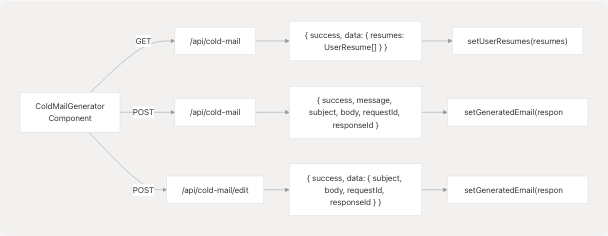
Fetch Resumes Endpoint
Request:
const response = await fetch("/api/cold-mail", {
  method: "GET",
});
frontend/app/dashboard/cold-mail/page.tsx78-80
Response Type:
interface FetchResumesResponse {
  success: boolean;
  data?: {
    resumes: UserResume[];
  };
}

interface UserResume {
  id: string;
  customName: string;
  uploadDate: string;
  candidateName?: string;
  predictedField?: string;
}
frontend/app/dashboard/cold-mail/page.tsx26-32
Usage: Called in fetchUserResumes() during component mount and updates userResumes state frontend/app/dashboard/cold-mail/page.tsx75-93
Generate Email Endpoint
Request:
const formDataToSend = new FormData();
// Add resume data based on mode
// Add all form fields
// Optional: company_url

const response = await fetch("/api/cold-mail", {
  method: "POST",
  body: formDataToSend,
});
frontend/app/dashboard/cold-mail/page.tsx310-313
Response Type:
interface ColdMailResponse {
  success: boolean;
  message: string;
  subject: string;
  body: string;
  requestId?: string;
  responseId?: string;
}
frontend/app/dashboard/cold-mail/page.tsx17-24
FormData Fields:
resumeId(existing mode) orfile(upload mode) or both conditionally (custom draft)recipient_name,recipient_designation,company_name(required)sender_name,sender_role_or_goal,key_points_to_include(required)additional_info_for_llm(optional)company_url(optional)custom_draft(custom draft mode only)edit_instructions(custom draft mode only)
Edit Email Endpoint
Request:
const formDataToSend = new FormData();
// Add resume data
// Add all form fields
// Add edit-specific fields:
formDataToSend.append("generated_email_subject", generatedEmail.subject);
formDataToSend.append("generated_email_body", generatedEmail.body);
formDataToSend.append("edit_inscription", editInstructions);
formDataToSend.append("cold_mail_request_id", generatedEmail.requestId);

const response = await fetch("/api/cold-mail/edit", {
  method: "POST",
  body: formDataToSend,
});
frontend/app/dashboard/cold-mail/page.tsx404-458
Response Structure: Same as ColdMailResponse but wrapped in data object:
interface EditResponse {
  success: boolean;
  message?: string;
  data: {
    subject: string;
    body: string;
    requestId?: string;
    responseId?: string;
  };
}
frontend/app/dashboard/cold-mail/page.tsx460-468
Sources: frontend/app/dashboard/cold-mail/page.tsx75-93 frontend/app/dashboard/cold-mail/page.tsx192-348 frontend/app/dashboard/cold-mail/page.tsx382-491
User Feedback System
The page implements comprehensive user feedback through toast notifications and loading states.
Toast Notifications
The component uses the useToast hook to display feedback for various user actions:
Success Notifications:
- Resume pre-loaded: "Resume Pre-loaded!" frontend/app/dashboard/cold-mail/page.tsx151-155
- Email generated: "Email Generated Successfully!" with mode-specific description frontend/app/dashboard/cold-mail/page.tsx324-332
- Email edited: "Email Edited Successfully!" frontend/app/dashboard/cold-mail/page.tsx471-475
- Draft enhanced: "Draft Enhanced Successfully!" frontend/app/dashboard/cold-mail/page.tsx566-570
- Content copied: "Copied!" frontend/app/dashboard/cold-mail/page.tsx353-356
Error Notifications:
- Resume required frontend/app/dashboard/cold-mail/page.tsx195-200
- Draft required frontend/app/dashboard/cold-mail/page.tsx222-229
- Required fields missing frontend/app/dashboard/cold-mail/page.tsx247-253
- Generation failed frontend/app/dashboard/cold-mail/page.tsx337-344
- Edit failed frontend/app/dashboard/cold-mail/page.tsx480-487
- Enhancement failed frontend/app/dashboard/cold-mail/page.tsx575-582
- Copy failed frontend/app/dashboard/cold-mail/page.tsx359-363
Loading States
The page implements multiple loading indicators:
PageLoader Component:
- Shows during initial page load (
isPageLoading) - Hides content until data is ready frontend/app/dashboard/cold-mail/page.tsx590-591
LoadingOverlay Component:
- Displays during email generation (
isGenerating) - Displays during email editing (
isEditing) - Provides visual feedback that operation is in progress frontend/app/dashboard/cold-mail/page.tsx593
Inline Loaders:
- Resume dropdown shows spinner while
isLoadingResumesfrontend/components/cold-mail/ResumeSelection.tsx194-201 - Generate button shows animated spinner and progress bar while generating frontend/app/dashboard/cold-mail/page.tsx719-773
- Edit Draft button shows spinner while editing frontend/components/cold-mail/ResumeSelection.tsx667-671
Button Disabled States:
- Generate button disabled when missing required data or during generation frontend/app/dashboard/cold-mail/page.tsx703-715
- Edit button disabled when no instructions provided or during editing frontend/components/cold-mail/ResumeSelection.tsx662-664
Sources: frontend/app/dashboard/cold-mail/page.tsx10 frontend/app/dashboard/cold-mail/page.tsx350-364
Utility Functions
The page implements several utility functions for user interactions with generated content.
Copy to Clipboard
The copyToClipboard function uses the Clipboard API to copy email content:
const copyToClipboard = async (text: string) => {
  try {
    await navigator.clipboard.writeText(text);
    toast({
      title: "Copied!",
      description: "Email content copied to clipboard.",
    });
  } catch (error) {
    toast({
      title: "Copy Failed",
      description: "Could not copy to clipboard.",
      variant: "destructive",
    });
  }
};
frontend/app/dashboard/cold-mail/page.tsx350-364
This function is passed to GeneratedEmailPanel for copy buttons on subject and body sections.
Download as Text
The downloadAsText function creates a downloadable text file containing the generated email:
const downloadAsText = () => {
  if (!generatedEmail) return;

  const content = `Subject: ${generatedEmail.subject}\n\n${generatedEmail.body}`;
  const blob = new Blob([content], { type: "text/plain" });
  const url = URL.createObjectURL(blob);
  const a = document.createElement("a");
  a.href = url;
  a.download = "cold-email.txt";
  document.body.appendChild(a);
  a.click();
  document.body.removeChild(a);
  URL.revokeObjectURL(url);
};
frontend/app/dashboard/cold-mail/page.tsx366-379
Process:
- Combines subject and body with formatting
- Creates a
Blobwithtext/plainMIME type - Generates object URL for the blob
- Creates temporary anchor element and triggers click
- Cleans up DOM and revokes object URL
Sources: frontend/app/dashboard/cold-mail/page.tsx350-379
Responsive Design
The page implements mobile-first responsive design with breakpoint-specific adaptations.
Layout Adaptations
Container Padding:
px-4 sm:px-6 lg:px-8 py-4 sm:py-8
- Mobile: 16px horizontal, 16px vertical
- Tablet (sm): 24px horizontal, 32px vertical
- Desktop (lg): 32px horizontal, 32px vertical
Grid Layout:
grid grid-cols-1 xl:grid-cols-2 gap-6 lg:gap-8
- Mobile/Tablet: Single column stacking
- Desktop (xl): Two-column side-by-side layout frontend/app/dashboard/cold-mail/page.tsx637
Header Typography:
text-3xl sm:text-4xl md:text-5xl
- Mobile: 30px
- Tablet (sm): 36px
- Desktop (md): 48px frontend/app/dashboard/cold-mail/page.tsx627
Back Button Text:
<span className="hidden sm:inline">Back to Dashboard</span>
<span className="sm:hidden">Back</span>
Shows abbreviated text on mobile frontend/app/dashboard/cold-mail/page.tsx610-611
Component-Level Responsiveness
Resume Dropdown:
- Fixed height with scrolling on mobile:
max-h-64 overflow-y-autofrontend/components/cold-mail/ResumeSelection.tsx203 - Truncates long resume names:
truncateutility frontend/components/cold-mail/ResumeSelection.tsx234
File Upload Label:
- Height adjusts:
h-28(112px) maintains consistent touch target frontend/components/cold-mail/ResumeSelection.tsx302 - File format badges stack with
space-x-2frontend/components/cold-mail/ResumeSelection.tsx345-358
Generate Button:
- Full width on all screen sizes:
w-fullfrontend/app/dashboard/cold-mail/page.tsx716 - Fixed height for consistent touch target:
h-14frontend/app/dashboard/cold-mail/page.tsx716 - Text adjusts for loading state frontend/app/dashboard/cold-mail/page.tsx739-760
Sources: frontend/app/dashboard/cold-mail/page.tsx595-637 frontend/components/cold-mail/ResumeSelection.tsx104-363