Frontend Architecture
Purpose and Scope
This document describes the Next.js frontend architecture for TalentSync, including application structure, routing patterns, component organization, navigation system, and state management strategies. For backend services and API structure, see Backend Architecture. For data flow between frontend and backend, see Data Flow Patterns. For authentication implementation details, see Authentication System. For individual feature implementations, see Frontend Application.
Technology Stack
The frontend is built on the following core technologies:
| Technology | Version | Purpose |
|---|---|---|
| Next.js | 15.5.6 | React framework with App Router |
| React | 18.2.0 | UI library |
| NextAuth | 4.24.11 | Authentication and session management |
| Prisma | 6.9.0 | Database ORM and client |
| Bun | 1-slim | JavaScript runtime and package manager |
| TypeScript | 5.x | Type-safe development |
| TailwindCSS | 3.3.3 | Utility-first CSS framework |
| Framer Motion | 11.0.8 | Animation library |
| next-pwa | 5.6.0 | Progressive Web App capabilities |
| PostHog | 1.279.0 | Product analytics |
| Radix UI | Various | Accessible UI primitives |
Sources: frontend/package.json1-98
Application Structure Overview
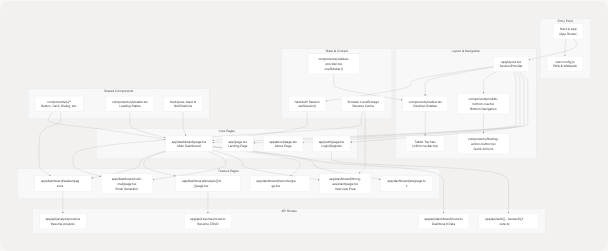
Diagram: Frontend Application Structure
This diagram shows the hierarchical structure of the frontend application, mapping key files and directories to their roles in the system. The App Router organizes pages under app/, with layout.tsx providing the shell for all pages.
Sources: frontend/next.config.js1-82 frontend/package.json1-98 frontend/app/dashboard/page.tsx1-109
Navigation System Architecture
The navigation system adapts to three viewport sizes with distinct implementations:
Multi-Viewport Navigation Components
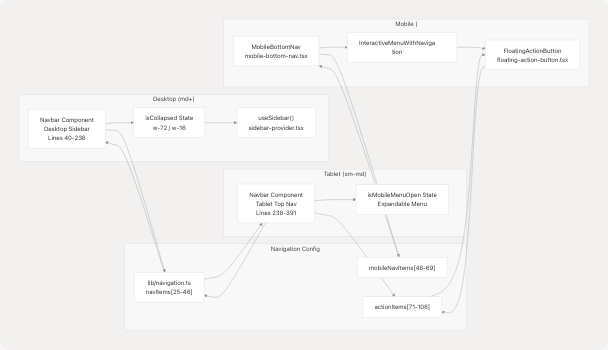
Diagram: Navigation System Component Mapping
Sources: frontend/components/navbar.tsx1-398 frontend/components/mobile-bottom-nav.tsx1-209 frontend/components/floating-action-button.tsx1-109 frontend/lib/navigation.ts1-109
Navigation Item Configuration
The navigation system is driven by configuration objects in lib/navigation.ts:
| Configuration | Type | Purpose | Lines |
|---|---|---|---|
navItems |
NavItem[] |
Main navigation items for desktop/tablet | 25-46 |
mobileNavItems |
NavItem[] |
Bottom navigation items for mobile | 48-69 |
actionItems |
ActionItem[] |
Quick action items (FAB menu) | 71-108 |
Each NavItem contains:
label: string- Display texthref: string- Navigation targeticon: LucideIcon- Icon component from lucide-react
Each ActionItem extends NavItem with:
description: string- Detailed description for expanded views
Sources: frontend/lib/navigation.ts15-108
Desktop Sidebar Implementation
The desktop sidebar frontend/components/navbar.tsx40-236 features:
- Collapsible State: Managed by
useSidebar()context frontend/components/navbar.tsx31 - Width Toggle: Switches between
w-72(expanded) andw-16(collapsed) frontend/components/navbar.tsx46 - Section Organization:
- Header with logo and collapse button [lines 51-74]
- Main navigation items [lines 77-100]
- Quick actions section (authenticated users) [lines 103-142]
- User section with account link and sign out [lines 146-234]
Mobile Bottom Navigation
The mobile implementation frontend/components/mobile-bottom-nav.tsx1-209 uses a custom interactive menu:
- Item Split: Left 2 items, spacer for FAB, right 2 items [lines 139-141]
- Active Indicator: Underline animation with dynamic width calculation [lines 118-132]
- Route Matching: Automatic active state based on
usePathname()[lines 31-38] - Backdrop: Dark overlay when FAB is expanded [lines 93-102]
Sources: frontend/components/navbar.tsx1-398 frontend/components/mobile-bottom-nav.tsx1-209 frontend/components/floating-action-button.tsx1-109
Routing and Page Organization
Next.js App Router uses file-system based routing with the following structure:

Diagram: Application Routing Structure
Route Protection Strategy
The middleware intercepts all requests and enforces:
- Public Paths: Allow unauthenticated access to
/,/about,/auth - Authentication Check: Redirect unauthenticated users to
/auth - Role Assignment Check: Redirect users without roles to
/select-role - Role Validation: Prevent role-assigned users from accessing
/select-role
Sources: frontend/app/dashboard/page.tsx1-109
State Management Strategy
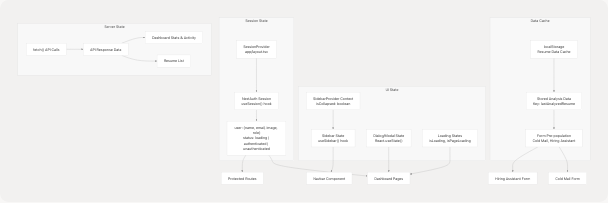
Diagram: State Management Flow
State Management Patterns
The frontend uses a hybrid state management approach:
| State Type | Implementation | Scope | Example Usage |
|---|---|---|---|
| Authentication | NextAuth useSession() |
Global | User identity, role, authentication status |
| UI State | React useState() |
Component-local | Modal visibility, loading indicators |
| Sidebar State | Context API | Layout-wide | Sidebar collapse state across navigation |
| Form State | react-hook-form |
Form-local | Input validation, submission handling |
| Data Cache | localStorage | Cross-session | Resume analysis results for reuse |
| Server State | fetch() + useState() |
Page-specific | Dashboard data, resume lists |
Session Management
NextAuth session structure frontend/app/dashboard/page.tsx110-111:
{
  data: session,  // Contains user, expires
  status          // 'loading' | 'authenticated' | 'unauthenticated'
}
Session data includes:
user.name: User's display nameuser.email: User's email addressuser.image: Profile avatar URLuser.role: "User" (job seeker) or "Admin" (recruiter)
LocalStorage Caching Strategy
Resume analysis results are cached in localStorage to enable:
- Pre-population: Forms auto-fill with last analyzed resume
- Cross-feature Flow: Resume data flows from analysis → cold mail → hiring assistant
- Reduced API Calls: Avoid re-fetching recently analyzed data
Implementation in dashboard frontend/app/dashboard/page.tsx1-1500 stores analysis results after successful upload.
Sources: frontend/app/dashboard/page.tsx110-172 frontend/components/navbar.tsx31-32 frontend/lib/navigation.ts1-109
Component Architecture
Component Hierarchy
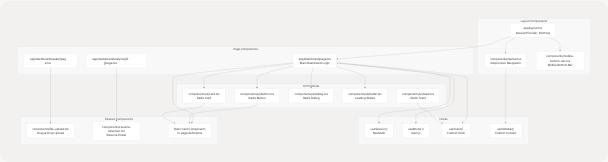
Diagram: Component Dependency Graph
Shared Component Library
The components/ui/ directory contains Radix UI-based primitives:
| Component | Source | Purpose |
|---|---|---|
Button |
@radix-ui/react-slot |
Interactive buttons with variants |
Card |
Custom wrapper | Content containers with header/footer |
Dialog |
@radix-ui/react-dialog |
Modal dialogs and confirmations |
Toast |
@radix-ui/react-toast |
Notification system |
Avatar |
@radix-ui/react-avatar |
User profile images |
Progress |
@radix-ui/react-progress |
Progress bars |
Badge |
Custom styled | Status indicators and labels |
Loader |
Custom | Loading spinners and overlays |
Custom Hook Patterns
Custom hooks encapsulate reusable logic:
useToast(): Toast notification management with queue and auto-dismissuseSidebar(): Sidebar collapse state shared across components frontend/components/navbar.tsx31useSession(): NextAuth session access throughout the app
Sources: frontend/app/dashboard/page.tsx1-1500 frontend/components/navbar.tsx1-398 frontend/components/ui/loader.tsx1-100 (inferred from usage)
Build and Configuration
Next.js Configuration
The frontend/next.config.js1-82 configures:
| Feature | Configuration | Purpose |
|---|---|---|
| PWA | next-pwa plugin |
Service worker generation, offline support |
| Images | Unoptimized, external domains | Support OAuth provider images |
| Webpack | Node.js polyfills disabled | Fix PostHog instrumentation in browser |
| Rewrites | Proxy /ph/* to PostHog EU |
Analytics without CORS issues |
| External Packages | @prisma/client, bcrypt |
Mark as server-only modules |
PWA Configuration Details
PWA setup frontend/next.config.js1-6:
- Destination:
public/directory - Auto-registration: Service worker registers automatically
- Skip waiting: Updates apply immediately
- Disabled in dev: Only active in production builds
Webpack Customizations
Browser builds frontend/next.config.js18-62 configure fallbacks for Node.js modules:
- Rewrite
node:*imports to plain names - Set fallbacks to
falsefor unavailable modules - Prevent UnhandledSchemeError from PostHog dependencies
Sources: frontend/next.config.js1-82
Build Process
Build Pipeline
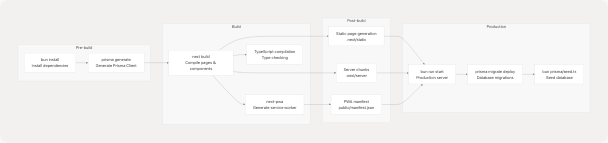
Diagram: Frontend Build Process
Build Scripts
Package scripts frontend/package.json5-12:
| Script | Command | Purpose |
|---|---|---|
dev |
next dev |
Development server with hot reload |
build |
prisma generate && next build |
Production build with Prisma client |
start |
next start |
Production server |
postinstall |
prisma generate |
Auto-generate Prisma client after install |
lint |
next lint |
ESLint code quality checks |
seed |
tsx prisma/seed.ts |
Database seeding script |
Production Deployment Flow
- Docker Build: Multi-stage Dockerfile with builder and runner stages
- Dependency Installation:
bun installfor fast package installation - Prisma Generation: Generate type-safe database client
- Next.js Build: Compile all pages, API routes, and components
- PWA Generation: Create service worker and manifest files
- Container Start: Run migrations, seed database, start Next.js server
Sources: frontend/package.json1-98 frontend/next.config.js1-82
Key Architectural Decisions
Responsive Navigation Strategy
Decision: Implement three distinct navigation patterns instead of a single responsive component.
Rationale:
- Desktop: Sidebar provides persistent access to all navigation items
- Tablet: Top navigation with hamburger menu balances screen space
- Mobile: Bottom navigation with thumb-friendly FAB maximizes content area
Implementation: Single Navbar component frontend/components/navbar.tsx1-398 handles desktop and tablet, while MobileBottomNav frontend/components/mobile-bottom-nav.tsx1-209 handles mobile viewport.
Session vs. LocalStorage
Decision: Use NextAuth session for authentication, localStorage for resume data cache.
Rationale:
- Session: Secure, server-validated, expires automatically
- LocalStorage: Persists across sessions, reduces API calls for recently analyzed resumes
Trade-offs: LocalStorage can become stale, but acceptable for UX enhancement.
App Router Over Pages Router
Decision: Use Next.js App Router (app directory) instead of Pages Router.
Benefits:
- Server Components by default (better performance)
- Nested layouts without prop drilling
- Simplified data fetching patterns
- Better TypeScript support
Sources: frontend/components/navbar.tsx1-398 frontend/components/mobile-bottom-nav.tsx1-209 frontend/app/dashboard/page.tsx1-1500