Frontend Application
Purpose and Scope
This document provides an overview of the TalentSync frontend application, a Next.js-based Progressive Web Application (PWA) that serves as the user interface for the AI-powered hiring intelligence platform. The frontend provides separate experiences for job seekers and recruiters through a responsive, role-based architecture.
For detailed information about specific subsystems:
- Next.js configuration and PWA setup: see Next.js Configuration & Dependencies
- Authentication flows and NextAuth integration: see Authentication System
- Navigation components and responsive design: see Navigation System
- Public-facing pages: see Landing & Public Pages
- Protected feature pages: see Dashboard Pages
- User profile management: see Account Management
- Reusable UI components: see Shared Components
This page focuses on the overall architecture, technology stack, and how the major subsystems fit together.
Technology Stack
The frontend is built using the following core technologies and libraries:
| Technology | Version | Purpose |
|---|---|---|
| Next.js | 15.5.6 | React framework with App Router, server components, and routing |
| React | 18.2.0 | UI library for component-based interface |
| TypeScript | 5.x | Type-safe development |
| NextAuth | 4.24.11 | Authentication with email/password, Google OAuth, GitHub OAuth |
| Prisma | 6.9.0 | ORM for PostgreSQL database access |
| next-pwa | 5.6.0 | Progressive Web App support with service workers |
| Tailwind CSS | 3.3.3 | Utility-first CSS framework |
| Framer Motion | 11.0.8 | Animation library for smooth transitions |
| PostHog | 1.279.0 | Product analytics and user behavior tracking |
| Radix UI | Various | Accessible, unstyled component primitives |
| Bun | 1.x | JavaScript runtime and package manager |
Sources: frontend/package.json1-98
Application Structure
Directory Organization

Sources: frontend/package.json1-98 frontend/app/page.tsx1-60 frontend/components/navbar.tsx1-398 frontend/lib/navigation.ts1-109
Routing Structure
The application uses Next.js App Router with file-based routing. The routing structure maps directly to the filesystem:
| Route | File Path | Description | Access |
|---|---|---|---|
/ |
app/page.tsx |
Landing page | Public |
/about |
app/about/page.tsx |
About page | Public |
/auth |
app/auth/page.tsx |
Login/Register | Public |
/dashboard |
app/dashboard/page.tsx |
Main dashboard hub | Protected |
/dashboard/seeker |
app/dashboard/seeker/page.tsx |
Job seeker interface | Protected |
/dashboard/recruiter |
app/dashboard/recruiter/page.tsx |
Recruiter interface | Protected (Admin role) |
/dashboard/analysis/[id] |
app/dashboard/analysis/[id]/page.tsx |
Detailed resume analysis | Protected |
/dashboard/cold-mail |
app/dashboard/cold-mail/page.tsx |
Cold email generator | Protected |
/dashboard/hiring-assistant |
app/dashboard/hiring-assistant/page.tsx |
Interview prep | Protected |
/dashboard/linkedin-posts |
app/dashboard/linkedin-posts/page.tsx |
LinkedIn post generator | Protected |
/dashboard/ats |
app/dashboard/ats/page.tsx |
ATS evaluation | Protected |
/account |
app/account/page.tsx |
Account settings | Protected |
/api/* |
app/api/*/route.ts |
API route handlers | Varies |
Protected routes are enforced by middleware.ts which checks session status and role assignment.
Sources: frontend/app/page.tsx1-60 frontend/lib/navigation.ts1-109
Component Architecture
Component Hierarchy
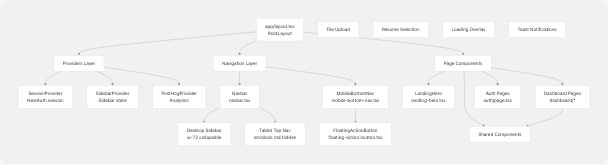
Sources: frontend/components/navbar.tsx1-398 frontend/components/mobile-bottom-nav.tsx1-209 frontend/components/floating-action-button.tsx1-109 frontend/components/sidebar-provider.tsx1-29
Navigation Configuration
The navigation system is driven by configuration objects defined in lib/navigation.ts:
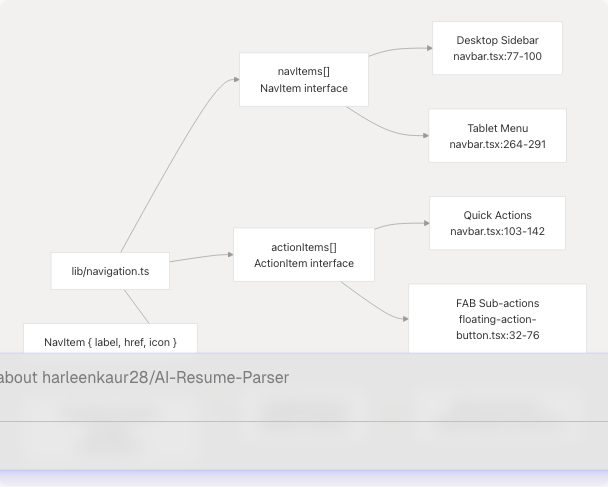
The NavItem interface includes label, href, and icon (LucideIcon type). The ActionItem extends this with a description field for detailed tooltips.
Sources: frontend/lib/navigation.ts1-109 frontend/components/navbar.tsx24 frontend/components/floating-action-button.tsx5 frontend/components/mobile-bottom-nav.tsx6
Responsive Navigation System
The frontend implements a fully responsive navigation system that adapts to three breakpoints:
Desktop (≥768px): Collapsible Sidebar
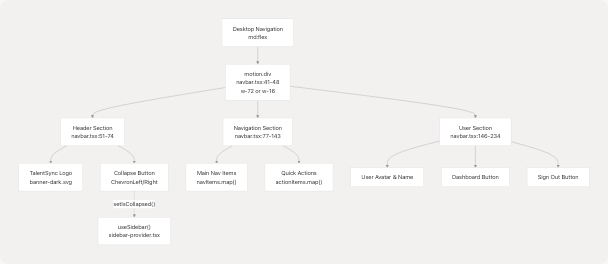
Sources: frontend/components/navbar.tsx41-236 frontend/components/sidebar-provider.tsx1-29
Tablet (640px-767px): Top Navigation Bar
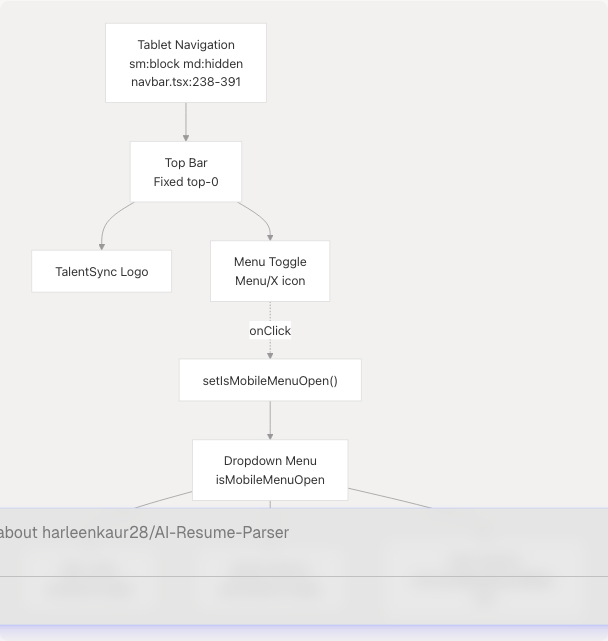
Sources: frontend/components/navbar.tsx238-391
Mobile (<640px): Bottom Navigation + FAB
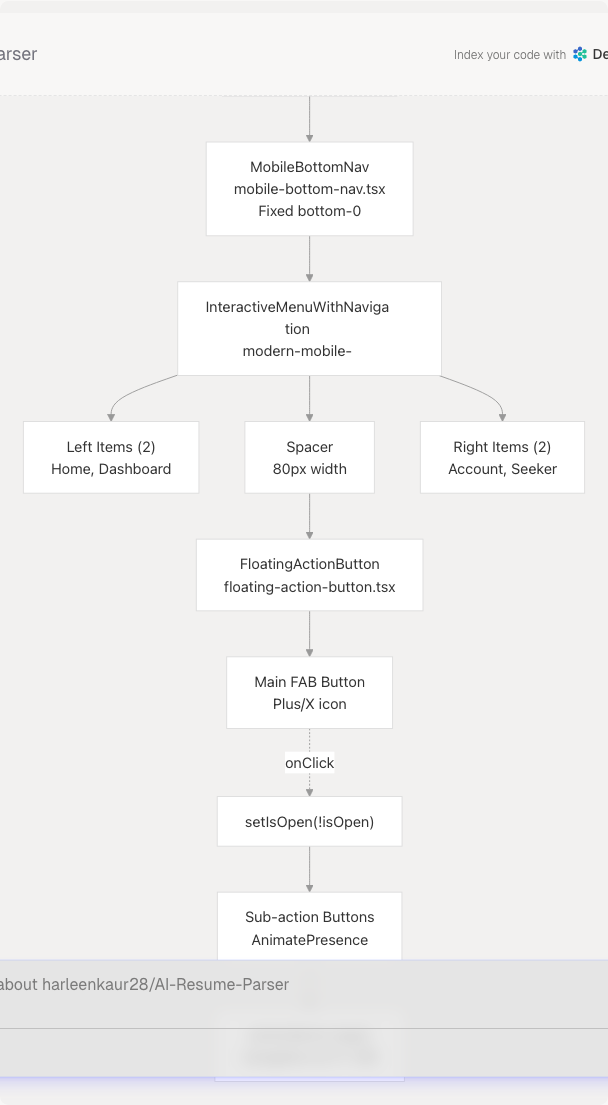
The mobile bottom navigation uses the InteractiveMenuWithNavigation component which provides smooth animations and active state indicators. The FAB expands to reveal quick action items from the actionItems array.
Sources: frontend/components/mobile-bottom-nav.tsx1-209 frontend/components/floating-action-button.tsx1-109 frontend/components/ui/modern-mobile-menu.tsx1-121 frontend/lib/navigation.ts71-108
State Management
The frontend uses a combination of state management strategies:
State Management Patterns
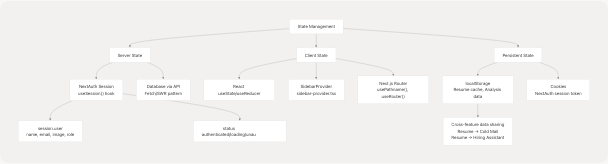
Session Management
The application uses NextAuth's SessionProvider to manage authentication state globally:
// Pattern used in navbar.tsx:32
const { data: session, status } = useSession();

// Session structure includes:
interface Session {
  user: {
    name?: string;
    email?: string;
    image?: string;
    role?: "User" | "Admin";  // User=Seeker, Admin=Recruiter
  }
}
The status field indicates whether the session is "loading", "authenticated", or "unauthenticated", enabling conditional UI rendering.
Sources: frontend/components/navbar.tsx32 frontend/components/sidebar-provider.tsx1-29 frontend/components/mobile-bottom-nav.tsx26
Progressive Web App (PWA) Configuration
The frontend is configured as a PWA using next-pwa:
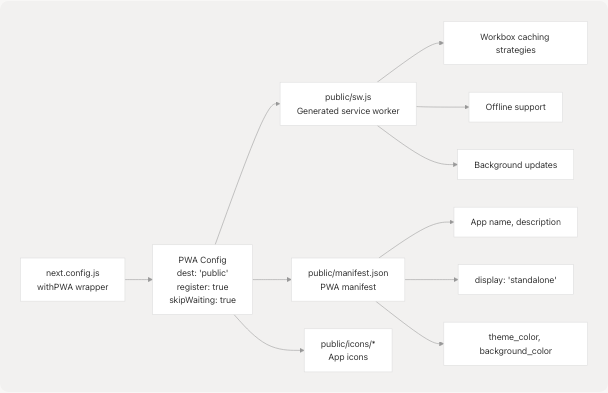
PWA features are disabled in development mode: disable: process.env.NODE_ENV === "development".
Sources: frontend/next.config.js1-82
Build Configuration
Next.js Configuration Overview
The next.config.js includes several important customizations:
| Configuration | Purpose | Reference |
|---|---|---|
| Image Optimization | Disabled (unoptimized: true) for static export compatibility |
next.config.js14 |
| External Image Domains | Allows Google and GitHub avatars | next.config.js15 |
| Server External Packages | Excludes Prisma and bcrypt from bundling | next.config.js17 |
| Webpack Aliases | Provides fallbacks for Node.js modules in browser | next.config.js18-64 |
| PostHog Proxy | Rewrites /ph/* to PostHog EU servers |
next.config.js65-76 |
| Trailing Slash | Skips redirect for PostHog API compatibility | next.config.js78 |
Webpack Customization for PostHog
The configuration includes custom webpack rules to handle PostHog's Node.js dependencies in the browser:
// Pattern from next.config.js:25-61
if (!isServer) {
  config.resolve.fallback = {
    child_process: false,
    fs: false,
    net: false,
    tls: false,
    crypto: false,
    path: false,
  };

  // NormalModuleReplacementPlugin to rewrite node: imports
  config.plugins.push(
    new webpack.NormalModuleReplacementPlugin(/^node:(.+)$/, (resource) => {
      resource.request = resource.request.replace(/^node:/, "");
    })
  );
}
This prevents PostHog instrumentation from attempting to use Node.js modules in the browser bundle.
Sources: frontend/next.config.js1-82
Development Scripts
Available Commands
The package.json defines the following scripts:
| Command | Description | Usage |
|---|---|---|
dev |
Start development server | bun dev |
build |
Production build with Prisma generation | bun run build |
postinstall |
Auto-generate Prisma client after install | Automatic |
start |
Start production server | bun start |
lint |
Run ESLint | bun run lint |
seed |
Seed database | bun run seed |
generate:icons |
Generate PWA icons | bun run generate:icons |
The build process includes Prisma client generation (prisma generate) before Next.js build, ensuring database types are up-to-date.
Sources: frontend/package.json5-12
Feature Organization Pattern
Features in the dashboard follow a consistent organization pattern:
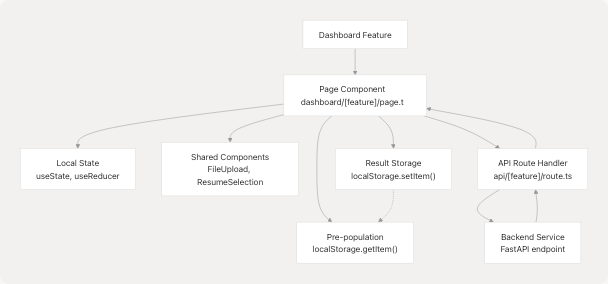
This pattern enables:
- Pre-population: Features can access resume analysis data from localStorage
- Shared Components: Consistent UX across features (file upload, resume selection)
- API Abstraction: Frontend calls Next.js API routes which proxy to FastAPI backend
- Result Caching: Generated content can be cached for later reference
Sources: frontend/app/page.tsx1-60 frontend/components/navbar.tsx1-398 frontend/lib/navigation.ts1-109
Analytics Integration
PostHog Configuration
The frontend integrates PostHog for product analytics:
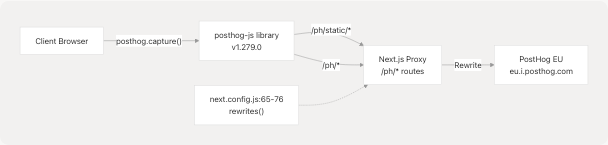
PostHog requests are proxied through the Next.js server to avoid ad blockers and CORS issues. Static assets are served from /ph/static/* and API requests from /ph/*.
Sources: frontend/next.config.js65-76 frontend/package.json61
Summary
The TalentSync frontend is a sophisticated Next.js application that provides:
- Progressive Web App capabilities with offline support and installability
- Responsive Navigation adapting to desktop (sidebar), tablet (top nav), and mobile (bottom nav + FAB)
- Role-Based Access with separate interfaces for job seekers and recruiters
- Type-Safe Development using TypeScript and Prisma-generated types
- Modern Authentication via NextAuth with multiple providers
- Cross-Feature Integration through localStorage-based data sharing
- Production Analytics with PostHog tracking
- Optimized Build Process using Bun runtime and multi-stage PWA generation
The architecture emphasizes modularity, reusability, and responsive design while maintaining a clear separation between public pages, authenticated dashboards, and admin-only features.
For implementation details of specific subsystems, refer to the child pages linked at the beginning of this document.