Authentication System
- frontend/app/api/auth/[...nextauth]/route.ts
- frontend/app/api/auth/confirm-reset/route.ts
- frontend/app/api/auth/register/route.ts
- frontend/app/api/auth/reset-password/route.ts
- frontend/app/api/auth/update-role/route.ts
- frontend/app/auth/forgot-password/page.tsx
- frontend/app/auth/page.tsx
- frontend/app/auth/resend-verification/page.tsx
- frontend/app/auth/reset-password/page.tsx
- frontend/app/auth/verify-email/page.tsx
- frontend/app/select-role/page.tsx
- frontend/middleware.ts
Purpose and Scope
This document covers the comprehensive authentication system implemented in TalentSync using NextAuth. The system provides multiple authentication methods (email/password, Google OAuth, GitHub OAuth), email verification, password reset functionality, role-based access control, and middleware-enforced route protection.
For database schema details related to user authentication, see Database & Data Models. For role selection UI and middleware implementation specifically, see subsections Role Selection & Management and Middleware & Route Protection.
System Architecture
The authentication system is built on NextAuth with custom extensions for email verification, role management, and OAuth integration. It consists of frontend UI components, API routes, middleware for route protection, and database-backed token management.
Authentication Component Architecture
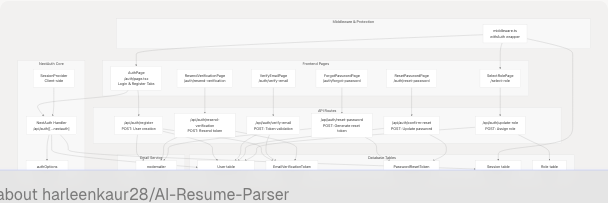
Sources: frontend/app/auth/page.tsx1-928 frontend/middleware.ts1-75 frontend/app/api/auth/register/route.ts1-176
Authentication Providers
The system supports three authentication providers configured in NextAuth.
Provider Configuration
| Provider | Implementation | User Data Handling |
|---|---|---|
| Credentials | Email/password with bcrypt hashing | Creates user with passwordHash field |
| Google OAuth | NextAuth GoogleProvider | Auto-creates user without passwordHash |
| GitHub OAuth | NextAuth GithubProvider | Auto-creates user without passwordHash |
Credentials Provider Flow
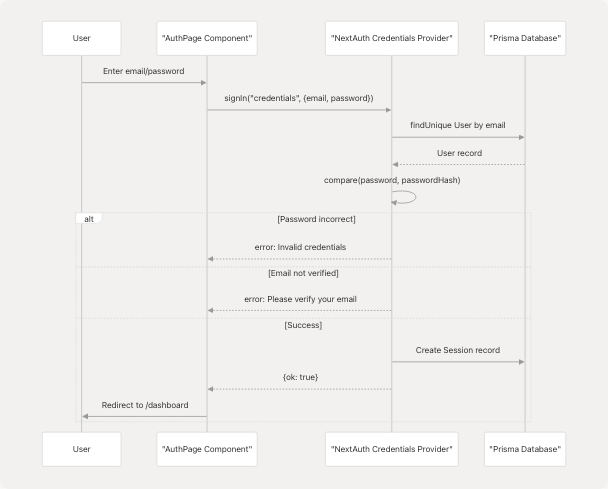
Sources: frontend/app/auth/page.tsx151-186 frontend/lib/auth-options.ts (referenced but not provided)
OAuth Provider Flow
OAuth providers (Google, GitHub) bypass password verification and email verification requirements. The isVerified field is automatically set to true for OAuth users.
Implementation:
- Google OAuth button: frontend/app/auth/page.tsx424-453
- GitHub OAuth button: frontend/app/auth/page.tsx455-467
- OAuth handler: Calls
signIn(provider, {callbackUrl: "/dashboard"})at frontend/app/auth/page.tsx145-149
Sources: frontend/app/auth/page.tsx145-149 frontend/app/auth/page.tsx424-467
Registration & Email Verification
Registration Flow
The registration process creates a user account with an unverified status and sends a verification email containing a unique token.
Registration State Machine

Sources: frontend/app/auth/page.tsx188-274 frontend/app/api/auth/register/route.ts68-176
Email Verification Token System
The system uses cryptographically secure tokens stored in the EmailVerificationToken table.
Token Generation: frontend/app/api/auth/register/route.ts103-104
const verificationToken = randomBytes(32).toString("hex");
const tokenExpiresAt = new Date(Date.now() + 24 * 60 * 60 * 1000); // 24 hours
Token Storage: frontend/app/api/auth/register/route.ts132-138
- Creates
EmailVerificationTokenrecord linked touserId - Token expires after 24 hours
Email Template: frontend/app/api/auth/register/route.ts35-66
- Sends HTML email via Nodemailer
- Contains verification URL:
${NEXTAUTH_URL}/auth/verify-email?token=${token} - Styled with inline CSS for email client compatibility
Email Verification Process
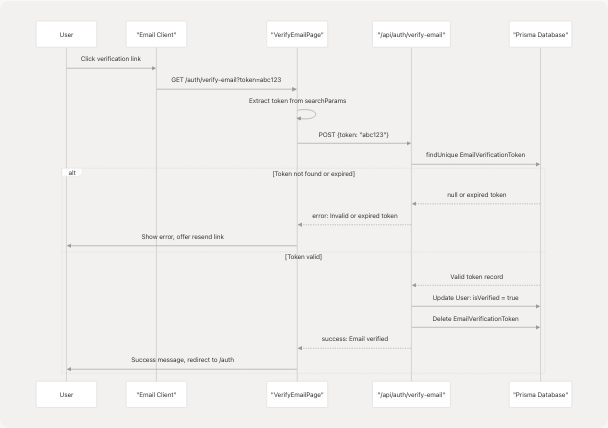
Sources: frontend/app/auth/verify-email/page.tsx18-222 frontend/app/api/auth/verify-email/route.ts (referenced but not provided)
Resend Verification Email
Users can request a new verification email if the original expires or is lost.
UI Implementation: frontend/app/auth/resend-verification/page.tsx20-293
- Pre-fills email from URL parameter:
?email=user@example.com - Auto-triggers resend if email parameter present: frontend/app/auth/resend-verification/page.tsx35-42
API Endpoint: frontend/app/api/auth/resend-verification/route.ts (referenced but not provided)
- Deletes old verification tokens for the user
- Generates new token with fresh 24-hour expiry
- Sends new verification email
Sources: frontend/app/auth/resend-verification/page.tsx1-293 frontend/app/auth/page.tsx128-143
Login Flow
Credentials Login Process
The credentials login validates email/password and enforces email verification before granting access.
Login Handler: frontend/app/auth/page.tsx151-186
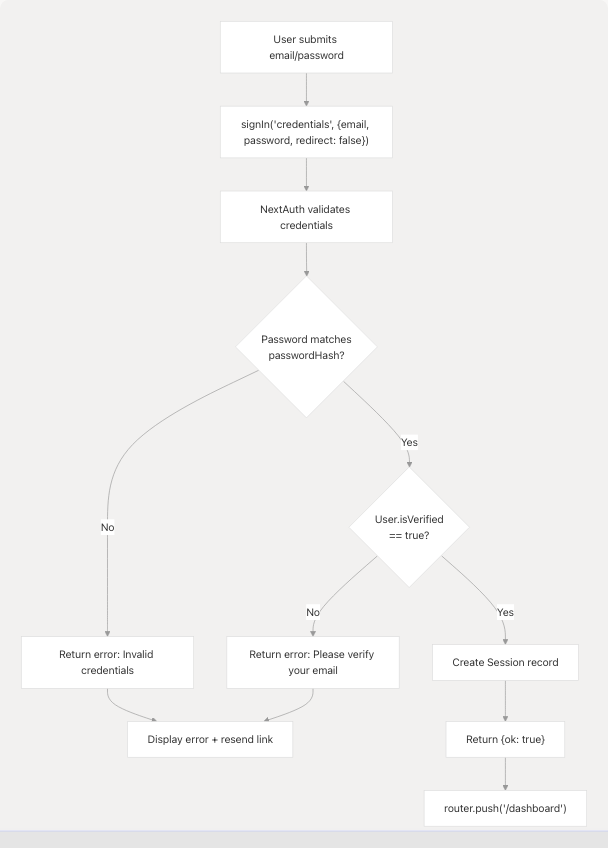
Email Verification Error Handling: frontend/app/auth/page.tsx163-177
- Displays inline error message
- Provides clickable link to resend verification email
- Pre-fills email in resend form
Sources: frontend/app/auth/page.tsx151-186
OAuth Login Process
OAuth logins bypass email verification and password checks entirely.
Flow:
- User clicks "Continue with Google/GitHub"
- Calls
signIn(provider, {callbackUrl: "/dashboard"})at frontend/app/auth/page.tsx145-149 - NextAuth redirects to OAuth provider
- Provider authenticates user and returns profile
- NextAuth creates or updates user record with
isVerified: true - Session created, user redirected to
/dashboardor/select-roleif no role assigned
OAuth User Characteristics:
passwordHashisnull(cannot use password reset)isVerifiedistrueby defaultimagefield populated from OAuth provider avatar
Sources: frontend/app/auth/page.tsx145-149 frontend/app/auth/page.tsx424-467
Password Reset Flow
Forgot Password Request
Users without OAuth accounts can request a password reset via email.
Password Reset Request Flow
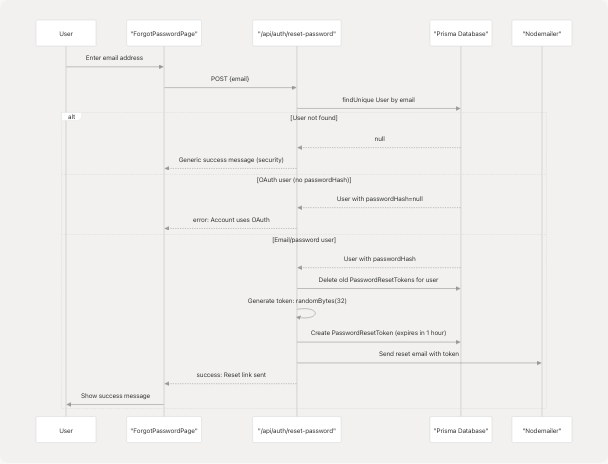
Sources: frontend/app/auth/forgot-password/page.tsx1-237 frontend/app/api/auth/reset-password/route.ts59-134
Password Reset Token Management
Token Generation: frontend/app/api/auth/reset-password/route.ts91-92
const token = randomBytes(32).toString("hex");
const expiresAt = new Date(Date.now() + 60 * 60 * 1000); // 1 hour
Token Security:
- Old tokens deleted before creating new one: frontend/app/api/auth/reset-password/route.ts86-88
- Expires after 1 hour (shorter than verification tokens)
- Single-use: marked with
usedAttimestamp after use
Email Template: frontend/app/api/auth/reset-password/route.ts25-57
- Reset URL:
${NEXTAUTH_URL}/auth/reset-password?token=${token} - Clear expiration notice: "This link will expire in 1 hour"
Password Reset Confirmation
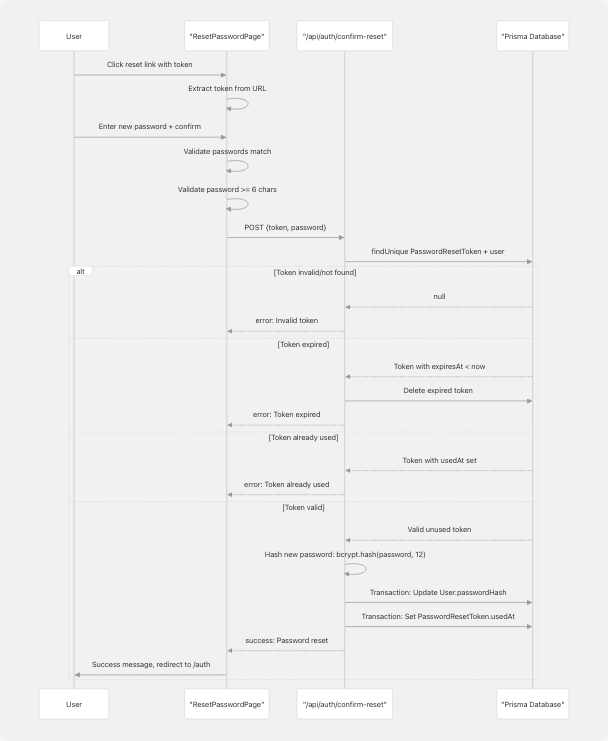
Sources: frontend/app/auth/reset-password/page.tsx27-324 frontend/app/api/auth/confirm-reset/route.ts11-88
Key Security Features:
- Token validation: frontend/app/api/auth/confirm-reset/route.ts17-48
- Expiration check: frontend/app/api/auth/confirm-reset/route.ts30-40
- Single-use enforcement via
usedAt: frontend/app/api/auth/confirm-reset/route.ts43-48 - Transaction ensures atomicity: frontend/app/api/auth/confirm-reset/route.ts54-63
Role Selection & Management
Role Assignment Flow
Users authenticating via OAuth do not select a role during registration. They must select a role before accessing the dashboard.
Role Selection State Machine
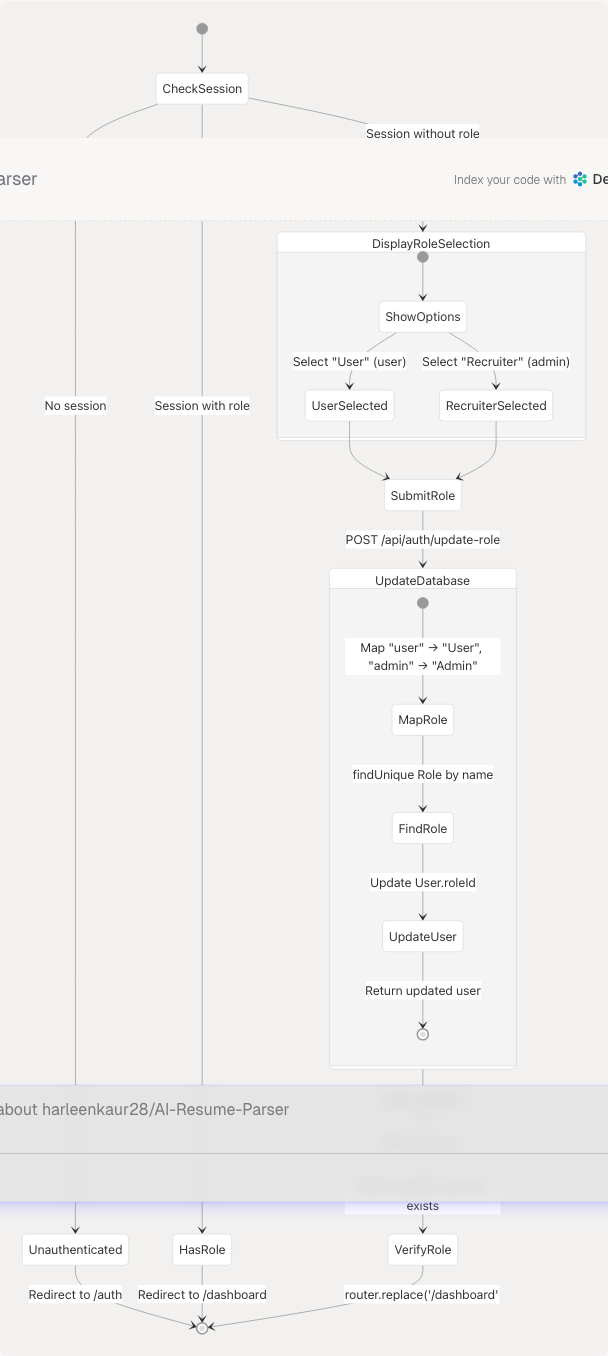
Sources: frontend/app/select-role/page.tsx1-156 frontend/app/api/auth/update-role/route.ts1-65
Update Role API
Endpoint: /api/auth/update-role
Role Mapping: frontend/app/api/auth/update-role/route.ts26-31
// Frontend sends "user" or "admin"
// Backend maps to database Role.name: "User" or "Admin"
const roleName = roleId === "user" ? "User" : "Admin";
Database Update: frontend/app/api/auth/update-role/route.ts41-45
- Updates
User.roleIdfield - Includes role relation in response
Session Refresh: frontend/app/select-role/page.tsx52-56
const updated = await update(); // Refresh NextAuth session
if (updated?.user && (updated.user as any).role) {
  router.replace("/dashboard");
}
Sources: frontend/app/select-role/page.tsx33-67 frontend/app/api/auth/update-role/route.ts6-64
Middleware & Route Protection
The authentication middleware enforces access control on all routes, ensuring users are authenticated and have assigned roles before accessing protected pages.
Middleware Logic Flow
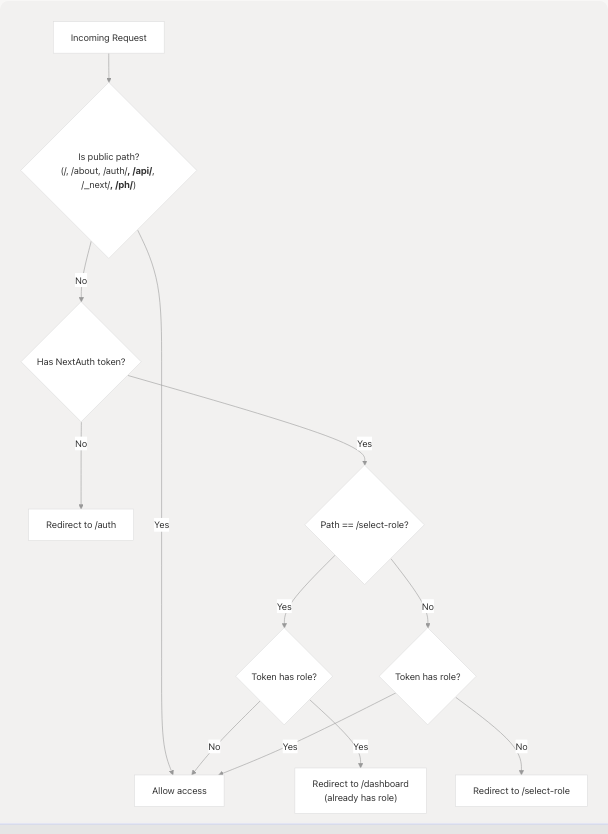
Sources: frontend/middleware.ts1-75
Middleware Implementation Details
Public Paths: frontend/middleware.ts42-55
- Landing page:
/ - About page:
/about - Auth pages:
/auth,/auth/verify-email,/auth/resend-verification,/auth/forgot-password,/auth/reset-password - API routes:
/api/* - Next.js internals:
/_next/* - Static assets:
*.{css,js,png,jpg,...} - PostHog analytics proxy:
/ph/*
Role Enforcement Logic: frontend/middleware.ts14-26
// If authenticated but no role, redirect to role selection
if (token && !token.role && pathname !== "/select-role" && ...) {
  return NextResponse.redirect(new URL("/select-role", req.url));
}

// If has role but on select-role page, redirect to dashboard
if (token && token.role && pathname === "/select-role") {
  return NextResponse.redirect(new URL("/dashboard", req.url));
}
Authorization Callback: frontend/middleware.ts36-64
- Returns
truefor public paths - Returns
truefor/select-roleif token exists (even without role) - Returns
truefor protected pages only if token exists
Matcher Configuration: frontend/middleware.ts69-74
matcher: ["/((?!api/auth|_next/static|_next/image|favicon.ico|ph).*)"]
Excludes NextAuth internal routes, static assets, and PostHog proxy from middleware processing.
Sources: frontend/middleware.ts1-75
Session Management
NextAuth Session Structure
NextAuth sessions are stored in the database and managed server-side with JWT tokens for client access.
Session Token Contents:
user.id: User database IDuser.email: User email addressuser.name: User display nameuser.image: Avatar URL (from OAuth or registration)user.role: Role name ("User" or "Admin") - custom field
Session Retrieval:
Client-side: frontend/app/auth/page.tsx40
const { data: session, status } = useSession();
Server-side (API routes): frontend/app/api/auth/update-role/route.ts8
const session = await getServerSession(authOptions);
Session Update: After role assignment, session must be refreshed: frontend/app/select-role/page.tsx52-53
const updated = await update(); // Force session refresh
Token Structure & Callbacks
The JWT token is customized via callbacks in authOptions to include role information.
Expected Callback Structure (in authOptions):
callbacks: {
  async jwt({ token, user }) {
    if (user) {
      token.role = user.role?.name; // Add role to token
    }
    return token;
  },
  async session({ session, token }) {
    if (session.user) {
      session.user.role = token.role; // Add role to session
    }
    return session;
  }
}
Sources: frontend/app/api/auth/[...nextauth]/route.ts:1-7, frontend/lib/auth-options.ts (referenced but not provided), frontend/app/auth/page.tsx40 frontend/app/api/auth/update-role/route.ts8
Authentication Data Models
User Model Fields
| Field | Type | Purpose | Set By |
|---|---|---|---|
id |
String | Primary key (UUID) | Auto-generated |
email |
String | Unique email address | User input / OAuth |
name |
String | Display name | User input / OAuth |
passwordHash |
String? | Bcrypt hashed password | Registration (null for OAuth) |
image |
String? | Avatar URL | User input / OAuth provider |
isVerified |
Boolean | Email verification status | false on registration, true after verification or OAuth |
roleId |
String? | Foreign key to Role | Selected during registration or after OAuth |
createdAt |
DateTime | Account creation timestamp | Auto-generated |
Email Verification Token Model
| Field | Type | Purpose |
|---|---|---|
id |
String | Primary key (UUID) |
token |
String | Unique 64-char hex token |
userId |
String | Foreign key to User |
expiresAt |
DateTime | Token expiration (24 hours from creation) |
createdAt |
DateTime | Token creation timestamp |
Password Reset Token Model
| Field | Type | Purpose |
|---|---|---|
id |
String | Primary key (UUID) |
token |
String | Unique 64-char hex token |
userId |
String | Foreign key to User |
expiresAt |
DateTime | Token expiration (1 hour from creation) |
usedAt |
DateTime? | Timestamp when token was used (null if unused) |
createdAt |
DateTime | Token creation timestamp |
Role Model
| Field | Type | Values |
|---|---|---|
id |
String | Primary key (UUID) |
name |
String | "User" or "Admin" |
Role Semantics:
- "User" (role ID "user" in frontend): Job seeker - access to resume analysis, cold mail, hiring assistant, LinkedIn posts
- "Admin" (role ID "admin" in frontend): Recruiter - access to candidate dashboard, bulk processing, ATS evaluation
Sources: frontend/app/api/auth/register/route.ts109-129 frontend/app/api/auth/update-role/route.ts26-38 frontend/prisma/schema.prisma (referenced but not provided)
Error Handling & User Feedback
Error Display Patterns
All authentication pages use consistent error handling with inline error messages and helpful recovery actions.
Error Display Component: frontend/app/auth/page.tsx393-409
- Red background for errors (
bg-red-500/10) - Green background for success (
bg-green-500/10) - AlertCircle icon for visual feedback
- Actionable links embedded in error messages
Common Error Scenarios:
| Scenario | Error Message | Recovery Action |
|---|---|---|
| Unverified email on login | "Please verify your email before signing in." | Link to /auth/resend-verification?email=... |
| Invalid credentials | "Invalid email or password" | User can retry or use forgot password |
| Password reset for OAuth user | "This account was created with OAuth..." | User must sign in with OAuth provider |
| Expired verification token | "Invalid or expired reset token" | Link to request new token |
| Password mismatch | "Passwords do not match" | Client-side validation, immediate feedback |
| Weak password | "Password must be at least 6 characters" | Client-side validation |
| Missing role | "Please select a role" | Inline form validation |
Loading States
All authentication operations display full-screen loading overlays during async operations.
Loading Overlay Implementation: frontend/app/auth/page.tsx311-342
- Backdrop blur effect
- Animated pulse loader
- Status message ("Processing Authentication...", "Sending Verification...", etc.)
- Three animated dots for visual feedback
Specific Loading Messages:
- Registration: "Creating Account..."
- Login: "Signing in..."
- Email verification: "Verifying your email, please wait..."
- Password reset request: "Sending Reset Link"
- Password reset confirmation: "Resetting Password"
Sources: frontend/app/auth/page.tsx311-342 frontend/app/auth/verify-email/page.tsx79-93 frontend/app/auth/resend-verification/page.tsx83-127
Security Considerations
Password Security
- Hashing Algorithm: bcrypt with salt rounds = 12
- Implementation: frontend/app/api/auth/register/route.ts100 frontend/app/api/auth/confirm-reset/route.ts51
- Minimum Length: 6 characters enforced in both frontend and backend
Token Security
Email Verification Tokens:
- 64-character hex strings (256 bits of entropy): frontend/app/api/auth/register/route.ts103
- 24-hour expiration window
- Deleted after successful verification
- Cryptographically random:
crypto.randomBytes(32)
Password Reset Tokens:
- 64-character hex strings (256 bits of entropy): frontend/app/api/auth/reset-password/route.ts91
- 1-hour expiration window (shorter for higher security)
- Single-use enforcement via
usedAtfield - Old tokens deleted before issuing new ones: frontend/app/api/auth/reset-password/route.ts86-88
Email Security
Anti-Enumeration: Password reset returns generic success message regardless of whether user exists: frontend/app/api/auth/reset-password/route.ts70-75
// Don't reveal whether the email exists or not for security
return NextResponse.json(
  { message: "If an account with this email exists, a password reset link has been sent." }
);
Session Security
- Server-side session storage in database
- JWT tokens with short expiration
- HTTPOnly cookies (NextAuth default)
- CSRF protection via NextAuth
Sources: frontend/app/api/auth/register/route.ts100-104 frontend/app/api/auth/reset-password/route.ts86-92 frontend/app/api/auth/confirm-reset/route.ts43-63