Database & Data Models
Purpose and Scope
This document describes the PostgreSQL database schema, Prisma ORM integration, and data models used throughout the TalentSync platform. It covers the database tables, their relationships, field definitions, and validation strategies employed on both the frontend (Prisma) and backend (Pydantic).
For information about how data flows through the system during specific operations, see Data Flow Patterns. For details about the Prisma ORM configuration and migrations, see Prisma Schema.
Database Architecture
TalentSync uses PostgreSQL 16 as its primary relational database, managed through Prisma ORM on the frontend and accessed via raw SQL queries from the backend when needed. The database is deployed as a Docker container and communicates with both the Next.js frontend and FastAPI backend through internal Docker networking.
Database Connection Configuration
The database connection is established through environment variables defined in the Docker Compose configuration:
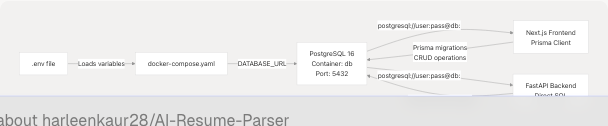
Sources: docker-compose.yaml4-17 docker-compose.yaml28 docker-compose.yaml59
The connection string follows this pattern:
postgresql://${POSTGRES_USER}:${POSTGRES_PASSWORD}@db:5432/${POSTGRES_DB}?schema=public
Entity-Relationship Diagram
The database schema consists of 15+ interconnected tables organized around user authentication, resume management, and AI-generated content.
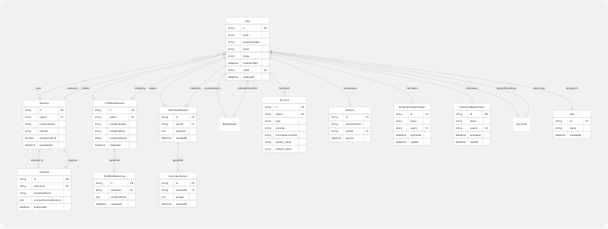
Sources: frontend/app/api/auth/delete-account/route.ts42-134 frontend/prisma/migrations/20250613172024_replace_file_url_with_raw_text/migration.sql1-96
Core Data Models
User Model
The User table is the central entity in the system, supporting both email/password and OAuth authentication through NextAuth.
| Field | Type | Constraints | Description |
|---|---|---|---|
id |
String | PRIMARY KEY | Unique user identifier (UUID) |
email |
String | UNIQUE, nullable | User's email address (nullable for OAuth) |
passwordHash |
String | nullable | Bcrypt hashed password (null for OAuth users) |
name |
String | nullable | User's display name |
image |
String | nullable | Profile picture URL |
emailVerified |
DateTime | nullable | Email verification timestamp |
roleId |
String | FOREIGN KEY, nullable | Reference to Role table |
createdAt |
DateTime | DEFAULT NOW() | Account creation timestamp |
Authentication Methods:
- Email/Password:
emailandpasswordHashpopulated - Google OAuth:
email,name,imagefrom Google, linked viaAccounttable - GitHub OAuth:
name,imagefrom GitHub, linked viaAccounttable
Sources: frontend/prisma/migrations/20250613172024_replace_file_url_with_raw_text/migration.sql16-21 frontend/app/account/page.tsx59-63
Resume Model
The Resume table stores uploaded resume information with the actual text content instead of file URLs.
| Field | Type | Constraints | Description |
|---|---|---|---|
id |
String | PRIMARY KEY | Unique resume identifier |
userId |
String | FOREIGN KEY | Reference to User who uploaded |
customName |
String | NOT NULL | User-provided name for the resume |
rawText |
Text | NOT NULL | Extracted resume text content |
showInCentral |
Boolean | DEFAULT false | Display in central repository flag |
uploadedAt |
DateTime | DEFAULT NOW() | Upload timestamp |
Migration History: The schema was migrated from storing fileUrl to storing rawText directly in the database, eliminating the need for file system dependencies.
Sources: frontend/prisma/migrations/20250613172024_replace_file_url_with_raw_text/migration.sql12-13 frontend/components/upload-resume.tsx14 frontend/components/upload-resume.tsx41
Analysis Model
The Analysis table stores the results of AI-powered resume analysis, including ML classification and LLM-generated comprehensive analysis.
| Field | Type | Constraints | Description |
|---|---|---|---|
id |
String | PRIMARY KEY | Unique analysis identifier |
resumeId |
String | FOREIGN KEY | Reference to analyzed Resume |
predictedField |
String | NOT NULL | ML-predicted job category (25 classes) |
comprehensiveAnalysis |
JSON | NOT NULL | Structured LLM analysis results |
analyzedAt |
DateTime | DEFAULT NOW() | Analysis timestamp |
Comprehensive Analysis JSON Structure:
{
  "skills": {
    "technical": ["Python", "React", "PostgreSQL"],
    "soft": ["Communication", "Leadership"]
  },
  "experience": [
    {
      "company": "Company Name",
      "role": "Job Title",
      "duration": "Jan 2020 - Present",
      "highlights": ["Achievement 1", "Achievement 2"]
    }
  ],
  "projects": [
    {
      "name": "Project Name",
      "description": "Brief description",
      "technologies": ["Tech1", "Tech2"]
    }
  ],
  "education": [
    {
      "degree": "Degree Name",
      "institution": "University",
      "year": "2019"
    }
  ]
}
Sources: Referenced from system architecture diagrams and backend processing logic
Authentication & Session Models
NextAuth Integration Tables
TalentSync uses NextAuth for authentication, which requires specific tables for OAuth and session management.
Account Table (OAuth)
| Field | Type | Description |
|---|---|---|
id |
String | PRIMARY KEY |
userId |
String | FOREIGN KEY to User |
type |
String | OAuth type (e.g., "oauth") |
provider |
String | Provider name ("google" or "github") |
providerAccountId |
String | Provider's user ID |
access_token |
Text | OAuth access token |
refresh_token |
Text | OAuth refresh token |
expires_at |
Integer | Token expiration timestamp |
token_type |
String | Token type (e.g., "Bearer") |
scope |
String | OAuth scopes granted |
id_token |
Text | JWT ID token |
Composite Unique Constraint: (provider, providerAccountId)
Sources: frontend/prisma/migrations/20250613172024_replace_file_url_with_raw_text/migration.sql36-51
Session Table
| Field | Type | Description |
|---|---|---|
id |
String | PRIMARY KEY |
sessionToken |
String | UNIQUE, session identifier |
userId |
String | FOREIGN KEY to User |
expires |
DateTime | Session expiration timestamp |
Sources: frontend/prisma/migrations/20250613172024_replace_file_url_with_raw_text/migration.sql54-61
Token Management Tables
EmailVerificationToken
Stores tokens for email verification during registration.
| Field | Type | Description |
|---|---|---|
id |
String | PRIMARY KEY |
token |
String | UNIQUE, verification token (UUID) |
userId |
String | FOREIGN KEY to User |
expiresAt |
DateTime | Token expiration (24 hours) |
usedAt |
DateTime | Timestamp when token was used |
createdAt |
DateTime | Token creation timestamp |
PasswordResetToken
Stores tokens for password reset requests.
| Field | Type | Description |
|---|---|---|
id |
String | PRIMARY KEY |
token |
String | UNIQUE, reset token (UUID) |
userId |
String | FOREIGN KEY to User |
expiresAt |
DateTime | Token expiration (1 hour) |
usedAt |
DateTime | Timestamp when token was used |
createdAt |
DateTime | Token creation timestamp |
Sources: frontend/prisma/migrations/20250613172024_replace_file_url_with_raw_text/migration.sql24-33 frontend/app/account/page.tsx82-120
AI-Generated Content Models
ColdMailRequest & ColdMailResponse
These tables store cold email generation requests and their AI-generated responses.
ColdMailRequest
| Field | Type | Description |
|---|---|---|
id |
String | PRIMARY KEY |
userId |
String | FOREIGN KEY to User |
recipientName |
String | Target recipient name |
recipientRole |
String | Target recipient job title |
companyName |
String | Target company |
createdAt |
DateTime | Request timestamp |
ColdMailResponse
| Field | Type | Description |
|---|---|---|
id |
String | PRIMARY KEY |
requestId |
String | FOREIGN KEY to ColdMailRequest |
emailContent |
Text | Generated email body |
createdAt |
DateTime | Generation timestamp |
Sources: frontend/app/api/auth/delete-account/route.ts62-75
InterviewRequest & InterviewAnswer
These tables store interview preparation questions and AI-generated answers.
InterviewRequest
| Field | Type | Description |
|---|---|---|
id |
String | PRIMARY KEY |
userId |
String | FOREIGN KEY to User |
question |
Text | Interview question |
createdAt |
DateTime | Request timestamp |
InterviewAnswer
| Field | Type | Description |
|---|---|---|
id |
String | PRIMARY KEY |
requestId |
String | FOREIGN KEY to InterviewRequest |
answer |
Text | AI-generated answer |
createdAt |
DateTime | Generation timestamp |
Sources: frontend/app/api/auth/delete-account/route.ts46-59
Database Operations & Transactions
Cascade Deletion Strategy
When a user account is deleted, all associated data is removed in a specific order to respect foreign key constraints. This is implemented as a Prisma transaction in the delete account endpoint.
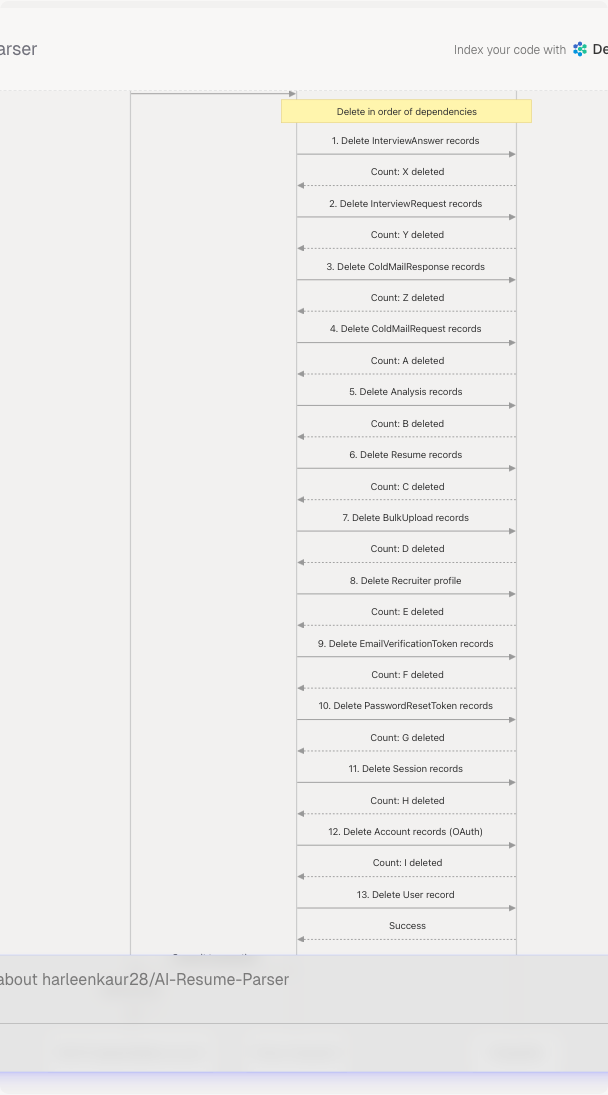
Deletion Order:
- InterviewAnswer (child of InterviewRequest)
- InterviewRequest (references User)
- ColdMailResponse (child of ColdMailRequest)
- ColdMailRequest (references User)
- Analysis (child of Resume)
- Resume (references User)
- BulkUpload (references User as adminId)
- Recruiter (references User as adminId)
- EmailVerificationToken (references User)
- PasswordResetToken (references User)
- Session (references User)
- Account (references User)
- User (final deletion)
Sources: frontend/app/api/auth/delete-account/route.ts42-134 frontend/app/account/page.tsx123-157
Data Validation & Type Safety
Frontend: Prisma Client
The frontend uses Prisma Client for type-safe database operations. Prisma automatically generates TypeScript types from the schema, ensuring compile-time type checking.
Example Prisma Operations:
// User lookup with related data
const user = await prisma.user.findUnique({
  where: { id: userId },
  include: {
    _count: {
      select: {
        resumes: true,
        coldMailRequests: true,
        interviewRequests: true
      }
    }
  }
});

// Resume creation
const resume = await prisma.resume.create({
  data: {
    userId: session.user.id,
    customName: "My Resume",
    rawText: extractedText,
    showInCentral: false
  }
});

// Analysis with resume relation
const analysis = await prisma.analysis.create({
  data: {
    resumeId: resume.id,
    predictedField: "Java Developer",
    comprehensiveAnalysis: analysisJson
  }
});
Sources: frontend/app/api/auth/delete-account/route.ts20-33 frontend/components/upload-resume.tsx27-74
Backend: Pydantic Models
The FastAPI backend uses Pydantic models for request/response validation and data serialization. While the backend primarily receives data via API calls rather than direct database access, it validates all incoming data structures.
Request Validation Models:
ResumeUploadRequest: Validates resume file uploadsColdMailGenerationRequest: Validates email generation parametersInterviewQuestionRequest: Validates interview preparation inputsComprehensiveAnalysisData: Validates LLM analysis output structure
Response Models:
ComprehensiveAnalysisResponse: Structured resume analysis resultsATSEvaluationResponse: ATS score and suggestionsColdMailResponse: Generated email content
These models ensure data consistency between frontend and backend services.
Sources: Referenced from backend architecture and service descriptions in system diagrams
Database Initialization & Seeding
Migration Management
Database schema changes are managed through Prisma migrations. The frontend container automatically runs migrations on startup:
bunx prisma migrate deploy && bun prisma/seed.ts && bun run start
Migration Process:
prisma migrate deployapplies pending migrations to the databasebun prisma/seed.tsruns the seed script to populate initial databun run startstarts the Next.js application
Sources: docker-compose.yaml63
Seed Data
The seed script (prisma/seed.ts) initializes:
- Roles: "User" and "Admin" roles for RBAC
- Default Categories: 25 job categories for resume classification
This ensures the database has required reference data before the application starts.
Data Access Patterns
Frontend → Database
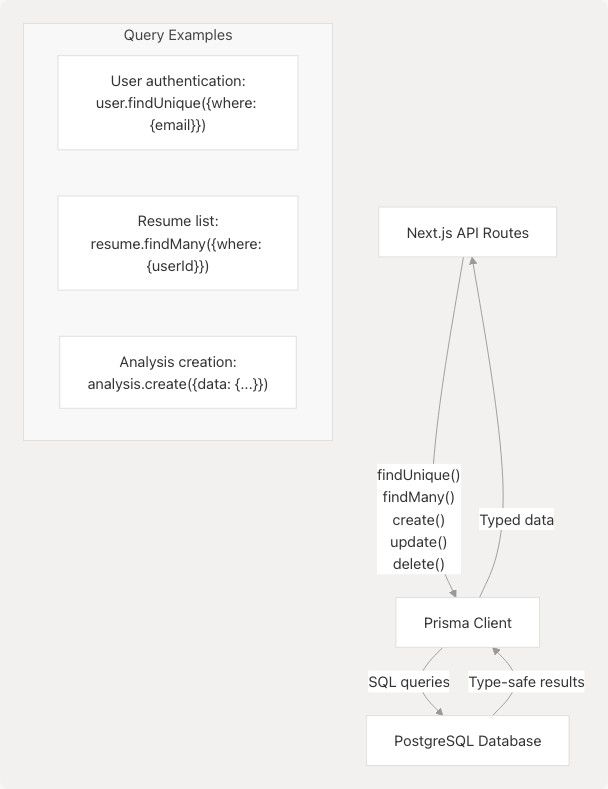
Key Patterns:
- Session Management: NextAuth automatically handles Session and Account table operations
- Resume Upload: Creates Resume record, then Analysis record in sequence
- Data Retrieval: Uses Prisma's relation loading for efficient queries
Sources: frontend/app/api/auth/delete-account/route.ts20-40
Backend → Database
The FastAPI backend primarily receives processed data from the frontend API and doesn't directly access the database for most operations. However, it can connect to PostgreSQL using the DATABASE_URL environment variable when needed for batch operations or analytics.
Sources: docker-compose.yaml28
Storage Considerations
Text vs File Storage
Current Approach: Resume text content is stored directly in the rawText field of the Resume table.
Advantages:
- Eliminates file system dependencies
- Simplifies backup and replication
- Enables full-text search capabilities
- Reduces complexity in containerized deployments
File Uploads Directory: The backend maintains an uploads directory for temporary file processing, mounted as a Docker volume:
volumes:
  - ./backend/uploads:/app/uploads
Sources: frontend/prisma/migrations/20250613172024_replace_file_url_with_raw_text/migration.sql12-13 docker-compose.yaml34
JSON Data Storage
Complex structured data (like comprehensive analysis results) is stored as JSON in PostgreSQL, leveraging native JSON support for:
- Flexible schema evolution
- Efficient querying with JSON operators
- Reduced table complexity
Performance & Indexing
Indexed Fields
The following fields have indexes for query optimization:
User Table:
email(UNIQUE index)id(PRIMARY KEY index)
Session Table:
sessionToken(UNIQUE index)
Account Table:
(provider, providerAccountId)(COMPOSITE UNIQUE index)
Token Tables:
token(UNIQUE index) on EmailVerificationToken and PasswordResetToken
Query Optimization
Prisma automatically generates optimized queries using:
- Relation preloading:
includeandselectfor efficient joins - Batch operations:
createMany,updateMany,deleteMany - Transactions:
prisma.$transaction()for atomic operations
Sources: frontend/prisma/migrations/20250613172024_replace_file_url_with_raw_text/migration.sql70-83
Data Migration Example
The migration from file-based storage to text-based storage demonstrates the schema evolution process:
-- Remove file URL column
ALTER TABLE "Resume" DROP COLUMN "fileUrl";

-- Add raw text column
ALTER TABLE "Resume" ADD COLUMN "rawText" TEXT NOT NULL;

-- Make email and password optional for OAuth users
ALTER TABLE "User" ALTER COLUMN "email" DROP NOT NULL;
ALTER TABLE "User" ALTER COLUMN "passwordHash" DROP NOT NULL;

-- Add OAuth support fields
ALTER TABLE "User" ADD COLUMN "emailVerified" TIMESTAMP(3);
ALTER TABLE "User" ADD COLUMN "image" TEXT;
ALTER TABLE "User" ADD COLUMN "name" TEXT;
This migration enabled:
- OAuth authentication support
- Simplified resume storage
- Improved data portability
Sources: frontend/prisma/migrations/20250613172024_replace_file_url_with_raw_text/migration.sql1-21